

View in English

  • Apple Developer
    • Get Started

    Explore Get Started

    • Overview
    • Learn
    • Apple Developer Program

    Stay Updated

    • Latest News
    • Hello Developer
    • Platforms

    Explore Platforms

    • Apple Platforms
    • iOS
    • iPadOS
    • macOS
    • tvOS
    • visionOS
    • watchOS
    • App Store

    Featured

    • Design
    • Distribution
    • Games
    • Accessories
    • Web
    • Home
    • CarPlay
    • Technologies

    Explore Technologies

    • Overview
    • Xcode
    • Swift
    • SwiftUI

    Featured

    • Accessibility
    • App Intents
    • Apple Intelligence
    • Games
    • Machine Learning & AI
    • Security
    • Xcode Cloud
    • Community

    Explore Community

    • Overview
    • Meet with Apple events
    • Community-driven events
    • Developer Forums
    • Open Source

    Featured

    • WWDC
    • Swift Student Challenge
    • Developer Stories
    • App Store Awards
    • Apple Design Awards
    • Apple Developer Centers
    • Documentation

    Explore Documentation

    • Documentation Library
    • Technology Overviews
    • Sample Code
    • Human Interface Guidelines
    • Videos

    Release Notes

    • Featured Updates
    • iOS
    • iPadOS
    • macOS
    • watchOS
    • visionOS
    • tvOS
    • Xcode
    • Downloads

    Explore Downloads

    • All Downloads
    • Operating Systems
    • Applications
    • Design Resources

    Featured

    • Xcode
    • TestFlight
    • Fonts
    • SF Symbols
    • Icon Composer
    • Support

    Explore Support

    • Overview
    • Help Guides
    • Developer Forums
    • Feedback Assistant
    • Contact Us

    Featured

    • Account Help
    • App Review Guidelines
    • App Store Connect Help
    • Upcoming Requirements
    • Agreements and Guidelines
    • System Status
  • Quick Links

    • Events
    • News
    • Forums
    • Sample Code
    • Videos
 

Vídeos

Abrir menu Fechar menu
  • Coleções
  • Todos os vídeos
  • Sobre

Mais vídeos

  • Sobre
  • Resumo
  • Código
  • Eleve a experiência de texto do seu app com o TextKit

    Descubra como combinar a conveniência das visualizações de texto integradas com o controle do TextKit. Vamos mostrar como as novas APIs facilitam a extensão do UITextView e do NSTextView com comportamentos personalizados, como números de linha e seções recolhíveis. Também vamos explorar a arquitetura do TextKit e analisar as novas políticas de armazenamento em cache e reutilização para anexos de texto. Para aproveitar ao máximo esta sessão, assista às sessões "Conheça o TextKit 2" da WWDC21 e "Novidades no TextKit e nas visualizações de texto" da WWDC22.

    Capítulos

    • 0:00 - Introduction
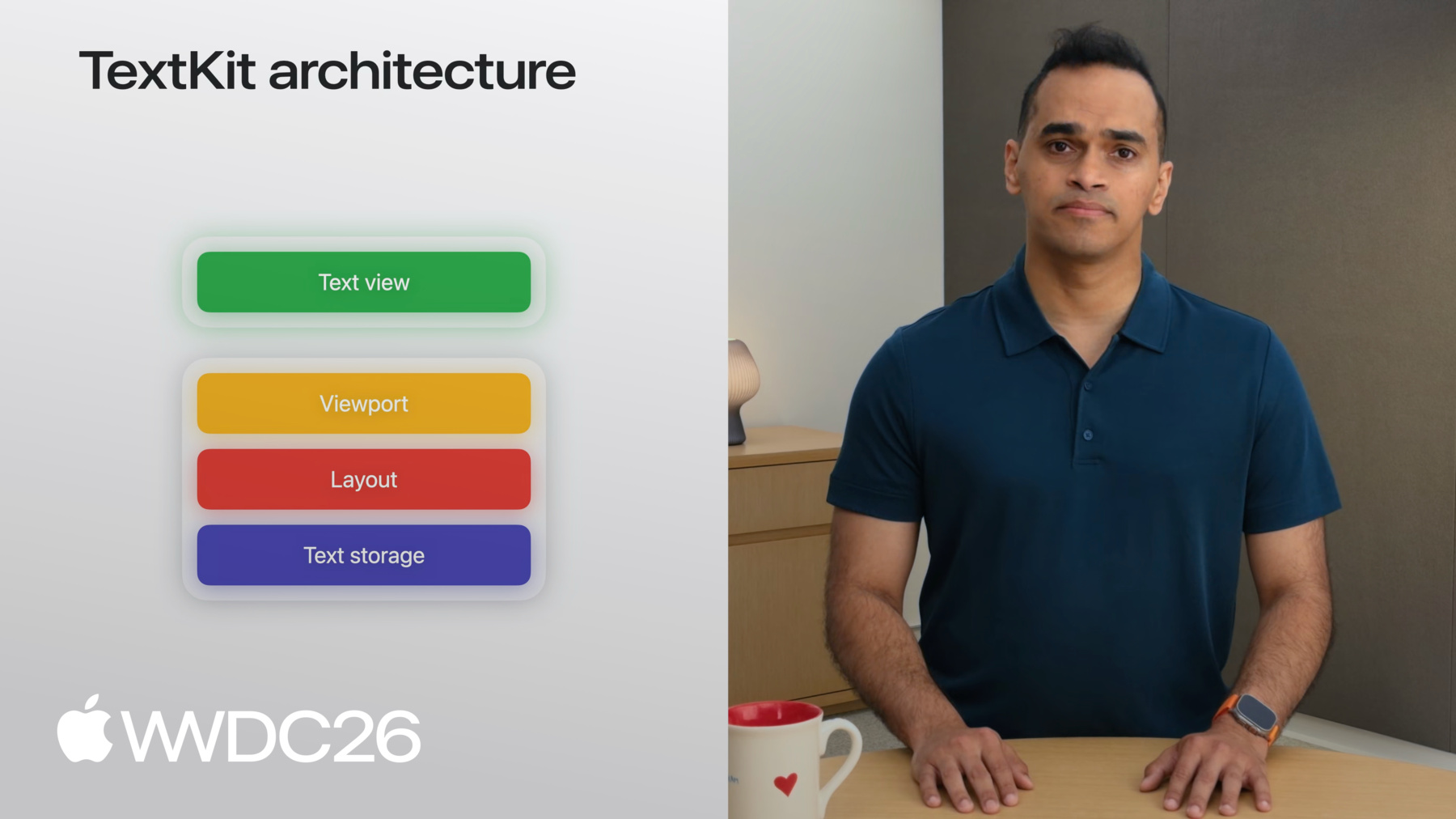
    • 3:09 - TextKit architecture
    • 9:17 - What's new in TextKit
    • 11:27 - Extending framework text views
    • 12:58 - Example: Code editor with line numbers
    • 17:52 - Example: Collapsible recipe sections
    • 19:56 - Text attachments and view provider reuse
    • 23:00 - Next steps

    Recursos

    • Enriching your text in text views
    • TextKit
      • Vídeo HD
      • Vídeo SD

    Vídeos relacionados

    WWDC26

    • Melhore a acessibilidade do seu app de leitura

    WWDC22

    • What's new in TextKit and text views

    WWDC21

    • Meet TextKit 2
  • Buscar neste vídeo...
    • 9:47 - NSTextViewportRenderingSurface conformance

      class MyView: UIView, NSTextViewportRenderingSurface {}
    • 10:25 - NSTextViewportRenderingSurfaceKey and NSMapTable

      class MyView: UIView, NSTextViewportRenderingSurface {}
      
      var cache: NSMapTable<NSTextLayoutFragment, MyView>
    • 12:39 - UITextView/NSTextView in SwiftUI via ViewRepresentable

      // Using a TextView in SwiftUI
      
      import SwiftUI
      
      struct MyTextView: View {
          var body: some View { TextViewRepresentable() }
      }
      
      #if os(macOS)
      struct TextViewRepresentable: NSViewRepresentable {
          func makeNSView(context: Context) -> NSTextView { 
            NSTextView() 
          }
          func updateNSView(_ nsView: NSTextView, context: Context) {
          }
      }
      #else
      struct TextViewRepresentable: UIViewRepresentable {
          func makeUIView(context: Context) -> UITextView {
              UITextView() 
          }
          func updateUIView(_ uiView: UITextView, context: Context) {
          }
      }
      #endif
    • 13:33 - ContainerView with TextView and line number view

      // Create a text view subclass for a code editor
      
      import UIKit
      
      class TextView: UITextView {}
      
      class ContainerView: UIView {
          let textView = TextView()
          let lineNumberView = UIView()
         
          textView.font = UIFont.monospacedSystemFont
      }
    • 14:42 - Three NSTextViewportLayoutControllerDelegate overrides

      // Override viewport controller delegate methods
      
      class TextView: UITextView {
          // Set up
      		override func textViewportLayoutControllerWillLayout(_ textViewportLayoutController: NSTextViewportLayoutController) {
          	super.textViewportLayoutControllerWillLayout(textViewportLayoutController)
            //...
          }
      
          // Get paragraph bounds
          override func textViewportLayoutController (_ textViewportLayoutController: NSTextViewportLayoutController, configureRenderingSurfaceFor textLayoutFragment: NSTextLayoutFragment) {
      			super.textViewportLayoutController(textViewportLayoutController, configureRenderingSurfaceFor: textLayoutFragment)
            //...
          }
      
          // Share accumulated info back to ContainerView
      		override func textViewportLayoutControllerDidLayout (_ textViewportLayoutController: NSTextViewportLayoutController) {
      		  super.textViewportLayoutControllerDidLayout(textViewportLayoutController)
            //...
          }
      }
    • 15:59 - startingLineNumber(for:) using enumerateTextElements

      func startingLineNumber(for viewportRange: NSTextRange?) -> Int {
          guard let viewportRange,
                let storage = textLayoutManager?.textContentManager
                    as? NSTextContentStorage else { return 0 }
          let startLocation = storage.documentRange.location
          var count = 1
          storage.enumerateTextElements(from: startLocation) { element in
              guard let range = element.elementRange else { return true }
              if range.location.compare(viewportRange.location)
                  != .orderedAscending { return false }
              count += 1
              return true
          }
          return count
      }
    • 17:02 - DidLayout: convert frames to viewport coordinates

      // Override viewport controller delegate methods
      
      class TextView: UITextView {
          private var lines: [CGRect] = []
          private var startingLineNumber = 0
          var onDidLayout: ((Int, [CGRect]) -> Void)?
      
          // Share accumulated info back to ContainerView
      		override func textViewportLayoutControllerDidLayout (_ textViewportLayoutController: NSTextViewportLayoutController) {
              super.textViewportLayoutControllerDidLayout(controller)
              let origin = controller.viewportBounds.origin
              onDidLayout?(startingLineNumber, lines.map {$0.offsetBy(dx: 0, dy: -origin.y) })
          }
      }
    • 17:16 - Draw line numbers in ContainerView closure

      // Draw line numbers in the ContainerView
      
      class ContainerView: UIView {
          let textView = TextView()
          let lineNumberView = UIView()
          func setup() {
              textView.onDidLayout = {startingLineNumber, lines in
                  let attributes: [NSAttributedString.Key: Any] = [
                      .font: UIFont.monospacedSystemFont(ofSize: 11, weight: .regular),
                      .foregroundColor: UIColor.secondaryLabel
                  ]
                  for (i, frame) in lines.enumerated() {
                      let number = "\(startingLineNumber + i)" as NSString
                      number.draw(at: CGPoint(x: 8, y: frame.minY),
                          withAttributes: attributes)
                  }
              }
          }
      }
    • 19:22 - Collapsible sections: full TextView class

      // Add collapsible sections to your text view
      
      class TextView: UITextView, NSTextContentStorageDelegate {
          var collapsedSections: Set<Int> = []
      
          // Set up
      		override func textViewportLayoutControllerWillLayout(_ textViewportLayoutController: NSTextViewportLayoutController) {
          	super.textViewportLayoutControllerWillLayout(textViewportLayoutController)
            //...
          }
      
          // Get paragraph bounds
          override func textViewportLayoutController (_ textViewportLayoutController: NSTextViewportLayoutController, configureRenderingSurfaceFor textLayoutFragment: NSTextLayoutFragment) {
      			super.textViewportLayoutController(textViewportLayoutController, configureRenderingSurfaceFor: textLayoutFragment)
            //...
          }
      
          // Share accumulated info back to ContainerView
      		override func textViewportLayoutControllerDidLayout (_ textViewportLayoutController: NSTextViewportLayoutController) {
      		  super.textViewportLayoutControllerDidLayout(textViewportLayoutController)
            //...
          }
        
          // Skip layout for paragraphs marked as collapsed
          func textContentManager(shouldEnumerate textElement: NSTextElement, options: NSTextContentManager.EnumerationOptions) -> Bool {
            //...
          }
      
          // Handle section collapse toggling
          func toggleSection(headerOffset: Int) {
              if collapsedSections.contains(headerOffset) {
                  collapsedSections.remove(headerOffset)
              } else {
                  collapsedSections.insert(headerOffset)
              }
              guard let textLayoutManager = textLayoutManager else { return }
      
              let textViewportLayoutController = textLayoutManager.textViewportLayoutController
              textViewportLayoutController.delegate?.textViewportLayoutControllerReceivedSetNeedsLayout?(textViewportLayoutController)
          }
      }
    • 22:06 - Text attachment view provider reuse policy

      // Cache text attachment view providers
      
      import UIKit
      
      class ViewController: UIViewController {
      
          var textView: UITextView
          
          func setupTextView() {
              textView = UITextView()
              textView.register(
                  [.onEditingInlineParagraphs],
                  forTextAttachmentViewProviderType: AnimatedAttachmentViewProvider.self
              )
          }
      }
    • 0:00 - Introduction
    • TextKit and the tension between using framework text views versus building custom ones. TextKit is Apple's text engine powering text controls in SwiftUI, UIKit, and AppKit.

    • 3:09 - TextKit architecture
    • Walk through TextKit's four-layer architecture: text storage, layout, viewport, and view. See how NSTextContentStorage breaks an attributed string into NSTextParagraph elements, how NSTextLayoutManager produces immutable NSTextLayoutFragments, and how NSTextViewportLayoutController coordinates with the text view to efficiently render only the paragraphs visible in the viewport.

    • 9:17 - What's new in TextKit
    • Meet the new NSTextViewportRenderingSurface protocol — a common abstraction for views or layers that draw layout fragments — and NSTextViewportRenderingSurfaceKey, which uniquely identifies surfaces across viewport layout cycles Use the new delegate methods to assign and query rendering surfaces during the viewport layout process.

    • 11:27 - Extending framework text views
    • UITextView and NSTextView now publicly conform to NSTextViewportLayoutControllerDelegate, so you can subclass and override willLayout, configureRenderingSurface, and didLayout to extend their behavior. Use a SwiftUI ViewRepresentable to bring these text views into a SwiftUI app.

    • 12:58 - Example: Code editor with line numbers
    • Build a code-editor experience by subclassing UITextView and overriding the viewport controller delegate methods. Calculate the starting line number with enumerateTextElements, capture each layout fragment's bounds in configureRenderingSurface, and pass the results to a container view that draws line numbers alongside the text.

    • 17:52 - Example: Collapsible recipe sections
    • Modify layout for multiple paragraphs by conforming to NSTextContentStorageDelegate. Use textContentManager(_:shouldEnumerate:) to skip layout for collapsed paragraphs, track collapsed paragraph offsets in state, and toggle them in response to user taps — collapsing each multi-paragraph recipe down to just its heading.

    • 19:56 - Text attachments and view provider reuse
    • Text attachments use the same TextKit architecture as regular text, with NSTextAttachmentViewProvider supplying the view. New in 2027: register a reuse policy with UITextView using register(_:forTextAttachmentViewProviderType:). Use onEditingInlineParagraphs to preserve view providers across edits and onScrollingOutOfViewport to cache surfaces when they scroll off screen.

    • 23:00 - Next steps
    • Kickstart your app with UITextView, NSTextView, or TextEditor; extend them via the viewport controller delegate hooks; or use TextKit directly to build fully custom rendering. Download the sample app to explore each example.

Developer Footer

  • Vídeos
  • WWDC26
  • Eleve a experiência de texto do seu app com o TextKit
  • Open Menu Close Menu
    • iOS
    • iPadOS
    • macOS
    • tvOS
    • visionOS
    • watchOS
    • App Store
    Open Menu Close Menu
    • Swift
    • SwiftUI
    • Swift Playground
    • TestFlight
    • Xcode
    • Xcode Cloud
    • Icon Composer
    • SF Symbols
    Open Menu Close Menu
    • Accessibility
    • Accessories
    • Apple Intelligence
    • Audio & Video
    • Augmented Reality
    • Business
    • Design
    • Distribution
    • Education
    • Games
    • Health & Fitness
    • In-App Purchase
    • Localization
    • Maps & Location
    • Machine Learning & AI
    • Security
    • Safari & Web
    Open Menu Close Menu
    • Documentation
    • Downloads
    • Sample Code
    • Videos
    Open Menu Close Menu
    • Help Guides & Articles
    • Contact Us
    • Forums
    • Feedback & Bug Reporting
    • System Status
    Open Menu Close Menu
    • Apple Developer
    • App Store Connect
    • Certificates, IDs, & Profiles
    • Feedback Assistant
    Open Menu Close Menu
    • Apple Developer Program
    • Apple Developer Enterprise Program
    • App Store Small Business Program
    • MFi Program
    • Mini Apps Partner Program
    • News Partner Program
    • Video Partner Program
    • Security Bounty Program
    • Security Research Device Program
    Open Menu Close Menu
    • Meet with Apple
    • Apple Developer Centers
    • App Store Awards
    • Apple Design Awards
    • Apple Developer Academies
    • WWDC
    Read the latest news.
    Get the Apple Developer app.
    Copyright © 2026 Apple Inc. All rights reserved.
    Terms of Use Privacy Policy Agreements and Guidelines