Confirming some results with iOS26 (sim), macOS26 and Xcode26.
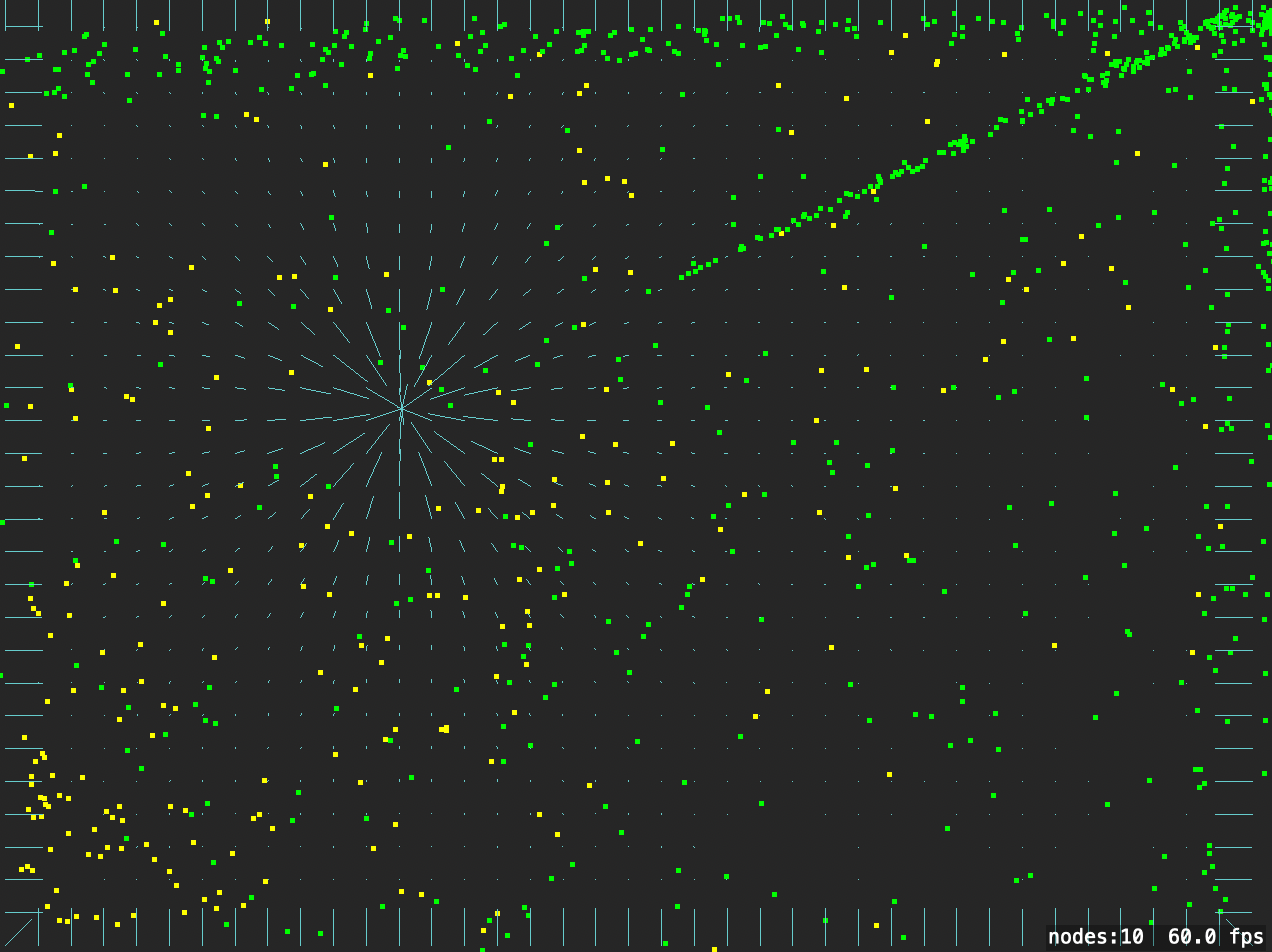
The field drawing is offset unless the scene anchorPoint is zero.
However, field visualisations are showing for me with a radialGravity and four linearGravity (mimicing particles bouncing off walls).
//: A SpriteKit based Playground

import PlaygroundSupport
import SpriteKit

let sqSize = CGSize(width: 50, height: 50)
let smallParticles = CGSize(width: 4, height: 4)

class GameScene: SKScene {

    var field:  SKFieldNode!
    var em1: SKEmitterNode!
    var em2: SKEmitterNode!
    var em2Mask: UInt32 = 2  // initially off, variable used so touches can toggle
    let field1Mask: UInt32 = 0b0001
    let bottomWallMask: UInt32 = 0b0100

    let wallGravityThickness: CGFloat = 20.0

    func addSquare(color sqcolor: SKColor) -> SKShapeNode {
        let ret = SKShapeNode(rectOf: sqSize)
        ret.fillColor = sqcolor
        ret.physicsBody = SKPhysicsBody(rectangleOf: sqSize)
        ret.physicsBody?.fieldBitMask = field1Mask
        ret.position = CGPoint(x: 0.1, y: 100.0)
        addChild(ret)
        return ret
    }

    func topRightSized(size: CGSize) -> CGPoint {
        CGPoint(x: Int(self.frame.width - size.width), y: Int(self.frame.height - size.height))
    }

    override func didMove(to view: SKView) {
        print("green particles are toggled as field aware each click")
        print("click or drag to move field")
        self.anchorPoint = .zero  // match Touchgram conventions
        let centre = CGPoint(x: Int(self.frame.width)/2, y: Int(self.frame.height)/2)
        let topCentre = CGPoint(x: centre.x, y: self.frame.height)
        let bottomCentre = CGPoint(x: centre.x, y: wallGravityThickness/2)
        let leftCentre = CGPoint(x: wallGravityThickness/2, y: self.frame.height/2)
        let rightCentre = CGPoint(x: self.frame.width - wallGravityThickness, y: self.frame.height/2)
        let redSq = addSquare(color: .red)
        redSq.physicsBody?.mass = 100
        let blueSq = addSquare(color: .blue)
        blueSq.physicsBody?.charge = 100.0
        redSq.physicsBody?.mass = 1
        self.physicsWorld.gravity.dy = 0  // so our squares don't just fall, react only to the fields


        view.showsFPS = true
        view.showsFields = true
        view.showsNodeCount = true

        // 1. Create a massive, un-missable field
        field = SKFieldNode.radialGravityField()
        field.categoryBitMask = field1Mask
        field.falloff = 2.0            // 0 = Uniform gravity everywhere
        field.strength = 1.0
        field.position = centre // Put this in the middle of your screen
        field.isExclusive = false  // uncomment this line and particles not affected
        self.addChild(field)

        let bottomWall = SKFieldNode.linearGravityField(withVector: [0,40,0])
        bottomWall.categoryBitMask = bottomWallMask
        bottomWall.falloff = 0          // 0 = Uniform gravity everywhere
        bottomWall.position = bottomCentre // Put this in the middle of your screen
        bottomWall.region = SKRegion(size: CGSize(width: frame.width, height: wallGravityThickness))
        self.addChild(bottomWall)

        let leftWall = SKFieldNode.linearGravityField(withVector: [40,0,0])
        leftWall.categoryBitMask = bottomWallMask
        leftWall.falloff = 0          // 0 = Uniform gravity everywhere
        leftWall.position = leftCentre // Put this in the middle of your screen
        leftWall.region = SKRegion(size: CGSize(width: wallGravityThickness, height: frame.height))
        self.addChild(leftWall)

        let rightWall = SKFieldNode.linearGravityField(withVector: [-40,0,0])
        rightWall.categoryBitMask = bottomWallMask
        rightWall.falloff = 0          // 0 = Uniform gravity everywhere
        rightWall.position = rightCentre // Put this in the middle of your screen
        rightWall.region = SKRegion(size: CGSize(width: wallGravityThickness, height: frame.height))
        self.addChild(rightWall)

        let topWall = SKFieldNode.linearGravityField(withVector: [0,-40,0])
        topWall.categoryBitMask = field1Mask
        topWall.falloff = 0
        topWall.position = topCentre
        topWall.region = SKRegion(size: CGSize(width: frame.width, height: wallGravityThickness))
        self.addChild(topWall)

        // simple emitters generated from Purrticles
        // radiating in circle but will see gravity pulls it in
        em1 = SKEmitterNode()
        em1.fieldBitMask = field1Mask | bottomWallMask     // Matches the field category
        em1.particleBirthRate = 20
        em1.emissionAngle = 1.5708 // rad (90º)
        em1.emissionAngleRange = 6.2832 // rad (360º)
        em1.particleLifetime = 20.0
        em1.particleSpeed = 50.0
        em1.particleColor = .yellow
        em1.particleSize = smallParticles
        em1.position = CGPoint(x: 40, y: 120) // big offset so lots of particles moving
        self.addChild(em1)

        em2 = SKEmitterNode()  // initially not reacting to field, each touch toggles
        em2.fieldBitMask = em2Mask | bottomWallMask
        em2.particleBirthRate = 200
        em2.emissionAngle = 1.5708 // rad (90º)
        em2.emissionAngleRange = 6.2832 // rad (360º)
        em2.particleLifetime = 20.0
        em2.particleSpeed = 0.0
        em2.particleColor = .green
        em2.particleSize = smallParticles
        em2.position = topRightSized(size: smallParticles)
        em2.particlePositionRange = CGVector(dx: 80, dy: 40)
        self.addChild(em2)

    }


    @objc static override var supportsSecureCoding: Bool {
        get {
            return true
        }
    }

    func touchDown(atPoint pos : CGPoint) {
        field.position = pos
        em2Mask = 3 - em2Mask
        em2.fieldBitMask = em2Mask | bottomWallMask
    }

    func touchMoved(toPoint pos : CGPoint) {
        field.position = pos
    }

    func touchUp(atPoint pos : CGPoint) {
        field.position = pos
    }

    override func mouseDown(with event: NSEvent) {
        touchDown(atPoint: event.location(in: self))
    }

    override func mouseDragged(with event: NSEvent) {
        touchMoved(toPoint: event.location(in: self))
    }

    override func mouseUp(with event: NSEvent) {
        touchUp(atPoint: event.location(in: self))
    }

}

// Load the SKScene from 'GameScene.sks'
let sceneView = SKView(frame: CGRect(x:0 , y:0, width: 640, height: 480))
if let scene = GameScene(fileNamed: "GameScene") {
    // Set the scale mode to scale to fit the window
    scene.scaleMode = .aspectFill

    // Present the scene
    sceneView.presentScene(scene)
}

PlaygroundSupport.PlaygroundPage.current.liveView = sceneView