Annoying popup window in Xcode Previews when the initial controller of the main storyboard is a macOS window

I started a project targeting macOS and used Storyboard app lifecycle. I also used Xcode Previews in this project.

If I:

  • Keep the entry point of the main storyboard to a window controller. (as default setup in macOS),
  • Turn the Xcode window into full-screen,

That window controller would pop up its window every time Xcode Previews refreshes.

I tested in Xcode 26.3 RC and many versions before.

Answered by Developer Tools Engineer in 875543022

So far I've been unable to reproduce the problem you are seeing. Would you be able to make a reproducer project and file a feedback with it attached?

If you do please reply back here with the feedback ID so I can make sure it gets to the right team asap.

Thank you for your post and your screenshot. While the screenshot depicts the app as a SwiftUI View, your post explicitly mentions that the app is built using UIKit Storyboards?

When utilizing Xcode Previews with a storyboard-based macOS application that retains the default window controller entry point, it is important to note that the app’s entry point is typically defined by a window controller in the storyboard (often linked to the initial scene). In full-screen mode, macOS may preserve this state across UI refreshes.

Could you please isolate the entry point of the app and create a new focused project that displays it? Additionally, I recommend providing your expectations so that we can assist you in fulfilling them. If you intend to use SwiftUI, I would suggest sticking to that framework.

Albert Pascual
  Worldwide Developer Relations.

Thank you for replying, Albert.

I'm focusing on developing a macOS app using non-SwiftUI app lifecycle. I would need some SwiftUI-AppKit bridging in this project, and I might want to use Xcode Previews also on AppKit view controllers.

I'm encountering the problem described in the first post, meaning that I can't experience both Xcode Previews and Storyboard well as expected. That popup window can be moved away, but it reappears back at the initial position every time I write source code.

I created the first post a bit prematurely. Sorry for that.

I noticed that it's nothing about the entry point. Instead, it's about making any instance of window controller from storyboards — instantiateInitialController() I used before, and other instantiate… methods. Just make a window controller from a storyboard and show its window (e.g. in applicationDidFinishLaunching(_:)). Only NSStoryboard trigger the problem, while NSNib don't.

I also noticed that the mechanism behind the problem also works when the Xcode window is not full-screen. Those windows are just "hidden" in the background so we're not interrupted as in full-screen.
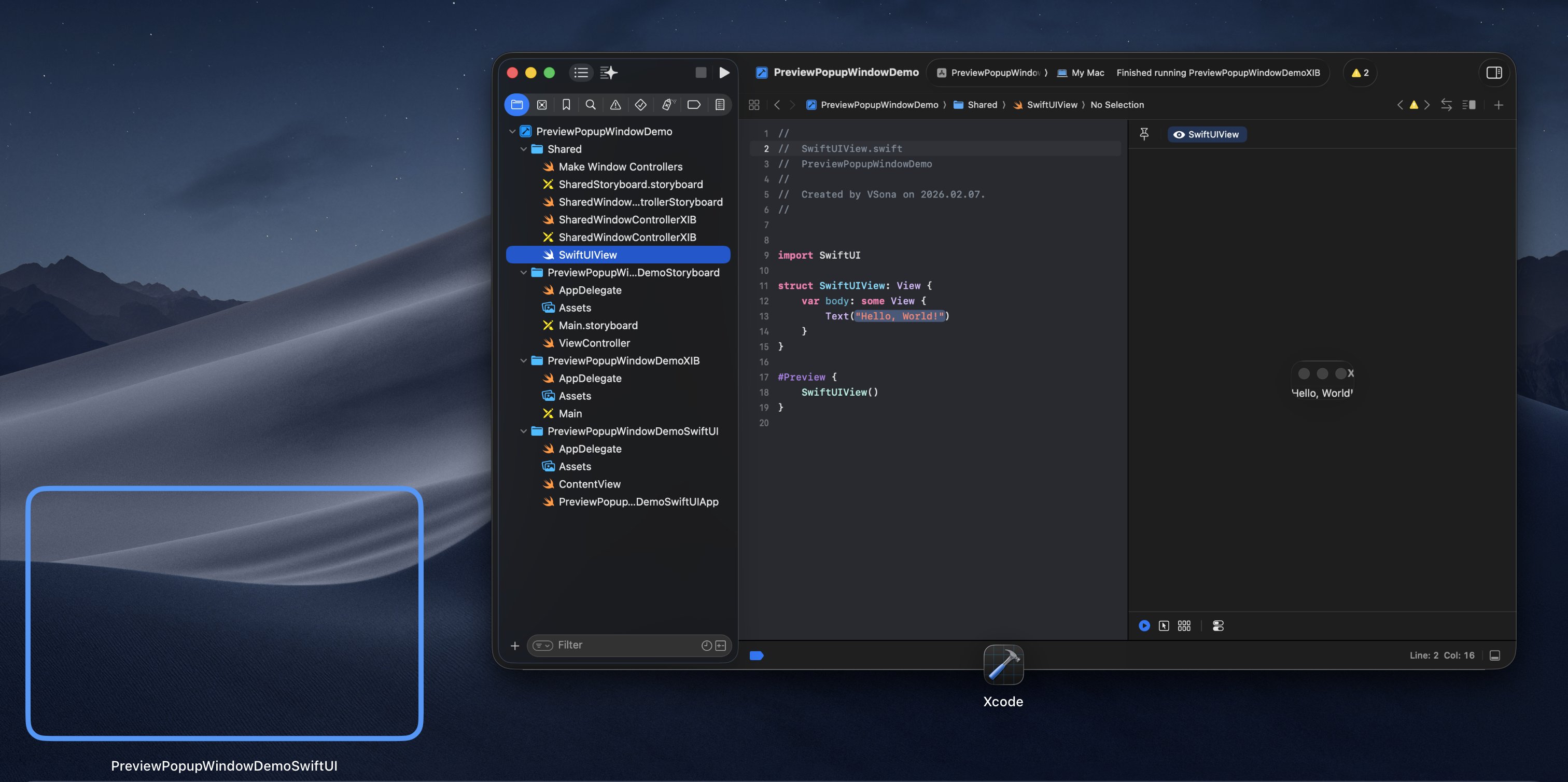
From my conclusion I think this is a bug or technical limitation. I'll prepare the demo later if you're interested.

If you intend to use SwiftUI, I would suggest sticking to that framework.

Thanks for your suggestion. SwiftUI is better in most cases, but SwiftUI app lifecycle for macOS isn't powerful enough for me.


So far I've been unable to reproduce the problem you are seeing. Would you be able to make a reproducer project and file a feedback with it attached?

If you do please reply back here with the feedback ID so I can make sure it gets to the right team asap.

Annoying popup window in Xcode Previews when the initial controller of the main storyboard is a macOS window
 
 
Q
