

View in English

  • Apple Developer
    • Get Started

    Explore Get Started

    • Overview
    • Learn
    • Apple Developer Program

    Stay Updated

    • Latest News
    • Hello Developer
    • Platforms

    Explore Platforms

    • Apple Platforms
    • iOS
    • iPadOS
    • macOS
    • tvOS
    • visionOS
    • watchOS
    • App Store

    Featured

    • Design
    • Distribution
    • Games
    • Accessories
    • Web
    • Home
    • CarPlay
    • Technologies

    Explore Technologies

    • Overview
    • Xcode
    • Swift
    • SwiftUI

    Featured

    • Accessibility
    • App Intents
    • Apple Intelligence
    • Games
    • Machine Learning & AI
    • Security
    • Xcode Cloud
    • Community

    Explore Community

    • Overview
    • Meet with Apple events
    • Community-driven events
    • Developer Forums
    • Open Source

    Featured

    • WWDC
    • Swift Student Challenge
    • Developer Stories
    • App Store Awards
    • Apple Design Awards
    • Apple Developer Centers
    • Documentation

    Explore Documentation

    • Documentation Library
    • Technology Overviews
    • Sample Code
    • Human Interface Guidelines
    • Videos

    Release Notes

    • Featured Updates
    • iOS
    • iPadOS
    • macOS
    • watchOS
    • visionOS
    • tvOS
    • Xcode
    • Downloads

    Explore Downloads

    • All Downloads
    • Operating Systems
    • Applications
    • Design Resources

    Featured

    • Xcode
    • TestFlight
    • Fonts
    • SF Symbols
    • Icon Composer
    • Support

    Explore Support

    • Overview
    • Help Guides
    • Developer Forums
    • Feedback Assistant
    • Contact Us

    Featured

    • Account Help
    • App Review Guidelines
    • App Store Connect Help
    • Upcoming Requirements
    • Agreements and Guidelines
    • System Status
  • Quick Links

    • Events
    • News
    • Forums
    • Sample Code
    • Videos
 

Vidéos

Ouvrir le menu Fermer le menu
  • Collections
  • Toutes les vidéos
  • À propos

Plus de vidéos

  • À propos
  • Code
  • Streamline your localized strings

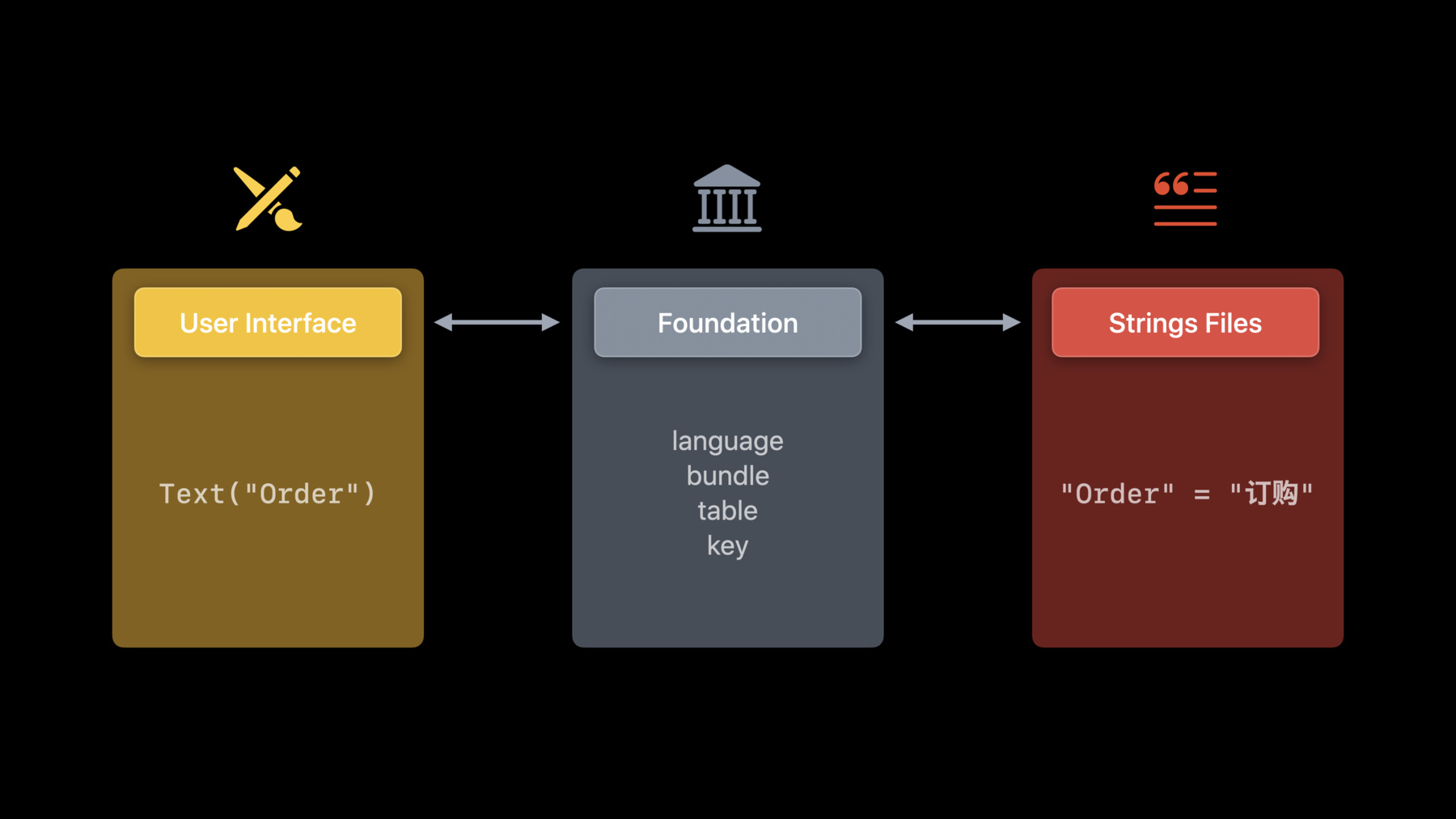
    When you localize the text within your app, you can help make your app more accessible to a worldwide audience. Discover best practices for building your localization workflow, including how to write and format strings accurately, and learn how to prepare strings for localization in different languages using Xcode.

    Ressources

    • Localization
    • Expanding Your App to New Markets
      • Vidéo HD
      • Vidéo SD

    Vidéos connexes

    WWDC22

    • Build global apps: Localization by example
    • Get it right (to left)

    WWDC21

    • Localize your SwiftUI app
    • What's new in Foundation

    WWDC20

    • Formatters: Make data human-friendly

    WWDC19

    • Creating Great Localized Experiences with Xcode 11
  • Rechercher dans cette vidéo…
    • 3:30 - Declaring a string

      Button("Order")
    • 3:44 - Declaring a string anywhere else

      button.title = NSLocalizedString("Order", comment: "…")
      button.title = String(localized: "Order")
    • 4:20 - Declaring a string in a SwiftUI view 2

      Text("Your order is ready.")
      Button("Order") {
        // Action…
      }
    • 4:33 - Declare a string in SwiftUI view with verbatim

      Text(verbatim: "Sample data")
    • 4:54 - Button to place an order

      // SwiftUI
      Button("Order") { … }
      
      
      // Swift
      button.title = String(localized: "Order")
    • 5:15 - Button to place an order with a variable

      let count = 3
      
      
      // SwiftUI
      Button("Order \(count) Tickets") { … }
      
      
      // Swift
      button.title = String(localized: "Order \(count) Tickets")
    • 5:36 - Button to place an order with a variable 2

      let count = 3
      
      // Supports user’s preferred numbers,
      // pluralization, RTL variables isolation…
      // Previously: .localizedStringWithFormat()
      String(localized: "Order \(count) Tickets")
    • 6:21 - Use 2 separate strings

      // Recommended for all languages
      String(localized: "Order Now")
      String(localized: "Order Later")
    • 6:57 - Button to place an order 2

      // SwiftUI
      Text("Order")
      
      
      // Swift
      String(localized: "Order")
    • 7:09 - Button to place an order with comment

      // SwiftUI
      Text("Order", comment: "Button: confirms concert tickets booking”)
      
      
      // Swift
      String(localized: "Order", comment: "Button: confirms concert tickets booking")
    • 7:36 - What makes a good comment

      Text("Order", comment: "Button: confirms concert tickets booking")
      Text("Order", comment: "Button: confirms concert tickets booking")
      Text("\(ticketCount) Ordered", comment: "Order summary: total number of tickets ordered")
    • 10:52 - Request server strings in the user's language

      Bundle.preferredLocalizations(from: allServerLanguages).first
    • 11:37 - Declare a string with a variable, customized table name, and a comment

      Text("\(ticketCount) Ordered",
           tableName: "UserProfile",
           comment: "Profile subtitle: total number of tickets ordered")
    • 13:49 - Using a framework

      /* —-----------—------------—-—---- In TicketKit Framework —---------—------------—-—---- */
      
      // TicketKit/OrderStatus.swift
      public enum OrderStatus {
          case pending, processing, complete, canceled, invalid(Error)
      
          var displayName: String {
              switch self {
              case .complete: return String(localized: "Complete",
                                            bundle: Bundle(for: AnyClassInTicketKit.self),
                                            comment: "Standalone ticket status: order finalized")
                
      /* —-----------—-----------—---—---       In Host App      —---------—------------—-—---- */
      
      import TicketKit
      Text(OrderStatus.complete.displayName)
    • 17:43 - Import translated strings catalogs

      xcodebuild -exportLocalizations -workspace VacationPlanet.xcworkspace -localizationPath ~/Documents
      xcodebuild -importLocalizations -workspace VacationPlanet.xcworkspace -localizationPath ~/Documents/de.xcloc
    • 18:28 - Localized attributed strings

      AttributedString(localized: "Your order is **complete**!",
                       comment: "Ticket order confirmation title")
    • 19:22 - Plural with stringsdict

      String(localized: "Order \(ticketCount) Ticket(s)")
    • 22:46 - Plural for strings without a number

      if ticketCount == 1 {
          button.text = String(localized: "Order This Ticket")
      } else if ticketCount == 2 { // If needed
          button.text = String(localized: "Order Both Tickets")
      } else {
          button.text = String(localized: "Order All Tickets")
      }
    • 23:31 - Automatic grammar agreement

      AttributedString(localized: "Order ^[\(ticketsCount) Ticket](inflect: true)")
    • 25:45 - Format data in strings

      ["pop", "rock", "electronic"].formatted(.list(type: .or)) // pop, rock, or electronic
      
      Text("Total: \(price, format: .currency(code: "USD"))", // Total: $9.41
           comment: "Order subtitle: total price of all tickets")

Developer Footer

  • Vidéos
  • WWDC21
  • Streamline your localized strings
  • Open Menu Close Menu
    • iOS
    • iPadOS
    • macOS
    • tvOS
    • visionOS
    • watchOS
    • App Store
    Open Menu Close Menu
    • Swift
    • SwiftUI
    • Swift Playground
    • TestFlight
    • Xcode
    • Xcode Cloud
    • Icon Composer
    • SF Symbols
    Open Menu Close Menu
    • Accessibility
    • Accessories
    • Apple Intelligence
    • Audio & Video
    • Augmented Reality
    • Business
    • Design
    • Distribution
    • Education
    • Games
    • Health & Fitness
    • In-App Purchase
    • Localization
    • Maps & Location
    • Machine Learning & AI
    • Security
    • Safari & Web
    Open Menu Close Menu
    • Documentation
    • Downloads
    • Sample Code
    • Videos
    Open Menu Close Menu
    • Help Guides & Articles
    • Contact Us
    • Forums
    • Feedback & Bug Reporting
    • System Status
    Open Menu Close Menu
    • Apple Developer
    • App Store Connect
    • Certificates, IDs, & Profiles
    • Feedback Assistant
    Open Menu Close Menu
    • Apple Developer Program
    • Apple Developer Enterprise Program
    • App Store Small Business Program
    • MFi Program
    • Mini Apps Partner Program
    • News Partner Program
    • Video Partner Program
    • Security Bounty Program
    • Security Research Device Program
    Open Menu Close Menu
    • Meet with Apple
    • Apple Developer Centers
    • App Store Awards
    • Apple Design Awards
    • Apple Developer Academies
    • WWDC
    Read the latest news.
    Get the Apple Developer app.
    Copyright © 2026 Apple Inc. All rights reserved.
    Terms of Use Privacy Policy Agreements and Guidelines