

View in English

  • Apple Developer
    • Get Started

    Explore Get Started

    • Overview
    • Learn
    • Apple Developer Program

    Stay Updated

    • Latest News
    • Hello Developer
    • Platforms

    Explore Platforms

    • Apple Platforms
    • iOS
    • iPadOS
    • macOS
    • tvOS
    • visionOS
    • watchOS
    • App Store

    Featured

    • Design
    • Distribution
    • Games
    • Accessories
    • Web
    • Home
    • CarPlay
    • Technologies

    Explore Technologies

    • Overview
    • Xcode
    • Swift
    • SwiftUI

    Featured

    • Accessibility
    • App Intents
    • Apple Intelligence
    • Games
    • Machine Learning & AI
    • Security
    • Xcode Cloud
    • Community

    Explore Community

    • Overview
    • Meet with Apple events
    • Community-driven events
    • Developer Forums
    • Open Source

    Featured

    • WWDC
    • Swift Student Challenge
    • Developer Stories
    • App Store Awards
    • Apple Design Awards
    • Apple Developer Centers
    • Documentation

    Explore Documentation

    • Documentation Library
    • Technology Overviews
    • Sample Code
    • Human Interface Guidelines
    • Videos

    Release Notes

    • Featured Updates
    • iOS
    • iPadOS
    • macOS
    • watchOS
    • visionOS
    • tvOS
    • Xcode
    • Downloads

    Explore Downloads

    • All Downloads
    • Operating Systems
    • Applications
    • Design Resources

    Featured

    • Xcode
    • TestFlight
    • Fonts
    • SF Symbols
    • Icon Composer
    • Support

    Explore Support

    • Overview
    • Help Guides
    • Developer Forums
    • Feedback Assistant
    • Contact Us

    Featured

    • Account Help
    • App Review Guidelines
    • App Store Connect Help
    • Upcoming Requirements
    • Agreements and Guidelines
    • System Status
  • Quick Links

    • Events
    • News
    • Forums
    • Sample Code
    • Videos
 

Vidéos

Ouvrir le menu Fermer le menu
  • Collections
  • Toutes les vidéos
  • À propos

Plus de vidéos

  • À propos
  • Code
  • Explore AirPlay with interstitials

    Learn how you can use HLS Interstitials with AirPlay to create seamless transitions for your video content between advertisements. We'll share best practices and tips for creating a great experience when sharing content from Apple devices to popular smart TVs.

    Chapitres

    • 0:00 - Overview
    • 0:02 - Navigation restrictions
    • 0:04 - Optimize AirPlay playback
    • 0:06 - Interstitials localization
    • 0:08 - Testing
    • 0:10 - Example VOD plan

    Ressources

    • AirPlay-Enabled TVs and Video Accessories
    • Media playback
    • Supporting AirPlay in your app
    • Getting Started with HLS Interstitials
      • Vidéo HD
      • Vidéo SD

    Vidéos connexes

    WWDC23

    • Tune up your AirPlay audio experience
  • Rechercher dans cette vidéo…
    • 9:19 - Example: Navigation restriction client driven

      let player = AVPlayer(url: movieURL) //no ads in primary
      let controller = AVPlayerInterstitialEventController( primaryPlayer: player )
      
      let ad1Item = [AVPlayerItem(url: ad1Url)]
      let ad1event = AVPlayerInterstitialEvent( primaryItem: player.currentItem,
      										  time: CMTime(seconds: 5, preferredTimescale: 1) )
      ad1event.identifier = "ad1"
      ad1event.templateItems = ad1Item
      
      //set SKIP restriction on ad1 
      ad1event.restrictions = [.requiresPlaybackAtPreferredRateForAdvancement]
      		
      controller.events = [ad1event]
      
       code snippet.
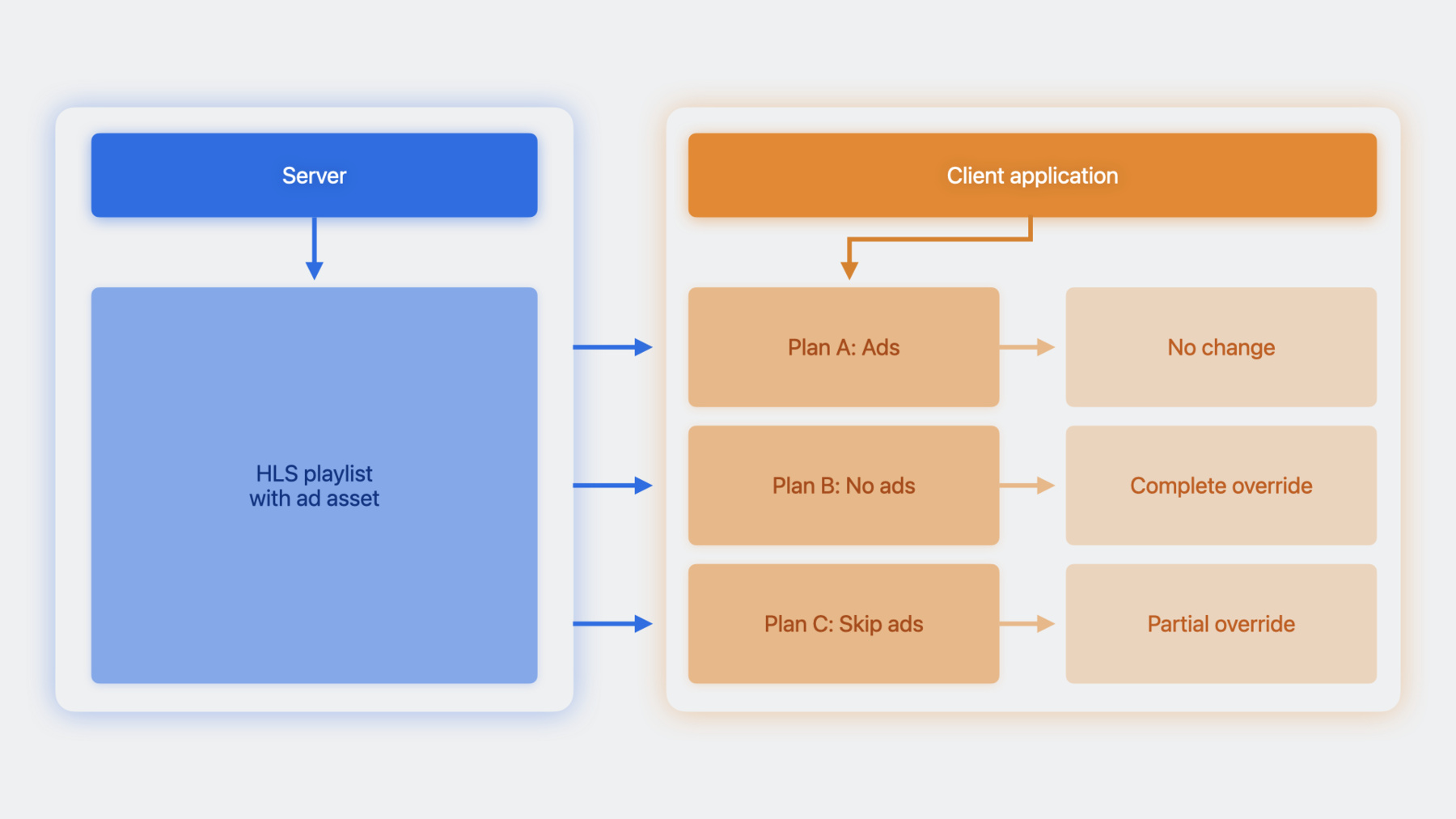
    • 15:44 - Plan C: Sample code to override the restrictions

      let player = AVPlayer( url: movieURL )
      let controller = AVPlayerInterstitialEventController( primaryPlayer: player )
      			
      let ad1Event = controller.events[0]
      let ad2Event = controller.events[1]
      			
      let newEvent  = ad2Event.copy() as! AVPlayerInterstitialEvent
      //clear the restrictions on ad2 event
      newEvent.restrictions = []
      
      //set the original ad1 Event and modified ad2 Event on controller
      controller.events = [ad1Event, newEvent]

Developer Footer

  • Vidéos
  • WWDC23
  • Explore AirPlay with interstitials
  • Open Menu Close Menu
    • iOS
    • iPadOS
    • macOS
    • tvOS
    • visionOS
    • watchOS
    • App Store
    Open Menu Close Menu
    • Swift
    • SwiftUI
    • Swift Playground
    • TestFlight
    • Xcode
    • Xcode Cloud
    • Icon Composer
    • SF Symbols
    Open Menu Close Menu
    • Accessibility
    • Accessories
    • Apple Intelligence
    • Audio & Video
    • Augmented Reality
    • Business
    • Design
    • Distribution
    • Education
    • Games
    • Health & Fitness
    • In-App Purchase
    • Localization
    • Maps & Location
    • Machine Learning & AI
    • Security
    • Safari & Web
    Open Menu Close Menu
    • Documentation
    • Downloads
    • Sample Code
    • Videos
    Open Menu Close Menu
    • Help Guides & Articles
    • Contact Us
    • Forums
    • Feedback & Bug Reporting
    • System Status
    Open Menu Close Menu
    • Apple Developer
    • App Store Connect
    • Certificates, IDs, & Profiles
    • Feedback Assistant
    Open Menu Close Menu
    • Apple Developer Program
    • Apple Developer Enterprise Program
    • App Store Small Business Program
    • MFi Program
    • Mini Apps Partner Program
    • News Partner Program
    • Video Partner Program
    • Security Bounty Program
    • Security Research Device Program
    Open Menu Close Menu
    • Meet with Apple
    • Apple Developer Centers
    • App Store Awards
    • Apple Design Awards
    • Apple Developer Academies
    • WWDC
    Read the latest news.
    Get the Apple Developer app.
    Copyright © 2026 Apple Inc. All rights reserved.
    Terms of Use Privacy Policy Agreements and Guidelines