

-
Plongez dans les lazy stacks et le défilement avec SwiftUI
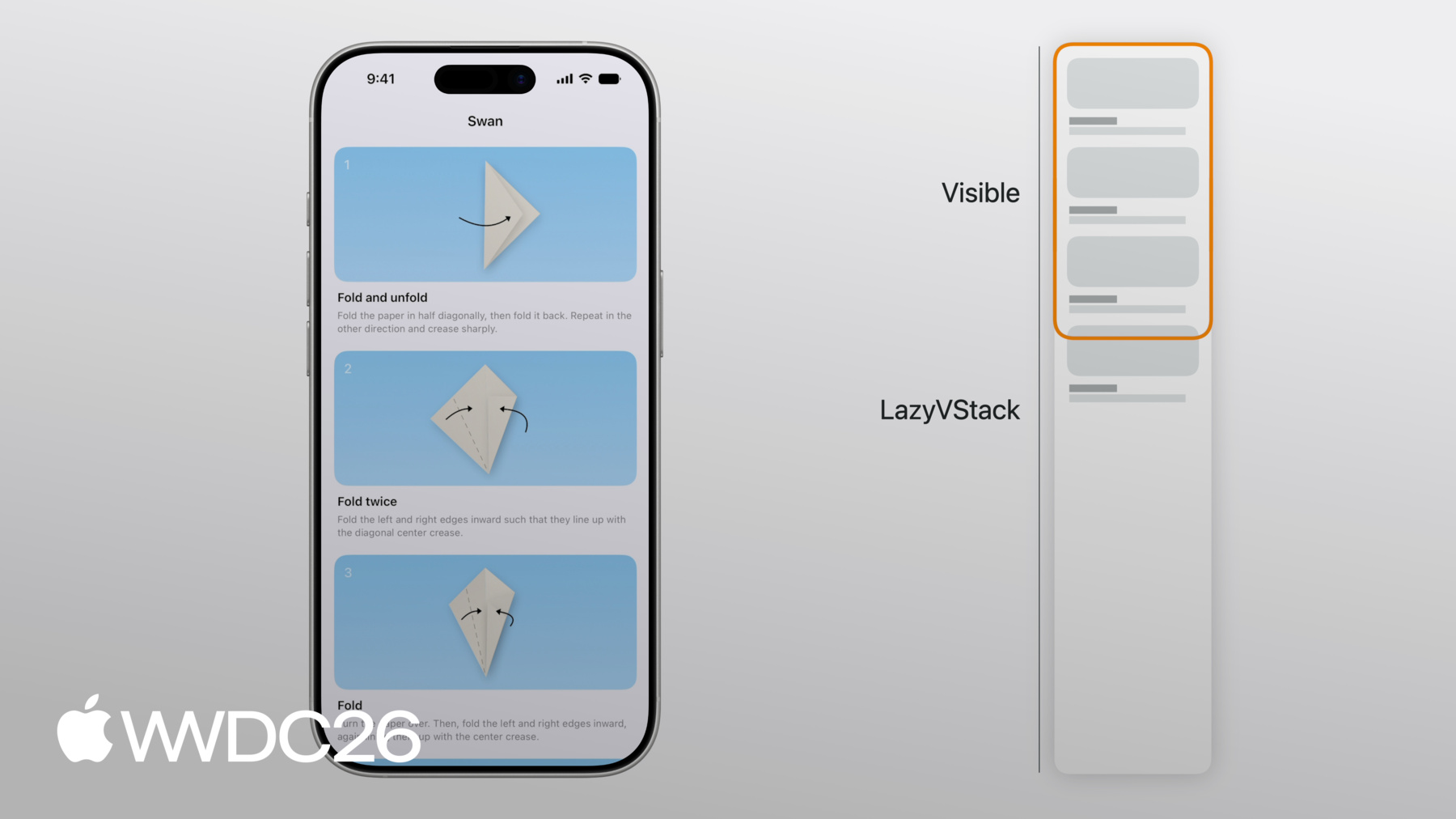
Découvrez le fonctionnement interne des lazy stacks dans SwiftUI. Nous explorons comment LazyVStack et LazyHStack estiment les tailles, chargent les sous-vues à la demande et préchargent le contenu pour offrir des expériences de défilement fluides. Nous abordons également les optimisations avancées des performances, les bonnes pratiques de gestion des états et des conseils pour un défilement programmatique précis. Pour tirer le meilleur parti de cette séance, nous vous recommandons de vous familiariser avec les mises en page SwiftUI à l'aide de piles.
Chapitres
- 0:00 - Introduction
- 1:24 - Disposition
- 9:13 - Chargement des sous-vues
- 13:15 - Préchargement
- 17:40 - Défilement programmatique
- 19:55 - Étapes suivantes
Ressources
Vidéos connexes
WWDC26
WWDC22
WWDC20
-
Rechercher dans cette vidéo…
-
-
1:23 - Origami app
// Origami app struct ContentView: View { var body: some View { ScrollView { LazyVStack { ForEach(steps) { step in StepView(step: step) } } } } } struct StepView: View { /* ... */ } -
5:11 - Horizontally scrolling showcase
// Horizontally scrolling showcase struct ContentView: View { var body: some View { ScrollView { LazyVStack { ForEach(steps) { step in StepView(step: step) } Showcase() } } } } struct StepView: View { /* ... */ } struct Showcase: View { var body: some View { ScrollView(.horizontal) { LazyHStack { ForEach(photos) { photo in PhotoView(photo: photo) } } } } } -
6:30 - Showcase section
// Showcase section struct ContentView: View { var body: some View { ScrollView { LazyVStack(pinnedViews: [.sectionHeaders]) { ForEach(steps) { step in StepView(step: step) } Showcase() } } } } struct StepView: View { /* ... */ } struct Showcase: View { var body: some View { Section { ForEach(photos) { photo in PhotoView(photo: photo) } } header: { /* ... */ } } } -
7:04 - Scroll effect
// Scroll effect struct ContentView: View { /* ... */ } struct StepView: View { /* ... */ } struct Showcase: View { var body: some View { Section { ForEach(photos) { photo in PhotoView(photo: photo) .scrollTransition { effect, phase in effect .rotationEffect(.degrees(phase.value * 20)) .scaleEffect(1 + phase.value * 0.2) } } } header: { /* ... */ } } } -
7:36 - Scroll effect
// Scroll effect struct ContentView: View { /* ... */ } struct StepView: View { /* ... */ } struct Showcase: View { var body: some View { Section { ForEach(photos) { photo in PhotoView(photo: photo) .scrollTransition { effect, phase in effect .scaleEffect(1 - abs(phase.value) * 0.1) } } } header: { /* ... */ } } } -
8:20 - Scroll to Showcase button
// Absolute offset struct ContentView: View { @State var isScrollToShowcaseVisible = false var body: some View { ScrollView { /* ... */ } .overlay(alignment: .bottom) { /* ... */ } .onScrollGeometryChange(for: Bool.self) { geo in geo.contentOffset.y <= 100 } action: { _, newValue in self.isScrollToShowcaseVisible = newValue } } } -
8:51 - Scroll to Showcase button
// Absolute offset struct ContentView: View { @State var isScrollToShowcaseVisible = false var body: some View { ScrollView { /* ... */ } .overlay(alignment: .bottom) { /* ... */ } .onScrollTargetVisibilityChange( idType: Step.ID.self, threshold: 0.8 ) { visibleIDs in isScrollToShowcaseVisible = shouldShowScrollButton(visibleIDs: visibleIDs) } } } -
9:29 - One resolved subview
// Origami struct ContentView: View { var body: some View { ScrollView { LazyVStack { ForEach(steps) { step in StepView(step: step) } } } } } struct StepView: View { /* ... */ } -
10:03 - Multiple resolved subviews
// Multiple subviews struct ContentView: View { /* ... */ } struct StepView: View { let step: Step var body: some View { StepDiagram(/* ... */) StepInstructions(/* ... */) } } -
10:52 - Dynamic number of subviews
// Dynamic number of views struct ContentView: View { /* ... */ } struct StepView: View { let step: Step @Environment(\.detailLevel) var detailLevel var body: some View { if step.isVisible(in: detailLevel) { VStack { /* ... */ } } } } -
11:46 - Filtering on the view level
// Dynamic number of views struct ContentView: View { /* ... */ } struct StepView: View { let step: Step @Environment(\.detailLevel) var detailLevel @Environment(\.writingStyle) var writingStyle var body: some View { if step.isVisible(in: detailLevel) { /* ... */ } } } -
12:15 - Filtering on the data level
// Filter at the data level struct ContentView: View { @Query var steps: [Step] init(detailLevel: DetailLevel) { _steps = Query(filter: #Predicate<Step> { step in step.detailLevel >= detailLevel }) } var body: some View { /* ... */ } } struct StepView: View { /* ... */ } -
12:35 - Optional unwrapping
// Optional unwrapping struct ContentView: View { /* ... */ } struct StepView: View { let step: Step @Environment(\.apiToken) var token var body: some View { if let token { /* ... */ } } } -
12:48 - Optional unwrapping
// Optional unwrapping struct ContentView: View { /* ... */ } struct StepView: View { let step: Step @Environment(NetworkClient.self) var networkClient var body: some View { /* ... */ } } -
15:28 - Loading more content
// Loading more content struct Showcase: View { @State var pager = ShowcasePager() var body: some View { ForEach(pager.pages) { page in PageView(page: page) } if !pager.atEnd { ProgressView() .progressViewStyle(.circular) .onAppear { pager.fetchPage() } } } } -
15:53 - Setting up lazy stack subview in onAppear
// onAppear struct StepView: View { let id: Step.ID @State var viewModel = StepViewModel() var body: some View { VStack { if let content = viewModel.content { /* ... */ } } .onAppear { viewModel.configure(with: id) } } } -
16:14 - Lazy stack subview ready before onAppear
// onAppear struct StepView: View { @State var viewModel: StepViewModel init(id: Step.ID) { _viewModel = State(initialValue: StepViewModel(id: id)) } var body: some View { /* ... */ } } -
16:23 - Loading diagram with task modifier
// Diagram loading struct StepView: View { let step: Step @State var diagramLoader = DiagramLoader() @State var diagram: Diagram? var body: some View { VStack { /* ... */ } .task { diagram = await diagramLoader.loadDiagram(id: step.id) } } } -
16:40 - Loading diagram in initializer
// Diagram loading struct StepView: View { let step: Step @State var diagramLoader: DiagramLoader init(step: Step) { self.step = step _diagramLoader = State(initialValue: DiagramLoader(id: step.id)) } var body: some View { /* ... */ } } @Observable class DiagramLoader { /* ... */ } -
17:16 - Highlight @State variable
// Highlighting struct ContentView: View { /* ... */ } struct StepView: View { let step: Step @State var isHighlighted = false var body: some View { /* ... */ } } -
17:33 - Highlight @Binding
// Highlighting struct ContentView: View { @State var highlighted: Set<Step.ID> = [] var body: some View { /* ... */ } } struct StepView: View { let step: Step @Binding var highlighted: Set<Step.ID> var body: some View { /* ... */ } } -
17:58 - Programmatically scroll to showcase
// Programmatically scroll to showcase struct ContentView: View { @State var scrollPosition = ScrollPosition() var body: some View { ScrollView { /* ... */ } .scrollPosition($scrollPosition) .overlay(alignment: .bottom) { Button { scrollToShowcase() } label: { /* ... */ } } } func scrollToShowcase() { withAnimation { scrollPosition.scrollTo(id: "showcase-header") } } } -
18:24 - Dynamic number of views
// Dynamic number of views struct ContentView: View { /* ... */ } struct StepView: View { let step: Step @Environment(\.detailLevel) var detailLevel var body: some View { if step.isVisible(in: detailLevel) { /* ... */ } } } -
18:53 - Filter at the data level
// Filter at the data level struct ContentView: View { @Query var steps: [Step] init(detailLevel: DetailLevel) { _steps = Query(filter: #Predicate<Step> { step in step.detailLevel >= detailLevel }) } var body: some View { /* ... */ } } struct StepView: View { /* ... */ } -
19:16 - Using onGeometryChange in lazy stack subview
// Don't change layout after views appear struct ContentView: View { /* ... */ } struct StepView: View { let step: Step @State var subtitleHeight: CGFloat? var body: some View { VStack { StepDiagram(diagram: step.diagram) .frame(height: diagramHeight(subtitleHeight: subtitleHeight)) Title(step.title) Subtitle(step.subtitle) .onGeometryChange(for: CGFloat.self, of: \.size.height) { _, value in subtitleHeight = value } } } } -
19:17 - Using custom layout in lazy stack subview
// Don't change layout after views appear

struct ContentView: View { /* ... */ }

struct StepView: View {
    let step: Step

    var body: some View {
        StepLayout {
            StepDiagram(diagram: step.diagram)
            Title(step.title)
            Subtitle(step.subtitle)
        }
    }
}

struct StepLayout: Layout { /* ... */ }
-