

View in English

  • Apple Developer
    • Get Started

    Explore Get Started

    • Overview
    • Learn
    • Apple Developer Program

    Stay Updated

    • Latest News
    • Hello Developer
    • Platforms

    Explore Platforms

    • Apple Platforms
    • iOS
    • iPadOS
    • macOS
    • tvOS
    • visionOS
    • watchOS
    • App Store

    Featured

    • Design
    • Distribution
    • Games
    • Accessories
    • Web
    • Home
    • CarPlay
    • Technologies

    Explore Technologies

    • Overview
    • Xcode
    • Swift
    • SwiftUI

    Featured

    • Accessibility
    • App Intents
    • Apple Intelligence
    • Games
    • Machine Learning & AI
    • Security
    • Xcode Cloud
    • Community

    Explore Community

    • Overview
    • Meet with Apple events
    • Community-driven events
    • Developer Forums
    • Open Source

    Featured

    • WWDC
    • Swift Student Challenge
    • Developer Stories
    • App Store Awards
    • Apple Design Awards
    • Apple Developer Centers
    • Documentation

    Explore Documentation

    • Documentation Library
    • Technology Overviews
    • Sample Code
    • Human Interface Guidelines
    • Videos

    Release Notes

    • Featured Updates
    • iOS
    • iPadOS
    • macOS
    • watchOS
    • visionOS
    • tvOS
    • Xcode
    • Downloads

    Explore Downloads

    • All Downloads
    • Operating Systems
    • Applications
    • Design Resources

    Featured

    • Xcode
    • TestFlight
    • Fonts
    • SF Symbols
    • Icon Composer
    • Support

    Explore Support

    • Overview
    • Help Guides
    • Developer Forums
    • Feedback Assistant
    • Contact Us

    Featured

    • Account Help
    • App Review Guidelines
    • App Store Connect Help
    • Upcoming Requirements
    • Agreements and Guidelines
    • System Status
  • Quick Links

    • Events
    • News
    • Forums
    • Sample Code
    • Videos
 

Vidéos

Ouvrir le menu Fermer le menu
  • Collections
  • Toutes les vidéos
  • À propos

Plus de vidéos

  • À propos
  • Résumé
  • Code
  • Composez des effets graphiques avancés avec SwiftUI

    Découvrez comment créer des expériences personnalisées riches en composant de manière créative les API de mise en page et de graphisme SwiftUI. Nous vous montrons comment décomposer des designs complexes et utiliser un pipeline créatif pour enchaîner des blocs de construction simples. Apprenez à animer avec des shaders de calques, à ancrer des vues avec des guides d'alignement et à lire la géométrie de la mise en page avec des préférences.

    Chapitres

    • 0:00 - Introduction
    • 1:40 - Design breakdown
    • 4:11 - Cover art and shader effects
    • 11:07 - Driving animation with time
    • 12:00 - Time-synced transcript view
    • 13:18 - Floating timestamps with alignment guides
    • 16:16 - Creative pipelines
    • 17:13 - Next steps

    Ressources

    • Alignment
    • Composing advanced graphics effects with SwiftUI
    • Shader
      • Vidéo HD
      • Vidéo SD

    Vidéos connexes

    WWDC24

    • Create custom visual effects with SwiftUI
  • Rechercher dans cette vidéo…
    • 4:18 - Cover art image

      Image("CoverArt")
    • 4:24 - Blurred cover art image

      Image("CoverArt")
          .blur(radius: 30)
    • 7:09 - Applying layer effect in SwiftUI

      GeometryReader { proxy in
          CoverArtView()
              .layerEffect(
                  ShaderLibrary.backgroundWarp(),
                  maxSampleOffset: .zero
              )
      }
      .ignoresSafeArea()
    • 7:21 - Writing layer effect shader in Metal

      [[stitchable]] half4 backgroundWarp(
          float2 position, SwiftUI::Layer layer
      ) {
          return layer.sample(position);
      }
    • 7:39 - Metal shader with offset parameter

      [[stitchable]] half4 backgroundWarp(
          float2 position, SwiftUI::Layer layer,
          float2 offset
      ) {
          return layer.sample(position + offset);
      }
    • 7:55 - SwiftUI layer effect with offset parameter

      GeometryReader { proxy in
          CoverArtView()
              .layerEffect(
                  ShaderLibrary.backgroundWarp(
                     .float2(.init(x: 0, y: 0))
                  ),
                  maxSampleOffset: .zero
              )
      }
      .ignoresSafeArea()
    • 8:04 - SwiftUI layer effect with full-width offset

      GeometryReader { proxy in
          CoverArtView()
              .layerEffect(
                  ShaderLibrary.backgroundWarp(
                     .float2(.init(x: proxy.size.width, y: 0))
                  ),
                  maxSampleOffset: .zero
              )
      }
      .ignoresSafeArea()
    • 8:37 - SwiftUI layer effect with noise sampling

      GeometryReader { proxy in
          CoverArtView()
              .layerEffect(
                  ShaderLibrary.backgroundWarp(
                      .float2(proxy.size),
                      .image(Image("NoiseTexture"))
                  ),
                  maxSampleOffset: .zero
              )
      }
      .ignoresSafeArea()
    • 8:55 - Metal shader with noise sampling

      [[stitchable]] half4 backgroundWarp(
          float2 position, SwiftUI::Layer layer,
          float2 size, texture2d<half> noiseTex
      ) {
          constexpr sampler s(address::repeat, filter::linear);
          float2 uv = position / size;
      
          half4 n = noiseTex.sample(s, uv);
          float2 offset = (float2(n.r, n.g) - 0.5) * 200.0;
      
          return layer.sample(position + offset);
      }
    • 10:22 - Metal shader with domain warping

      [[stitchable]] half4 backgroundWarp(
          float2 position, SwiftUI::Layer layer,
          float2 size, texture2d<half> noiseTex
      ) {
          constexpr sampler s(address::repeat, filter::linear);
          float2 uv = position / size;
      
          half4 n = noiseTex.sample(s, uv);
      
          float2 q = float2(n.r, n.g);
          n = noiseTex.sample(s, uv + q);
      
          float2 offset = (float2(n.r, n.g) - 0.5) * 200.0;
      
          return layer.sample(position + offset);
      }
    • 11:16 - SwiftUI layer effect with static visual

      GeometryReader { proxy in
          CoverArtView()
              .layerEffect(
                  ShaderLibrary.backgroundWarp(
                      .float2(proxy.size),
                      .image(Image("NoiseTexture"))
                  ),
                  maxSampleOffset: .zero
              )
      }
      .ignoresSafeArea()
    • 11:37 - SwiftUI layer effect with animated visual

      @State private var startDate = Date.now
      
      TimelineView(.animation) { timeline in
          let elapsed = timeline.date.timeIntervalSince(
              startDate
          )
          CoverArtView()
              .layerEffect(
                  ShaderLibrary.backgroundWarp(
                      .float2(proxy.size),
                      .image(Image("NoiseTexture")),
                      .float(elapsed)
                  ),
                  maxSampleOffset: .zero
              )
      }
    • 12:15 - Basic transcript view

      ScrollView {
          LazyVStack(alignment: .leading, spacing: 12) {
              ForEach(sampleTranscript) { line in
                      .font(.title)
                      .fontWeight(.bold)
              }
          }
      }
    • 12:33 - Time-synced transcript view

      @State private var playback = PlaybackState()
      
      ScrollViewReader { scrollProxy in
          ScrollView {
              LazyVStack(alignment: .leading, spacing: 12) {
                  ForEach(sampleTranscript) { line in
                      Text(line.text)
                          .transcriptLineStyle(isCurrent: 
                              line.id == playback.currentLineIndex
                          )
                  }
              }
          }
          .onChange(of: playback.currentLineIndex, { _, i in
              scrollProxy.scrollTo(i, anchor: .center)
          })
      }
    • 13:53 - Overlay with center alignment

      Text(line.text)
           .overlay {
                Text(line.formattedTimestamp)
           }
    • 14:06 - Overlay with bottom leading alignment

      Text(line.text)
           .overlay(alignment: .bottomLeading) {
                Text(line.formattedTimestamp)
           }
    • 14:32 - Overlay with alignment guide override

      Text(line.text)
           .overlay(alignment: .bottomLeading) {
                Text(line.formattedTimestamp)
                    .alignmentGuide(.bottom) { $0[.top] }
           }
    • 0:00 - Introduction
    • A way of thinking about advanced graphics and layout in SwiftUI as a creative pipeline — a series of stages that take data in, transform it, and pass it along.

    • 1:40 - Design breakdown
    • Take a finished design and decompose it into pipeline stages. Working from a podcast app's existing UI — cover art, playback info, transcript text — see how each piece can be transformed and connected: a shader pipe converts cover art into a visualizer, a time pipe drives motion, and another time pipe syncs transcript scrolling.

    • 4:11 - Cover art and shader effects
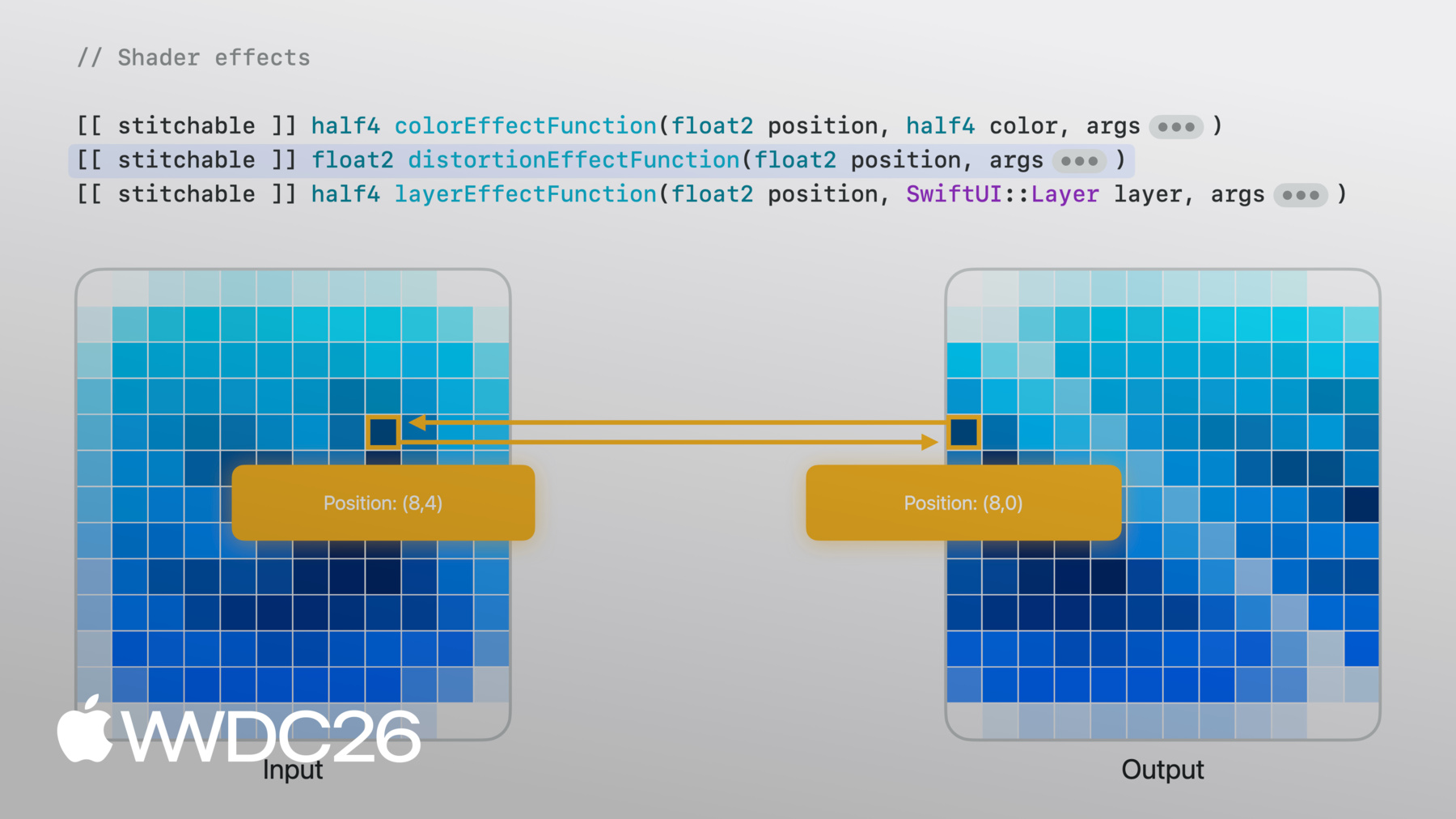
    • Soften the cover art with a blur, then layer on shader effects. Learn how shaders run per pixel on the GPU and how SwiftUI exposes them through three modifiers — color, distortion, and layer effects — each with different inputs and trade-offs. Build a layer-effect 'background warp' shader that samples a noise texture for organic, per-pixel offsets.

    • 11:07 - Driving animation with time
    • Shaders are stateless — for animation, time has to come from outside. Use TimelineView to fire every frame with a timestamp, pass it into the shader, and watch the warp pattern flow as time advances.

    • 12:00 - Time-synced transcript view
    • Build the foreground transcript using Text views in a LazyVStack inside a ScrollView. Use the playback timestamp to highlight the current line and fade the rest, then use onChange to scroll the current line to center as playback progresses.

    • 13:18 - Floating timestamps with alignment guides
    • Position a small timestamp on the edge of the current line without resorting to manual offsets. Walk through how SwiftUI's alignment system pins views together at their alignment points, then use alignmentGuide to override an alignment semantically — moving the subview's bottom guide to its top edge so it floats neatly outside its container.

    • 16:16 - Creative pipelines
    • Step back and see the pattern: each stage's output becomes the next stage's input. The same approach extends beyond this podcast app — swap audio for gyroscope data, a twist shader for a ripple, or a scroll view for a freeform canvas — to compose your own advanced effects.

    • 17:13 - Next steps
    • Download the sample project, experiment with the shader, and look for opportunities in your own app where a small visual effect could make a big difference.

Developer Footer

  • Vidéos
  • WWDC26
  • Composez des effets graphiques avancés avec SwiftUI
  • Open Menu Close Menu
    • iOS
    • iPadOS
    • macOS
    • tvOS
    • visionOS
    • watchOS
    • App Store
    Open Menu Close Menu
    • Swift
    • SwiftUI
    • Swift Playground
    • TestFlight
    • Xcode
    • Xcode Cloud
    • Icon Composer
    • SF Symbols
    Open Menu Close Menu
    • Accessibility
    • Accessories
    • Apple Intelligence
    • Audio & Video
    • Augmented Reality
    • Business
    • Design
    • Distribution
    • Education
    • Games
    • Health & Fitness
    • In-App Purchase
    • Localization
    • Maps & Location
    • Machine Learning & AI
    • Security
    • Safari & Web
    Open Menu Close Menu
    • Documentation
    • Downloads
    • Sample Code
    • Videos
    Open Menu Close Menu
    • Help Guides & Articles
    • Contact Us
    • Forums
    • Feedback & Bug Reporting
    • System Status
    Open Menu Close Menu
    • Apple Developer
    • App Store Connect
    • Certificates, IDs, & Profiles
    • Feedback Assistant
    Open Menu Close Menu
    • Apple Developer Program
    • Apple Developer Enterprise Program
    • App Store Small Business Program
    • MFi Program
    • Mini Apps Partner Program
    • News Partner Program
    • Video Partner Program
    • Security Bounty Program
    • Security Research Device Program
    Open Menu Close Menu
    • Meet with Apple
    • Apple Developer Centers
    • App Store Awards
    • Apple Design Awards
    • Apple Developer Academies
    • WWDC
    Read the latest news.
    Get the Apple Developer app.
    Copyright © 2026 Apple Inc. All rights reserved.
    Terms of Use Privacy Policy Agreements and Guidelines