

View in English

  • Apple Developer
    • Get Started

    Explore Get Started

    • Overview
    • Learn
    • Apple Developer Program

    Stay Updated

    • Latest News
    • Hello Developer
    • Platforms

    Explore Platforms

    • Apple Platforms
    • iOS
    • iPadOS
    • macOS
    • tvOS
    • visionOS
    • watchOS
    • App Store

    Featured

    • Design
    • Distribution
    • Games
    • Accessories
    • Web
    • Home
    • CarPlay
    • Technologies

    Explore Technologies

    • Overview
    • Xcode
    • Swift
    • SwiftUI

    Featured

    • Accessibility
    • App Intents
    • Apple Intelligence
    • Games
    • Machine Learning & AI
    • Security
    • Xcode Cloud
    • Community

    Explore Community

    • Overview
    • Meet with Apple events
    • Community-driven events
    • Developer Forums
    • Open Source

    Featured

    • WWDC
    • Swift Student Challenge
    • Developer Stories
    • App Store Awards
    • Apple Design Awards
    • Apple Developer Centers
    • Documentation

    Explore Documentation

    • Documentation Library
    • Technology Overviews
    • Sample Code
    • Human Interface Guidelines
    • Videos

    Release Notes

    • Featured Updates
    • iOS
    • iPadOS
    • macOS
    • watchOS
    • visionOS
    • tvOS
    • Xcode
    • Downloads

    Explore Downloads

    • All Downloads
    • Operating Systems
    • Applications
    • Design Resources

    Featured

    • Xcode
    • TestFlight
    • Fonts
    • SF Symbols
    • Icon Composer
    • Support

    Explore Support

    • Overview
    • Help Guides
    • Developer Forums
    • Feedback Assistant
    • Contact Us

    Featured

    • Account Help
    • App Review Guidelines
    • App Store Connect Help
    • Upcoming Requirements
    • Agreements and Guidelines
    • System Status
  • Quick Links

    • Events
    • News
    • Forums
    • Sample Code
    • Videos
 

Vidéos

Ouvrir le menu Fermer le menu
  • Collections
  • Toutes les vidéos
  • À propos

Plus de vidéos

  • À propos
  • Résumé
  • Code
  • Développez des scripts propulsés par l’IA avec la CLI fm et le SDK Python.

    Découvrez toutes les nouvelles façons d'exploiter Apple Foundation Models sur macOS. Le SDK Foundation Models pour Python facilite l'intégration à des outils et modules d'évaluation populaires de l'écosystème Python. Découvrez comment utiliser la toute nouvelle commande fm introduite dans macOS 27 pour rationaliser la création de scripts, automatiser les workflows de modèles et accélérer votre processus de développement.

    Chapitres

    • 0:00 - Introduction
    • 1:22 - Introducing the fm CLI and Python SDK
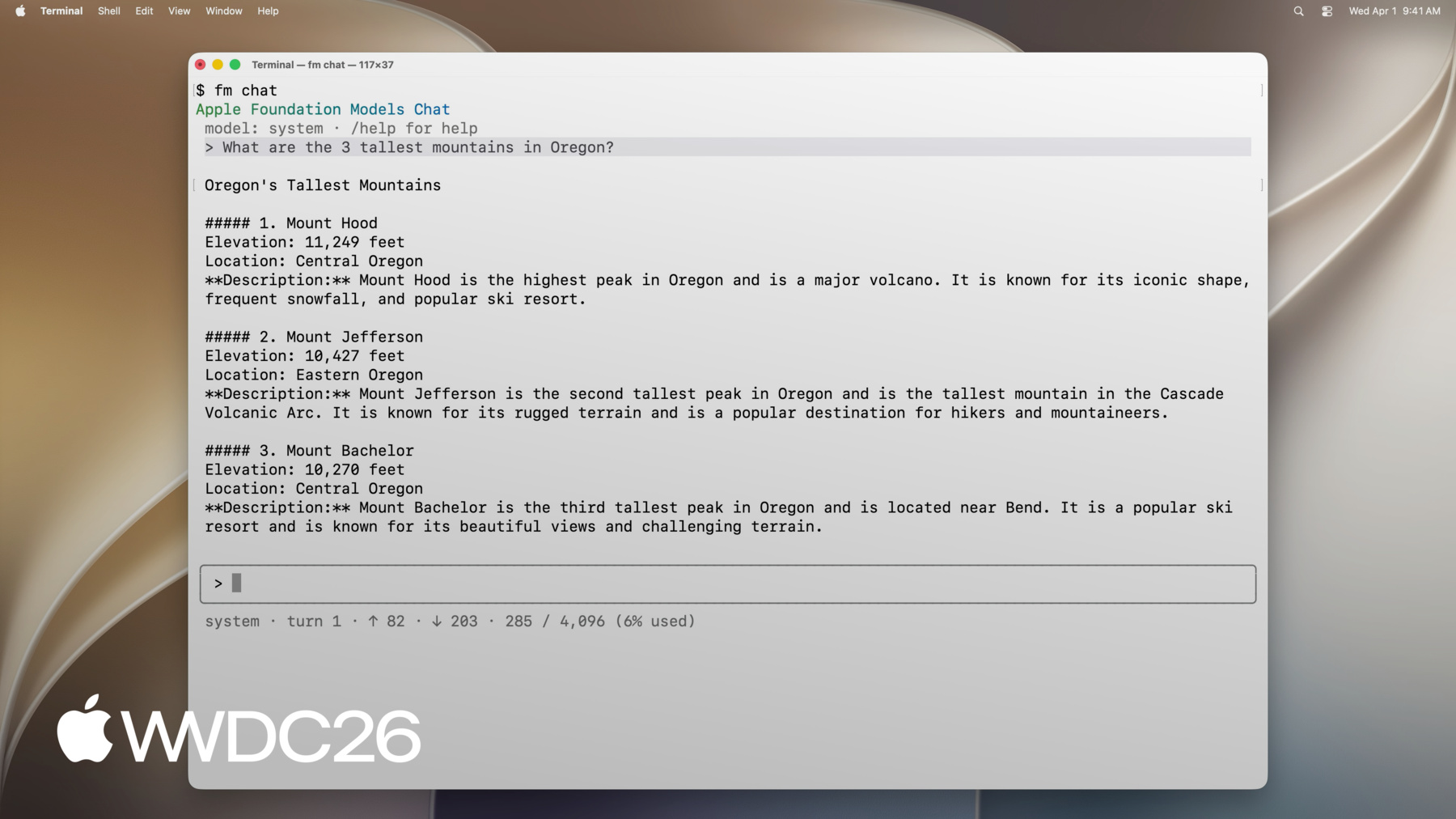
    • 3:23 - Command line tool
    • 5:02 - fm respond and structured output
    • 6:11 - Automating file management with fm
    • 8:52 - Python SDK
    • 9:42 - Prompting, tool calling and guided generation
    • 10:44 - Building an evaluation pipeline in Python
    • 15:20 - Next steps

    Ressources

    • Foundation Models SDK for Python on GitHub
    • Foundation Models SDK for Python Documentation on GitHub
      • Vidéo HD
      • Vidéo SD

    Vidéos connexes

    WWDC26

    • Créez des expériences d’apps agentiques avec le framework Foundation Models
    • Exploitez [Model Name] dans Private Cloud Compute
    • Intégrez un fournisseur de LLM au framework Foundation Models
    • Nouveautés du framework Foundation Models
  • Rechercher dans cette vidéo…
    • 5:07 - Prompt the on-device model with fm respond

      $ fm respond "Provide a basic regex in Swift to parse an email address"
      # Here is a basic regex to parse an email address in Swift: [...]
      
      $ fm respond "Provide a comprehensive regex in Swift to parse an email address" --model pcc
      # [...] Here's a robust Swift implementation using 'NSRegularExpression' to validate a typical email address:
      
      $ fm respond "What app is the user using in this screenshot?" --model pcc \
      	--image Screenshot.png
      # The user is using the Mail app.
      
      $ fm schema object --name AppsIdentified --string app_names --array > schema.json 
      $ fm respond "What apps are the user actively using in this screenshot?" \
      	--image Screenshot.png --model pcc --schema schema.json
      # {"app_names": ["Messages", "Mail", "Calendar"]}
      
      $ fm respond --help
    • 7:55 - Sort files with fm respond and a schema

      fm schema object --name "TriagedFileList" \
          --string 'final_files' --array \
          --string 'draft_files' --array > /tmp/schema.json
      
      output=$(fm respond \
          --instructions "I just completed a project, and I need help triaging the latest version of the files from the previous versions. I will give you a list of files. Return a list of the latest files (i.e., all files that, you can infer from their name in the list, are the latest versions), and then return separately a list of all draft files (i.e., all files that weren't considered final)." \
          "This is the list of all files:\n\n${files_list}" \
          --schema /tmp/schema.json
      )
      
      echo "${output}" | jq -r '.final_files[]' | while read -r file; do
          cp "${DIRECTORY_TO_TRIAGE}/${file}" "${FINAL_FILES_STORAGE_DIRECTORY}"
      done
      
      echo "${output}" | jq -r '.draft_files[]' | while read -r file; do
          mv "${DIRECTORY_TO_TRIAGE}/${file}" "${DRAFT_FILES_STORAGE_DIRECTORY}"
      done
    • 8:54 - Install the Foundation Models Python SDK

      pip install apple_fm_sdk
    • 10:00 - Create a session and respond to a prompt

      import apple_fm_sdk as fm
      
      INSTRUCTIONS = "You're an AI assistant for Cupertino Mart, a grocery store with in-app ordering."
      
      async def answer_question(prompt: str) -> str:
      	session = fm.LanguageModelSession(instructions=INSTRUCTIONS)
        return await session.respond(prompt)
    • 10:21 - Define a Tool for the language model

      class GetPastOrdersTool(fm.Tool):
        name = "get_past_orders"
        description = "Retrieves information about this user's past orders."
      
        @fm.generable("Past orders query parameter")
        class Arguments:
        	number_orders: str = fm.guide("How many of the last orders to retrieve")
      
        @property
        def arguments_schema(self) -> fm.GenerationSchema:
        	return self.Arguments.generation_schema()
      
      async def call(self, args: fm.GeneratedContent) -> str:
      	number_orders = args.value(int, for_property="number_orders")
        return await Orders.load_last_orders(user_id=user_id, amount=number_orders)
    • 10:35 - Generate structured output with @fm.generable

      @fm.generable("Suggested items")
      class ItemsSuggestion:
      	item_names: list[str] = fm.guide("Names of the suggested items")
      
      INSTRUCTIONS = "You're an AI assistant tasked with returning potential grocery items that the user might be interested in."
      
      async def generate_suggested_cart_items(user_input: Optional[str]) -> ItemsSuggestion:
      	session = fm.LanguageModelSession(instructions=INSTRUCTIONS, tools=load_tools())
      	prompt = """Using the tools to load the user's previous orders, \
                    return a list of items the user has already ordered \
                    and that they might be interested in again \
                    as they're getting ready to place a new grocery order."""
      	if user_input is not None:
          prompt += f"\nAccount for the following request from the user: {user_input}"
          return await session.respond(prompt, generating=ItemsSuggestion)
    • 0:00 - Introduction
    • Overview of the Foundation Models Framework — guided generation, tool calling, and new macOS 27 features like image inputs and server model access.

    • 1:22 - Introducing the fm CLI and Python SDK
    • Two new ways to access Apple Foundation Models on macOS: the fm command line tool (pre-installed with macOS 27 for terminal-based prompting and automation) and the Foundation Models SDK for Python (for ML engineers who work more in Python than Swift).

    • 3:23 - Command line tool
    • How to use the fm command line tool — browsing available commands, starting an interactive conversation with fm chat, switching between the on-device and Private Cloud Compute models, and saving sessions to resume later.

    • 5:02 - fm respond and structured output
    • How to use fm respond for inline scripting — passing prompts and getting responses as terminal output, using the model and image options, and combining fm schema object with the schema option to produce structured JSON outputs.

    • 6:11 - Automating file management with fm
    • A practical automation demo: using fm in a shell script to intelligently sort a messy presentation folder — prompting the model with a file list to classify drafts versus finals, generating structured JSON output, and routing files to backup and archive accordingly.

    • 8:52 - Python SDK
    • Introduction to the Foundation Models SDK for Python — installation requirements (Python 3.10+, Xcode, Apple Silicon), core features mirroring the Swift framework (text and image inputs, streaming, tool calling, guided generation), and its value for ML engineers and rapid prototyping.

    • 9:42 - Prompting, tool calling and guided generation
    • How to use the Python SDK in a grocery app prototype — creating a LanguageModelSession, calling session.respond with a prompt, exposing tools for the model to fetch order history, and using the fm.generable decorator for structured output into a typed ItemsSuggestion object.

    • 10:44 - Building an evaluation pipeline in Python
    • A case study using the Python SDK with Jupyter, Pandas, and matplotlib to evaluate three prompt implementations for a cart completion feature — generating outputs with the on-device model, scoring them with a server judge model on criteria like excess items, missing items, and hallucinations, and visualizing results to guide prompt iteration.

    • 15:20 - Next steps
    • Summary of the new macOS tools and next steps: explore fm in Terminal, visit the Python SDK GitHub for example snippets, and build an evaluation pipeline to measure and improve prompt quality.

Developer Footer

  • Vidéos
  • WWDC26
  • Développez des scripts propulsés par l’IA avec la CLI fm et le SDK Python.
  • Open Menu Close Menu
    • iOS
    • iPadOS
    • macOS
    • tvOS
    • visionOS
    • watchOS
    • App Store
    Open Menu Close Menu
    • Swift
    • SwiftUI
    • Swift Playground
    • TestFlight
    • Xcode
    • Xcode Cloud
    • Icon Composer
    • SF Symbols
    Open Menu Close Menu
    • Accessibility
    • Accessories
    • Apple Intelligence
    • Audio & Video
    • Augmented Reality
    • Business
    • Design
    • Distribution
    • Education
    • Games
    • Health & Fitness
    • In-App Purchase
    • Localization
    • Maps & Location
    • Machine Learning & AI
    • Security
    • Safari & Web
    Open Menu Close Menu
    • Documentation
    • Downloads
    • Sample Code
    • Videos
    Open Menu Close Menu
    • Help Guides & Articles
    • Contact Us
    • Forums
    • Feedback & Bug Reporting
    • System Status
    Open Menu Close Menu
    • Apple Developer
    • App Store Connect
    • Certificates, IDs, & Profiles
    • Feedback Assistant
    Open Menu Close Menu
    • Apple Developer Program
    • Apple Developer Enterprise Program
    • App Store Small Business Program
    • MFi Program
    • Mini Apps Partner Program
    • News Partner Program
    • Video Partner Program
    • Security Bounty Program
    • Security Research Device Program
    Open Menu Close Menu
    • Meet with Apple
    • Apple Developer Centers
    • App Store Awards
    • Apple Design Awards
    • Apple Developer Academies
    • WWDC
    Read the latest news.
    Get the Apple Developer app.
    Copyright © 2026 Apple Inc. All rights reserved.
    Terms of Use Privacy Policy Agreements and Guidelines