

View in English

  • Apple Developer
    • Get Started

    Explore Get Started

    • Overview
    • Learn
    • Apple Developer Program

    Stay Updated

    • Latest News
    • Hello Developer
    • Platforms

    Explore Platforms

    • Apple Platforms
    • iOS
    • iPadOS
    • macOS
    • tvOS
    • visionOS
    • watchOS
    • App Store

    Featured

    • Design
    • Distribution
    • Games
    • Accessories
    • Web
    • Home
    • CarPlay
    • Technologies

    Explore Technologies

    • Overview
    • Xcode
    • Swift
    • SwiftUI

    Featured

    • Accessibility
    • App Intents
    • Apple Intelligence
    • Games
    • Machine Learning & AI
    • Security
    • Xcode Cloud
    • Community

    Explore Community

    • Overview
    • Meet with Apple events
    • Community-driven events
    • Developer Forums
    • Open Source

    Featured

    • WWDC
    • Swift Student Challenge
    • Developer Stories
    • App Store Awards
    • Apple Design Awards
    • Apple Developer Centers
    • Documentation

    Explore Documentation

    • Documentation Library
    • Technology Overviews
    • Sample Code
    • Human Interface Guidelines
    • Videos

    Release Notes

    • Featured Updates
    • iOS
    • iPadOS
    • macOS
    • watchOS
    • visionOS
    • tvOS
    • Xcode
    • Downloads

    Explore Downloads

    • All Downloads
    • Operating Systems
    • Applications
    • Design Resources

    Featured

    • Xcode
    • TestFlight
    • Fonts
    • SF Symbols
    • Icon Composer
    • Support

    Explore Support

    • Overview
    • Help Guides
    • Developer Forums
    • Feedback Assistant
    • Contact Us

    Featured

    • Account Help
    • App Review Guidelines
    • App Store Connect Help
    • Upcoming Requirements
    • Agreements and Guidelines
    • System Status
  • Quick Links

    • Events
    • News
    • Forums
    • Sample Code
    • Videos
 

Vidéos

Ouvrir le menu Fermer le menu
  • Collections
  • Toutes les vidéos
  • À propos

Plus de vidéos

  • À propos
  • Résumé
  • Code
  • Trouvez votre accessoire avec Bluetooth Channel Sounding

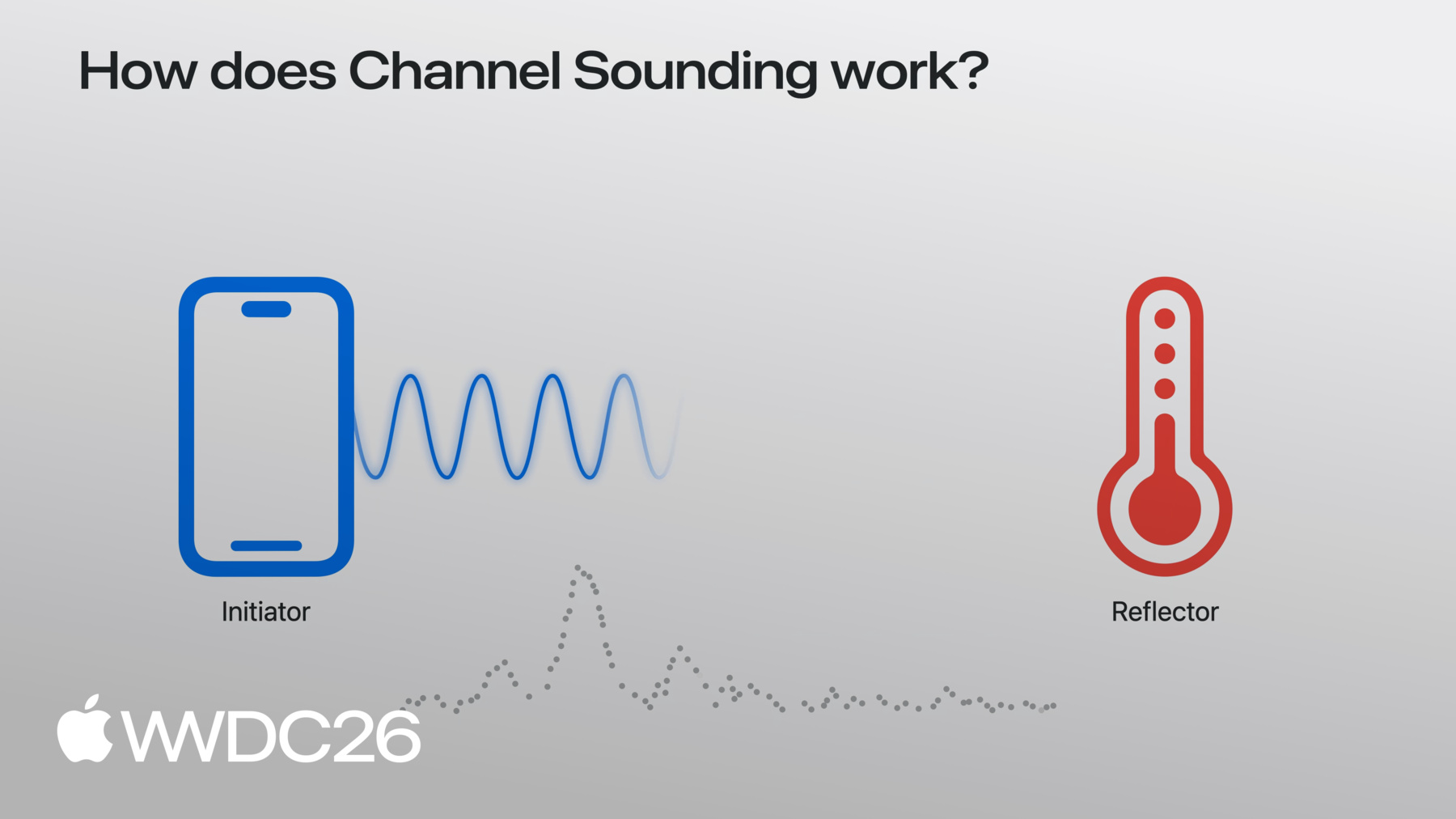
    Commencez avec Channel Sounding pour doter vos accessoires Bluetooth d'une fonction de détection de la distance et de la direction. Plongez dans les nouvelles API Nearby Interaction et Core Bluetooth, et parcourez les modifications nécessaires côté accessoires. Optimisez la consommation d'énergie tout en garantissant une expérience fluide et réactive.

    Chapitres

    • 0:01 - Introduction
    • 0:50 - Overview
    • 3:17 - Core Bluetooth API
    • 4:34 - Nearby Interaction API
    • 7:05 - Hardware tips

    Ressources

    • AccessorySetupKit
    • Nearby Interaction
    • Core Bluetooth
      • Vidéo HD
      • Vidéo SD

    Vidéos connexes

    WWDC24

    • Meet AccessorySetupKit

    WWDC21

    • Explore Nearby Interaction with third-party accessories
  • Rechercher dans cette vidéo…
    • 3:43 - Start a Core Bluetooth Channel Sounding session

      import CoreBluetooth
      
      func isChannelSoundingSupported() -> BOOL {
          guard centralManager.state == .poweredOn else { return }
          if #available(iOS 27.0, *) {
              // Check current device supports Bluetooth Channel Sounding
              return CBCentralManager.supportsFeatures(.channelSounding)
          }
      }
      
      func startChannelSounding(_ peripheral: CBPeripheral) {
          guard peripheral.isConnected else { return }
          if #available(iOS 27.0, *) {  
              // Step 1: Create a CBChannelSoundingSessionConfiguration
              let config = CBChannelSoundingSessionConfiguration(role: .initiator)
      
              // Step 2: Start the channel sounding session
              peripheral.startChannelSoundingSession(config)
          }
      }
    • 4:09 - Receive distance results and cancel a session

      import CoreBluetooth
      
      // Receive distance results
      func peripheral(_ peripheral: CBPeripheral,
                      didReceive results: CBChannelSoundingProcedureResults?,
                      error: Error?) {
          guard let results = results else { return }
      
          let distance = results.distance
          
          // Do something with distance
      }
      
      // Cancel a Channel Sounding session
      func cancelChannelSounding(_ peripheral: CBPeripheral) {
          guard peripheral.isConnected else { return }
          if #available(iOS 27.0, *) {
              // Cancel the channel sounding session
              peripheral.cancelChannelSoundingSession(config)
          }
      }
      
      func peripheral(_ peripheral: CBPeripheral,
                      didCompleteChannelSoundingSession error: Error?) {   
          // Session is complete
      }
    • 4:41 - Start a Nearby Interaction Channel Sounding session

      import CoreBluetooth
      import NearbyInteraction
      
      // Configure a Nearby Interaction Channel Sounding session
      func startChannelSoundingThroughNearbyInteraction(_ peripheral: CBPeripheral) {
          if #available(iOS 27.0, *) {        
              // Step 1: Check current device supports Bluetooth Channel Sounding
              guard NISession.deviceCapabilities.supportsBluetoothChannelSounding else { return }
      
              // Step 2: Create an NINearbyAccessoryConfiguration
              let config = NINearbyAccessoryConfiguration(
                  bluetoothChannelSoundingIdentifier: peripheral.identifier, 
                  previousChannelSoundingIdentifier: nil)
      
              // Step 3: Enable camera assistance for direction support
              if NISession.deviceCapabilities.supportsCameraAssistance { 
                  config.isCameraAssistanceEnabled = true
              }
          }
      }
    • 5:19 - Run a Nearby Interaction Channel Sounding session

      import CoreBluetooth
      import NearbyInteraction
      
      // Run a Nearby Interaction Channel Sounding session
      func runChannelSoundingThroughNearbyInteraction(_ config: NINearbyAccessoryConfiguration) {
          // Create an NISession
          let session = NISession()
          session.delegate = self
          // Run the NISession with the accessory configuration
          session.run(config)
      }
      
      // Improve Nearby Interaction direction outputs
      func updateAccessoryMotionState(_ isMoving: Bool) {
          NIMotionActivityState motionState = isMoving ? .moving : .stationary
          
          // Tell NISession about.the accessory's motion state
          session.updateMotionState(motionState, forObjectWithToken: object.discoveryToken)
      }
      
      // Receive NISession updates
      func session(_ session: NISession, didUpdate nearbyObjects: [NINearbyObjects]) {   
          guard let object = nearbyObjects.first else { return }
      
          if let distance = object.distance {
              // Do something with distance
          }
      
          if let direction = object.horizontalAngle {
              // Do something with horizontal angle
          }
      }
    • 0:01 - Introduction
    • Discover the three aspects of Bluetooth Channel Sounding that will be discussed in this video.

    • 0:50 - Overview
    • Find inspiration for using Bluetooth Channel Sounding.

    • 3:17 - Core Bluetooth API
    • Learn how to get distance with the Core Bluetooth API.

    • 4:34 - Nearby Interaction API
    • Get distance and direction with the Nearby Interaction API.

    • 7:05 - Hardware tips
    • Understand the hardware requirements for Bluetooth Channel Sounding.

Developer Footer

  • Vidéos
  • WWDC26
  • Trouvez votre accessoire avec Bluetooth Channel Sounding
  • Open Menu Close Menu
    • iOS
    • iPadOS
    • macOS
    • tvOS
    • visionOS
    • watchOS
    • App Store
    Open Menu Close Menu
    • Swift
    • SwiftUI
    • Swift Playground
    • TestFlight
    • Xcode
    • Xcode Cloud
    • Icon Composer
    • SF Symbols
    Open Menu Close Menu
    • Accessibility
    • Accessories
    • Apple Intelligence
    • Audio & Video
    • Augmented Reality
    • Business
    • Design
    • Distribution
    • Education
    • Games
    • Health & Fitness
    • In-App Purchase
    • Localization
    • Maps & Location
    • Machine Learning & AI
    • Security
    • Safari & Web
    Open Menu Close Menu
    • Documentation
    • Downloads
    • Sample Code
    • Videos
    Open Menu Close Menu
    • Help Guides & Articles
    • Contact Us
    • Forums
    • Feedback & Bug Reporting
    • System Status
    Open Menu Close Menu
    • Apple Developer
    • App Store Connect
    • Certificates, IDs, & Profiles
    • Feedback Assistant
    Open Menu Close Menu
    • Apple Developer Program
    • Apple Developer Enterprise Program
    • App Store Small Business Program
    • MFi Program
    • Mini Apps Partner Program
    • News Partner Program
    • Video Partner Program
    • Security Bounty Program
    • Security Research Device Program
    Open Menu Close Menu
    • Meet with Apple
    • Apple Developer Centers
    • App Store Awards
    • Apple Design Awards
    • Apple Developer Academies
    • WWDC
    Read the latest news.
    Get the Apple Developer app.
    Copyright © 2026 Apple Inc. All rights reserved.
    Terms of Use Privacy Policy Agreements and Guidelines