

View in English

  • Apple Developer
    • Get Started

    Explore Get Started

    • Overview
    • Learn
    • Apple Developer Program

    Stay Updated

    • Latest News
    • Hello Developer
    • Platforms

    Explore Platforms

    • Apple Platforms
    • iOS
    • iPadOS
    • macOS
    • tvOS
    • visionOS
    • watchOS
    • App Store

    Featured

    • Design
    • Distribution
    • Games
    • Accessories
    • Web
    • Home
    • CarPlay
    • Technologies

    Explore Technologies

    • Overview
    • Xcode
    • Swift
    • SwiftUI

    Featured

    • Accessibility
    • App Intents
    • Apple Intelligence
    • Games
    • Machine Learning & AI
    • Security
    • Xcode Cloud
    • Community

    Explore Community

    • Overview
    • Meet with Apple events
    • Community-driven events
    • Developer Forums
    • Open Source

    Featured

    • WWDC
    • Swift Student Challenge
    • Developer Stories
    • App Store Awards
    • Apple Design Awards
    • Apple Developer Centers
    • Documentation

    Explore Documentation

    • Documentation Library
    • Technology Overviews
    • Sample Code
    • Human Interface Guidelines
    • Videos

    Release Notes

    • Featured Updates
    • iOS
    • iPadOS
    • macOS
    • watchOS
    • visionOS
    • tvOS
    • Xcode
    • Downloads

    Explore Downloads

    • All Downloads
    • Operating Systems
    • Applications
    • Design Resources

    Featured

    • Xcode
    • TestFlight
    • Fonts
    • SF Symbols
    • Icon Composer
    • Support

    Explore Support

    • Overview
    • Help Guides
    • Developer Forums
    • Feedback Assistant
    • Contact Us

    Featured

    • Account Help
    • App Review Guidelines
    • App Store Connect Help
    • Upcoming Requirements
    • Agreements and Guidelines
    • System Status
  • Quick Links

    • Events
    • News
    • Forums
    • Sample Code
    • Videos
 

Videos

Abrir menú Cerrar menú
  • Colecciones
  • Todos los videos
  • Información

Más videos

  • Información
  • Código
  • Make your app visually accessible

    When you design with accessibility in mind, you empower everyone to use your app. Discover how to create an adaptive interface for your app that takes a thoughtful approach to color, provides readable text, and accommodates other visual settings to maintain a great experience throughout.

    We've designed this session like our user interfaces — to be accessible to all. If you'd like to learn even more about accessibility and design, you may also enjoy “Visual Design and Accessibility,” “Accessibility Inspector,” “Building Apps with Dynamic Type,” and “Introducing SF Symbols.”

    Recursos

    • Accessibility for UIKit
      • Video HD
      • Video SD

    Videos relacionados

    WWDC23

    • Create accessible spatial experiences

    WWDC21

    • Create accessible experiences for watchOS

    WWDC19

    • Accessibility Inspector
    • Introducing SF Symbols
    • Visual Design and Accessibility
  • Buscar este video…
    • 3:14 - Button Shapes

      func observeButtonShapesNotification() {
          // Make buttons more visible by using shapes.
          // If your default design does not include button shapes, observe this notification to make visual changes.
          NotificationCenter.default.addObserver(self, selector: #selector(updateButtonShapes), name: UIAccessibility.buttonShapesEnabledStatusDidChangeNotification, object: nil)
      }
      
      @objc func updateButtonShapes() {
          if UIAccessibility.buttonShapesEnabled {
              // Use extra visualizations for buttons.
          } else {
              // Use default design for buttons.
          }
      }
    • 3:31 - Differentiate Without Color

      func observeDifferentiateWithoutColorNotification() {
          // Use symbols or shapes to convey meaning instead of relying on color alone.
          // If your default design does not differentiate without color, observe this notification to make visual changes.
          NotificationCenter.default.addObserver(self, selector: #selector(updateColorAndSymbols), name: NSNotification.Name(UIAccessibility.differentiateWithoutColorDidChangeNotification), object: nil)
      }
      
      @objc func updateColorAndSymbols() {
          if UIAccessibility.shouldDifferentiateWithoutColor {
              // Use symbols or shapes to convey meaning.
          } else {
              // Use default design.
          }
      }
    • 7:47 - Smart Invert Colors

      extension UIView {
          @available(iOS 11.0, tvOS 11.0)
          var accessibilityIgnoresInvertColors: Bool { get set }
      }
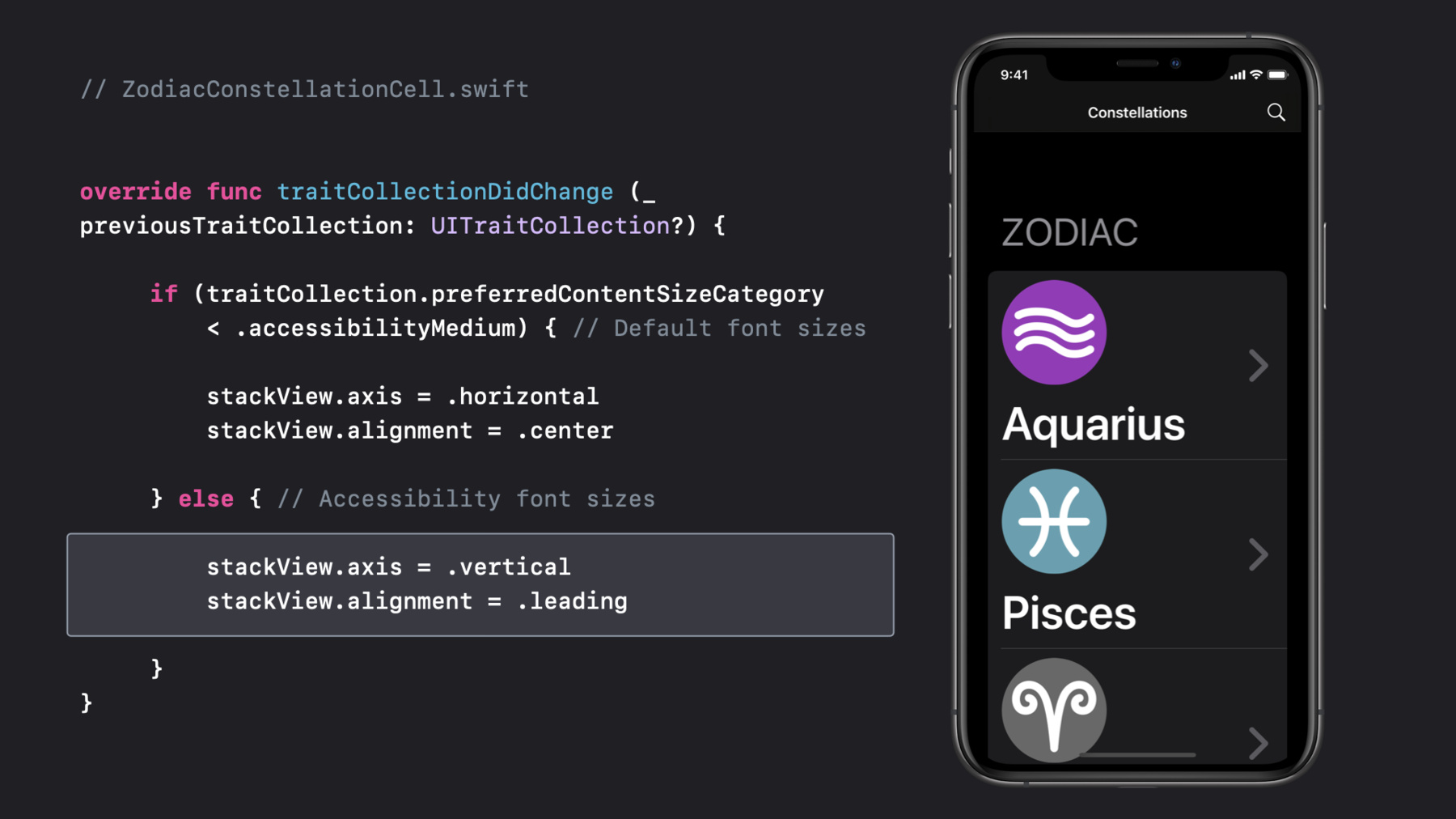
    • 9:57 - Large Text

      // ZodiacConstellationCell.swift
      
      
      override func traitCollectionDidChange (_ previousTraitCollection: UITraitCollection?) {
      
           if (traitCollection.preferredContentSizeCategory       
               < .accessibilityMedium) { // Default font sizes
      
               stackView.axis = .horizontal
               stackView.alignment = .center
      
           } else { // Accessibility font sizes
      
               stackView.axis = .vertical
               stackView.alignment = .leading
      
           }
      }
    • 11:33 - Bold Text

      func observeBoldTextNotification() {
          // Update labels to use bold or heavy font styles.
          // If you aren't using system font styles, observe this notification to make visual changes.
          NotificationCenter.default.addObserver(self, selector: #selector(updateLabelWeight), name: UIAccessibility.boldTextStatusDidChangeNotification, object: nil)
      }
      
      @objc func updateLabelWeight() {
          if UIAccessibility.isBoldTextEnabled {
              // Use bold or heavy font weight
          } else {
              // Use font weight that is default to your design.
          }
      }
    • 13:08 - Reduce Motion

      func observeReduceMotionNotification() {
          // Observe this notification to reduce or remove the frequency and intensity of motion effects.
          NotificationCenter.default.addObserver(self, selector: #selector(updateMotionEffects), name: UIAccessibility.reduceMotionStatusDidChangeNotification, object: nil)
      }
      
      @objc func updateMotionEffects() {
          if UIAccessibility.isReduceMotionEnabled {
              // Reduce or remove extraneous motion effects.
          } else {
              // Use default motion effects.
          }
      }
    • 13:51 - Prefers Cross-fade Transitions

      func observeCrossFadeTransitionsNotification() {
          // Reduce or remove sliding animations for transitioning views.
          // If you aren't using system-provided navigation, observe this notification to make visual changes.
          NotificationCenter.default.addObserver(self, selector: #selector(updateTransitionEffects), name: UIAccessibility.prefersCrossFadeTransitionsStatusDidChange, object: nil)
      }
      
      @objc func updateTransitionEffects() {
          if UIAccessibility.prefersCrossFadeTransitions {
              // Replace sliding transitions with cross-fade animations.
          } else {
              // Use default sliding transitions.
          }
      }
    • 15:07 - Reduce Transparency

      func observeReduceTransparencyNotification() {
          // Reduce or remove transparency by adjusting these effects to be completely opaque.
          // If you aren't using system-provided visual effects for blurs or vibrancy, observe this notification to make visual changes.
          NotificationCenter.default.addObserver(self, selector: #selector(updateTransparencyEffects), name: UIAccessibility.reduceTransparencyStatusDidChangeNotification, object: nil)
      }
      
      @objc func updateTransparencyEffects() {
          if UIAccessibility.isReduceTransparencyEnabled {
              // Make transparency effects opaque.
          } else {
              // Use default transparency.
          }
      }

Developer Footer

  • Videos
  • WWDC20
  • Make your app visually accessible
  • Open Menu Close Menu
    • iOS
    • iPadOS
    • macOS
    • tvOS
    • visionOS
    • watchOS
    • App Store
    Open Menu Close Menu
    • Swift
    • SwiftUI
    • Swift Playground
    • TestFlight
    • Xcode
    • Xcode Cloud
    • Icon Composer
    • SF Symbols
    Open Menu Close Menu
    • Accessibility
    • Accessories
    • Apple Intelligence
    • Audio & Video
    • Augmented Reality
    • Business
    • Design
    • Distribution
    • Education
    • Games
    • Health & Fitness
    • In-App Purchase
    • Localization
    • Maps & Location
    • Machine Learning & AI
    • Security
    • Safari & Web
    Open Menu Close Menu
    • Documentation
    • Downloads
    • Sample Code
    • Videos
    Open Menu Close Menu
    • Help Guides & Articles
    • Contact Us
    • Forums
    • Feedback & Bug Reporting
    • System Status
    Open Menu Close Menu
    • Apple Developer
    • App Store Connect
    • Certificates, IDs, & Profiles
    • Feedback Assistant
    Open Menu Close Menu
    • Apple Developer Program
    • Apple Developer Enterprise Program
    • App Store Small Business Program
    • MFi Program
    • Mini Apps Partner Program
    • News Partner Program
    • Video Partner Program
    • Security Bounty Program
    • Security Research Device Program
    Open Menu Close Menu
    • Meet with Apple
    • Apple Developer Centers
    • App Store Awards
    • Apple Design Awards
    • Apple Developer Academies
    • WWDC
    Read the latest news.
    Get the Apple Developer app.
    Copyright © 2026 Apple Inc. All rights reserved.
    Terms of Use Privacy Policy Agreements and Guidelines