

View in English

  • Apple Developer
    • Get Started

    Explore Get Started

    • Overview
    • Learn
    • Apple Developer Program

    Stay Updated

    • Latest News
    • Hello Developer
    • Platforms

    Explore Platforms

    • Apple Platforms
    • iOS
    • iPadOS
    • macOS
    • tvOS
    • visionOS
    • watchOS
    • App Store

    Featured

    • Design
    • Distribution
    • Games
    • Accessories
    • Web
    • Home
    • CarPlay
    • Technologies

    Explore Technologies

    • Overview
    • Xcode
    • Swift
    • SwiftUI

    Featured

    • Accessibility
    • App Intents
    • Apple Intelligence
    • Games
    • Machine Learning & AI
    • Security
    • Xcode Cloud
    • Community

    Explore Community

    • Overview
    • Meet with Apple events
    • Community-driven events
    • Developer Forums
    • Open Source

    Featured

    • WWDC
    • Swift Student Challenge
    • Developer Stories
    • App Store Awards
    • Apple Design Awards
    • Apple Developer Centers
    • Documentation

    Explore Documentation

    • Documentation Library
    • Technology Overviews
    • Sample Code
    • Human Interface Guidelines
    • Videos

    Release Notes

    • Featured Updates
    • iOS
    • iPadOS
    • macOS
    • watchOS
    • visionOS
    • tvOS
    • Xcode
    • Downloads

    Explore Downloads

    • All Downloads
    • Operating Systems
    • Applications
    • Design Resources

    Featured

    • Xcode
    • TestFlight
    • Fonts
    • SF Symbols
    • Icon Composer
    • Support

    Explore Support

    • Overview
    • Help Guides
    • Developer Forums
    • Feedback Assistant
    • Contact Us

    Featured

    • Account Help
    • App Review Guidelines
    • App Store Connect Help
    • Upcoming Requirements
    • Agreements and Guidelines
    • System Status
  • Quick Links

    • Events
    • News
    • Forums
    • Sample Code
    • Videos
 

Videos

Abrir menú Cerrar menú
  • Colecciones
  • Todos los videos
  • Información

Más videos

  • Información
  • Código
  • What's new in USD

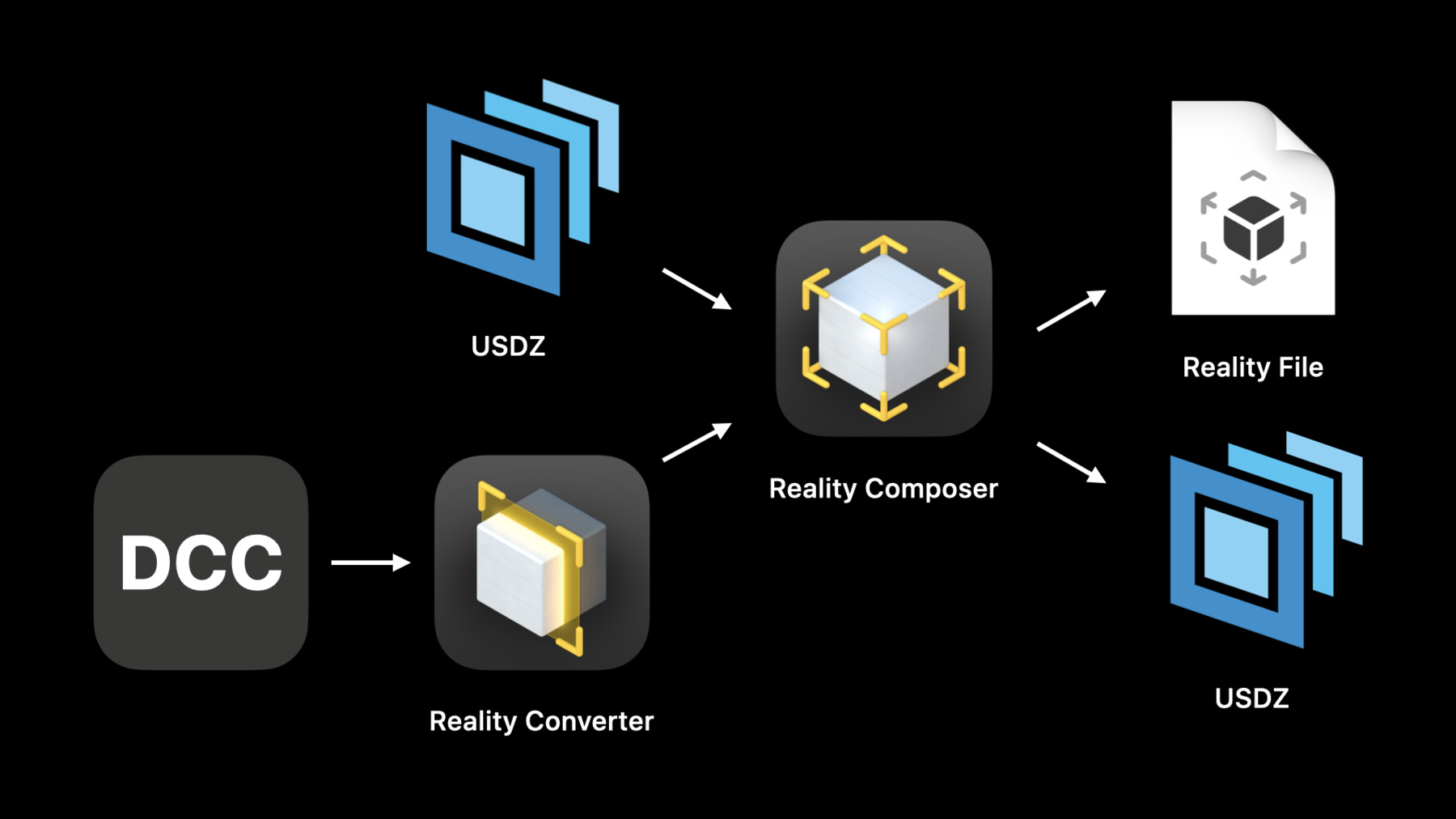
    Discover proposed schema and structure updates to the Universal Scene Description (USD) standard. Learn how you can use Reality Composer to build AR content with interactive properties like anchoring, physics, behaviors, 3D text, and spatial audio that exports to USDZ. And, discover streamlined workflows that help you bring newly-created objects into your app.

    If you're interested to learn more about USDZ as a distribution format, check out "Working with USD.” And for more on creating AR content with Reality Composer, watch “The Artist's AR Toolkit."

    We'd love to hear feedback about the preliminary schemas. After you watch this session, come join us on the Developer Forums and share your thoughts.

    Recursos

      • Video HD
      • Video SD

    Videos relacionados

    WWDC21

    • Create 3D workflows with USD

    WWDC20

    • Shop online with AR Quick Look
    • The artist’s AR toolkit

    WWDC19

    • Working with USD
  • Buscar este video…
    • 11:44 - USD scene structure

      def Xform "Root" (
          kind = "sceneLibrary"
      )
      {
          def Cube "MyCubeScene" (
              sceneName = "My Cube Scene"
          )
          { 
              ... 
          }
      
          over Sphere "MySphereScene" (
              sceneName = "My Sphere Scene"
          )
          { 
              ... 
          }
      }
    • 13:30 - Adding anchoring to USD

      def Cube "ImageAnchoredCube" (
          prepend apiSchemas = [ "Preliminary_AnchoringAPI" ]
      )
      {
          uniform token preliminary:anchoring:type = "image"
          rel preliminary:imageAnchoring:referenceImage = <ImageReference>
      
          def Preliminary_ReferenceImage "ImageReference"
          {
              uniform asset image = @image.png@
              uniform double physicalWidth = 12
          }
      
          ...
      }
    • 15:11 - Defining a behavior

      def Preliminary_Behavior "TapAndBounce"
      {
          rel triggers = [ <Tap> ]
          rel actions = [ <Bounce> ]
      
          def Preliminary_Trigger "Tap"
          {
              uniform token info:id = "tap"
              rel affectedObjects = [ </Cube> ]
          }
      
          def Preliminary_Action "Bounce"
          {
              uniform token info:id = "emphasize" 
              uniform token motionType = "bounce"
              rel affectedObjects = [ </Cube> ]
          }
      
          ...
      }
    • 16:22 - Compound behavior

      def Preliminary_Behavior "TapOrGetCloseAndBounceJiggleAndFlip"
      {
          rel triggers = [ <Tap>, <Proximity> ]
          rel actions = [ <Bounce>, <Jiggle>, <Flip> ]
      
          ...
      }
    • 17:19 - Defining physics

      def Sphere "WoodenBall" (
          prepend apiSchemas = [ "Preliminary_PhysicsColliderAPI",
                                 "Preliminary_PhysicsRigidBodyAPI" ]
      )
      {
          rel preliminary:physics:collider:convexShape = </WoodenBall>
          double preliminary:physics:rigidBody:mass = 10.0
      }
    • 18:15 - Applying a wood material for physics

      def Material "Wood" (
          prepend apiSchemas = ["Preliminary_PhysicsMaterialAPI"]
      )
      {
          double preliminary:physics:material:restitution = 0.603
          double preliminary:physics:material:friction:static = 0.375
          double preliminary:physics:material:friction:dynamic = 0.375
      }
      
      def Sphere "WoodenBall" (
          prepend apiSchemas = [ "Preliminary_PhysicsColliderAPI",
                                 "Preliminary_PhysicsRigidBodyAPI" ]
      )
      {
          rel preliminary:physics:collider:convexShape = </WoodenBall>
          double preliminary:physics:rigidBody:mass = 10.0
          rel material:binding = </Wood>
      }
    • 18:40 - Defining a ground plane

      def Xform "MyScene" (
          prepend apiSchemas = ["Preliminary_PhysicsColliderAPI"]
      )
      {
          def Preliminary_InfiniteColliderPlane "groundPlane" (
              customData = {
                  bool preliminary_isSceneGroundPlane = 1
              }
          ) {
              point3d position = (0, 0, -2)
              vector3d normal = (0, 1, 0)
              rel preliminary:physics:collider:convexShape = </MyScene/groundPlane>
          }
          rel material:binding = </Wood>
      }
    • 19:08 - Adding gravity

      def Preliminary_PhysicsGravitationalForce "MoonsGravity"
      {
          vector3d physics:gravitationalForce:acceleration = (0, -1.625, 0)
      }
    • 20:28 - Defining spatial audio

      def SpatialAudio "HorseNeigh"
      {
          uniform asset filePath        = @Horse.m4a@
          uniform token auralMode       = "spatial"
          uniform timeCode startTime    =  65.0
          uniform double mediaOffset    =  0.33333333333
          double3 xformOp:translate = (0, 0.5, 0.1)
          uniform token[] xformOpOrder = ["xformOp:translate"]
      }
    • 21:45 - 3D text

      def Preliminary_Text "heading"
      {
          string content = "#WWDC20"
          string[] font = [ "Helvetica", "Arial" ]
          token wrapMode = "singleLine"
          token horizontalAlignment = "center"
          token verticalAlignment = "baseline"
      }
    • 22:46 - Playback metadata

      #usda 1.0
      (
          endTimeCode = 300
          startTimeCode = 1
          timeCodesPerSecond = 30
          playbackMode = "loop"
          autoPlay = false
      )
      
      def Xform “AnimatedCube"
      {
          ...
      }
    • 23:08 - Scene understanding metadata

      def Xform "Root" (
          kind = "sceneLibrary"
      )
      {
          def Xform "MyScene" (
              sceneName = "My Scene"
              preliminary_collidesWithEnvironment = true
          )
          {
              def Xform "DigitalBug"
              {
                  ...
              }
          }
      }

Developer Footer

  • Videos
  • WWDC20
  • What's new in USD
  • Open Menu Close Menu
    • iOS
    • iPadOS
    • macOS
    • tvOS
    • visionOS
    • watchOS
    • App Store
    Open Menu Close Menu
    • Swift
    • SwiftUI
    • Swift Playground
    • TestFlight
    • Xcode
    • Xcode Cloud
    • Icon Composer
    • SF Symbols
    Open Menu Close Menu
    • Accessibility
    • Accessories
    • Apple Intelligence
    • Audio & Video
    • Augmented Reality
    • Business
    • Design
    • Distribution
    • Education
    • Games
    • Health & Fitness
    • In-App Purchase
    • Localization
    • Maps & Location
    • Machine Learning & AI
    • Security
    • Safari & Web
    Open Menu Close Menu
    • Documentation
    • Downloads
    • Sample Code
    • Videos
    Open Menu Close Menu
    • Help Guides & Articles
    • Contact Us
    • Forums
    • Feedback & Bug Reporting
    • System Status
    Open Menu Close Menu
    • Apple Developer
    • App Store Connect
    • Certificates, IDs, & Profiles
    • Feedback Assistant
    Open Menu Close Menu
    • Apple Developer Program
    • Apple Developer Enterprise Program
    • App Store Small Business Program
    • MFi Program
    • Mini Apps Partner Program
    • News Partner Program
    • Video Partner Program
    • Security Bounty Program
    • Security Research Device Program
    Open Menu Close Menu
    • Meet with Apple
    • Apple Developer Centers
    • App Store Awards
    • Apple Design Awards
    • Apple Developer Academies
    • WWDC
    Read the latest news.
    Get the Apple Developer app.
    Copyright © 2026 Apple Inc. All rights reserved.
    Terms of Use Privacy Policy Agreements and Guidelines