

-
Meet desktop-class iPad
Learn how you can bring desktop-class features to your iPad app. Explore updates to UINavigationBar that bring more discoverability and customizability to your app's features. Find out how the latest updates to UIKit can help make it easier and faster for people to explore content in your app. Lastly, we'll share a few updates on how it's easier than ever to bring your iPad app to the desktop with Mac Catalyst.
Recursos
- titleMenuProvider
- UINavigationItem.ItemStyle
- searchSuggestions
- centerItemGroups
- UINavigationItemRenameDelegate
- UIDocumentProperties
- Building a desktop-class iPad app
- Supporting desktop-class features in your iPad app
Videos relacionados
WWDC23
WWDC22
-
Buscar este video…
-
-
4:27 - Creating a fixed UIBarButtonItemGroup from a single UIBarButtonItem
let insertGroup = UIBarButtonItem(title: "Insert", image: UIImage(systemName: "photo"), primaryAction: UIAction { _ in }).creatingFixedGroup() -
4:55 - Convenient form
// Creating the 'Draw' group // Convenient form of // UIBarButtonItemGroup.movableGroup(customizationIdentifier:representativeItem:items:) let drawGroup = UIBarButtonItem(title: "Draw", …) .creatingMovableGroup(customizationIdentifier: "Draw") -
5:30 - Creating an optional group with multiple UIBarButtonItems using UIBarButtonItemGroup
let shapeGroup = UIBarButtonItemGroup.optionalGroup( customizationIdentifier: "Shapes", representativeItem: UIBarButtonItem(title: "Shapes", image: UIImage(systemName: "square.on.circle")), items: [ UIBarButtonItem(title: "Square", image: UIImage(systemName: "square"), primaryAction: UIAction { _ in }), UIBarButtonItem(title: "Circle", image: UIImage(systemName: "circle"), primaryAction: UIAction { _ in }), UIBarButtonItem(title: "Rectangle", image: UIImage(systemName: "rectangle"), primaryAction: UIAction { _ in }), UIBarButtonItem(title: "Diamond", image: UIImage(systemName: "diamond"), primaryAction: UIAction { _ in }), ]) -
6:56 - Setting up customizable centerItemGroups on a UINavigationItem
navigationItem.customizationIdentifier = "com.jetpack.blueprints.maineditor" navigationItem.centerItemGroups = [ // groups in the default customization UIBarButtonItem(title: "Insert", image: UIImage(systemName: "photo"), primaryAction: UIAction { _ in }).creatingFixedGroup(), UIBarButtonItem(title: "Draw", image: UIImage(systemName: "scribble"), primaryAction: UIAction { _ in }).creatingMovableGroup(customizationIdentifier: "Draw"), .optionalGroup(customizationIdentifier: "Shapes", representativeItem: UIBarButtonItem(title: "Shapes", image: UIImage(systemName: "square.on.circle")), items: [ UIBarButtonItem(title: "Square", image: UIImage(systemName: "square"), primaryAction: UIAction { _ in }), UIBarButtonItem(title: "Circle", image: UIImage(systemName: "circle"), primaryAction: UIAction { _ in }), UIBarButtonItem(title: "Rectangle", image: UIImage(systemName: "rectangle"), primaryAction: UIAction { _ in }), UIBarButtonItem(title: "Diamond", image: UIImage(systemName: "diamond"), primaryAction: UIAction { _ in }), ]), .optionalGroup(customizationIdentifier: "Text", items: [ UIBarButtonItem(title: "Label", image: UIImage(systemName: "character.textbox"), primaryAction: UIAction { _ in }), UIBarButtonItem(title: "Text", image: UIImage(systemName: "text.bubble"), primaryAction: UIAction { _ in }), ]), // additional group not in the default customization .optionalGroup(customizationIdentifier: "Format", isInDefaultCustomization: false, representativeItem: UIBarButtonItem(title: "BIU", image: UIImage(systemName: "bold.italic.underline")), items:[ UIBarButtonItem(title: "Bold", image: UIImage(systemName: "bold"), primaryAction: UIAction { _ in }), UIBarButtonItem(title: "Italic", image: UIImage(systemName: "italic"), primaryAction: UIAction { _ in }), UIBarButtonItem(title: "Underline", image: UIImage(systemName: "underline"), primaryAction: UIAction { _ in }), ]) ] -
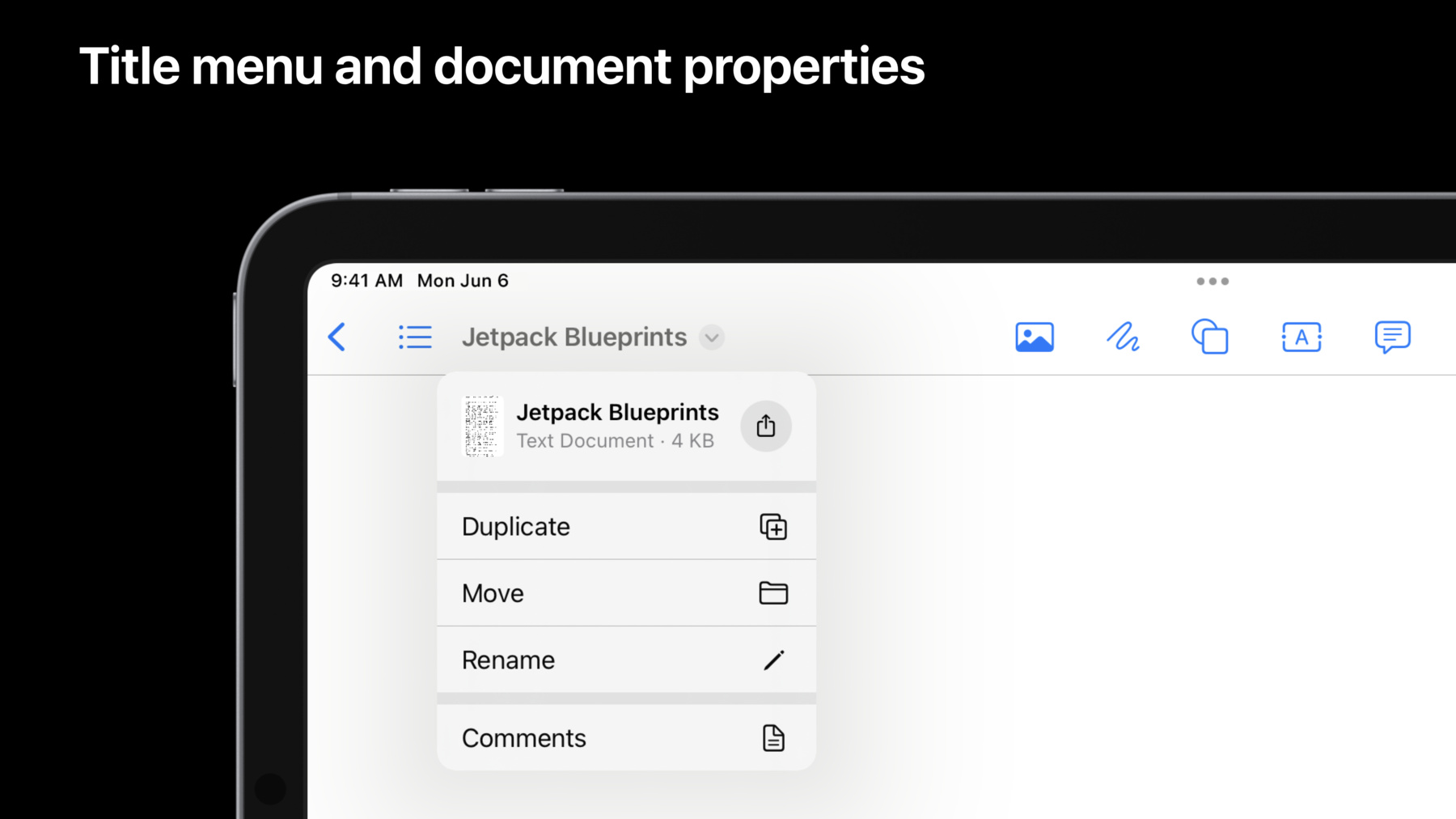
9:30 - Adding a "Comments" item to the default title menu
navigationItem.titleMenuProvider = { suggestedActions in var children = suggestedActions children += [ UIAction(title: "Comments", image: UIImage(systemName: "text.bubble")) { _ in } ] return UIMenu(children: children) } -
10:15 - Supporting Drag & Drop and Sharing from the title menu
let url = <#T##URL#> let documentProperties = UIDocumentProperties(url: url) if let itemProvider = NSItemProvider(contentsOf: url) { documentProperties.dragItemsProvider = { _ in [UIDragItem(itemProvider: itemProvider)] } documentProperties.activityViewControllerProvider = { UIActivityViewController(activityItems: [itemProvider], applicationActivities: nil) } } navigationItem.documentProperties = documentProperties -
12:45 - Implementing inline rename
class ViewController: UIViewController { override func viewDidLoad() { super.viewDidLoad() navigationItem.renameDelegate = self } } extension ViewController: UINavigationItemRenameDelegate { func navigationItem(_ navigationItem: UINavigationItem, didEndRenamingWith title: String) { // Try renaming our document, the completion handler will have the updated URL or return an error. documentBrowserViewController.renameDocument(at: <#T##URL#>, proposedName: title, completionHandler: <#T##(URL?, Error?) -> Void#>) } } -
14:05 - Implementing Search Suggestions
class ViewController: UIViewController {
    override func viewDidLoad() {
        super.viewDidLoad()
        searchController.searchResultsUpdater = self
    }
}

extension ViewController: UISearchResultsUpdating {
    func fetchQuerySuggestions(for searchController: UISearchController) -> [(String, UIImage?)] {
        let queryText = searchController.searchBar.text
        // Here you would decide how to transform the queryText into search results. This example just returns something fixed.
        return [("Sample Suggestion", UIImage(systemName: "rectangle.and.text.magnifyingglass"))]
    }

    func updateSearch(_ searchController: UISearchController, query: String) {
        // This method is used to update the search UI from our query text change
        // You should also update internal state related to when the query changes, as you might for when the user changes the query by typing.
        searchController.searchBar.text = query
    }

    func updateSearchResults(for searchController: UISearchController) {
        let querySuggestions = self.fetchQuerySuggestions(for: searchController)
        searchController.searchSuggestions = querySuggestions.map { name, icon in
            UISearchSuggestionItem(localizedSuggestion: name, localizedDescription: nil, iconImage: icon)
        }
    }

    func updateSearchResults(for searchController: UISearchController, selecting searchSuggestion: UISearchSuggestion) {
        if let suggestion = searchSuggestion.localizedSuggestion {
            updateSearch(searchController, query: suggestion)
        }
    }
}
-