

View in English

  • Apple Developer
    • Get Started

    Explore Get Started

    • Overview
    • Learn
    • Apple Developer Program

    Stay Updated

    • Latest News
    • Hello Developer
    • Platforms

    Explore Platforms

    • Apple Platforms
    • iOS
    • iPadOS
    • macOS
    • tvOS
    • visionOS
    • watchOS
    • App Store

    Featured

    • Design
    • Distribution
    • Games
    • Accessories
    • Web
    • Home
    • CarPlay
    • Technologies

    Explore Technologies

    • Overview
    • Xcode
    • Swift
    • SwiftUI

    Featured

    • Accessibility
    • App Intents
    • Apple Intelligence
    • Games
    • Machine Learning & AI
    • Security
    • Xcode Cloud
    • Community

    Explore Community

    • Overview
    • Meet with Apple events
    • Community-driven events
    • Developer Forums
    • Open Source

    Featured

    • WWDC
    • Swift Student Challenge
    • Developer Stories
    • App Store Awards
    • Apple Design Awards
    • Apple Developer Centers
    • Documentation

    Explore Documentation

    • Documentation Library
    • Technology Overviews
    • Sample Code
    • Human Interface Guidelines
    • Videos

    Release Notes

    • Featured Updates
    • iOS
    • iPadOS
    • macOS
    • watchOS
    • visionOS
    • tvOS
    • Xcode
    • Downloads

    Explore Downloads

    • All Downloads
    • Operating Systems
    • Applications
    • Design Resources

    Featured

    • Xcode
    • TestFlight
    • Fonts
    • SF Symbols
    • Icon Composer
    • Support

    Explore Support

    • Overview
    • Help Guides
    • Developer Forums
    • Feedback Assistant
    • Contact Us

    Featured

    • Account Help
    • App Review Guidelines
    • App Store Connect Help
    • Upcoming Requirements
    • Agreements and Guidelines
    • System Status
  • Quick Links

    • Events
    • News
    • Forums
    • Sample Code
    • Videos
 

Videos

Abrir menú Cerrar menú
  • Colecciones
  • Todos los videos
  • Información

Más videos

  • Información
  • Resumen
  • Código
  • Novedades de Wallet

    Descubre las últimas novedades en diseño y herramientas para desarrolladores relacionadas con los pases de Apple Wallet. Renueva tus pases con nuevos y atractivos diseños para lograr un aspecto llamativo y vibrante. Descubre nuevos formatos de códigos de barras y una API flexible de acciones para pases digitales. Presentamos Pass Designer y Pass Builder, potentes herramientas que simplifican el diseño, la personalización y la distribución de los pases a gran escala.

    Capítulos

    • 0:01 - Introduction
    • 0:40 - Poster Generic
    • 2:36 - Barcodes
    • 4:27 - Featured actions
    • 5:46 - Developer tools
    • 5:47 - Pass Designer
    • 10:40 - Pass Builder
    • 13:50 - Personalizing a pass template
    • 15:01 - Next steps

    Recursos

    • Pass Builder
    • Wallet
      • Video HD
      • Video SD

    Videos relacionados

    WWDC25

    • Explora la interoperabilidad de Swift y Java
    • Novedades de Wallet

    WWDC24

    • What’s new in Wallet and Apple Pay
  • Buscar este video…
    • 1:41 - Adopting Poster Generic

      // Adopting Poster Generic
      "posterGeneric": {
        "headerFields": [
          {
            "key": "memberID",
            "label": "Guest No.",
            "value": "102035"
          }
        ],
        "footerFields": [
          {
            "key": "membershipType",
            "value": "Family Pass"
          }
        ]
      }
    • 2:11 - Adopting Poster Generic with Generic fallback

      // Adopting Poster Generic and supporting Generic on iOS 26 and earlier
      "posterGeneric": {
        "headerFields": [
          {
            "key": "memberID",
            "label": "Guest No.",
            "value": "102035"
          }
        ],
        "footerFields": [
          {
            "key": "membershipType",
            "value": "Family Pass"
          }
        ]
      },
      "generic": {
        "headerFields": [
          {
            "key": "memberID",
            "label": "Guest No.",
            "value": "102035"
          }
        ],
        "footerFields": [
          {
            "key": "membershipType",
            "value": "Family Pass"
          }
        ]
      }
    • 2:52 - Barcodes: Add new types for iOS 27

      // Adopting new barcode types
      "barcodes": [
        {
          "format": "PKBarcodeFormatCodabar"
          "message": "…"
          "messageEncoding": "…"
        }
      ]
    • 3:37 - Barcodes: Supporting iOS 26 and earlier

      // Adopting new barcode types and supporting iOS 26 and earlier.
      "barcodes": [
        {
          "format": "PKBarcodeFormatCodabar"
          "message": "123456789"
          "messageEncoding": "iso-8859-1"
        },
        {
          "format": "PKBarcodeFormatQR"
          "message": "123456789"
          "messageEncoding": "iso-8859-1"
        }
      ]
    • 4:48 - Featured actions

      // Featured actions
      "featuredActions": [
        {
          "identifier": "my-offer-id",
          "type": "membershipBenefits",
          "url": "www.example.com/offers"
        }
      ]
    • 10:56 - Package.swift

      // Package.swift
      
      import PackageDescription
      
      let package = Package(
          name: "MyServer",
          products: [
                .library(
                    name: "MyServer",
                    targets: ["MyServer"]
              ),
          ],
          dependencies: [
              .package(path: "./path/to/PassBuilder")
          ],
          targets: [
              .target(
                  name: "MyServer",
                  dependencies: [
                      .product(name: "PassBuilder", package: "PassBuilder")
                  ]
              ),
              …
          ]
    • 11:05 - CreatePass.swift

      // CreatePass.swift
      
      import PassBuilder
      
      func createPass(for doggo: MemeberModel) async throws -> URL {
          var package = PassPackage(url: "template.pkpasstemplate")
          
          package.pass.fields.setValue(doggo.name, forKey: "DOG_NAME")
          package.pass.fields.setValue(doggo.favoriteToy, forKey: "LOVES")
          package.pass.fields.setValue(doggo.id, forKey: "MEMBER_ID")
        
          package.background = PassImage(url: doggo.photoURL)
        
          package.pass.barcodes = [
              Pass.Barcode(message: doggo.id, format: .pdf417)
          ]
        
          package.featuredActions = [
              Pass.Action(id: "action-1", type: "viewMembership", url: doggo.membershipURL) 
          ]
          …
      }
    • 13:11 - CreatePass.swift

      // CreatePass.swift
      
      import PassBuilder
      
      func createPass(for doggo: MemeberModel) async throws -> URL {
          var package = PassPackage(url: "template.pkpasstemplate")
          
          package.pass.fields.setValue(doggo.name, forKey: "DOG_NAME")
          package.pass.fields.setValue(doggo.favoriteToy, forKey: "LOVES")
          package.pass.fields.setValue(doggo.id, forKey: "MEMBER_ID")
        
          package.background = PassImage(url: doggo.photoURL)
        
          package.pass.barcodes = [
              Pass.Barcode(message: doggo.id, format: .pdf417)
          ]
        
          package.featuredActions = [
              Pass.Action(id: "action-1", type: "viewMembership", url: doggo.membershipURL) 
          ]
      
          let passCertificate = try PassCertificate(url: "pass.p12", password: "s3cr3t")
          let wwdrCertificate = try PassCertificate(url: "wwdr.cer")
        
          let signer = PassSigner(
              passCertificate: passCertificate,
              wwdrCertifiate: wwdrCertificate
          )
        
          let destinationURL = URL(string: "/www/passes/" + doggo.id)
          try signer.signPass(package, writingTo: destinationURL)
        
          return destinationURL
      }
    • 0:01 - Introduction
    • Since their introduction, Wallet passes have become an essential part of how people move through their day. From picking up a morning coffee — to tapping through transit gates — to checking in and boarding a flight — all without ever handing over a physical card. Passes help people move through the world faster, more privately, and more securely.

    • 0:40 - Poster Generic
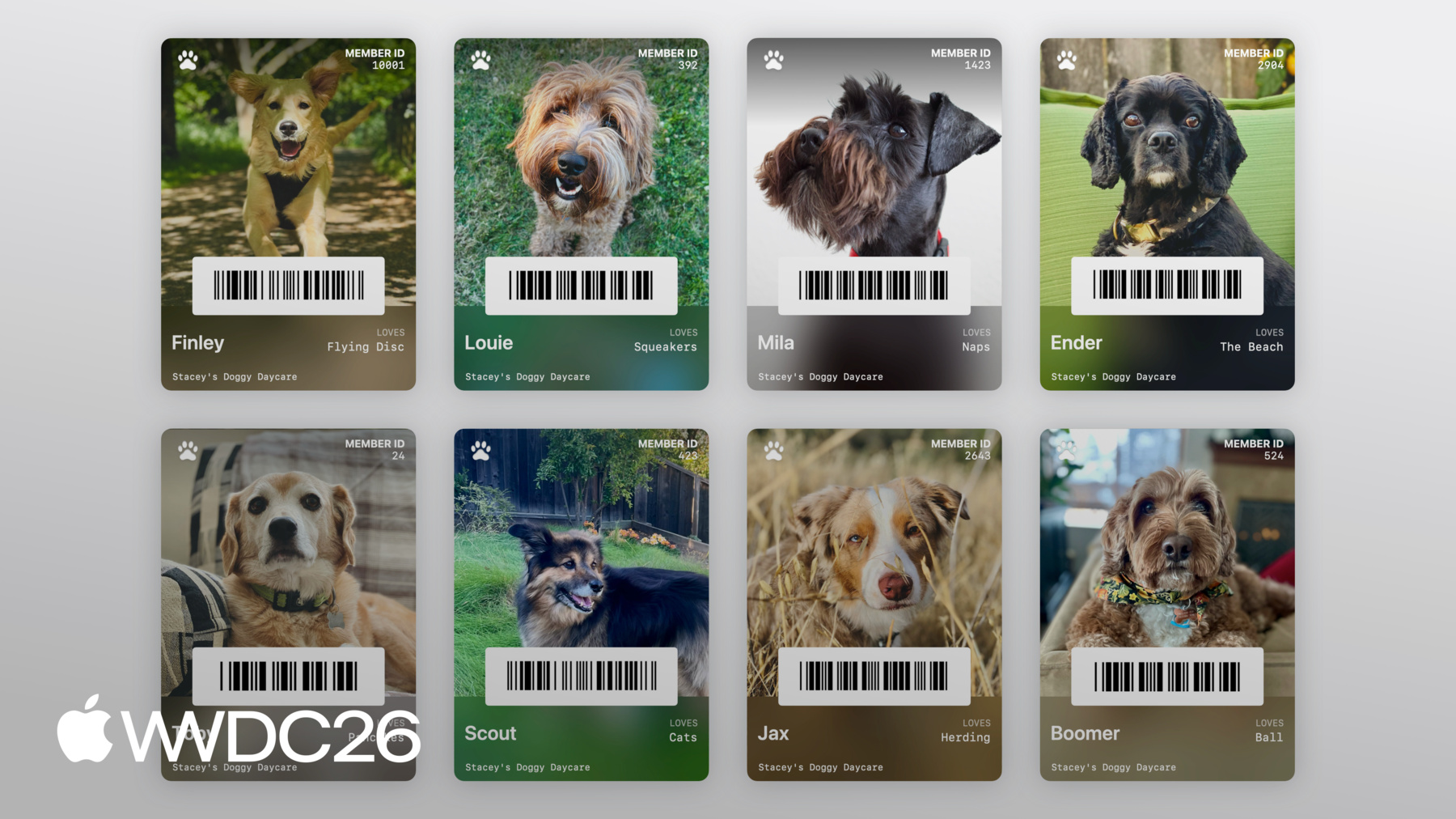
    • In iOS 27, Wallet is introducing a brand new pass style called Poster Generic. The pass face consists of a background image, a primary logo, header fields, primary fields, a footer field, and a barcode (if provided). On iOS 26 and earlier, include the Generic pass style in your `pass.json` for backwards compatibility.

    • 2:36 - Barcodes
    • In iOS 27, Wallet passes support four new barcode types: EAN-13, Code 39, Codabar, and Interleaved 2 of 5 (ITF). These are specified using the existing `Barcode` object and `barcodes` array in your `pass.json`. On iOS 26 and earlier, provide support barcode type, such as a QR code.

    • 4:27 - Featured actions
    • In iOS 27, Wallet passes can provide actions for all pass styles, called featured actions. In the top-level of your `pass.json`, define the `featuredActions` key, which takes an array of `Action` objects. Each action is defined as a unique ID, the action type, and a value, such as a URL. Each pass can contain up to 2 featured actions, in priority order.

    • 5:46 - Developer tools
    • We're introducing a brand new suite of developer tools for Mac and server platforms, making it easier than ever to design, personalize, and build great passes with Pass Designer and Pass Builder.

    • 5:47 - Pass Designer
    • Pass Designer is a WYSIWYG editor, giving you a true-to-iOS rendering of your pass as you build it.

    • 10:40 - Pass Builder
    • Pass Builder takes the pass templates created in Pass Designer, and allows you to personalize, sign and validate your passes. Pass Builder can also be used from other programming languages.

    • 13:50 - Personalizing a pass template
    • The swift-java project can generate native Java bindings for the Swift API, allowing you to invoke Pass Builder from the Java runtime. We're also making protobuf definitions of the Pass Package format available, allowing you to generate type-safe models in your preferred programming language. You can then generate a customization message, and invoke the `buildpass` command line executable to personalize and sign your pass.

    • 15:01 - Next steps
    • Check out Pass Designer. Use Pass Designer to experiment with the new Poster Generic style — and check if it's the right fit for your pass. If you plan on adopting any of the new barcode types, make a plan for providing graceful fallbacks. And take a moment to identify the most meaningful and relevant actions for your customers, then bring them to life with featured actions.

Developer Footer

  • Videos
  • WWDC26
  • Novedades de Wallet
  • Open Menu Close Menu
    • iOS
    • iPadOS
    • macOS
    • tvOS
    • visionOS
    • watchOS
    • App Store
    Open Menu Close Menu
    • Swift
    • SwiftUI
    • Swift Playground
    • TestFlight
    • Xcode
    • Xcode Cloud
    • Icon Composer
    • SF Symbols
    Open Menu Close Menu
    • Accessibility
    • Accessories
    • Apple Intelligence
    • Audio & Video
    • Augmented Reality
    • Business
    • Design
    • Distribution
    • Education
    • Games
    • Health & Fitness
    • In-App Purchase
    • Localization
    • Maps & Location
    • Machine Learning & AI
    • Security
    • Safari & Web
    Open Menu Close Menu
    • Documentation
    • Downloads
    • Sample Code
    • Videos
    Open Menu Close Menu
    • Help Guides & Articles
    • Contact Us
    • Forums
    • Feedback & Bug Reporting
    • System Status
    Open Menu Close Menu
    • Apple Developer
    • App Store Connect
    • Certificates, IDs, & Profiles
    • Feedback Assistant
    Open Menu Close Menu
    • Apple Developer Program
    • Apple Developer Enterprise Program
    • App Store Small Business Program
    • MFi Program
    • Mini Apps Partner Program
    • News Partner Program
    • Video Partner Program
    • Security Bounty Program
    • Security Research Device Program
    Open Menu Close Menu
    • Meet with Apple
    • Apple Developer Centers
    • App Store Awards
    • Apple Design Awards
    • Apple Developer Academies
    • WWDC
    Read the latest news.
    Get the Apple Developer app.
    Copyright © 2026 Apple Inc. All rights reserved.
    Terms of Use Privacy Policy Agreements and Guidelines