

View in English

  • Apple Developer
    • Get Started

    Explore Get Started

    • Overview
    • Learn
    • Apple Developer Program

    Stay Updated

    • Latest News
    • Hello Developer
    • Platforms

    Explore Platforms

    • Apple Platforms
    • iOS
    • iPadOS
    • macOS
    • tvOS
    • visionOS
    • watchOS
    • App Store

    Featured

    • Design
    • Distribution
    • Games
    • Accessories
    • Web
    • Home
    • CarPlay
    • Technologies

    Explore Technologies

    • Overview
    • Xcode
    • Swift
    • SwiftUI

    Featured

    • Accessibility
    • App Intents
    • Apple Intelligence
    • Games
    • Machine Learning & AI
    • Security
    • Xcode Cloud
    • Community

    Explore Community

    • Overview
    • Meet with Apple events
    • Community-driven events
    • Developer Forums
    • Open Source

    Featured

    • WWDC
    • Swift Student Challenge
    • Developer Stories
    • App Store Awards
    • Apple Design Awards
    • Apple Developer Centers
    • Documentation

    Explore Documentation

    • Documentation Library
    • Technology Overviews
    • Sample Code
    • Human Interface Guidelines
    • Videos

    Release Notes

    • Featured Updates
    • iOS
    • iPadOS
    • macOS
    • watchOS
    • visionOS
    • tvOS
    • Xcode
    • Downloads

    Explore Downloads

    • All Downloads
    • Operating Systems
    • Applications
    • Design Resources

    Featured

    • Xcode
    • TestFlight
    • Fonts
    • SF Symbols
    • Icon Composer
    • Support

    Explore Support

    • Overview
    • Help Guides
    • Developer Forums
    • Feedback Assistant
    • Contact Us

    Featured

    • Account Help
    • App Review Guidelines
    • App Store Connect Help
    • Upcoming Requirements
    • Agreements and Guidelines
    • System Status
  • Quick Links

    • Events
    • News
    • Forums
    • Sample Code
    • Videos
 

Videos

Abrir menú Cerrar menú
  • Colecciones
  • Todos los videos
  • Información

Más videos

  • Información
  • Resumen
  • Código
  • Integra MusicKit en tu app

    Incorpora todo el potencial de Apple Music a tu app con MusicKit. Abordaremos la autorización, la verificación del estado de la suscripción, la selección de música, el control de reproducción y el intercambio de canciones entre tiendas. Aprende a usar el nuevo Music Picker para que los usuarios puedan explorar el catálogo de Apple Music y sus bibliotecas personales. También analizaremos las diferencias entre SystemMusicPlayer y ApplicationMusicPlayer, y te mostraremos cómo consultar el estado de reproducción. 

    Capítulos

    • 0:00 - Introduction
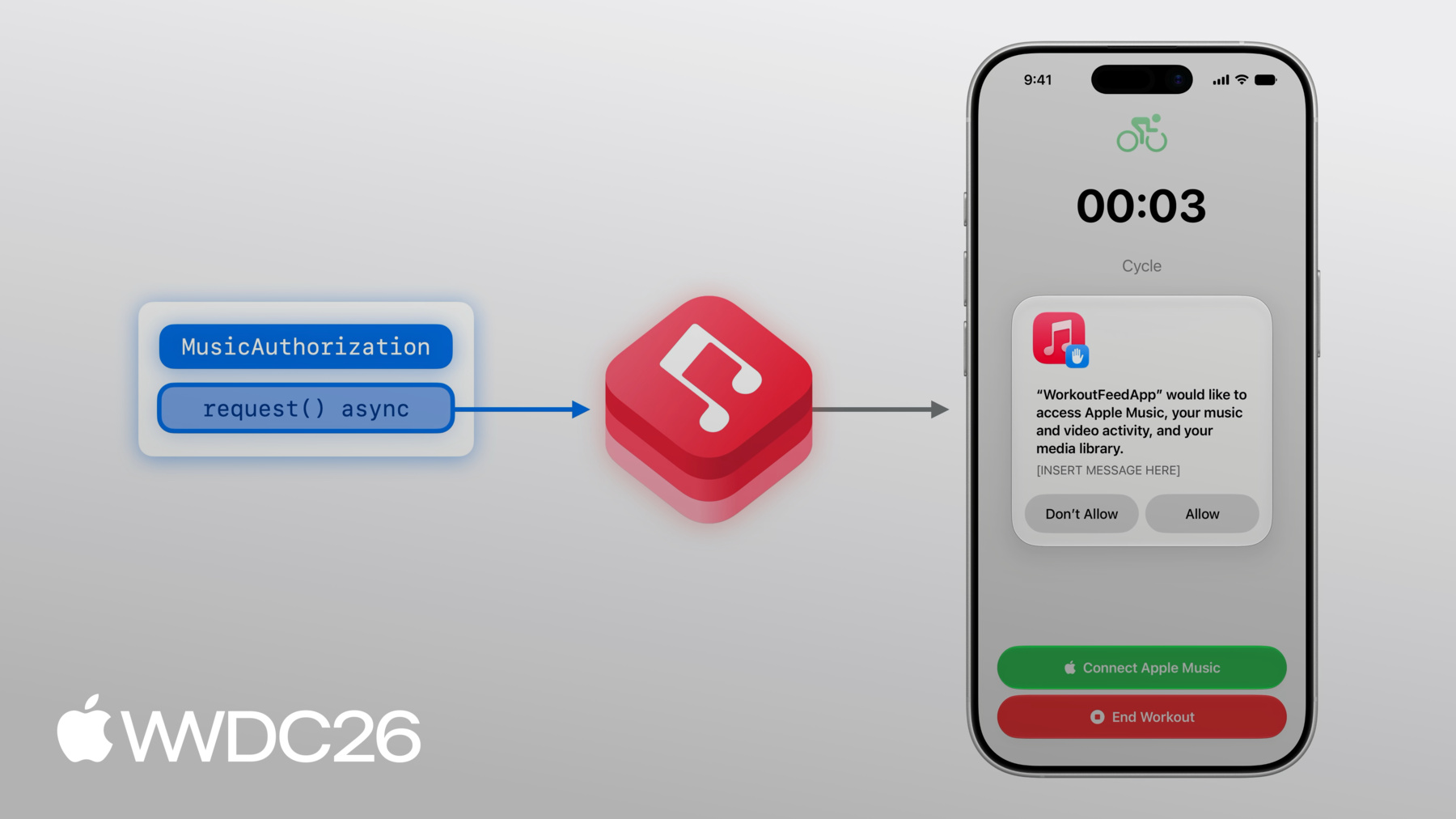
    • 2:11 - Project setup and authorization
    • 7:10 - Music items and music picker
    • 10:54 - Music players and playback
    • 16:26 - Catalog requests
    • 20:11 - Next steps

    Recursos

    • Integrating MusicKit into your app
    • Apple Services Performance Partner Program
    • MusicKit
      • Video HD
      • Video SD

    Videos relacionados

    WWDC23

    • Discover Observation in SwiftUI

    WWDC22

    • Explore more content with MusicKit
    • Meet Apple Music API and MusicKit
  • Buscar este video…
    • 4:47 - Presents the Apple Music subscription offer

      @State var showSubscriptionOffer = false
      
      let options = MusicSubscriptionOffer.Options(
          messageIdentifier: .playMusic
      )
      
      @ViewBuilder
      var musicSubsriptionButton: some View {
          Button("Subscribe to Apple Music", systemImage: "music.note") {
              showSubscriptionOffer = true
          }
          .musicSubscriptionOffer(isPresented: $showSubscriptionOffer, options: options)
      }
    • 5:59 - Adds subscription button to main view

      @State var subscription: MusicSubscription?
      
      var body: some View {
        	VStack {
              // ...
              if let subscription, subscription.canBecomeSubscriber {
                  musicSubscriptionButton
              }
          }
          .task(id: isAuthorized) {
      	      self.subscription = try? await MusicSubscription.current
              for await subscription in MusicSubscription.subscriptionUpdates {
                  self.subscription = subscription
              }
          }
      }
    • 8:48 - Add .musicPicker() modifier

      @State var showMusicPicker = false
      @State var selectedSong: Song? = nil
      
      @ViewBuilder
      var musicPickerButton: some View {
          Button("Pick some Music", systemImage: "music.note.list") {
              showMusicPicker = true
          }
          .musicPicker(isPresented: $showMusicPicker, selection: $selectedSong)
      }
      
      var body: some View {
          VStack {
              if let subscription, subscription.canBecomeSubscriber {
                  musicSubscriptionButton
              }
              musicPickerButton
          }
      }
    • 14:49 - Artwork

      @State var queue = ApplicationMusicPlayer.shared.queue
      
      var body: some View {
          VStack {
              if let artwork = queue.currentEntry?.artwork {
                  ArtworkImage(artwork, width: 200, height: 200)
              } else {
                  // Placeholder artwork
                  RoundedRectangle(cornerRadius: 16)
                      .fill(.quaternary)
                      .frame(width: 200, height: 200)
              }
          }
      }
    • 15:06 - Current entry info

      @State var queue = ApplicationMusicPlayer.shared.queue
      
      var body: some View {
          VStack {
              // ...
              if let currentSong = queue.currentEntry {
                  Text(currentSong.title)
                      .font(.title3.bold())
                    
                  if let subtitle = currentSong.subtitle {
                      Text(subtitle)
                          .font(.subheadline)
                          .foregroundStyle(.secondary)
                  }
              }
          }
      }
    • 15:14 - Playback controls (play, pause)

      let player = ApplicationMusicPlayer.shared
      @State var state = ApplicationMusicPlayer.shared.state
      
      var isPlaying: Bool {
          state.playbackStatus == .playing
      }
      
      var playPause: some View {
          Button (
              isPlaying ? "Pause": "Play",
              systemImage: isplaying ? "pause.fill" : "play.fill"
          ) {
              if isPlaying {
                  player.pause()
              } else {
                  Task {
                      try await player.play()
                  }
              }
          }
      }
    • 15:38 - Playback controls (next, previous)

      let player = ApplicationMusicPlayer.shared
      
      var controls: some View {
          HStack {
              Button("Back", systemImage: "backward.fill") {
                  Task {
                      try await player.skipToPreviousEntry()
                  }
              }
              // ...
              Button("Next", systemImage: "forward.fill") {
                  Task {
                      try await player.skipToNextEntry()
                  }
              }
          }
      }
    • 18:58 - Music catalog resource request

      func fetchSongs(songIDs: [MusicItemID]) async throws -> (featured: Song?, other: [Song]) {
          var request = MusicCatalogResourceRequest‹Song>(matching: \.id, memberOf: songIDs)
          request.options = [.findEquivalents]
          
          let response = try await request.response()
          
          let featuredSongID = songIDs[0]
          let featuredSong = response.item(for: featuredSongID)
          
          let others: [Song] = songIDs[1...].compactMap { songID in
              return response.item(for: songID)
          }
          
          return (featuredSong, others)
      }
    • 0:00 - Introduction
    • An introduction to MusicKit and an overview of how to build a music-enhanced workout app using Swift concurrency and SwiftUI.

    • 2:11 - Project setup and authorization
    • Learn how to configure your Xcode project with the necessary capabilities, request music library authorization, and present Apple Music subscription offers to users.

    • 7:10 - Music items and music picker
    • Explore the properties and relationships of MusicKit music items, and use the music picker view modifier to let users browse and select songs from the Apple Music catalog or their own library.

    • 10:54 - Music players and playback
    • Dive into using SystemMusicPlayer and ApplicationMusicPlayer. Discover how to set up playback queues, observe playback state, and build UI controls for playback in SwiftUI.

    • 16:26 - Catalog requests
    • Use structured catalog requests like MusicCatalogResourceRequest to fetch curated Apple Music content, and learn how to handle localization and content equivalency.

    • 20:11 - Next steps
    • A quick recap of MusicKit capabilities and pointers to related sessions for further learning.

Developer Footer

  • Videos
  • WWDC26
  • Integra MusicKit en tu app
  • Open Menu Close Menu
    • iOS
    • iPadOS
    • macOS
    • tvOS
    • visionOS
    • watchOS
    • App Store
    Open Menu Close Menu
    • Swift
    • SwiftUI
    • Swift Playground
    • TestFlight
    • Xcode
    • Xcode Cloud
    • Icon Composer
    • SF Symbols
    Open Menu Close Menu
    • Accessibility
    • Accessories
    • Apple Intelligence
    • Audio & Video
    • Augmented Reality
    • Business
    • Design
    • Distribution
    • Education
    • Games
    • Health & Fitness
    • In-App Purchase
    • Localization
    • Maps & Location
    • Machine Learning & AI
    • Security
    • Safari & Web
    Open Menu Close Menu
    • Documentation
    • Downloads
    • Sample Code
    • Videos
    Open Menu Close Menu
    • Help Guides & Articles
    • Contact Us
    • Forums
    • Feedback & Bug Reporting
    • System Status
    Open Menu Close Menu
    • Apple Developer
    • App Store Connect
    • Certificates, IDs, & Profiles
    • Feedback Assistant
    Open Menu Close Menu
    • Apple Developer Program
    • Apple Developer Enterprise Program
    • App Store Small Business Program
    • MFi Program
    • Mini Apps Partner Program
    • News Partner Program
    • Video Partner Program
    • Security Bounty Program
    • Security Research Device Program
    Open Menu Close Menu
    • Meet with Apple
    • Apple Developer Centers
    • App Store Awards
    • Apple Design Awards
    • Apple Developer Academies
    • WWDC
    Read the latest news.
    Get the Apple Developer app.
    Copyright © 2026 Apple Inc. All rights reserved.
    Terms of Use Privacy Policy Agreements and Guidelines