

View in English

  • Apple Developer
    • Get Started

    Explore Get Started

    • Overview
    • Learn
    • Apple Developer Program

    Stay Updated

    • Latest News
    • Hello Developer
    • Platforms

    Explore Platforms

    • Apple Platforms
    • iOS
    • iPadOS
    • macOS
    • tvOS
    • visionOS
    • watchOS
    • App Store

    Featured

    • Design
    • Distribution
    • Games
    • Accessories
    • Web
    • Home
    • CarPlay
    • Technologies

    Explore Technologies

    • Overview
    • Xcode
    • Swift
    • SwiftUI

    Featured

    • Accessibility
    • App Intents
    • Apple Intelligence
    • Games
    • Machine Learning & AI
    • Security
    • Xcode Cloud
    • Community

    Explore Community

    • Overview
    • Meet with Apple events
    • Community-driven events
    • Developer Forums
    • Open Source

    Featured

    • WWDC
    • Swift Student Challenge
    • Developer Stories
    • App Store Awards
    • Apple Design Awards
    • Apple Developer Centers
    • Documentation

    Explore Documentation

    • Documentation Library
    • Technology Overviews
    • Sample Code
    • Human Interface Guidelines
    • Videos

    Release Notes

    • Featured Updates
    • iOS
    • iPadOS
    • macOS
    • watchOS
    • visionOS
    • tvOS
    • Xcode
    • Downloads

    Explore Downloads

    • All Downloads
    • Operating Systems
    • Applications
    • Design Resources

    Featured

    • Xcode
    • TestFlight
    • Fonts
    • SF Symbols
    • Icon Composer
    • Support

    Explore Support

    • Overview
    • Help Guides
    • Developer Forums
    • Feedback Assistant
    • Contact Us

    Featured

    • Account Help
    • App Review Guidelines
    • App Store Connect Help
    • Upcoming Requirements
    • Agreements and Guidelines
    • System Status
  • Quick Links

    • Events
    • News
    • Forums
    • Sample Code
    • Videos
 

Videos

Abrir menú Cerrar menú
  • Colecciones
  • Todos los videos
  • Información

Más videos

  • Información
  • Resumen
  • Código
  • Descubre el framework Spatial Preview

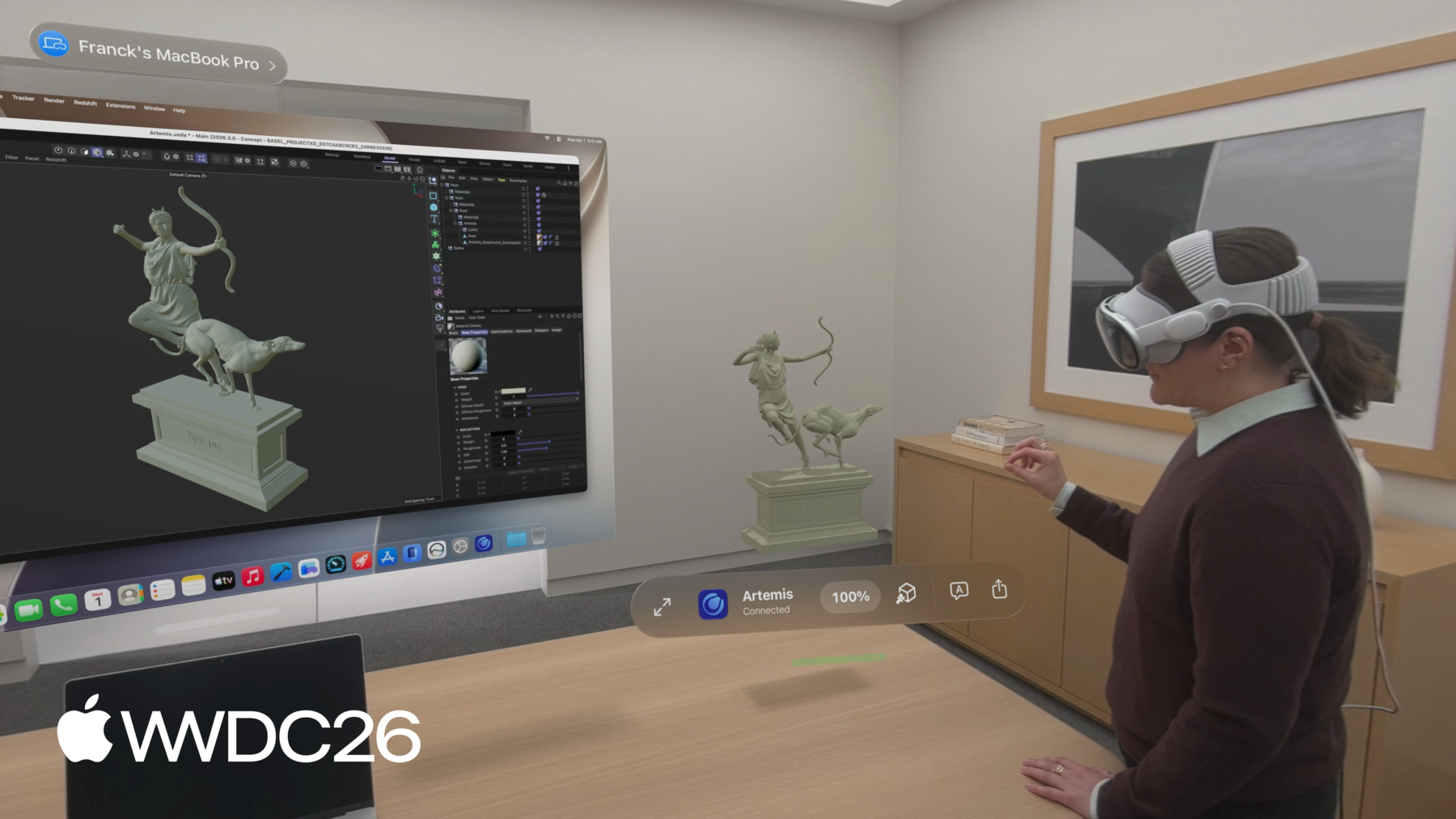
    Descubre cómo el nuevo framework Spatial Preview lleva el contenido de tu Mac directamente a visionOS. Descubre cómo crear flujos de trabajo dinámicos con sincronización en tiempo real y edición bidireccional en ambas plataformas. Obtén información sobre la API SpatialPreview, la detección de dispositivos, la integración de sesiones en 2D y 3D, y las nuevas capacidades de Quick Look para mejorar la experiencia espacial de tus apps de Mac.

    Capítulos

    • 0:00 - Introduction
    • 2:37 - Learn about Spatial Preview
    • 3:30 - Document Preview
    • 6:36 - USD Preview
    • 9:16 - Editing Features
    • 13:28 - Next steps

    Recursos

    • Reducing the rendering cost of RealityKit content on visionOS
    • Spatial Preview
      • Video HD
      • Video SD

    Videos relacionados

    WWDC26

    • Colabora en modelos 3D estructurados en visionOS
    • Descubre USDKit y las novedades de OpenUSD

    WWDC22

    • Understand USD fundamentals
  • Buscar este video…
    • 3:58 - Document Preview Session with Device Picker

      // Send and update documents using the Spatial Preview framework
      
      import SwiftUI
      import SpatialPreview
      let deviceObserver = ConnectedSpatialEndpointObserver()
      
      let previewSession = DocumentPreviewSession(name: "Immersive.aivu", contentType: .aivu)
      
      func startPreview(contentURL: URL, endpoint: SpatialPreviewEndpoint) async throws {
          let endpoint = try await deviceObserver.endpoint
          try await previewSession.start(endpoint: endpoint)
          try await previewSession.updateContents(url: contentURL)
      }
      
      @State var showDevicePicker: Bool = false
      
      var body: some View {
          ...
          .sheet(isPresented: $showDevicePicker) {
              SpatialPreviewDevicePicker(isPresented: $showDevicePicker) { endpoint in
                  showDevicePicker = false
                  Task {
                      try await startPreview(filename: filename, endpoint: endpoint)
                  }
              }
          }
      }
    • 5:20 - Update Document Contents

      // Send and update documents using the Spatial Preview framework
      
      import SwiftUI
      import SpatialPreview
      
      ForEach(contentURLs, id: \.self) { url in
          Button {
              Task { try await previewSession?.updateContents(url: url) }
          }
      }
      .task(id: previewSession.map { ObjectIdentifier($0) }) {
          for await state in Observations({ session.state }) {
              if state.isInvalidated {
                  previewSession = nil
                  break
              }
          }
      }
      
      try await previewSession?.close()
    • 7:36 - Edit USD Live

      // Edit USD live using USDKit and Spatial Preview
      
      import SpatialPreview
      import USDKit
      
      let deviceObserver = ConnectedSpatialEndpointObserver()
      
      var usdSession: USDPreviewSession?
      
      func shareStage(to endpoint: SpatialPreviewEndpoint) async throws -> USDPreviewSession {
          let endpoint = try await deviceObserver.endpoint
      
          let stageURL = Bundle.main.url(forResource: "sampleScene", withExtension: "usdz")
          let stage = try USDStage.open(stageURL)
          usdSession = USDPreviewSession(stage: stage)
      
          try await usdSession?.start(endpoint: endpoint)
      }
    • 8:56 - Opt out of optimization

      // Optimization
      
      import SpatialPreview


      let endpoint = try await deviceObserver.endpoint
      do {
          try await usdSession.start(endpoint: endpoint, parameters: .unmodified)
      } catch USDPreviewSession.Error.assetUnshareable {
          // Handle Asset Unshareable error
      }
    • 10:10 - USD Layout Variants

      // LayoutVariants.usda
      #usda 1.0
      over "furniture" (
          variantSets = "Layout"
          variants = { string Layout = "LayoutA" }
      )
      {
          variantSet "Layout" = {
              "LayoutA" {
                  // Default furniture position and rotation
              }
              "LayoutB" {
                  // Moves furniture prims to a different position and rotation
              }
              ...
          }
      }
    • 10:17 - Edit USD live using USDKit and Spatial Preview

      // Edit USD live using USDKit and Spatial Preview
      
      import SpatialPreview
      import USDKit
      
      func applyLayoutVariant(named layoutVariantName: String) throws {
          let prim = stage.prim(at: SdfPath("/root/furniture"))
          try prim.variantSets?.setSelection("Layout", variantName: layoutVariantName)
      }
    • 10:49 - USD Stage Observations

      // Edit USD live using Spatial Preview
      
      import SpatialPreview
      import USDKit
      
      let observerToken: ObservationToken
      
      observerToken = stage.addObserver(for: UsdStage.ObjectsDidChange.self) { notice in
          for path in notice.resyncedPaths {
              let prim = notice.stage.prim(at: path)
              guard prim.isValid else { continue }
              if prim.isAnnotation {
                  // Handle annotation change
                  break
              }
          }
      }
    • 11:13 - Annotation Spec

      // Annotation spec example
      
      AppleTextAnnotation {
          // The textual representation of this annotation
          string text
      
          // The identifier for this specific author
          uniform string author
      
          // An identifier that is unique to your data tracking system
          uniform string identifier
      }
      
      /__documentAnnotationGroup__
    • 11:33 - Metadata for Object Manipulation

      // Metadata required for object manipulation in Quick Look
      
      customData = {
          dictionary apple = {
              bool spatialEditable = 1
          }
      }
    • 12:16 - Session Options and Events

      // Spatial Preview session options and events
      
      import SpatialPreview
      import USDKit
      
      session.start(endpoint: endpoint, options: [.annotations, .perObjectManipulation, .export])
      
      func listenForEvents(session: USDPreviewSession) async {
          for await event in session.events {
              if case .timeChanged(let time) = event {
                  playbackModel.timeCode = time
              } else if case .playbackStateChanged(let isPlaying) = event {
                  playbackModel.playbackStateChanged(isPlaying)
              }
          }
      }
    • 12:38 - Observe Session Progress

      // Observe Spatial Preview session progress
      
      import SpatialPreview
      import USDKit
      
      @State private var sessionProgress: Double = 0
      
      var body: some View {
          ...
          .task(id: usdSession.map { ObjectIdentifier($0) }) {
              guard let session = usdSession else { return }
              for await fraction in Observations({ session.progress.fractionCompleted }) {
                  sessionProgress = fraction
              }
          }
          .overlay(alignment: .bottom) {
              ProgressView(value: sessionProgress)
                  .padding()
          }
      }
    • 0:00 - Introduction
    • The Spatial Preview framework, which lets developers extend content from Mac into visionOS using Mac Virtual Display. Previews what the session covers: an overview of the framework, document preview, and USD preview for live 3D workflows.

    • 2:37 - Learn about Spatial Preview
    • Explores the core components of the Spatial Preview framework: selecting a spatial endpoint, creating a preview session, and launching Quick Look on visionOS. Covers the two session types—Document Preview Session and USD Preview Session—and explains that no visionOS code is required.

    • 3:30 - Document Preview
    • Walks through using DocumentPreviewSession to send files like Apple Immersive Video frames from a Mac app to visionOS. Covers obtaining a Mac Virtual Display endpoint with ConnectedSpatialEndpointObserver, starting a session, providing content URLs, integrating SpatialPreviewDevicePicker in SwiftUI, and using updateContents to build a gallery experience that reuses the same scene.

    • 6:36 - USD Preview
    • Shows how to share and live-edit USD content from a Mac app on visionOS using USDPreviewSession with a USDKit stage. Covers selecting a device, opening a USD stage, starting the session, and handling unshareable assets via the optimization parameter.

    • 9:16 - Editing Features
    • Covers the rich set of Quick Look editing features available through USD Preview: USD layout variants, annotation authoring with AppleTextAnnotation, object manipulation with spatialEditable metadata, and session options including playback events and progress monitoring via ProgressReporter.

    • 13:28 - Next steps
    • Summarizes how to get started with Spatial Preview using USDKit Swift APIs and bridging for existing USD apps. Encourages developers to explore Document Preview Session, USD Preview Session, live editing, SharePlay collaboration, and the full suite of asset review tools.

Developer Footer

  • Videos
  • WWDC26
  • Descubre el framework Spatial Preview
  • Open Menu Close Menu
    • iOS
    • iPadOS
    • macOS
    • tvOS
    • visionOS
    • watchOS
    • App Store
    Open Menu Close Menu
    • Swift
    • SwiftUI
    • Swift Playground
    • TestFlight
    • Xcode
    • Xcode Cloud
    • Icon Composer
    • SF Symbols
    Open Menu Close Menu
    • Accessibility
    • Accessories
    • Apple Intelligence
    • Audio & Video
    • Augmented Reality
    • Business
    • Design
    • Distribution
    • Education
    • Games
    • Health & Fitness
    • In-App Purchase
    • Localization
    • Maps & Location
    • Machine Learning & AI
    • Security
    • Safari & Web
    Open Menu Close Menu
    • Documentation
    • Downloads
    • Sample Code
    • Videos
    Open Menu Close Menu
    • Help Guides & Articles
    • Contact Us
    • Forums
    • Feedback & Bug Reporting
    • System Status
    Open Menu Close Menu
    • Apple Developer
    • App Store Connect
    • Certificates, IDs, & Profiles
    • Feedback Assistant
    Open Menu Close Menu
    • Apple Developer Program
    • Apple Developer Enterprise Program
    • App Store Small Business Program
    • MFi Program
    • Mini Apps Partner Program
    • News Partner Program
    • Video Partner Program
    • Security Bounty Program
    • Security Research Device Program
    Open Menu Close Menu
    • Meet with Apple
    • Apple Developer Centers
    • App Store Awards
    • Apple Design Awards
    • Apple Developer Academies
    • WWDC
    Read the latest news.
    Get the Apple Developer app.
    Copyright © 2026 Apple Inc. All rights reserved.
    Terms of Use Privacy Policy Agreements and Guidelines