

View in English

  • Apple Developer
    • Get Started

    Explore Get Started

    • Overview
    • Learn
    • Apple Developer Program

    Stay Updated

    • Latest News
    • Hello Developer
    • Platforms

    Explore Platforms

    • Apple Platforms
    • iOS
    • iPadOS
    • macOS
    • tvOS
    • visionOS
    • watchOS
    • App Store

    Featured

    • Design
    • Distribution
    • Games
    • Accessories
    • Web
    • Home
    • CarPlay
    • Technologies

    Explore Technologies

    • Overview
    • Xcode
    • Swift
    • SwiftUI

    Featured

    • Accessibility
    • App Intents
    • Apple Intelligence
    • Games
    • Machine Learning & AI
    • Security
    • Xcode Cloud
    • Community

    Explore Community

    • Overview
    • Meet with Apple events
    • Community-driven events
    • Developer Forums
    • Open Source

    Featured

    • WWDC
    • Swift Student Challenge
    • Developer Stories
    • App Store Awards
    • Apple Design Awards
    • Apple Developer Centers
    • Documentation

    Explore Documentation

    • Documentation Library
    • Technology Overviews
    • Sample Code
    • Human Interface Guidelines
    • Videos

    Release Notes

    • Featured Updates
    • iOS
    • iPadOS
    • macOS
    • watchOS
    • visionOS
    • tvOS
    • Xcode
    • Downloads

    Explore Downloads

    • All Downloads
    • Operating Systems
    • Applications
    • Design Resources

    Featured

    • Xcode
    • TestFlight
    • Fonts
    • SF Symbols
    • Icon Composer
    • Support

    Explore Support

    • Overview
    • Help Guides
    • Developer Forums
    • Feedback Assistant
    • Contact Us

    Featured

    • Account Help
    • App Review Guidelines
    • App Store Connect Help
    • Upcoming Requirements
    • Agreements and Guidelines
    • System Status
  • Quick Links

    • Events
    • News
    • Forums
    • Sample Code
    • Videos
 

Videos

Abrir menú Cerrar menú
  • Colecciones
  • Todos los videos
  • Información

Más videos

  • Información
  • Resumen
  • Código
  • Sumérgete en las pilas desplazables y el desplazamiento con SwiftUI

    Descubre cómo funcionan las pilas desplazables en SwiftUI. Analizaremos cómo LazyVStack y LazyHStack calculan los tamaños, cargan las subvistas de forma diferida y precargan el contenido para ofrecer una experiencia de desplazamiento fluida. También abordaremos optimizaciones avanzadas de rendimiento, mejores prácticas para la administración de estados y consejos para un desplazamiento programático preciso. Para aprovechar al máximo esta sesión, te recomendamos que tengas conocimientos básicos sobre el diseño en SwiftUI utilizando pilas.

    Capítulos

    • 0:00 - Introduction
    • 1:24 - Layout
    • 9:13 - Subview loading
    • 13:15 - Prefetching
    • 17:40 - Programmatic scrolling
    • 19:55 - Next steps

    Recursos

    • Grouping data with lazy stack views
      • Video HD
      • Video SD

    Videos relacionados

    WWDC26

    • Tutorial de programación: Crea potentes funcionalidades de arrastrar y soltar en SwiftUI

    WWDC22

    • Compose custom layouts with SwiftUI

    WWDC20

    • Stacks, Grids, and Outlines in SwiftUI
  • Buscar este video…
    • 1:23 - Origami app

      // Origami app
      
      struct ContentView: View {
          var body: some View {
              ScrollView {
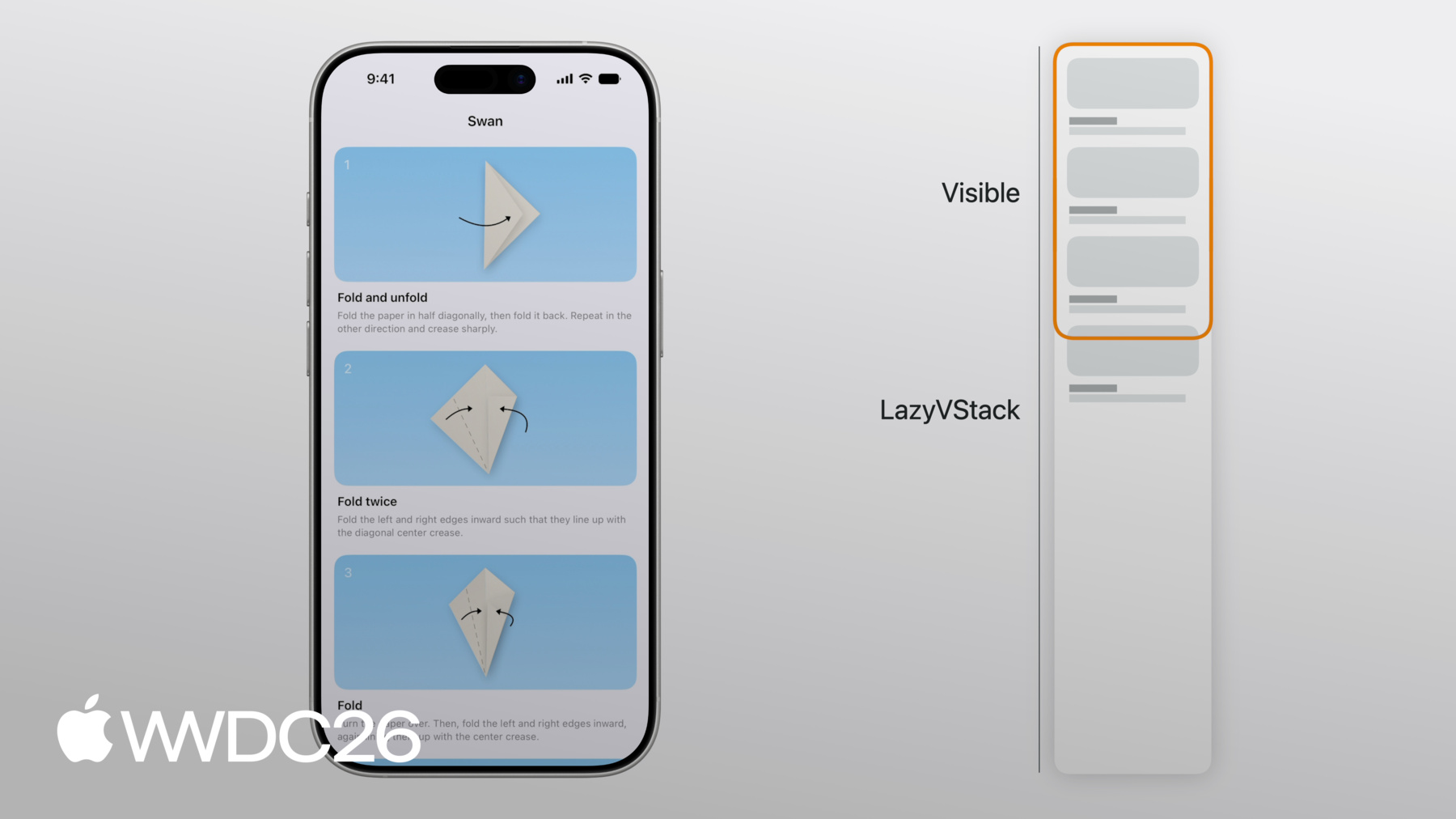
                  LazyVStack {
                      ForEach(steps) { step in
                          StepView(step: step)
                      }
                  }
              }
          }
      }
      
      struct StepView: View { /* ... */ }
    • 5:11 - Horizontally scrolling showcase

      // Horizontally scrolling showcase
      
      struct ContentView: View {
          var body: some View {
              ScrollView {
                  LazyVStack {
                      ForEach(steps) { step in
                          StepView(step: step)
                      }
                      Showcase()
                  }
              }
          }
      }
      
      struct StepView: View { /* ... */ }
      
      struct Showcase: View {
          var body: some View {
              ScrollView(.horizontal) {
                  LazyHStack {
                      ForEach(photos) { photo in
                          PhotoView(photo: photo)
                      }
                  }
              }
          }
      }
    • 6:30 - Showcase section

      // Showcase section
      
      struct ContentView: View {
          var body: some View {
              ScrollView {
                  LazyVStack(pinnedViews: [.sectionHeaders]) {
                      ForEach(steps) { step in
                          StepView(step: step)
                      }
                      Showcase()
                  }
              }
          }
      }
      
      struct StepView: View { /* ... */ }
        
      struct Showcase: View {
          var body: some View {
              Section {
                  ForEach(photos) { photo in
                      PhotoView(photo: photo)
                  }
              } header: { /* ... */ }
          }
      }
    • 7:04 - Scroll effect

      // Scroll effect
      
      struct ContentView: View { /* ... */ }
      
      struct StepView: View { /* ... */ }
      
      struct Showcase: View {
          var body: some View {
              Section {
                  ForEach(photos) { photo in
                      PhotoView(photo: photo)
                          .scrollTransition { effect, phase in
                              effect
                                  .rotationEffect(.degrees(phase.value * 20))
                                  .scaleEffect(1 + phase.value * 0.2)
                          }
                  }
              } header: { /* ... */ }
          }
      }
    • 7:36 - Scroll effect

      // Scroll effect
      
      struct ContentView: View { /* ... */ }
      
      struct StepView: View { /* ... */ }
      
      struct Showcase: View {
          var body: some View {
              Section {
                  ForEach(photos) { photo in
                      PhotoView(photo: photo)
                          .scrollTransition { effect, phase in
                              effect
                                  .scaleEffect(1 - abs(phase.value) * 0.1)
                          }
                  }
              } header: { /* ... */ }
          }
      }
    • 8:20 - Scroll to Showcase button

      // Absolute offset
      
      struct ContentView: View {
          @State var isScrollToShowcaseVisible = false
      
          var body: some View {
              ScrollView { /* ... */ }
                  .overlay(alignment: .bottom) { /* ... */ }
                  .onScrollGeometryChange(for: Bool.self) { geo in
                      geo.contentOffset.y <= 100
                  } action: { _, newValue in
                      self.isScrollToShowcaseVisible = newValue
                  }
          }
      }
    • 8:51 - Scroll to Showcase button

      // Absolute offset
      
      struct ContentView: View {
          @State var isScrollToShowcaseVisible = false
      
          var body: some View {
              ScrollView { /* ... */ }
                  .overlay(alignment: .bottom) { /* ... */ }
                  .onScrollTargetVisibilityChange(
                      idType: Step.ID.self,
                      threshold: 0.8
                  ) { visibleIDs in
                      isScrollToShowcaseVisible = shouldShowScrollButton(visibleIDs: visibleIDs)
                  }
          }
      }
    • 9:29 - One resolved subview

      // Origami
      
      struct ContentView: View {
          var body: some View {
              ScrollView {
                  LazyVStack {
                      ForEach(steps) { step in
                          StepView(step: step)
                      }
                  }
              }
          }
      }
      
      struct StepView: View { /* ... */ }
    • 10:03 - Multiple resolved subviews

      // Multiple subviews
      
      struct ContentView: View { /* ... */ }
      
      struct StepView: View {
          let step: Step
      
          var body: some View {
              StepDiagram(/* ... */)
              StepInstructions(/* ... */)
          }
      }
    • 10:52 - Dynamic number of subviews

      // Dynamic number of views
      
      struct ContentView: View { /* ... */ }
      
      struct StepView: View {
          let step: Step
      
          @Environment(\.detailLevel) var detailLevel
      
          var body: some View {
              if step.isVisible(in: detailLevel) {
                  VStack { /* ... */ }
              }
          }
      }
    • 11:46 - Filtering on the view level

      // Dynamic number of views
      
      struct ContentView: View { /* ... */ }
      
      struct StepView: View {
          let step: Step
      
          @Environment(\.detailLevel) var detailLevel
          @Environment(\.writingStyle) var writingStyle
      
          var body: some View {
              if step.isVisible(in: detailLevel) { /* ... */ }
          }
      }
    • 12:15 - Filtering on the data level

      // Filter at the data level
      
      struct ContentView: View {
          @Query var steps: [Step]
      
          init(detailLevel: DetailLevel) {
              _steps = Query(filter: #Predicate<Step> { step in
                  step.detailLevel >= detailLevel
              })
          }
      
          var body: some View { /* ... */ }
      }
      
      struct StepView: View { /* ... */ }
    • 12:35 - Optional unwrapping

      // Optional unwrapping
      
      struct ContentView: View { /* ... */ }
      
      struct StepView: View {
          let step: Step
      
          @Environment(\.apiToken) var token
      
          var body: some View {
              if let token { /* ... */ }
          }
      }
    • 12:48 - Optional unwrapping

      // Optional unwrapping
      
      struct ContentView: View { /* ... */ }
      
      struct StepView: View {
          let step: Step
      
          @Environment(NetworkClient.self) var networkClient
      
          var body: some View { /* ... */ }
      }
    • 15:28 - Loading more content

      // Loading more content
      
      struct Showcase: View {
          @State var pager = ShowcasePager()
      
          var body: some View {
              ForEach(pager.pages) { page in
                  PageView(page: page)
              }
              if !pager.atEnd {
                  ProgressView()
                      .progressViewStyle(.circular)
                      .onAppear {
                          pager.fetchPage()
                      }
              }
          }
      }
    • 15:53 - Setting up lazy stack subview in onAppear

      // onAppear
      
      struct StepView: View {
          let id: Step.ID
          @State var viewModel = StepViewModel()
      
          var body: some View {
              VStack {
                  if let content = viewModel.content { /* ... */ }
              }
              .onAppear {
                  viewModel.configure(with: id)
              }
          }
      }
    • 16:14 - Lazy stack subview ready before onAppear

      // onAppear
      
      struct StepView: View {
          @State var viewModel: StepViewModel
      
          init(id: Step.ID) {
              _viewModel = State(initialValue: StepViewModel(id: id))
          }
      
          var body: some View { /* ... */ }
      }
    • 16:23 - Loading diagram with task modifier

      // Diagram loading
      
      struct StepView: View {
          let step: Step
          @State var diagramLoader = DiagramLoader()
      
          @State var diagram: Diagram?
      
          var body: some View {
              VStack { /* ... */ }
                  .task {
                      diagram = await diagramLoader.loadDiagram(id: step.id)
                  }
          }
      }
    • 16:40 - Loading diagram in initializer

      // Diagram loading
      
      struct StepView: View {
          let step: Step
          @State var diagramLoader: DiagramLoader
      
          init(step: Step) {
              self.step = step
              _diagramLoader = State(initialValue: DiagramLoader(id: step.id))
          }
      
          var body: some View { /* ... */ }
      }
      
      @Observable
      class DiagramLoader { /* ... */ }
    • 17:16 - Highlight @State variable

      // Highlighting
      
      struct ContentView: View { /* ... */ }
      
      struct StepView: View {
          let step: Step
          @State var isHighlighted = false
      
          var body: some View { /* ... */ }
      }
    • 17:33 - Highlight @Binding

      // Highlighting
      
      struct ContentView: View {
          @State var highlighted: Set<Step.ID> = []
      
          var body: some View { /* ... */ }
      }
      
      struct StepView: View {
          let step: Step
          @Binding var highlighted: Set<Step.ID>
      
          var body: some View { /* ... */ }
      }
    • 17:58 - Programmatically scroll to showcase

      // Programmatically scroll to showcase
      
      struct ContentView: View {
          @State var scrollPosition = ScrollPosition()
      
          var body: some View {
              ScrollView { /* ... */ }
                  .scrollPosition($scrollPosition)
                  .overlay(alignment: .bottom) {
                      Button {
                          scrollToShowcase()
                      } label: { /* ... */ }
                  }
          }
      
          func scrollToShowcase() {
              withAnimation {
                  scrollPosition.scrollTo(id: "showcase-header")
              }
          }
      }
    • 18:24 - Dynamic number of views

      // Dynamic number of views
      
      struct ContentView: View { /* ... */ }
      
      struct StepView: View {
          let step: Step
      
          @Environment(\.detailLevel) var detailLevel
      
          var body: some View {
              if step.isVisible(in: detailLevel) { /* ... */ }
          }
      }
    • 18:53 - Filter at the data level

      // Filter at the data level
      
      struct ContentView: View {
          @Query var steps: [Step]
      
          init(detailLevel: DetailLevel) {
              _steps = Query(filter: #Predicate<Step> { step in
                  step.detailLevel >= detailLevel
              })
          }
      
          var body: some View { /* ... */ }
      }
      
      struct StepView: View { /* ... */ }
    • 19:16 - Using onGeometryChange in lazy stack subview

      // Don't change layout after views appear
      
      struct ContentView: View { /* ... */ }
      
      struct StepView: View {
          let step: Step
          @State var subtitleHeight: CGFloat?
      
          var body: some View {
              VStack {
                  StepDiagram(diagram: step.diagram)
                      .frame(height: diagramHeight(subtitleHeight: subtitleHeight))
                  Title(step.title)
                  Subtitle(step.subtitle)
                      .onGeometryChange(for: CGFloat.self, of: \.size.height) { _, value in
                          subtitleHeight = value
                      }
              }
          }
      }
    • 19:17 - Using custom layout in lazy stack subview

      // Don't change layout after views appear
      
      struct ContentView: View { /* ... */ }
      
      struct StepView: View {
          let step: Step
      
          var body: some View {
              StepLayout {
                  StepDiagram(diagram: step.diagram)
                  Title(step.title)
                  Subtitle(step.subtitle)
              }
          }
      }
      
      struct StepLayout: Layout { /* ... */ }
    • 0:00 - Introduction
    • Rens Breur gives an introduction to lazy stacks, an essential SwiftUI component for long and custom scrolling content.

    • 1:24 - Layout
    • How LazyVStack and LazyHStack lay out their subviews: only visible views are added, and the full size of lazy stacks is estimated. See how the lazy stack handles these estimated sizes, how the estimations can change, and how it coordinates the estimated content offset with the embedding ScrollView. Lazy stacks can also be composed to create more complex layouts.

    • 9:13 - Subview loading
    • How view structs are resolved into the individual subviews that the lazy stack sees — the 1-to-1 mapping you might expect isn't always what happens. A view's body can resolve to multiple subviews or to a dynamic number of subviews, which has consequences for what the lazy stack keeps alive.

    • 13:15 - Prefetching
    • Lazy stacks prefetch subviews before they scroll on screen, performing partial render work to avoid hitches. To take advantage of this, don't delay lazy stack subview set-up to onAppear. Lazy stack subviews are kept around a little longer after they are scrolled out of screen but are removed eventually. Move state that must survive being scrolled off screen into model objects or bindings from outer views.

    • 17:40 - Programmatic scrolling
    • Using a ScrollPosition binding to scroll to a target view works even when the target is off-screen, with the lazy stack estimating its position. Same pitfalls apply: dynamic subview counts in a ForEach hurt scroll performance, and layout passes driven by onAppear or onGeometryChange make scrolling less smooth. Sometimes a custom Layout is the better solution.

    • 19:55 - Next steps
    • Avoid absolute content size and offset with lazy stacks, don't filter data with conditional view content in leaf views, set up views in init rather than onAppear, and keep important state outside view structs that may scroll off screen.

Developer Footer

  • Videos
  • WWDC26
  • Sumérgete en las pilas desplazables y el desplazamiento con SwiftUI
  • Open Menu Close Menu
    • iOS
    • iPadOS
    • macOS
    • tvOS
    • visionOS
    • watchOS
    • App Store
    Open Menu Close Menu
    • Swift
    • SwiftUI
    • Swift Playground
    • TestFlight
    • Xcode
    • Xcode Cloud
    • Icon Composer
    • SF Symbols
    Open Menu Close Menu
    • Accessibility
    • Accessories
    • Apple Intelligence
    • Audio & Video
    • Augmented Reality
    • Business
    • Design
    • Distribution
    • Education
    • Games
    • Health & Fitness
    • In-App Purchase
    • Localization
    • Maps & Location
    • Machine Learning & AI
    • Security
    • Safari & Web
    Open Menu Close Menu
    • Documentation
    • Downloads
    • Sample Code
    • Videos
    Open Menu Close Menu
    • Help Guides & Articles
    • Contact Us
    • Forums
    • Feedback & Bug Reporting
    • System Status
    Open Menu Close Menu
    • Apple Developer
    • App Store Connect
    • Certificates, IDs, & Profiles
    • Feedback Assistant
    Open Menu Close Menu
    • Apple Developer Program
    • Apple Developer Enterprise Program
    • App Store Small Business Program
    • MFi Program
    • Mini Apps Partner Program
    • News Partner Program
    • Video Partner Program
    • Security Bounty Program
    • Security Research Device Program
    Open Menu Close Menu
    • Meet with Apple
    • Apple Developer Centers
    • App Store Awards
    • Apple Design Awards
    • Apple Developer Academies
    • WWDC
    Read the latest news.
    Get the Apple Developer app.
    Copyright © 2026 Apple Inc. All rights reserved.
    Terms of Use Privacy Policy Agreements and Guidelines