

View in English

  • Apple Developer
    • Get Started

    Explore Get Started

    • Overview
    • Learn
    • Apple Developer Program

    Stay Updated

    • Latest News
    • Hello Developer
    • Platforms

    Explore Platforms

    • Apple Platforms
    • iOS
    • iPadOS
    • macOS
    • tvOS
    • visionOS
    • watchOS
    • App Store

    Featured

    • Design
    • Distribution
    • Games
    • Accessories
    • Web
    • Home
    • CarPlay
    • Technologies

    Explore Technologies

    • Overview
    • Xcode
    • Swift
    • SwiftUI

    Featured

    • Accessibility
    • App Intents
    • Apple Intelligence
    • Games
    • Machine Learning & AI
    • Security
    • Xcode Cloud
    • Community

    Explore Community

    • Overview
    • Meet with Apple events
    • Community-driven events
    • Developer Forums
    • Open Source

    Featured

    • WWDC
    • Swift Student Challenge
    • Developer Stories
    • App Store Awards
    • Apple Design Awards
    • Apple Developer Centers
    • Documentation

    Explore Documentation

    • Documentation Library
    • Technology Overviews
    • Sample Code
    • Human Interface Guidelines
    • Videos

    Release Notes

    • Featured Updates
    • iOS
    • iPadOS
    • macOS
    • watchOS
    • visionOS
    • tvOS
    • Xcode
    • Downloads

    Explore Downloads

    • All Downloads
    • Operating Systems
    • Applications
    • Design Resources

    Featured

    • Xcode
    • TestFlight
    • Fonts
    • SF Symbols
    • Icon Composer
    • Support

    Explore Support

    • Overview
    • Help Guides
    • Developer Forums
    • Feedback Assistant
    • Contact Us

    Featured

    • Account Help
    • App Review Guidelines
    • App Store Connect Help
    • Upcoming Requirements
    • Agreements and Guidelines
    • System Status
  • Quick Links

    • Events
    • News
    • Forums
    • Sample Code
    • Videos
 

Videos

Abrir menú Cerrar menú
  • Colecciones
  • Todos los videos
  • Información

Más videos

  • Información
  • Resumen
  • Código
  • Explora la computación numérica en Swift con MLX

    Incorpora el cálculo al estilo de NumPy de forma nativa en Swift con MLX Swift. Descubre cómo eliminar los conflictos entre lenguajes en tus flujos de trabajo de aprendizaje automático mediante el procesamiento de imágenes, las operaciones con tensores y el entrenamiento de redes neuronales en un único entorno con seguridad de tipos. Explora las API que te permiten aprovechar la aceleración por GPU sin renunciar a la experiencia con el compilador, las herramientas y la depuración a la que ya te has acostumbrado.

    Capítulos

    • 0:00 - Introduction
    • 0:57 - MLX Swift and the Apple ecosystem
    • 3:04 - MLX Swift
    • 4:28 - Mandelbrot
    • 6:34 - Heat distribution
    • 8:12 - Faster convergence with SOR
    • 10:17 - Curve fitting
    • 12:17 - The full MLX toolkit and ecosystem
    • 13:47 - Next steps

    Recursos

    • MLX Swift LM on GitHub
    • MLX Swift Examples
    • MLX Examples
    • MLX Swift
    • MLX LM - Python API
    • MLX Explore - Python API
    • MLX Framework
    • MLX
      • Video HD
      • Video SD

    Videos relacionados

    WWDC26

    • Ejecuta una IA agéntica local en la Mac con MLX
    • Explora la inferencia y el entrenamiento distribuidos con MLX

    WWDC25

    • Comienza a usar MLX para el chip de Apple
    • Explora grandes modelos de lenguaje en el chip de Apple con MLX
  • Buscar este video…
    • 3:04 - Power iteration with MLX Swift arrays

      import MLX
      let n = 100
      let steps = 10
      let B = MLXRandom.normal([n, n])
      var v = MLXRandom.normal([n])
      
      // get symmetric matrix A = Bᵀ + B
      let A = B.T + B
      
      // Power iteration → top eigenvector of A.
      //   v ← A v / ‖A v‖
      for _ in 0 ..< steps {
          let Av = matmul(A, v)
          v = Av / norm(Av)
          eval(v)
      }
      
      // recover the eigenvalue.
      //   λ = vᵀ A v
      let lambda = matmul(matmul(v.T, A), v)
      
      print(lambda)
    • 5:09 - Mandelbrot set in plain Swift (scalar)

      // Plain Swift, scalar-at-a-time
      var counts = Array2D<Int>(width: w, height: h)
      
      for y in 0 ..< h {
          for x in 0 ..< w {
              let c = Complex(xMin + Float(x) * xStep, yMin + Float(y) * yStep)
              var z = Complex<Float>.zero
              var limit = maxIterations
              for i in 0 ..< maxIterations {
                  z = z * z + c
                  if z.lengthSquared > radiusSquared {
                      limit = i
                      break
                  }
              }
              counts[x, y] = limit
          }
      }
    • 5:27 - Mandelbrot set in MLX Swift (array)

      // Compute the Mandelbrot set on a grid of complex numbers
      import MLX
      
      let x = linspace(-2.0, 0.5, count: w)
      let y = linspace(-1.25, 1.25, count: h).reshaped(h, 1)
      let c = x + y.asImaginary()
      
      var z = MLXArray.zeros(like: c)
      var counts = MLXArray.zeros(c.shape, dtype: .int16)
      
      for _ in 0 ..< maxIterations {
          z = z * z + c                       // iterate z ← z² + c
          counts = counts + (abs(z) .< 2)     // count bounded iterations
      }
    • 7:27 - Jacobi iteration with conv2d

      // Jacobi iteration: average the four neighbors
      
      // Convolution weights
      let kernel = MLXArray(converting: [
          0,    0.25, 0,
          0.25, 0,    0.25,
          0,    0.25, 0,
      ]).reshaped(1, 3, 3, 1)
      
      // Initial value
      var temperature = heatSources
      
      // Run this in a loop until convergence
      let next = conv2d(temperature, kernel, padding: 1)
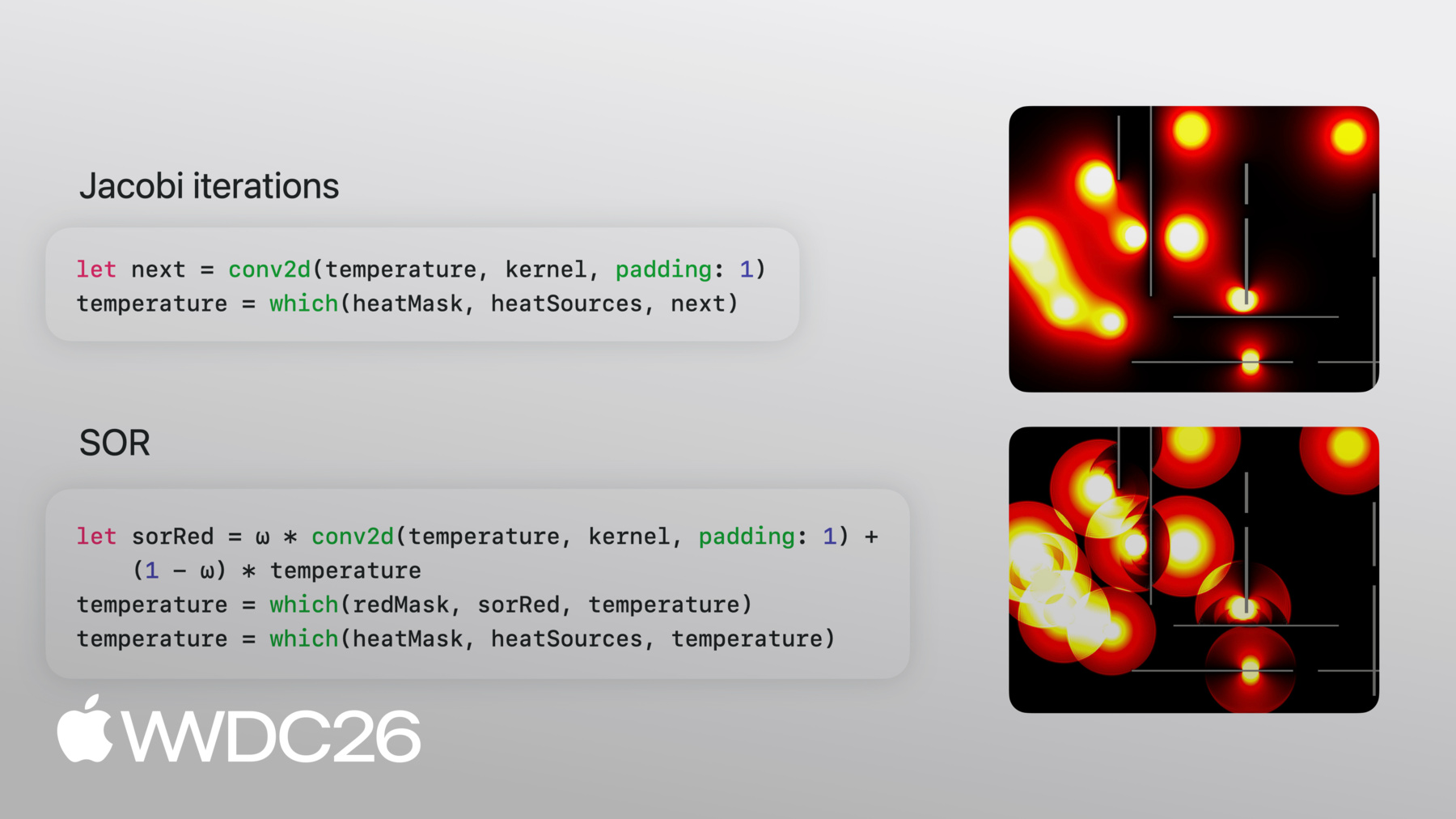
      temperature = which(heatMask, heatSources, next)
    • 9:17 - Successive Over-Relaxation (SOR)

      // Successive Over-Relaxation: blend the previous and next state
      let ω: Float = 2.0 / (1.0 + sin(Float.pi / Float(max(M, N))))
      
      let redMask   = checkerboard(rows: M, cols: N, phase: 0)
      let blackMask = checkerboard(rows: M, cols: N, phase: 1)
      
      // Update red cells using black neighbors
      let sorRed  = ω * conv2d(temperature, kernel, padding: 1) + (1 - ω) * temperature
      temperature = which(redMask, sorRed, temperature)
      temperature = which(heatMask, heatSources, temperature)
      
      // Update black cells using (now-updated) red neighbors
      let sorBlack = ω * conv2d(temperature, kernel, padding: 1) + (1 - ω) * temperature
      temperature  = which(blackMask, sorBlack, temperature)
      temperature  = which(heatMask, heatSources, temperature)
    • 11:13 - Curve fitting with automatic differentiation

      // Define a loss, then optimize it with autodiff
      // x, y: data points as MLXArrays
      func f(_ θ: MLXArray) -> MLXArray {
          θ[0] + θ[1] * x + θ[2] * x ** 2
      }
      
      func loss(_ θ: MLXArray) -> MLXArray {
          mean((f(θ) - y) ** 2)
      }
      
      var θ = zeros([numParams])
      let gradLoss = grad(loss)
      
      for _ in 0 ..< steps {
          let g = gradLoss(θ)         // ∇L(θ)
          θ = θ - learningRate * g    // parameter update
          eval(θ)                     // force evaluation
      }
    • 0:00 - Introduction
    • What numerical computing is and its applications — from simulations in chemistry, biology, and physics to signal processing, rendering, fractals, and machine learning training via gradient descent.

    • 0:57 - MLX Swift and the Apple ecosystem
    • Where MLX Swift fits among Apple's existing numerical computing frameworks (Accelerate, BNNS, Metal Performance Shaders, Swift Numerics) — and why to choose MLX Swift when your primary goal is writing mathematical code that looks like the math, with automatic GPU execution and automatic differentiation.

    • 3:04 - MLX Swift
    • Core MLX Swift concepts — n-dimensional arrays as the central abstraction (similar to NumPy), lazy evaluation that builds a compute graph before executing, and a walkthrough of the power iteration algorithm showing how operations like matmul, norm, and transpose map directly to mathematical notation.

    • 4:28 - Mandelbrot
    • Computing the Mandelbrot fractal as a showcase for array computing — comparing a scalar-at-a-time plain Swift implementation against an MLX Swift version that applies z = z² + c across the entire grid of complex numbers at once, running on the GPU with up to 10x speedup in fewer lines of code.

    • 6:34 - Heat distribution
    • Finding steady-state temperature in a room using Jacobi iteration — modeling heat as a 2D grid, implementing the four-neighbor stencil as a single conv2d call, and applying boundary conditions with an elementwise ternary. A convolution as physics.

    • 8:12 - Faster convergence with SOR
    • How Successive Over-Relaxation (SOR) reaches steady state in N iterations versus N² for Jacobi — using an omega parameter to overshoot updates, a red/black checkerboard pattern to simulate in-place updates, and a side-by-side comparison showing SOR completing 100x faster with the same minimal code.

    • 10:17 - Curve fitting
    • How automatic differentiation flips forward computation — given data points and a parametric function (a quadratic), using MLX's grad to derive gradients automatically and running a gradient descent loop to fit the curve without writing a single derivative by hand.

    • 12:17 - The full MLX toolkit and ecosystem
    • Overview of MLX's complete numerical computing toolkit — linear algebra, FFTs, n-dimensional convolutions, reductions, scans, indexing, random number generation, optimizers (SGD, Adam, RMSprop) — and the Swift ecosystem of packages including mlx-swift, mlx-swift-lm, and mlx-swift-examples.

    • 13:47 - Next steps
    • How to get started with mlx-swift and mlx-swift-examples (LLM integration, stable diffusion, model training, and session examples), MLX's multi-language support (Swift, Python, C++, C).

Developer Footer

  • Videos
  • WWDC26
  • Explora la computación numérica en Swift con MLX
  • Open Menu Close Menu
    • iOS
    • iPadOS
    • macOS
    • tvOS
    • visionOS
    • watchOS
    • App Store
    Open Menu Close Menu
    • Swift
    • SwiftUI
    • Swift Playground
    • TestFlight
    • Xcode
    • Xcode Cloud
    • Icon Composer
    • SF Symbols
    Open Menu Close Menu
    • Accessibility
    • Accessories
    • Apple Intelligence
    • Audio & Video
    • Augmented Reality
    • Business
    • Design
    • Distribution
    • Education
    • Games
    • Health & Fitness
    • In-App Purchase
    • Localization
    • Maps & Location
    • Machine Learning & AI
    • Security
    • Safari & Web
    Open Menu Close Menu
    • Documentation
    • Downloads
    • Sample Code
    • Videos
    Open Menu Close Menu
    • Help Guides & Articles
    • Contact Us
    • Forums
    • Feedback & Bug Reporting
    • System Status
    Open Menu Close Menu
    • Apple Developer
    • App Store Connect
    • Certificates, IDs, & Profiles
    • Feedback Assistant
    Open Menu Close Menu
    • Apple Developer Program
    • Apple Developer Enterprise Program
    • App Store Small Business Program
    • MFi Program
    • Mini Apps Partner Program
    • News Partner Program
    • Video Partner Program
    • Security Bounty Program
    • Security Research Device Program
    Open Menu Close Menu
    • Meet with Apple
    • Apple Developer Centers
    • App Store Awards
    • Apple Design Awards
    • Apple Developer Academies
    • WWDC
    Read the latest news.
    Get the Apple Developer app.
    Copyright © 2026 Apple Inc. All rights reserved.
    Terms of Use Privacy Policy Agreements and Guidelines