

-
Build an Action Classifier with Create ML
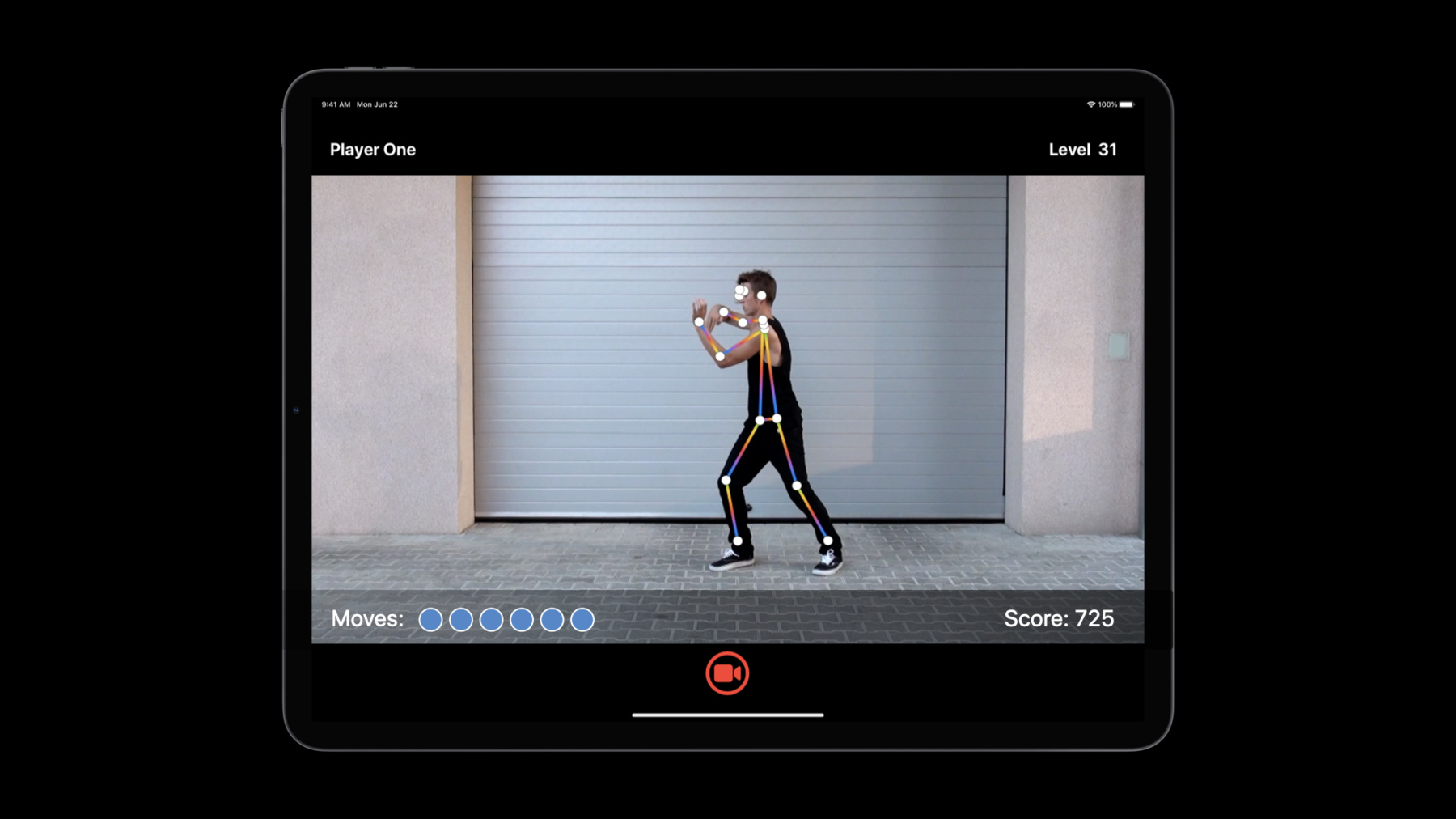
Discover how to build Action Classification models in Create ML. With a custom action classifier, your app can recognize and understand body movements in real-time from videos or through a camera. We'll show you how to use samples to easily train a Core ML model to identify human actions like jumping jacks, squats, and dance moves. Learn how this is powered by the Body Pose estimation features of the Vision Framework. Get inspired to create apps that can provide coaching for fitness routines, deliver feedback on athletic form, and more.
To get the most out of this session, you should be familiar with Create ML. For an overview, watch “Introducing the Create ML app.” You can also brush up on differences between Action Classification and sensor-based Activity Classification by watching “Building Activity Classification Models in Create ML.”
To learn more about the powerful technology that enables Action Classification features, be sure to check out “Detect Body and Hand Pose with Vision.” And you can see how we combined this classification capability together with other technologies to create our own sample application in “Explore the Action & Vision App.”Recursos
Vídeos relacionados
WWDC22
WWDC21
WWDC20
- Control training in Create ML with Swift
- Detect Body and Hand Pose with Vision
- Explore the Action & Vision app
WWDC19
-
Buscar neste vídeo...
-
-
5:28 - Working with montage videos
[ { "file_name": "Montage1.mov", "label": "Squats", "start_time": 4.5, "end_time": 8 } ] -
14:05 - Getting poses
import Vision let request = VNDetectHumanBodyPoseRequest() -
14:10 - Getting poses from a video
import Vision let videoURL = URL(fileURLWithPath: "your-video-file.MOV") let startTime = CMTime.zero let endTime = CMTime.indefinite let request = VNDetectHumanBodyPoseRequest(completionHandler: { request, error in let poses = request.results as! [VNRecognizedPointsObservation] }) let processor = VNVideoProcessor(url: videoURL) try processor.add(request) try processor.analyze(with: CMTimeRange(start: startTime, end: endTime)) -
14:26 - Getting poses from an image
import Vision let request = VNDetectHumanBodyPoseRequest() // Use either one from image URL, CVPixelBuffer, CMSampleBuffer, CGImage, CIImage, etc. in image request handler, based on the context. let handler = VNImageRequestHandler(url: URL(fileURLWithPath: "your-image.jpg")) try handler.perform([request]) let poses = request.results as! [VNRecognizedPointsObservation] -
14:57 - Making a prediction
import Vision import CoreML // Assume pose1, pose2, ..., have been obtained from a video file or camera stream. let pose1: VNRecognizedPointsObservation let pose2: VNRecognizedPointsObservation // ... // Get a [1, 3, 18] dimension multi-array for each frame let poseArray1 = try pose1.keypointsMultiArray() let poseArray2 = try pose2.keypointsMultiArray() // ... // Get a [60, 3, 18] dimension prediction window from 60 frames let modelInput = MLMultiArray(concatenating: [poseArray1, poseArray2], axis: 0, dataType: .float) -
16:27 - Demo: Building the app in Xcode
import Foundation
import CoreML
import Vision

@available(iOS 14.0, *)
class Predictor {
    /// Fitness classifier model.
    let fitnessClassifier = FitnessClassifier()

    /// Vision body pose request.
    let humanBodyPoseRequest = VNDetectHumanBodyPoseRequest()

    /// A rotation window to save the last 60 poses from past 2 seconds.
    var posesWindow: [VNRecognizedPointsObservation?] = []
    init() {
        posesWindow.reserveCapacity(predictionWindowSize)
    }

    /// Extracts poses from a frame.
    func processFrame(_ samplebuffer: CMSampleBuffer) throws -> [VNRecognizedPointsObservation] {
        // Perform Vision body pose request
        let framePoses = extractPoses(from: samplebuffer)

        // Select the most promiment person.
        let pose = try selectMostProminentPerson(from: framePoses)

        // Add the pose to window
        posesWindow.append(pose)

        return framePoses
    }

    // Make a prediction when window is full, periodically
    var isReadyToMakePrediction: Bool {
        posesWindow.count == predictionWindowSize
    }

    /// Make a model prediction on a window.
    func makePrediction() throws -> PredictionOutput {
        // Prepare model input: convert each pose to a multi-array, and concatenate multi-arrays.
        let poseMultiArrays: [MLMultiArray] = try posesWindow.map { person in
            guard let person = person else {
                // Pad 0s when no person detected.
                return zeroPaddedMultiArray()
            }
            return try person.keypointsMultiArray()
        }

        let modelInput = MLMultiArray(concatenating: poseMultiArrays, axis: 0, dataType: .float)

        // Perform prediction
        let predictions = try fitnessClassifier.prediction(poses: modelInput)

        // Reset poses window
        posesWindow.removeFirst(predictionInterval)

        return (
            label: predictions.label,
            confidence: predictions.labelProbabilities[predictions.label]!
        )
    }
}
-