

View in English

  • Apple Developer
    • Get Started

    Explore Get Started

    • Overview
    • Learn
    • Apple Developer Program

    Stay Updated

    • Latest News
    • Hello Developer
    • Platforms

    Explore Platforms

    • Apple Platforms
    • iOS
    • iPadOS
    • macOS
    • tvOS
    • visionOS
    • watchOS
    • App Store

    Featured

    • Design
    • Distribution
    • Games
    • Accessories
    • Web
    • Home
    • CarPlay
    • Technologies

    Explore Technologies

    • Overview
    • Xcode
    • Swift
    • SwiftUI

    Featured

    • Accessibility
    • App Intents
    • Apple Intelligence
    • Games
    • Machine Learning & AI
    • Security
    • Xcode Cloud
    • Community

    Explore Community

    • Overview
    • Meet with Apple events
    • Community-driven events
    • Developer Forums
    • Open Source

    Featured

    • WWDC
    • Swift Student Challenge
    • Developer Stories
    • App Store Awards
    • Apple Design Awards
    • Apple Developer Centers
    • Documentation

    Explore Documentation

    • Documentation Library
    • Technology Overviews
    • Sample Code
    • Human Interface Guidelines
    • Videos

    Release Notes

    • Featured Updates
    • iOS
    • iPadOS
    • macOS
    • watchOS
    • visionOS
    • tvOS
    • Xcode
    • Downloads

    Explore Downloads

    • All Downloads
    • Operating Systems
    • Applications
    • Design Resources

    Featured

    • Xcode
    • TestFlight
    • Fonts
    • SF Symbols
    • Icon Composer
    • Support

    Explore Support

    • Overview
    • Help Guides
    • Developer Forums
    • Feedback Assistant
    • Contact Us

    Featured

    • Account Help
    • App Review Guidelines
    • App Store Connect Help
    • Upcoming Requirements
    • Agreements and Guidelines
    • System Status
  • Quick Links

    • Events
    • News
    • Forums
    • Sample Code
    • Videos
 

Vídeos

Abrir menu Fechar menu
  • Coleções
  • Todos os vídeos
  • Sobre

Mais vídeos

  • Sobre
  • Código
  • Handle trackpad and mouse input

    Provide a more versatile experience when you optimize your iPad or Mac Catalyst app for indirect input from trackpads and mice. Discover how to make your app responsive to new events from these devices. Learn how to work with pointer movement, enable pointer locking, handle scroll input and trackpad gestures, and accept or reject events on your gesture recognizers. We'll also show you how to implement advanced features like changing gesture behaviors with keyboard modifiers or pointing device buttons to delight pro users and bring a richer experience to your app.

    To learn more about pointer-based interactions and to get the most out of this session, we recommend watching “Build for the iPadOS pointer,” “Bring keyboard and mouse gaming to iPad,” and “Support hardware keyboards in your app.”

    Recursos

      • Vídeo HD
      • Vídeo SD

    Vídeos relacionados

    WWDC22

    • Bring your iOS app to the Mac

    WWDC20

    • Bring keyboard and mouse gaming to iPad
    • Build for the iPadOS pointer
    • Support hardware keyboards in your app

    WWDC19

    • Taking iPad Apps for Mac to the Next Level
  • Buscar neste vídeo...
    • 1:49 - UIHoverGestureRecognizer

      let controlsHover = UIHoverGestureRecognizer(target: self, action: #selector(handleHover))
      
      @objc func handleHover(_ recognizer: UIHoverGestureRecognizer) {
          switch recognizer.state {
          case .began:
              // Pointer entered our view - show controls
              self.showsPlaybackControls = true
          case .ended:
              // Pointer exited our view - hide controls
              self.showsPlaybackControls = false
          default:
              break
          }
      }
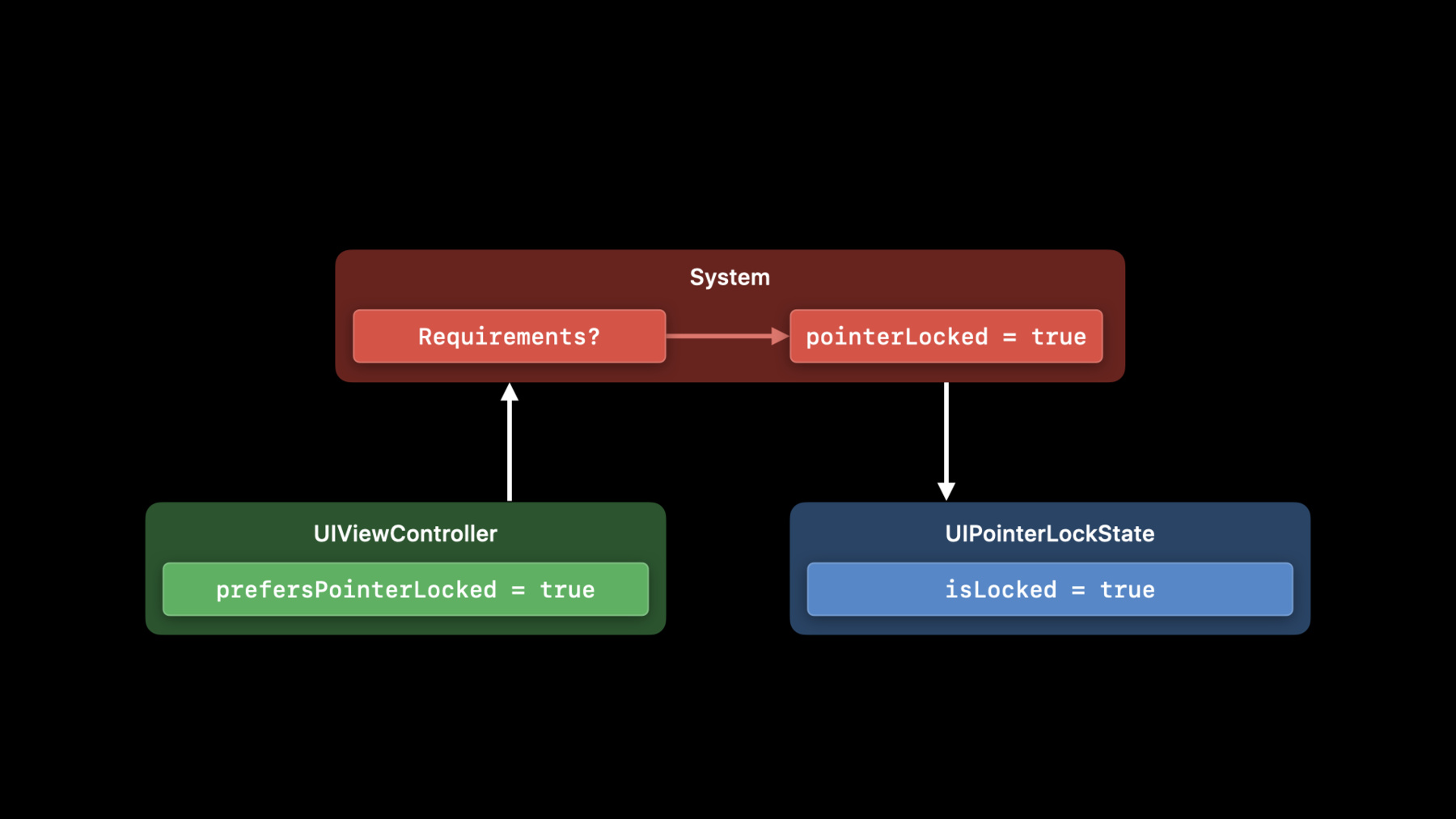
    • 5:33 - prefersPointerLocked

      class GameViewController: UIViewController {
          
          var shouldLockPointer: Bool = true
          
          override var prefersPointerLocked: Bool {
              return self.shouldLockPointer
          }
          
          func disablePointerLock() {
              self.shouldLockPointer = false
              self.setNeedsUpdateOfPrefersPointerLocked()
          }
      }
    • 5:53 - UIPointerLockState.isLocked

      if let pointerLockState = self.window.windowScene?.pointerLockState {
          self.observer = notificationCenter.addObserver(forName: UIPointerLockState.didChangeNotification,
                                                         object: pointerLockState,
                                                         queue: OperationQueue.main) { (note) in
              guard let lockState = note.object as? UIPointerLockState else { return }
              gameEngine.performExpensiveOperationWhile(lockState.isLocked)
          }
      }
    • 9:54 - UIPanGestureRecognizer.allowedScrollTypesMask

      // Enable scroll input for touch surface devices
          
      self.drawerPan.allowedScrollTypesMask = [.continuous]
              
      
      // Enable scroll input for scroll wheel devices as well
      
      self.pullToRefreshPan.allowedScrollTypesMask = [.all]
    • 14:48 - Requiring a 3rd mouse button click

      self.thirdMouseButtonTap.buttonMaskRequired = .button(3)
    • 15:07 - Changing response for .alternate keyboard modifier

      func handleHover(_ recognizer: UIHoverGestureRecognizer) {
              
          // Show chapter controls if alt is pressed
          let showChapterControls = recognizer.modifierFlags.contains(.alternate)
              
          // ...
      }
    • 16:38 - Only handle secondary clicks

      class SecondaryClickGesture: UIGestureRecognizer {
          
          override func shouldReceive(_ event: UIEvent) -> Bool {
              // Must look at the event’s mask, not the gesture’s 
              return event.buttonMask == .secondary
          }
          
          override func touchesBegan(_ touches: Set<UITouch>, with event: UIEvent) {
              // Touch handling code ...
          }
      }
    • 17:36 - Only handle secondary clicks or control clicks

      class SecondaryClickGesture: UIGestureRecognizer {
          
          override func shouldReceive(_ event: UIEvent) -> Bool {
              // Must look at the event’s properties, not the gesture’s
              let secondaryClick = event.buttonMask == .secondary
      
              let controlClick = event.buttonMask == .primary && event.modifierFlags == .control 
      
              return secondaryClick || controlClick
          }
          
          override func touchesBegan(_ touches: Set<UITouch>, with event: UIEvent) {
              // Touch handling code ...
          }
      }
    • 18:10 - Only receive hover events with the .alternate modifier pressed

      let ccHover = UIHoverGestureRecognizer(target: self, 
                                             action: #selector(handleClosedCaptionHover))
      
      ccHover.delegate = self
          
      func gestureRecognizer(_ gestureRecognizer: UIGestureRecognizer, 
                             shouldReceive event: UIEvent) -> Bool {
      
          if gestureRecognizer == self.closedCaptionHover {
              return event.modifierFlags.contains(.alternate)
          }
      
          return true
      }

Developer Footer

  • Vídeos
  • WWDC20
  • Handle trackpad and mouse input
  • Open Menu Close Menu
    • iOS
    • iPadOS
    • macOS
    • tvOS
    • visionOS
    • watchOS
    • App Store
    Open Menu Close Menu
    • Swift
    • SwiftUI
    • Swift Playground
    • TestFlight
    • Xcode
    • Xcode Cloud
    • Icon Composer
    • SF Symbols
    Open Menu Close Menu
    • Accessibility
    • Accessories
    • Apple Intelligence
    • Audio & Video
    • Augmented Reality
    • Business
    • Design
    • Distribution
    • Education
    • Games
    • Health & Fitness
    • In-App Purchase
    • Localization
    • Maps & Location
    • Machine Learning & AI
    • Security
    • Safari & Web
    Open Menu Close Menu
    • Documentation
    • Downloads
    • Sample Code
    • Videos
    Open Menu Close Menu
    • Help Guides & Articles
    • Contact Us
    • Forums
    • Feedback & Bug Reporting
    • System Status
    Open Menu Close Menu
    • Apple Developer
    • App Store Connect
    • Certificates, IDs, & Profiles
    • Feedback Assistant
    Open Menu Close Menu
    • Apple Developer Program
    • Apple Developer Enterprise Program
    • App Store Small Business Program
    • MFi Program
    • Mini Apps Partner Program
    • News Partner Program
    • Video Partner Program
    • Security Bounty Program
    • Security Research Device Program
    Open Menu Close Menu
    • Meet with Apple
    • Apple Developer Centers
    • App Store Awards
    • Apple Design Awards
    • Apple Developer Academies
    • WWDC
    Read the latest news.
    Get the Apple Developer app.
    Copyright © 2026 Apple Inc. All rights reserved.
    Terms of Use Privacy Policy Agreements and Guidelines