

View in English

  • Apple Developer
    • Get Started

    Explore Get Started

    • Overview
    • Learn
    • Apple Developer Program

    Stay Updated

    • Latest News
    • Hello Developer
    • Platforms

    Explore Platforms

    • Apple Platforms
    • iOS
    • iPadOS
    • macOS
    • tvOS
    • visionOS
    • watchOS
    • App Store

    Featured

    • Design
    • Distribution
    • Games
    • Accessories
    • Web
    • Home
    • CarPlay
    • Technologies

    Explore Technologies

    • Overview
    • Xcode
    • Swift
    • SwiftUI

    Featured

    • Accessibility
    • App Intents
    • Apple Intelligence
    • Games
    • Machine Learning & AI
    • Security
    • Xcode Cloud
    • Community

    Explore Community

    • Overview
    • Meet with Apple events
    • Community-driven events
    • Developer Forums
    • Open Source

    Featured

    • WWDC
    • Swift Student Challenge
    • Developer Stories
    • App Store Awards
    • Apple Design Awards
    • Apple Developer Centers
    • Documentation

    Explore Documentation

    • Documentation Library
    • Technology Overviews
    • Sample Code
    • Human Interface Guidelines
    • Videos

    Release Notes

    • Featured Updates
    • iOS
    • iPadOS
    • macOS
    • watchOS
    • visionOS
    • tvOS
    • Xcode
    • Downloads

    Explore Downloads

    • All Downloads
    • Operating Systems
    • Applications
    • Design Resources

    Featured

    • Xcode
    • TestFlight
    • Fonts
    • SF Symbols
    • Icon Composer
    • Support

    Explore Support

    • Overview
    • Help Guides
    • Developer Forums
    • Feedback Assistant
    • Contact Us

    Featured

    • Account Help
    • App Review Guidelines
    • App Store Connect Help
    • Upcoming Requirements
    • Agreements and Guidelines
    • System Status
  • Quick Links

    • Events
    • News
    • Forums
    • Sample Code
    • Videos
 

Vídeos

Abrir menu Fechar menu
  • Coleções
  • Todos os vídeos
  • Sobre

Mais vídeos

  • Sobre
  • Código
  • Use model deployment and security with Core ML

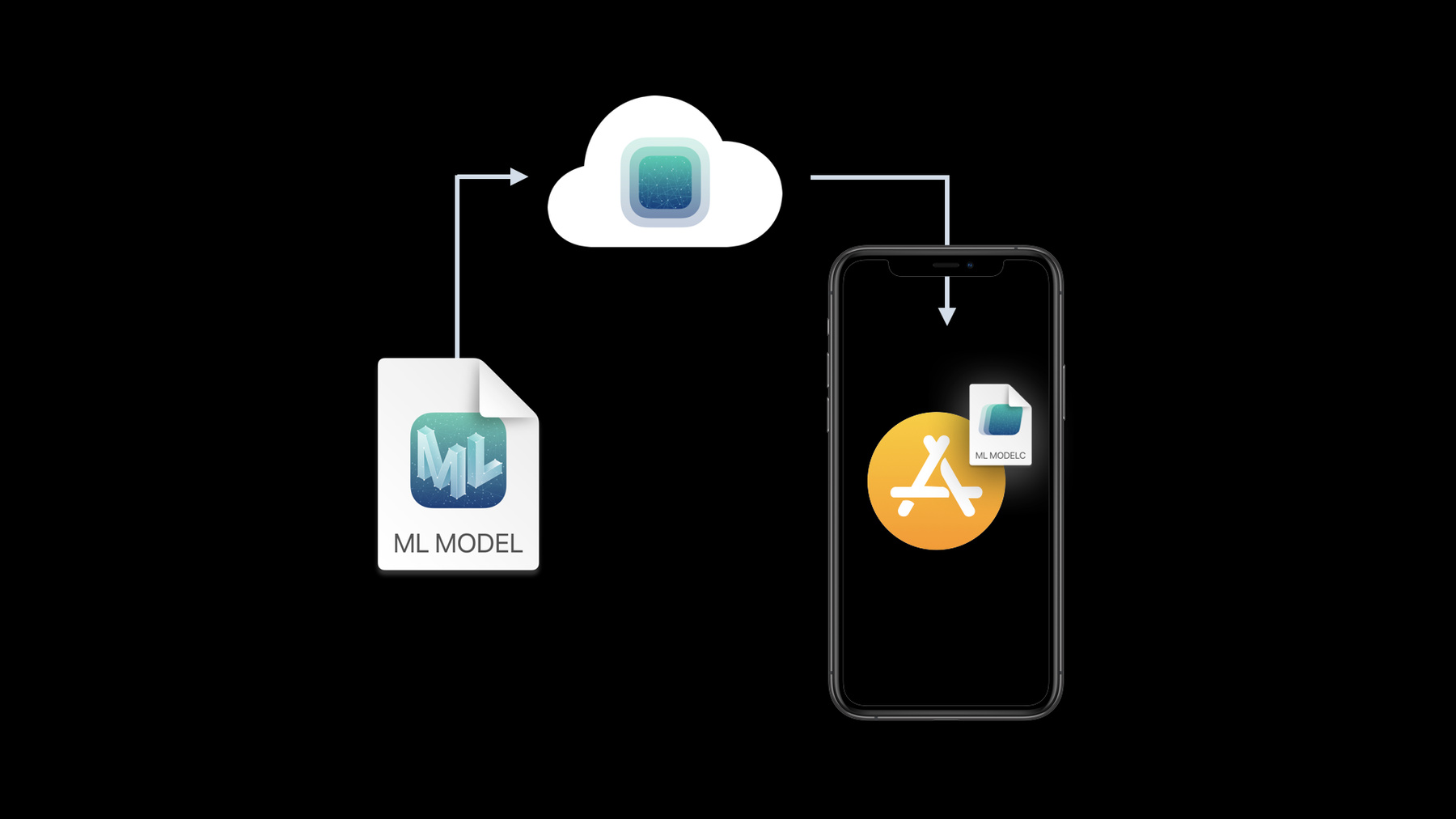
    Discover how to deploy Core ML models outside of your app binary, giving you greater flexibility and control when bringing machine learning features to your app. And learn how Core ML Model Deployment enables you to deliver revised models to your app without requiring an app update. We'll also walk you through how you can protect custom machine learning models through encryption, and preview your model performance in Xcode.

    For more information on working with Core ML, including bringing over models trained in environments like TensorFlow and PyTorch, we also recommend watching "Get your models on device using Core ML Converters.”

    Recursos

    • Core ML
      • Vídeo HD
      • Vídeo SD

    Vídeos relacionados

    WWDC20

    • Build trust through better privacy
    • Get models on device using Core ML Converters
  • Buscar neste vídeo...
    • 4:34 - Flower Classifier using Core ML Model Deployment

      private func classifyFlower(in image: CGImage) {
              // Check for a loaded model
              if let model = flowerClassifier {
                  classify(image, using: model)
                  return
              }
            
              MLModelCollection.beginAccessing(identifier: "FlowerModels") { [self] result in
                  var modelURL: URL?
                  switch result {
                  case .success(let collection):
                      modelURL = collection.entries["FlowerClassifier"]?.modelURL
                  case .failure(let error):
                      handleModelCollectionFailure(for: error)
                  }
                                                                     
                  let result = loadFlowerClassifier(from: modelURL)
                                                                     
                  switch result {
                  case .success(let model):
                      classify(image, using: model)
                  case .failure(let error):
                      handleModelLoadFailure(for: error)
                  }
              }
          }
      
          func loadFlowerClassifier(from modelURL: URL?) -> Result<FlowerClassifier, Error> {
              if let modelURL = modelURL {
                  return Result { try FlowerClassifier(contentsOf: modelURL) }
              } else {
                  return Result { try FlowerClassifier(configuration: .init()) }
              }
          }
    • 20:03 - Compiler flag for encrypting a model

      --encrypt "$SRCROOT/HelloFlowers/Models/FlowerStylizer.mlmodelkey"
      
      [Production note] or if we're tight for horizontal space we can use this:
      
      --encrypt "$SRCROOT/.../FlowerStylizer.mlmodelkey"
    • 20:50 - Working with an encrypted model

      func stylizeImage() {
          // If we already loaded the model, apply the effect
          if let model = flowerStylizer {
              applyStyledEffect(using: model)
              return
          }
              
          // Otherwise load and apply
          FlowerStylizer.load { [self] result in
                  
              switch result {
      
              case .success(let model):
                  flowerStylizer = model
                  DispatchQueue.main.async {
                      applyStyledEffect(using: model)
                  }
                      
              case .failure(let error):
                  handleFailure(for: error)
                      
              }
          }
      }
      
      func handleFailure(for error: Error) {
          switch error {
          case MLModelError.modelKeyFetch:
              handleNetworkFailure()
                  
          default:
              handleModelLoadError(error)
          }
      }

Developer Footer

  • Vídeos
  • WWDC20
  • Use model deployment and security with Core ML
  • Open Menu Close Menu
    • iOS
    • iPadOS
    • macOS
    • tvOS
    • visionOS
    • watchOS
    • App Store
    Open Menu Close Menu
    • Swift
    • SwiftUI
    • Swift Playground
    • TestFlight
    • Xcode
    • Xcode Cloud
    • Icon Composer
    • SF Symbols
    Open Menu Close Menu
    • Accessibility
    • Accessories
    • Apple Intelligence
    • Audio & Video
    • Augmented Reality
    • Business
    • Design
    • Distribution
    • Education
    • Games
    • Health & Fitness
    • In-App Purchase
    • Localization
    • Maps & Location
    • Machine Learning & AI
    • Security
    • Safari & Web
    Open Menu Close Menu
    • Documentation
    • Downloads
    • Sample Code
    • Videos
    Open Menu Close Menu
    • Help Guides & Articles
    • Contact Us
    • Forums
    • Feedback & Bug Reporting
    • System Status
    Open Menu Close Menu
    • Apple Developer
    • App Store Connect
    • Certificates, IDs, & Profiles
    • Feedback Assistant
    Open Menu Close Menu
    • Apple Developer Program
    • Apple Developer Enterprise Program
    • App Store Small Business Program
    • MFi Program
    • Mini Apps Partner Program
    • News Partner Program
    • Video Partner Program
    • Security Bounty Program
    • Security Research Device Program
    Open Menu Close Menu
    • Meet with Apple
    • Apple Developer Centers
    • App Store Awards
    • Apple Design Awards
    • Apple Developer Academies
    • WWDC
    Read the latest news.
    Get the Apple Developer app.
    Copyright © 2026 Apple Inc. All rights reserved.
    Terms of Use Privacy Policy Agreements and Guidelines