

View in English

  • Apple Developer
    • Get Started

    Explore Get Started

    • Overview
    • Learn
    • Apple Developer Program

    Stay Updated

    • Latest News
    • Hello Developer
    • Platforms

    Explore Platforms

    • Apple Platforms
    • iOS
    • iPadOS
    • macOS
    • tvOS
    • visionOS
    • watchOS
    • App Store

    Featured

    • Design
    • Distribution
    • Games
    • Accessories
    • Web
    • Home
    • CarPlay
    • Technologies

    Explore Technologies

    • Overview
    • Xcode
    • Swift
    • SwiftUI

    Featured

    • Accessibility
    • App Intents
    • Apple Intelligence
    • Games
    • Machine Learning & AI
    • Security
    • Xcode Cloud
    • Community

    Explore Community

    • Overview
    • Meet with Apple events
    • Community-driven events
    • Developer Forums
    • Open Source

    Featured

    • WWDC
    • Swift Student Challenge
    • Developer Stories
    • App Store Awards
    • Apple Design Awards
    • Apple Developer Centers
    • Documentation

    Explore Documentation

    • Documentation Library
    • Technology Overviews
    • Sample Code
    • Human Interface Guidelines
    • Videos

    Release Notes

    • Featured Updates
    • iOS
    • iPadOS
    • macOS
    • watchOS
    • visionOS
    • tvOS
    • Xcode
    • Downloads

    Explore Downloads

    • All Downloads
    • Operating Systems
    • Applications
    • Design Resources

    Featured

    • Xcode
    • TestFlight
    • Fonts
    • SF Symbols
    • Icon Composer
    • Support

    Explore Support

    • Overview
    • Help Guides
    • Developer Forums
    • Feedback Assistant
    • Contact Us

    Featured

    • Account Help
    • App Review Guidelines
    • App Store Connect Help
    • Upcoming Requirements
    • Agreements and Guidelines
    • System Status
  • Quick Links

    • Events
    • News
    • Forums
    • Sample Code
    • Videos
 

Vídeos

Abrir menu Fechar menu
  • Coleções
  • Todos os vídeos
  • Sobre

Mais vídeos

  • Sobre
  • Código
  • Adopt Quick Note

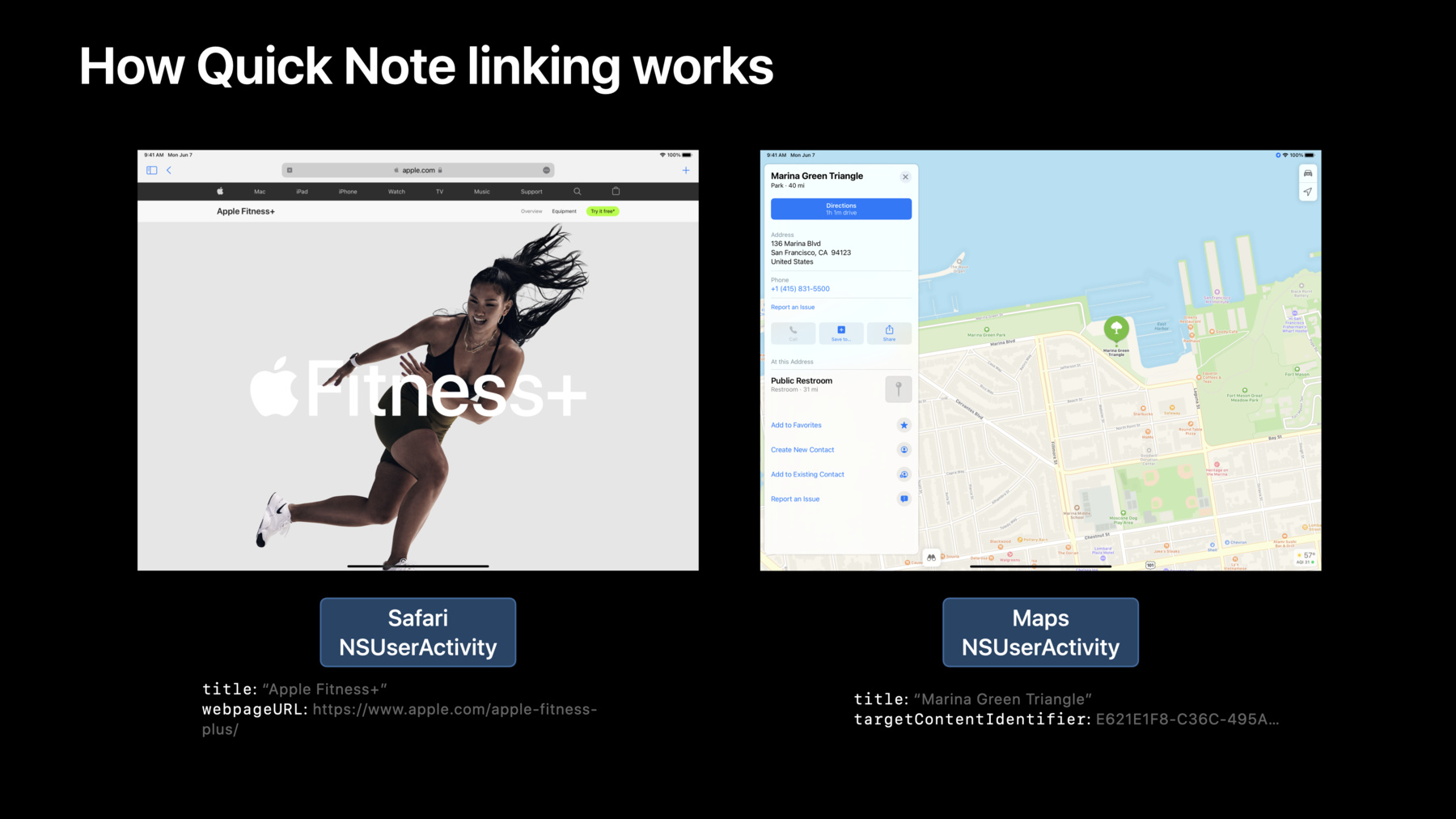
    Learn how you can link your app to Quick Note and help people quickly connect your content to their notes — and their notes to your content. Discover how Quick Note recognizes and links to app content through NSUserActivity, and find out how you can adopt this API in your app. We'll take you through the requirements, benefits, and features of supporting Quick Note. We'll also provide guidance and best practices for NSUserActivity to help your app get all of its benefits.

    Recursos

    • NSUserActivity
      • Vídeo HD
      • Vídeo SD

    Vídeos relacionados

    WWDC18

    • Introduction to Siri Shortcuts
  • Buscar neste vídeo...
    • 16:57 - How to adopt NSUserActivity to support Quick Note

      // Create the NSUserActivity and describe the content or user activity
      let activity = NSUserActivity(activityType: "com.myapp.MyActivityType")
      activity.title = document.title
      
      // Set one or more of:
      //   .targetContentIdentifier
      //   .persistentIdentifier
      //   .webpageURL
      activity.targetContentIdentifier = "uniqueGlobalStableIdentifier"
      
      // Set userInfo to save app-specific state information 
      activity.userInfo = ["myKey": …]
      
      // Attach it to a view controller, window, or other responder; let the system make it current when needed
      viewController.userActivity = activity
    • 17:02 - Handle NSUserActivity continuation in your window scene delegate or app delegate - iOS

      class SceneDelegate: UIResponder, UIWindowSceneDelegate {
      
          func scene(_ scene: UIScene, willContinueUserActivityWithType userActivityType: String) {
              // show user feedback while waiting for the NSUserActivity to arrive
          }
          
          func scene(_ scene: UIScene, continue userActivity: NSUserActivity) {
              // set up view controllers and views to continue the activity
          }
          
          func scene(_ scene: UIScene, didFailToContinueUserActivityWithType userActivityType: String, error: Error) {
              // show error about failing to continue an activity
          }
      
          …
      }
    • 17:06 - Handle NSUserActivity continuation in your window scene delegate or app delegate - macOS

      class AppDelegate: NSObject, NSApplicationDelegate {
      
          func application(_ application: NSApplication, willContinueUserActivityWithType userActivityType: String) -> Bool {
              // show user feedback while waiting for the NSUserActivity to arrive
              return true
          }
          
          func application(_ application: NSApplication, continue userActivity: NSUserActivity, restorationHandler: @escaping ([NSUserActivityRestoring]) -> Void) -> Bool {
              // set up view controllers or documents to continue the activity
              return true
          }
          
          func application(_ application: NSApplication, didFailToContinueUserActivityWithType userActivityType: String, error: Error) {
              // show error about failing to continue an activity, if appropriate
          }
          
          …
      }
    • 17:26 - Improve performance with needsSave

      activity.needsSave = true
      
      …
      
      func userActivityWillSave(_ userActivity: NSUserActivity) {
          userActivity.userInfo = [
              "center" : visibleFrame.middle
              "zoomScale" : scrollView.zoomScale
          ]
      }

Developer Footer

  • Vídeos
  • WWDC21
  • Adopt Quick Note
  • Open Menu Close Menu
    • iOS
    • iPadOS
    • macOS
    • tvOS
    • visionOS
    • watchOS
    • App Store
    Open Menu Close Menu
    • Swift
    • SwiftUI
    • Swift Playground
    • TestFlight
    • Xcode
    • Xcode Cloud
    • Icon Composer
    • SF Symbols
    Open Menu Close Menu
    • Accessibility
    • Accessories
    • Apple Intelligence
    • Audio & Video
    • Augmented Reality
    • Business
    • Design
    • Distribution
    • Education
    • Games
    • Health & Fitness
    • In-App Purchase
    • Localization
    • Maps & Location
    • Machine Learning & AI
    • Security
    • Safari & Web
    Open Menu Close Menu
    • Documentation
    • Downloads
    • Sample Code
    • Videos
    Open Menu Close Menu
    • Help Guides & Articles
    • Contact Us
    • Forums
    • Feedback & Bug Reporting
    • System Status
    Open Menu Close Menu
    • Apple Developer
    • App Store Connect
    • Certificates, IDs, & Profiles
    • Feedback Assistant
    Open Menu Close Menu
    • Apple Developer Program
    • Apple Developer Enterprise Program
    • App Store Small Business Program
    • MFi Program
    • Mini Apps Partner Program
    • News Partner Program
    • Video Partner Program
    • Security Bounty Program
    • Security Research Device Program
    Open Menu Close Menu
    • Meet with Apple
    • Apple Developer Centers
    • App Store Awards
    • Apple Design Awards
    • Apple Developer Academies
    • WWDC
    Read the latest news.
    Get the Apple Developer app.
    Copyright © 2026 Apple Inc. All rights reserved.
    Terms of Use Privacy Policy Agreements and Guidelines