

View in English

  • Apple Developer
    • Get Started

    Explore Get Started

    • Overview
    • Learn
    • Apple Developer Program

    Stay Updated

    • Latest News
    • Hello Developer
    • Platforms

    Explore Platforms

    • Apple Platforms
    • iOS
    • iPadOS
    • macOS
    • tvOS
    • visionOS
    • watchOS
    • App Store

    Featured

    • Design
    • Distribution
    • Games
    • Accessories
    • Web
    • Home
    • CarPlay
    • Technologies

    Explore Technologies

    • Overview
    • Xcode
    • Swift
    • SwiftUI

    Featured

    • Accessibility
    • App Intents
    • Apple Intelligence
    • Games
    • Machine Learning & AI
    • Security
    • Xcode Cloud
    • Community

    Explore Community

    • Overview
    • Meet with Apple events
    • Community-driven events
    • Developer Forums
    • Open Source

    Featured

    • WWDC
    • Swift Student Challenge
    • Developer Stories
    • App Store Awards
    • Apple Design Awards
    • Apple Developer Centers
    • Documentation

    Explore Documentation

    • Documentation Library
    • Technology Overviews
    • Sample Code
    • Human Interface Guidelines
    • Videos

    Release Notes

    • Featured Updates
    • iOS
    • iPadOS
    • macOS
    • watchOS
    • visionOS
    • tvOS
    • Xcode
    • Downloads

    Explore Downloads

    • All Downloads
    • Operating Systems
    • Applications
    • Design Resources

    Featured

    • Xcode
    • TestFlight
    • Fonts
    • SF Symbols
    • Icon Composer
    • Support

    Explore Support

    • Overview
    • Help Guides
    • Developer Forums
    • Feedback Assistant
    • Contact Us

    Featured

    • Account Help
    • App Review Guidelines
    • App Store Connect Help
    • Upcoming Requirements
    • Agreements and Guidelines
    • System Status
  • Quick Links

    • Events
    • News
    • Forums
    • Sample Code
    • Videos
 

Vídeos

Abrir menu Fechar menu
  • Coleções
  • Todos os vídeos
  • Sobre

Mais vídeos

  • Sobre
  • Código
  • Capture machine-readable codes and text with VisionKit

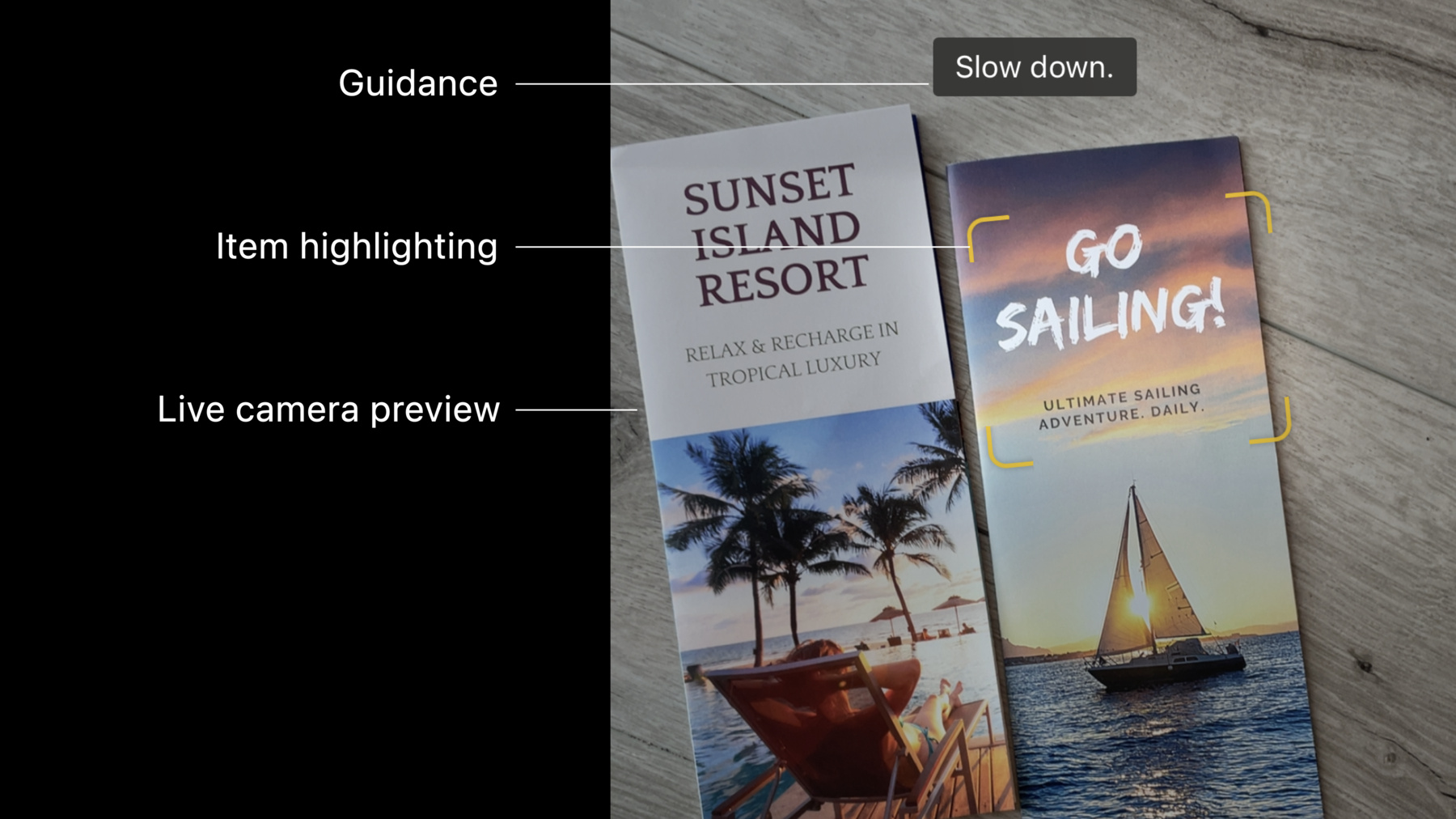
    Meet the Data Scanner in VisionKit: This framework combines AVCapture and Vision to enable live capture of machine-readable codes and text through a simple Swift API. We'll show you how to control the types of content your app can capture by specifying barcode symbologies and language selection. We'll also explore how you can enable guidance in your app, customize item highlighting or regions of interest, and handle interactions after your app detects an item.

    For more on interacting with Live Text through still images or paused video frames, watch "Add Live Text interaction to your app" from WWDC22.

    Recursos

    • Scanning data with the camera
      • Vídeo HD
      • Vídeo SD

    Vídeos relacionados

    Tech Talks

    • What's new for enterprise developers

    WWDC22

    • Add Live Text interaction to your app
    • What's new in Vision
  • Buscar neste vídeo...
    • 4:40 - Creating a data scanner instance and present it

      import VisionKit
      
      // Specify the types of data to recognize
      let recognizedDataTypes:Set<DataScannerViewController.RecognizedDataType> = [
          .barcode(symbologies: [.qr]),
        	// uncomment to filter on specific languages (e.g., Japanese)
          // .text(languages: ["ja"])
          // uncomment to filter on specific content types (e.g., URLs)
      		// .text(textContentType: .URL)
      ]
      
      // Create the data scanner, present it, and start scanning!
      let dataScanner = DataScannerViewController(recognizedDataTypes: recognizedDataTypes)
      present(dataScanner, animated: true) {
          try? dataScanner.startScanning()
      }
    • 8:11 - Set a delegate

      // Specify the types of data to recognize
      let recognizedDataTypes:Set<DataScannerViewController.RecognizedDataType> = [
          .barcode(symbologies: [.qr]),
          .text(textContentType: .URL)
      ]
      
      // Create the data scanner, present it, and start scanning!
      let dataScanner = DataScannerViewController(recognizedDataTypes: recognizedDataTypes)
      dataScanner.delegate = self.present(dataScanner, animated: true) {
          try? dataScanner.startScanning()
      }
    • 8:19 - Handling tap interactions

      func dataScanner(_ dataScanner: DataScannerViewController, didTapOn item: RecognizedItem) {
          switch item {
          case .text(let text):
              print("text: \(text.transcript)")
          case .barcode(let barcode):
              print("barcode: \(barcode.payloadStringValue ?? "unknown")")
          default:
              print("unexpected item")
          }
      }
    • 9:11 - Adding custom highlights via the didAdd delegate method

      // Dictionary to store our custom highlights keyed by their associated item ID.
      var itemHighlightViews: [RecognizedItem.ID: HighlightView] = [:]
      
      // For each new item, create a new highlight view and add it to the view hierarchy.
      func dataScanner(_ dataScanner: DataScannerViewController, didAdd addItems: [RecognizedItem], allItems: [RecognizedItem]) {
          for item in addedItems {
              let newView = newHighlightView(forItem: item)
              itemHighlightViews[item.id] = newView
              dataScanner.overlayContainerView.addSubview(newView)
          }
      }
    • 9:37 - Animating custom highlights during the didUpdate delegate method

      // Animate highlight views to their new bounds
      func dataScanner(_ dataScanner: DataScannerViewController, didUpdate updatedItems: [RecognizedItem], allItems: [RecognizedItem]) {
          for item in updatedItems {
              if let view = itemHighlightViews[item.id] {
                  animate(view: view, toNewBounds: item.bounds)
              }
          }
      }
    • 10:03 - Removing custom highlights during the didRemove delegate callback

      // Remove highlights when their associated items are removed.
      func dataScanner(_ dataScanner: DataScannerViewController, didRemove removedItems: [RecognizedItem], allItems: [RecognizedItem]) {
          for item in removedItems {
              if let view = itemHighlightViews[item.id] {
                  itemHighlightViews.removeValue(forKey: item.id)
                  view.removeFromSuperview()
              }
          }
      }
    • 10:54 - Take a still photo and save it to the camera roll

      // Take a still photo and save to the camera roll
      if let image = try? await dataScanner.capturePhoto() {
          UIImageWriteToSavedPhotosAlbum(image, nil, nil, nil)
      }
    • 11:10 - Using the recognizedItems async stream to keep track of items

      // Send a notification when the recognized items change.
      var currentItems: [RecognizedItem] = []
      
      func updateViaAsyncStream() async {
          guard let scanner = dataScannerViewController else { return }
          
          let stream = scanner.recognizedItems
          for await newItems: [RecognizedItem] in stream {
              let diff = newItems.difference(from: currentItems) { a, b in
                  return a.id == b.id
              }
              
              if !diff.isEmpty {
                  currentItems = newItems
                  sendDidChangeNotification()
              }
          }
      }

Developer Footer

  • Vídeos
  • WWDC22
  • Capture machine-readable codes and text with VisionKit
  • Open Menu Close Menu
    • iOS
    • iPadOS
    • macOS
    • tvOS
    • visionOS
    • watchOS
    • App Store
    Open Menu Close Menu
    • Swift
    • SwiftUI
    • Swift Playground
    • TestFlight
    • Xcode
    • Xcode Cloud
    • Icon Composer
    • SF Symbols
    Open Menu Close Menu
    • Accessibility
    • Accessories
    • Apple Intelligence
    • Audio & Video
    • Augmented Reality
    • Business
    • Design
    • Distribution
    • Education
    • Games
    • Health & Fitness
    • In-App Purchase
    • Localization
    • Maps & Location
    • Machine Learning & AI
    • Security
    • Safari & Web
    Open Menu Close Menu
    • Documentation
    • Downloads
    • Sample Code
    • Videos
    Open Menu Close Menu
    • Help Guides & Articles
    • Contact Us
    • Forums
    • Feedback & Bug Reporting
    • System Status
    Open Menu Close Menu
    • Apple Developer
    • App Store Connect
    • Certificates, IDs, & Profiles
    • Feedback Assistant
    Open Menu Close Menu
    • Apple Developer Program
    • Apple Developer Enterprise Program
    • App Store Small Business Program
    • MFi Program
    • Mini Apps Partner Program
    • News Partner Program
    • Video Partner Program
    • Security Bounty Program
    • Security Research Device Program
    Open Menu Close Menu
    • Meet with Apple
    • Apple Developer Centers
    • App Store Awards
    • Apple Design Awards
    • Apple Developer Academies
    • WWDC
    Read the latest news.
    Get the Apple Developer app.
    Copyright © 2026 Apple Inc. All rights reserved.
    Terms of Use Privacy Policy Agreements and Guidelines