

View in English

  • Apple Developer
    • Get Started

    Explore Get Started

    • Overview
    • Learn
    • Apple Developer Program

    Stay Updated

    • Latest News
    • Hello Developer
    • Platforms

    Explore Platforms

    • Apple Platforms
    • iOS
    • iPadOS
    • macOS
    • tvOS
    • visionOS
    • watchOS
    • App Store

    Featured

    • Design
    • Distribution
    • Games
    • Accessories
    • Web
    • Home
    • CarPlay
    • Technologies

    Explore Technologies

    • Overview
    • Xcode
    • Swift
    • SwiftUI

    Featured

    • Accessibility
    • App Intents
    • Apple Intelligence
    • Games
    • Machine Learning & AI
    • Security
    • Xcode Cloud
    • Community

    Explore Community

    • Overview
    • Meet with Apple events
    • Community-driven events
    • Developer Forums
    • Open Source

    Featured

    • WWDC
    • Swift Student Challenge
    • Developer Stories
    • App Store Awards
    • Apple Design Awards
    • Apple Developer Centers
    • Documentation

    Explore Documentation

    • Documentation Library
    • Technology Overviews
    • Sample Code
    • Human Interface Guidelines
    • Videos

    Release Notes

    • Featured Updates
    • iOS
    • iPadOS
    • macOS
    • watchOS
    • visionOS
    • tvOS
    • Xcode
    • Downloads

    Explore Downloads

    • All Downloads
    • Operating Systems
    • Applications
    • Design Resources

    Featured

    • Xcode
    • TestFlight
    • Fonts
    • SF Symbols
    • Icon Composer
    • Support

    Explore Support

    • Overview
    • Help Guides
    • Developer Forums
    • Feedback Assistant
    • Contact Us

    Featured

    • Account Help
    • App Review Guidelines
    • App Store Connect Help
    • Upcoming Requirements
    • Agreements and Guidelines
    • System Status
  • Quick Links

    • Events
    • News
    • Forums
    • Sample Code
    • Videos
 

Vídeos

Abrir menu Fechar menu
  • Coleções
  • Todos os vídeos
  • Sobre

Mais vídeos

  • Sobre
  • Código
  • Compose custom layouts with SwiftUI

    SwiftUI now offers powerful tools to level up your layouts and arrange views for your app's interface. We'll introduce you to the Grid container, which helps you create highly customizable, two-dimensional layouts, and show you how you can use the Layout protocol to build your own containers with completely custom behavior. We'll also explore how you can create seamless animated transitions between your layout types, and share tips and best practices for creating great interfaces.

    Recursos

    • Layout containers
    • ViewThatFits
    • AnyLayout
    • Layout
    • Grid
    • Composing custom layouts with SwiftUI
      • Vídeo HD
      • Vídeo SD

    Vídeos relacionados

    WWDC23

    • Meet Assistive Access

    WWDC22

    • Build global apps: Localization by example
    • Complications and widgets: Reloaded
    • What's new in SwiftUI
    • WWDC22 Day 3 recap

    WWDC20

    • Stacks, Grids, and Outlines in SwiftUI

    WWDC19

    • Building Custom Views with SwiftUI
  • Buscar neste vídeo...
    • 4:28 - Grid with explicit rows

      struct Leaderboard: View {
          var body: some View {
              Grid {
                  GridRow {
                      Text("Cat")
                      ProgressView(value: 0.5)
                      Text("25")
                  }
                  GridRow {
                      Text("Goldfish")
                      ProgressView(value: 0.2)
                      Text("9")
                  }
                  GridRow {
                      Text("Dog")
                      ProgressView(value: 0.3)
                      Text("16")
                  }
              }
          }
      }
    • 5:16 - Data model

      struct Pet: Identifiable, Equatable {
          let type: String
          var votes: Int = 0
          var id: String { type }
      
          static var exampleData: [Pet] = [
              Pet(type: "Cat", votes: 25),
              Pet(type: "Goldfish", votes: 9),
              Pet(type: "Dog", votes: 16)
          ]
      }
    • 5:41 - Final Leaderboard

      struct Leaderboard: View {
          var pets: [Pet]
          var totalVotes: Int
      
          var body: some View {
              Grid(alignment: .leading) {
                  ForEach(pets) { pet in
                      GridRow {
                          Text(pet.type)
                          ProgressView(
                              value: Double(pet.votes),
                              total: Double(totalVotes))
                          Text("\(pet.votes)")
                              .gridColumnAlignment(.trailing)
                      }
      
                      Divider()
                  }
              }
              .padding()
          }
      }
    • 10:53 - Layout protocol stubs for required methods

      struct MyEqualWidthHStack: Layout {
          func sizeThatFits(
              proposal: ProposedViewSize,
              subviews: Subviews,
              cache: inout Void
          ) -> CGSize {
              // Return a size.
          }
      
          func placeSubviews(
              in bounds: CGRect,
              proposal: ProposedViewSize,
              subviews: Subviews,
              cache: inout Void
          ) {
              // Place child views.
          }
      }
    • 13:44 - Maximum size helper method

      private func maxSize(subviews: Subviews) -> CGSize {
          let subviewSizes = subviews.map { $0.sizeThatFits(.unspecified) }
          let maxSize: CGSize = subviewSizes.reduce(.zero) { currentMax, subviewSize in
              CGSize(
                  width: max(currentMax.width, subviewSize.width),
                  height: max(currentMax.height, subviewSize.height))
          }
      
          return maxSize
      }
    • 15:40 - Spacing helper method

      private func spacing(subviews: Subviews) -> [CGFloat] {
          subviews.indices.map { index in
              guard index < subviews.count - 1 else { return 0 }
              return subviews[index].spacing.distance(
                  to: subviews[index + 1].spacing,
                  along: .horizontal)
          }
      }
    • 16:33 - Size that fits implementation

      func sizeThatFits(
          proposal: ProposedViewSize,
          subviews: Subviews,
          cache: inout Void
      ) -> CGSize {
          // Return a size.
          guard !subviews.isEmpty else { return .zero }
      
          let maxSize = maxSize(subviews: subviews)
          let spacing = spacing(subviews: subviews)
          let totalSpacing = spacing.reduce(0) { $0 + $1 }
      
          return CGSize(
              width: maxSize.width * CGFloat(subviews.count) + totalSpacing,
              height: maxSize.height)
      }
    • 16:51 - Place subviews implementation

      func placeSubviews(
          in bounds: CGRect,
          proposal: ProposedViewSize,
          subviews: Subviews,
          cache: inout Void
      ) {
          // Place child views.
          guard !subviews.isEmpty else { return }
        
          let maxSize = maxSize(subviews: subviews)
          let spacing = spacing(subviews: subviews)
      
          let placementProposal = ProposedViewSize(width: maxSize.width, height: maxSize.height)
          var x = bounds.minX + maxSize.width / 2
        
          for index in subviews.indices {
              subviews[index].place(
                  at: CGPoint(x: x, y: bounds.midY),
                  anchor: .center,
                  proposal: placementProposal)
              x += maxSize.width + spacing[index]
          }
      }
    • 18:07 - Custom layout instantiation

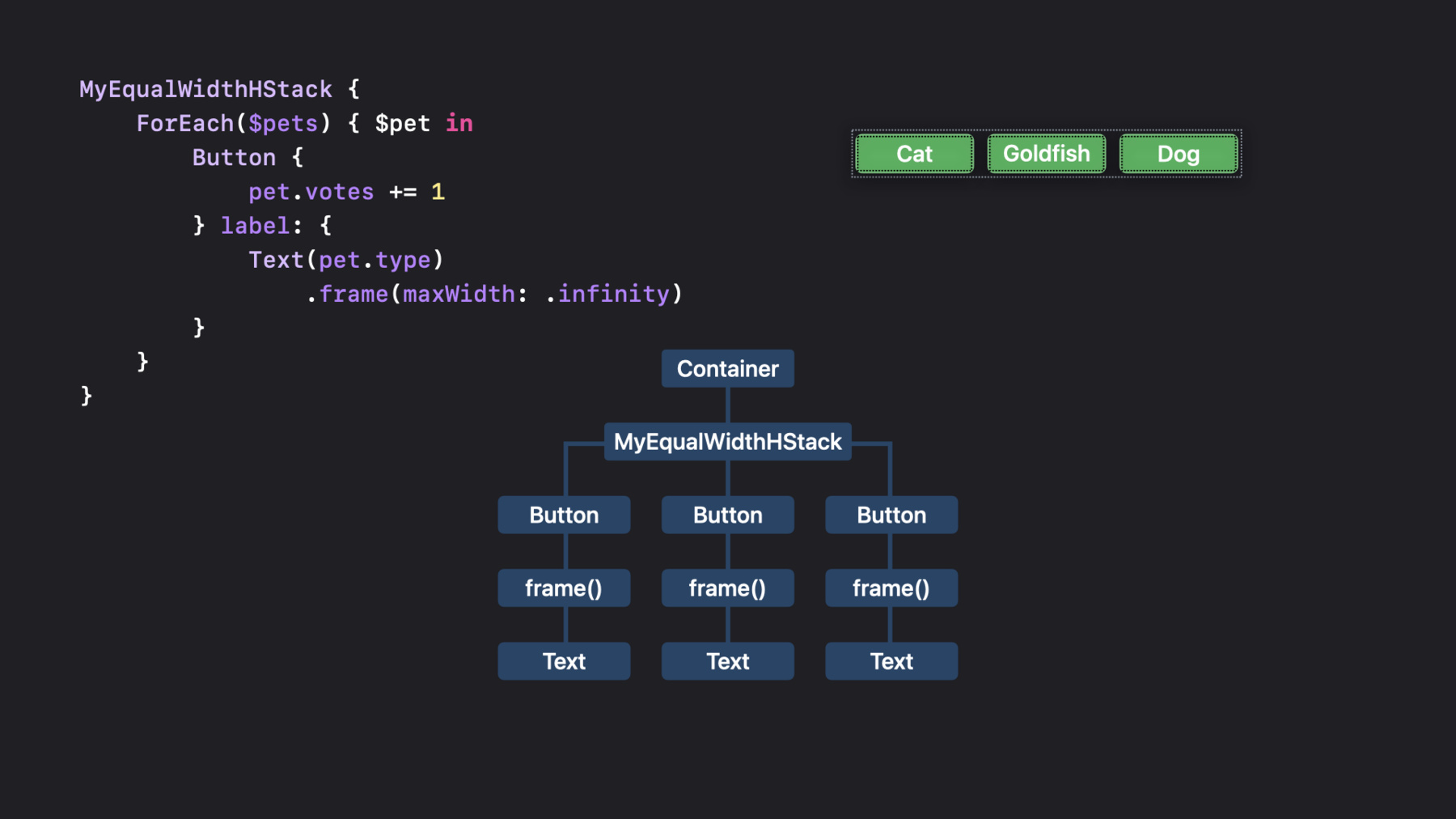
      MyEqualWidthHStack {
          ForEach($pets) { $pet in
              Button {
                  pet.votes += 1
              } label: {
                  Text(pet.type)
                      .frame(maxWidth: .infinity)
              }
              .buttonStyle(.bordered)
          }
      }
    • 20:12 - Buttons helper view

      struct Buttons: View {
          @Binding var pets: [Pet]
      
          var body: some View {
              ForEach($pets) { $pet in
                  Button {
                      pet.votes += 1
                  } label: {
                      Text(pet.type)
                          .frame(maxWidth: .infinity)
                  }
                  .buttonStyle(.bordered)
              }
          }
      }
    • 21:08 - Final voting buttons view

      struct StackedButtons: View {
          @Binding var pets: [Pet]
      
          var body: some View {
              ViewThatFits {
                  MyEqualWidthHStack {
                      Buttons(pets: $pets)
                  }
                  MyEqualWidthVStack {
                      Buttons(pets: $pets)
                  }
              }
          }
      }
    • 22:30 - Radial size that fits

      func sizeThatFits(
          proposal: ProposedViewSize,
          subviews: Subviews,
          cache: inout Void
      )  -> CGSize {
          // Take whatever space is offered.
          return proposal.replacingUnspecifiedDimensions()
      }
    • 22:52 - Radial place subviews without offsets

      func placeSubviews(
          in bounds: CGRect,
          proposal: ProposedViewSize,
          subviews: Subviews,
          cache: inout Void
      ) {
          let radius = min(bounds.size.width, bounds.size.height) / 3.0
          let angle = Angle.degrees(360.0 / Double(subviews.count)).radians
          let offset = 0 // This depends on rank...
      
          for (index, subview) in subviews.enumerated() {
              var point = CGPoint(x: 0, y: -radius)
                  .applying(CGAffineTransform(
                      rotationAngle: angle * Double(index) + offset))
      
              point.x += bounds.midX
              point.y += bounds.midY
      
              subview.place(at: point, anchor: .center, proposal: .unspecified)
          }
      }
    • 23:42 - Rank value

      private struct Rank: LayoutValueKey {
          static let defaultValue: Int = 1
      }
      
      extension View {
          func rank(_ value: Int) -> some View {
              layoutValue(key: Rank.self, value: value)
          }
      }
    • 24:21 - Radial place subviews with offsets

      func placeSubviews(
          in bounds: CGRect,
          proposal: ProposedViewSize,
          subviews: Subviews,
          cache: inout Void
      ) {
          let radius = min(bounds.size.width, bounds.size.height) / 3.0
          let angle = Angle.degrees(360.0 / Double(subviews.count)).radians
      
          let ranks = subviews.map { subview in
              subview[Rank.self]
          }
          let offset = getOffset(ranks)
      
          for (index, subview) in subviews.enumerated() {
              var point = CGPoint(x: 0, y: -radius)
                  .applying(CGAffineTransform(
                      rotationAngle: angle * Double(index) + offset))
              point.x += bounds.midX
              point.y += bounds.midY
              subview.place(at: point, anchor: .center, proposal: .unspecified)
          }
      }
    • 25:18 - Final profile view

      struct Profile: View {
          var pets: [Pet]
          var isThreeWayTie: Bool
      
          var body: some View {
              let layout = isThreeWayTie ? AnyLayout(HStackLayout()) : AnyLayout(MyRadialLayout())
      
              Podium() // Creates the background that shows ranks.
                  .overlay(alignment: .top) {
                      layout {
                          ForEach(pets) { pet in
                              Avatar(pet: pet)
                                  .rank(rank(pet))
                          }
                      }
                      .animation(.default, value: pets)
                  }
          }
      }

Developer Footer

  • Vídeos
  • WWDC22
  • Compose custom layouts with SwiftUI
  • Open Menu Close Menu
    • iOS
    • iPadOS
    • macOS
    • tvOS
    • visionOS
    • watchOS
    • App Store
    Open Menu Close Menu
    • Swift
    • SwiftUI
    • Swift Playground
    • TestFlight
    • Xcode
    • Xcode Cloud
    • Icon Composer
    • SF Symbols
    Open Menu Close Menu
    • Accessibility
    • Accessories
    • Apple Intelligence
    • Audio & Video
    • Augmented Reality
    • Business
    • Design
    • Distribution
    • Education
    • Games
    • Health & Fitness
    • In-App Purchase
    • Localization
    • Maps & Location
    • Machine Learning & AI
    • Security
    • Safari & Web
    Open Menu Close Menu
    • Documentation
    • Downloads
    • Sample Code
    • Videos
    Open Menu Close Menu
    • Help Guides & Articles
    • Contact Us
    • Forums
    • Feedback & Bug Reporting
    • System Status
    Open Menu Close Menu
    • Apple Developer
    • App Store Connect
    • Certificates, IDs, & Profiles
    • Feedback Assistant
    Open Menu Close Menu
    • Apple Developer Program
    • Apple Developer Enterprise Program
    • App Store Small Business Program
    • MFi Program
    • Mini Apps Partner Program
    • News Partner Program
    • Video Partner Program
    • Security Bounty Program
    • Security Research Device Program
    Open Menu Close Menu
    • Meet with Apple
    • Apple Developer Centers
    • App Store Awards
    • Apple Design Awards
    • Apple Developer Academies
    • WWDC
    Read the latest news.
    Get the Apple Developer app.
    Copyright © 2026 Apple Inc. All rights reserved.
    Terms of Use Privacy Policy Agreements and Guidelines