

View in English

  • Apple Developer
    • Get Started

    Explore Get Started

    • Overview
    • Learn
    • Apple Developer Program

    Stay Updated

    • Latest News
    • Hello Developer
    • Platforms

    Explore Platforms

    • Apple Platforms
    • iOS
    • iPadOS
    • macOS
    • tvOS
    • visionOS
    • watchOS
    • App Store

    Featured

    • Design
    • Distribution
    • Games
    • Accessories
    • Web
    • Home
    • CarPlay
    • Technologies

    Explore Technologies

    • Overview
    • Xcode
    • Swift
    • SwiftUI

    Featured

    • Accessibility
    • App Intents
    • Apple Intelligence
    • Games
    • Machine Learning & AI
    • Security
    • Xcode Cloud
    • Community

    Explore Community

    • Overview
    • Meet with Apple events
    • Community-driven events
    • Developer Forums
    • Open Source

    Featured

    • WWDC
    • Swift Student Challenge
    • Developer Stories
    • App Store Awards
    • Apple Design Awards
    • Apple Developer Centers
    • Documentation

    Explore Documentation

    • Documentation Library
    • Technology Overviews
    • Sample Code
    • Human Interface Guidelines
    • Videos

    Release Notes

    • Featured Updates
    • iOS
    • iPadOS
    • macOS
    • watchOS
    • visionOS
    • tvOS
    • Xcode
    • Downloads

    Explore Downloads

    • All Downloads
    • Operating Systems
    • Applications
    • Design Resources

    Featured

    • Xcode
    • TestFlight
    • Fonts
    • SF Symbols
    • Icon Composer
    • Support

    Explore Support

    • Overview
    • Help Guides
    • Developer Forums
    • Feedback Assistant
    • Contact Us

    Featured

    • Account Help
    • App Review Guidelines
    • App Store Connect Help
    • Upcoming Requirements
    • Agreements and Guidelines
    • System Status
  • Quick Links

    • Events
    • News
    • Forums
    • Sample Code
    • Videos
 

Vídeos

Abrir menu Fechar menu
  • Coleções
  • Todos os vídeos
  • Sobre

Mais vídeos

  • Sobre
  • Código
  • Build widgets for the Smart Stack on Apple Watch

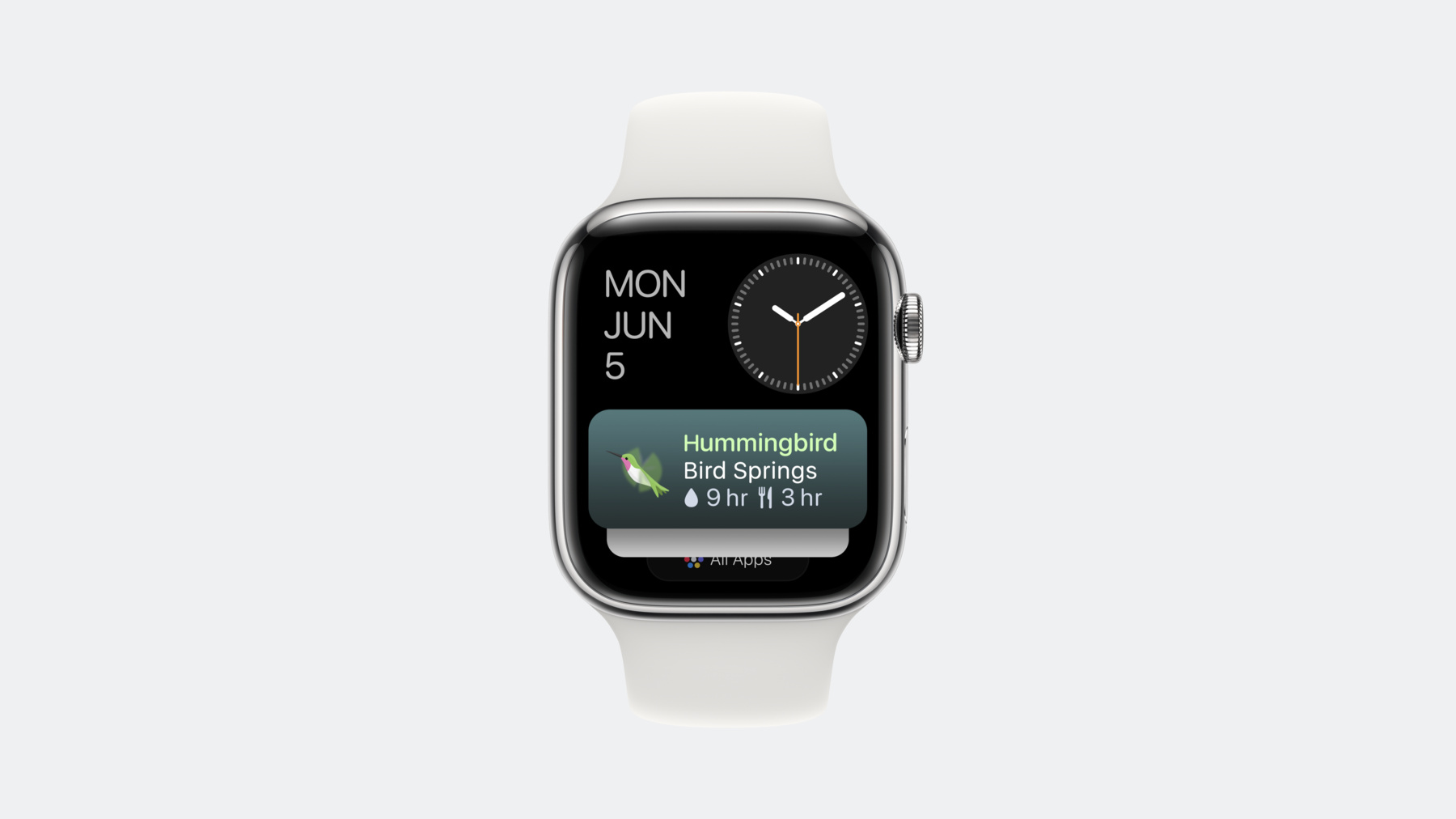
    Follow along as we build a widget for the Smart Stack on watchOS 10 using the latest SwiftUI and WidgetKit APIs. Learn tips, techniques, and best practices for creating widgets that show relevant information on Apple Watch.

    Capítulos

    • 0:58 - Get started
    • 2:03 - Configure the widget
    • 3:51 - Set up the timeline
    • 10:16 - Build widget views
    • 16:27 - Finish building timeline
    • 19:58 - Provide relevant intents

    Recursos

    • Updating your app and widgets for watchOS 10
    • WidgetKit
    • Human Interface Guidelines: Widgets
      • Vídeo HD
      • Vídeo SD

    Vídeos relacionados

    WWDC23

    • Design widgets for the Smart Stack on Apple Watch
  • Buscar neste vídeo...
    • 4:15 - TimelineEntry

      struct SimpleEntry: TimelineEntry {
          var date: Date
          var configuration: ConfigurationAppIntent
          var backyard: Backyard
          
          var bird: Bird? {
              return backyard.visitorEventForDate(date: date)?.bird
          }
          
          var waterDuration: Duration {
              return Duration.seconds(abs(self.date.distance(to: self.backyard.waterRefillDate)))
          }
      
          var foodDuration: Duration {
              return Duration.seconds(abs(self.date.distance(to: self.backyard.foodRefillDate)))
          }
      
          var relevance: TimelineEntryRelevance? {
              if let visitor = backyard.visitorEventForDate(date: date) {
                  return TimelineEntryRelevance(score: 10, duration: visitor.endDate.timeIntervalSince(date))
              }
              return TimelineEntryRelevance(score: 0)
          }
      }
    • 7:50 - placeholder function

      func placeholder(in context: Context) -> SimpleEntry {
        return SimpleEntry(date: Date(), configuration: ConfigurationAppIntent(), backyard: Backyard.anyBackyard(modelContext: modelContext))
      }
    • 8:15 - snapshot function

      func snapshot(for configuration: ConfigurationAppIntent, in context: Context) async -> SimpleEntry {
        if let backyard = Backyard.backyardForID(modelContext: modelContext, backyardID: configuration.backyardID) {
          if let event = backyard.visitorEvents.first {
            return SimpleEntry(date: event.startDate, configuration: configuration, backyard: backyard)
          } else {
            return SimpleEntry(date: Date(), configuration: configuration, backyard: backyard)
          }
        }
      
        let yard = Backyard.anyBackyard(modelContext: modelContext)
        return SimpleEntry(date: Date(), configuration: ConfigurationAppIntent(), backyard: yard)
      }
    • 10:26 - Widget Entry View

      struct BackyardBirdsWidgetEntryView: View {
          @Environment(\.widgetFamily) private var family
          var entry: SimpleEntry
          
          var body: some View {
              switch family {
              case .accessoryRectangular:
                  RectangularBackyardView(entry: entry)
              default:
                  Text(entry.date, style: .time)
              }
          }
      }
    • 11:23 - Backyard Rectangular View

      struct RectangularBackyardView: View {
          var entry: SimpleEntry
          
          var body: some View {
              HStack {
                  if let bird = entry.bird {
                      ComposedBird(bird: bird)
                          .scaledToFit()
                          .widgetAccentable()
                          .frame(width: 50, height: 50)
                      VStack(alignment: .leading) {
                          Text(bird.speciesName)
                              .font(.headline)
                              .foregroundStyle(bird.colors.wing.color)
                              .widgetAccentable()
                              .minimumScaleFactor(0.75)
                          Text(entry.backyard.name)
                              .minimumScaleFactor(0.75)
                          HStack {
                              Image(systemName: "drop.fill")
                              Text(entry.waterDuration, format: remainingHoursFormatter)
                              Image(systemName: "fork.knife")
                              Text(entry.foodDuration, format: remainingHoursFormatter)
                          }
                          .imageScale(.small)
                          .minimumScaleFactor(0.75)
                          .foregroundStyle(.secondary)
                      }
                      .frame(maxWidth: .infinity, alignment: .leading)
                  } else {
                      Image(.fountainFill)
                          .foregroundStyle(entry.backyard.backgroundColor)
                          .imageScale(.large)
                          .scaledToFit()
                          .widgetAccentable()
                          .frame(width: 50, height: 50)
                      VStack(alignment: .leading) {
                          Text(entry.backyard.name)
                              .font(.headline)
                              .foregroundStyle(entry.backyard.backgroundColor)
                              .widgetAccentable()
                              .minimumScaleFactor(0.75)
                          HStack {
                              Image(systemName: "drop.fill")
                              Text(entry.waterDuration, format: remainingHoursFormatter)
                              Image(systemName: "fork.knife")
                              Text(entry.foodDuration, format: remainingHoursFormatter)
                          }
                          .imageScale(.small)
                          .minimumScaleFactor(0.75)
                          Text("\(entry.backyard.historicalEvents.count) visitors")
                              .minimumScaleFactor(0.75)
                              .foregroundStyle(.secondary)
                      }
                      .frame(maxWidth: .infinity, alignment: .leading)
                  }
              }
              .containerBackground(entry.backyard.backgroundColor.gradient, for: .widget)
          }
      }
    • 16:30 - Timeline Function

      func timeline(for configuration: ConfigurationAppIntent, in context: Context) async -> Timeline<SimpleEntry> {
        var entries: [SimpleEntry] = []
      
        if let backyard = Backyard.backyardForID(modelContext: modelContext, backyardID: configuration.backyardID) {
          for event in backyard.visitorEvents {
            let entry = SimpleEntry(date: event.startDate, configuration: configuration, backyard: backyard)
            entries.append(entry)
            let afterEntry = SimpleEntry(date: event.endDate, configuration: configuration, backyard: backyard)
            entries.append(afterEntry)
          }
        }
        return Timeline(entries: entries, policy: .atEnd)
      }
    • 18:35 - Recommendations Function

      func recommendations() -> [AppIntentRecommendation<ConfigurationAppIntent>] {
        var recs = [AppIntentRecommendation<ConfigurationAppIntent>]()
      
        for backyard in Backyard.allBackyards(modelContext: modelContext) {
          let configIntent = ConfigurationAppIntent()
          configIntent.backyardID = backyard.id.uuidString
          let gardenRecommendation = AppIntentRecommendation(intent: configIntent, description: backyard.name)
          recs.append(gardenRecommendation)
        }
      
        return recs
      }
    • 20:47 - Relevant Intents Function

      func updateBackyardRelevantIntents() async {
          let modelContext = ModelContext(DataGeneration.container)
          var relevantIntents = [RelevantIntent]()
          
          for backyard in Backyard.allBackyards(modelContext: modelContext) {
      
              let configIntent = ConfigurationAppIntent()
              configIntent.backyardID = backyard.id.uuidString
              let relevantFoodDateContext = RelevantContext.date(from: backyard.lowSuppliesDate(for: .food), to: backyard.expectedEmptyDate(for: .food))
              let relevantFoodIntent = RelevantIntent(configIntent, widgetKind: "BackyardVisitorsWidget", relevance: relevantFoodDateContext)
              relevantIntents.append(relevantFoodIntent)
      
              let relevantWaterDateContext = RelevantContext.date(from: backyard.lowSuppliesDate(for: .water), to: backyard.expectedEmptyDate(for: .water))
              let relevantWaterIntent = RelevantIntent(configIntent, widgetKind: "BackyardVisitorsWidget", relevance: relevantWaterDateContext)
              relevantIntents.append(relevantWaterIntent)
          }
      
          do {
              try await RelevantIntentManager.shared.updateRelevantIntents(relevantIntents)
          } catch { }
      }
    • 23:00 - Update Relevant Intents

      Task {
        await updateBackyardRelevantIntents()
        WidgetCenter.shared.reloadTimelines(ofKind: "BackyardVisitorsWidget")
      }

Developer Footer

  • Vídeos
  • WWDC23
  • Build widgets for the Smart Stack on Apple Watch
  • Open Menu Close Menu
    • iOS
    • iPadOS
    • macOS
    • tvOS
    • visionOS
    • watchOS
    • App Store
    Open Menu Close Menu
    • Swift
    • SwiftUI
    • Swift Playground
    • TestFlight
    • Xcode
    • Xcode Cloud
    • Icon Composer
    • SF Symbols
    Open Menu Close Menu
    • Accessibility
    • Accessories
    • Apple Intelligence
    • Audio & Video
    • Augmented Reality
    • Business
    • Design
    • Distribution
    • Education
    • Games
    • Health & Fitness
    • In-App Purchase
    • Localization
    • Maps & Location
    • Machine Learning & AI
    • Security
    • Safari & Web
    Open Menu Close Menu
    • Documentation
    • Downloads
    • Sample Code
    • Videos
    Open Menu Close Menu
    • Help Guides & Articles
    • Contact Us
    • Forums
    • Feedback & Bug Reporting
    • System Status
    Open Menu Close Menu
    • Apple Developer
    • App Store Connect
    • Certificates, IDs, & Profiles
    • Feedback Assistant
    Open Menu Close Menu
    • Apple Developer Program
    • Apple Developer Enterprise Program
    • App Store Small Business Program
    • MFi Program
    • Mini Apps Partner Program
    • News Partner Program
    • Video Partner Program
    • Security Bounty Program
    • Security Research Device Program
    Open Menu Close Menu
    • Meet with Apple
    • Apple Developer Centers
    • App Store Awards
    • Apple Design Awards
    • Apple Developer Academies
    • WWDC
    Read the latest news.
    Get the Apple Developer app.
    Copyright © 2026 Apple Inc. All rights reserved.
    Terms of Use Privacy Policy Agreements and Guidelines