

-
Enhance ad experiences with HLS interstitials
Explore how HLS Interstitials can help you seamlessly insert advertisements into your HLS content. We'll also show you how to use integrated timeline to tune your UI experience and build SharePlay for interstitials.
Capítulos
- 0:00 - Introduction
- 0:45 - Interstitals recap
- 1:56 - Integrated timeline
- 10:40 - SharePlay with interstitials
Recursos
- Providing an integrated view of your timeline when playing HLS interstitials
- Forum: Media Technologies
Vídeos relacionados
WWDC21
-
Buscar neste vídeo...
-
-
3:55 - Create a point interstitial event
// Creating a single point interstitial event let pointEvent = AVPlayerInterstitialEvent(primaryItem: playerItem, time: ten) pointEvent.timelineOccupancy = .singlePoint -
4:07 - Create a fill interstitial event
// Creating a fill interstitial event let fillEvent = AVPlayerInterstitialEvent(primaryItem: playerItem, time: ten) fillEvent.timelineOccupancy = .fill fillEvent.plannedDuration = CMTime(value: 15, timescale: 1) -
4:32 - Create fill interstitial supplementing primary
// Creating a fill interstitial event supplementing primary let fillEvent2 = AVPlayerInterstitialEvent(primaryItem: playerItem, time: ten) fillEvent2.supplementsPrimaryContent = true fillEvent2.timelineOccupancy = .fill fillEvent2.plannedDuration = CMTime(value: 15, timescale: 1) -
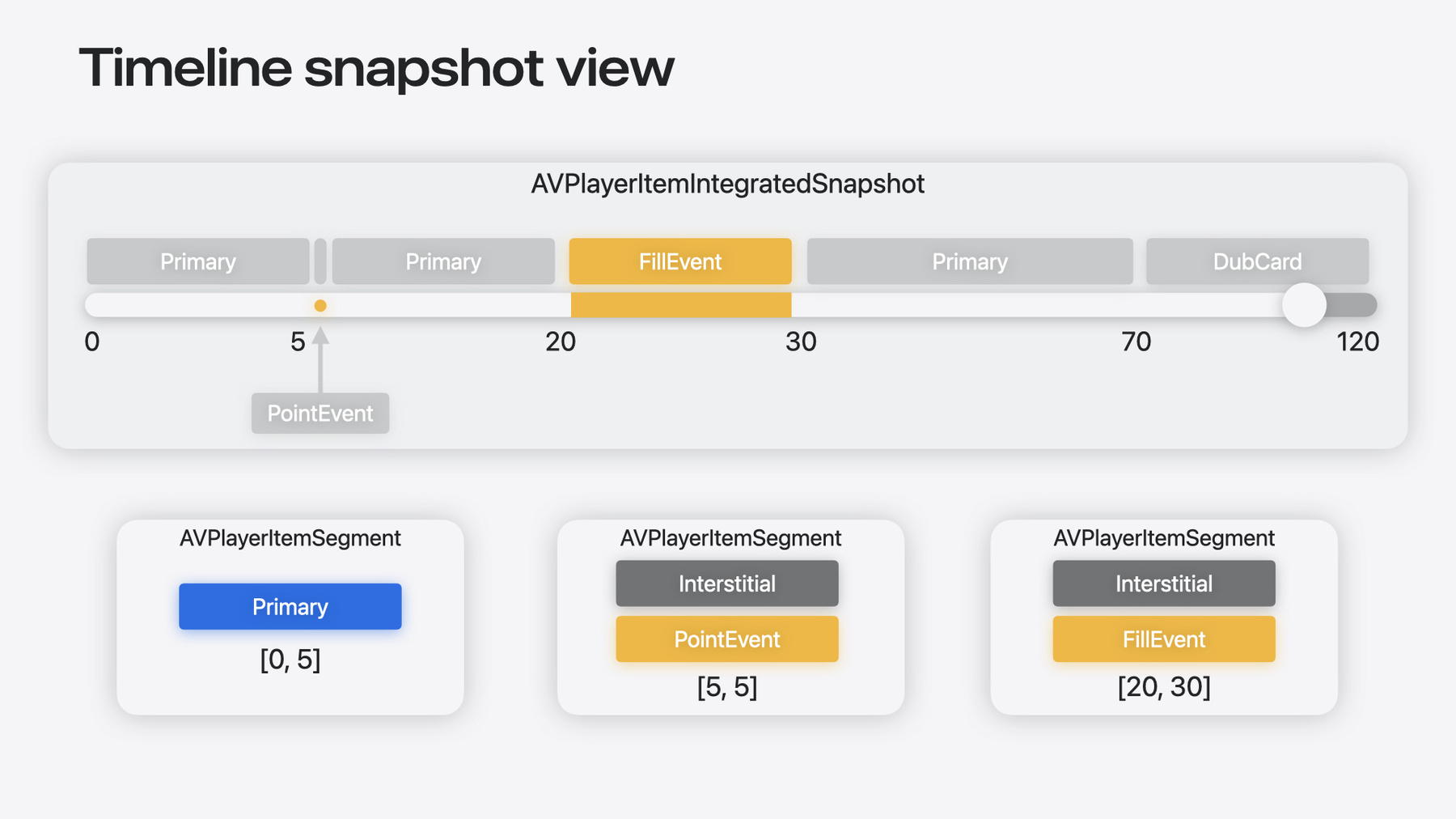
7:14 - Draw simple transport bar with integrated timeline
// Create AVPlayerItem and obtain its integrated timeline let item = AVPlayerItem(url: ...) let integratedTimeline = item.integratedTimeline // Any time we need a new representation of the timeline state, we can request for a snapshot let snapshot = integratedTimeline.currentSnapshot // Using our snapshot, we can build a simple transport bar drawUISlider(start: .zero, duration: snapshot.duration, currentPosition: snapshot.currentTime) // Draw single-point interstitials on the transport bar let pointSegments = snapshot.segments.filter { segment in segment.segmentType == .interstitial && segment.interstitialEvent?.timelineOccupancy == .singlePoint } for segment in pointSegments { drawPoint(position: segment.timeMapping.target.start) } // Draw range interstitials on the transport bar let highlightFillSegments = snapshot.segments.filter { segment in if (segment.segmentType == .interstitial) { if let interstitialEvent = segment.interstitialEvent { return interstitialEvent.timelineOccupancy == .fill && !interstitialEvent.supplementsPrimaryContent } } return false } for segment in highlightFillSegments { let range = segment.timeMapping.target highlightRegion(start: range.start, end: range.end) } -
8:26 - Listen to snapshotsOutOfSyncNotification to update our UI
// Listen to integrated timeline notifications to update our logic for await _ in NotificationCenter.default.notifications(named: AVPlayerItemIntegratedTimeline.snapshotsOutOfSyncNotification, object: integratedTimeline) { let reason = _.userInfo![AVPlayerItemIntegratedTimeline.snapshotsOutOfSyncReasonKey] as! AVPlayerIntegratedTimelineSnapshotsOutOfSyncReason switch(reason) { case .segmentsChanged: redrawTransportBar(snapshot: integratedTimeline.currentSnapshot) case .currentSegmentChanged: updatePlayerControls(snapshot: integratedTimeline.currentSnapshot) } } -
11:42 - Set ContentMayVary to false for Interstitial SharePlay support
// Set contentMayVary to false for SharePlay support
let event = AVPlayerInterstitialEvent(primaryItem: playerItem, time: ten)
event.contentMayVary = false
event.timelineOccupancy = .fill
event.plannedDuration = CMTime(value: 15, timescale: 1)
event.supplementsPrimaryContent = truensert code snippet.
-