

View in English

  • Apple Developer
    • Get Started

    Explore Get Started

    • Overview
    • Learn
    • Apple Developer Program

    Stay Updated

    • Latest News
    • Hello Developer
    • Platforms

    Explore Platforms

    • Apple Platforms
    • iOS
    • iPadOS
    • macOS
    • tvOS
    • visionOS
    • watchOS
    • App Store

    Featured

    • Design
    • Distribution
    • Games
    • Accessories
    • Web
    • Home
    • CarPlay
    • Technologies

    Explore Technologies

    • Overview
    • Xcode
    • Swift
    • SwiftUI

    Featured

    • Accessibility
    • App Intents
    • Apple Intelligence
    • Games
    • Machine Learning & AI
    • Security
    • Xcode Cloud
    • Community

    Explore Community

    • Overview
    • Meet with Apple events
    • Community-driven events
    • Developer Forums
    • Open Source

    Featured

    • WWDC
    • Swift Student Challenge
    • Developer Stories
    • App Store Awards
    • Apple Design Awards
    • Apple Developer Centers
    • Documentation

    Explore Documentation

    • Documentation Library
    • Technology Overviews
    • Sample Code
    • Human Interface Guidelines
    • Videos

    Release Notes

    • Featured Updates
    • iOS
    • iPadOS
    • macOS
    • watchOS
    • visionOS
    • tvOS
    • Xcode
    • Downloads

    Explore Downloads

    • All Downloads
    • Operating Systems
    • Applications
    • Design Resources

    Featured

    • Xcode
    • TestFlight
    • Fonts
    • SF Symbols
    • Icon Composer
    • Support

    Explore Support

    • Overview
    • Help Guides
    • Developer Forums
    • Feedback Assistant
    • Contact Us

    Featured

    • Account Help
    • App Review Guidelines
    • App Store Connect Help
    • Upcoming Requirements
    • Agreements and Guidelines
    • System Status
  • Quick Links

    • Events
    • News
    • Forums
    • Sample Code
    • Videos
 

Vídeos

Abrir menu Fechar menu
  • Coleções
  • Todos os vídeos
  • Sobre

Mais vídeos

  • Sobre
  • Código
  • Build compelling spatial photo and video experiences

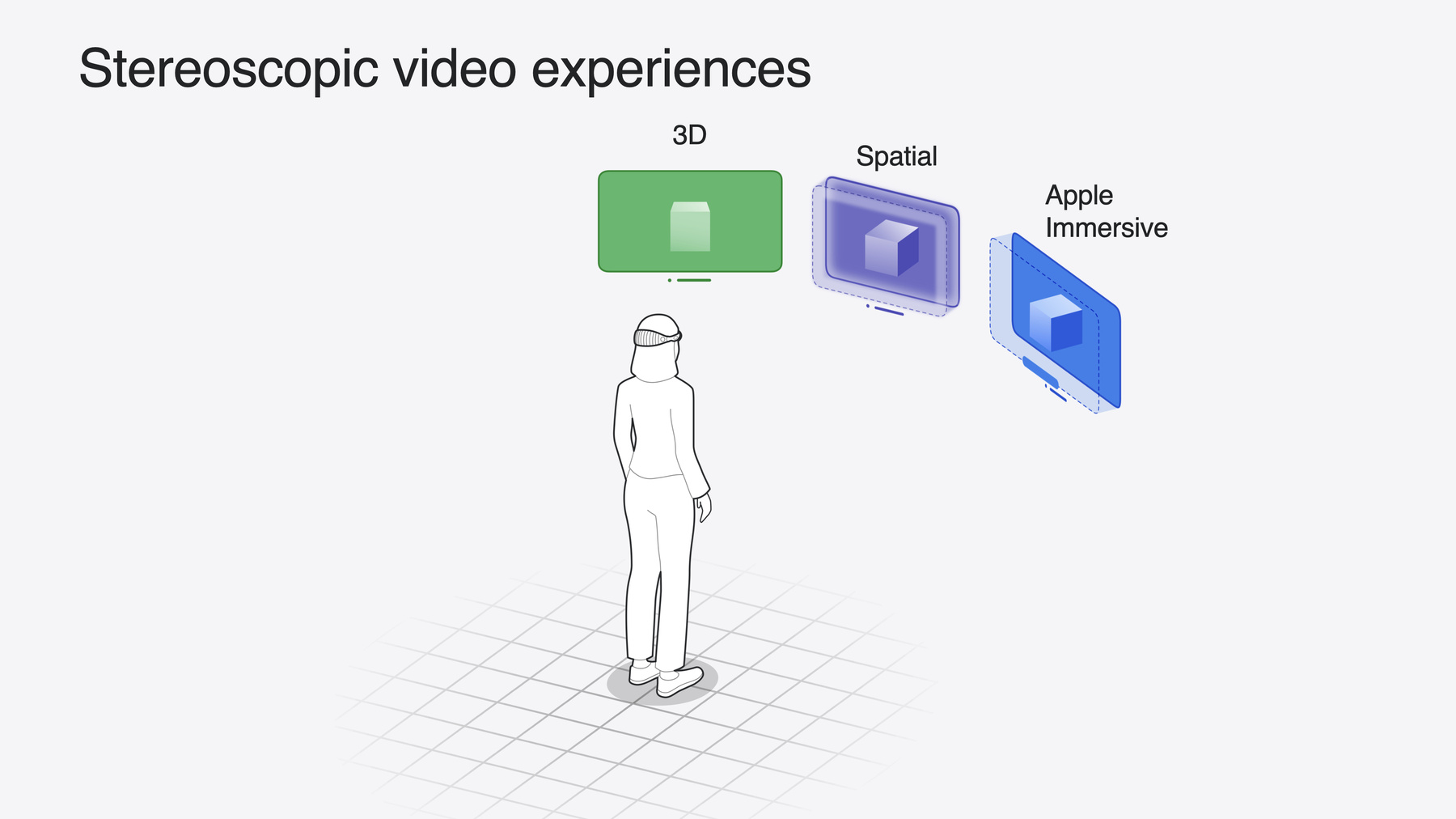
    Learn how to adopt spatial photos and videos in your apps. Explore the different types of stereoscopic media and find out how to capture spatial videos in your iOS app on iPhone 15 Pro. Discover the various ways to detect and present spatial media, including the new QuickLook Preview Application API in visionOS. And take a deep dive into the metadata and stereo concepts that make a photo or video spatial.

    Capítulos

    • 0:00 - Introduction
    • 1:07 - Types of stereoscopic experiences
    • 4:13 - Tour of the new APIs
    • 13:14 - Deep dive into spatial media formats

    Recursos

    • Creating spatial photos and videos with spatial metadata
    • Writing spatial photos
    • Converting side-by-side 3D video to multiview HEVC and spatial video
    • Forum: Spatial Computing
    • AVCam: Building a camera app
      • Vídeo HD
      • Vídeo SD

    Vídeos relacionados

    WWDC24

    • Bring your iOS or iPadOS game to visionOS
    • Enhance the immersion of media viewing in custom environments
    • Optimize for the spatial web
    • What’s new in Quick Look for visionOS

    WWDC23

    • Deliver video content for spatial experiences
  • Buscar neste vídeo...
    • 6:19 - Spatial video capture on iPhone 15 Pro

      class CaptureManager {
          var session: AVCaptureSession!
          var input: AVCaptureDeviceInput!
          var output: AVCaptureMovieFileOutput!
      
          func setupSession() throws -> Bool {
              session = AVCaptureSession()
              session.beginConfiguration()
      
              guard let videoDevice = AVCaptureDevice.default(
                  .builtInDualWideCamera, for: .video, position: .back
              ) else { return false }
      
              var foundSpatialFormat = false
              for format in videoDevice.formats {
                  if format.isSpatialVideoCaptureSupported {
                      try videoDevice.lockForConfiguration()
                      videoDevice.activeFormat = format
                      videoDevice.unlockForConfiguration()
                      foundSpatialFormat = true
                      break
                  }
              }
              guard foundSpatialFormat else { return false }
      
              let videoDeviceInput = try AVCaptureDeviceInput(device: videoDevice)
              guard session.canAddInput(videoDeviceInput) else { return false }
              session.addInput(videoDeviceInput)
              input = videoDeviceInput
      
              let movieFileOutput = AVCaptureMovieFileOutput()
              guard session.canAddOutput(movieFileOutput) else { return false }
              session.addOutput(movieFileOutput)
              output = movieFileOutput
      
              guard let connection = output.connection(with: .video) else { return false }
              guard connection.isVideoStabilizationSupported else { return false }
              connection.preferredVideoStabilizationMode = .cinematicExtendedEnhanced
      
              guard movieFileOutput.isSpatialVideoCaptureSupported else { return false }
              movieFileOutput.isSpatialVideoCaptureEnabled = true
      
              session.commitConfiguration()
              session.startRunning()
              return true
          }
      
      }
    • 9:13 - Observing spatial capture discomfort reasons

      let observation = videoDevice.observe(\.spatialCaptureDiscomfortReasons) { (device, change) in
          guard let newValue = change.newValue else { return }
          if newValue.contains(.subjectTooClose) {
              // Guide user to move back
          }
          if newValue.contains(.notEnoughLight) {
              // Guide user to find a brighter environment
          }
      }
    • 9:58 - PhotosPicker

      import SwiftUI
      import PhotosUI
      
      struct PickerView: View {
          @State var selectedItem: PhotosPickerItem?
          var body: some View {
              PhotosPicker(selection: $selectedItem, matching: .spatialMedia) {
                  Text("Choose a spatial photo or video")
              }
          }
      }
    • 10:14 - PhotoKit - all spatial assets

      import Photos
      
      func fetchSpatialAssets() {
          let fetchOptions = PHFetchOptions()
          fetchOptions.predicate = NSPredicate(
              format: "(mediaSubtypes & %d) != 0",
              argumentArray: [PHAssetMediaSubtype.spatialMedia.rawValue]
          )
          fetchResult = PHAsset.fetchAssets(with: fetchOptions)
      }
    • 10:36 - AVAssetPlaybackAssistant

      import AVFoundation
      
      extension AVURLAsset {
          func isSpatialVideo() async -> Bool {
              let assistant = AVAssetPlaybackAssistant(asset: self)
              let options = await assistant.playbackConfigurationOptions
              return options.contains(.spatialVideo)
          }
      }

Developer Footer

  • Vídeos
  • WWDC24
  • Build compelling spatial photo and video experiences
  • Open Menu Close Menu
    • iOS
    • iPadOS
    • macOS
    • tvOS
    • visionOS
    • watchOS
    • App Store
    Open Menu Close Menu
    • Swift
    • SwiftUI
    • Swift Playground
    • TestFlight
    • Xcode
    • Xcode Cloud
    • Icon Composer
    • SF Symbols
    Open Menu Close Menu
    • Accessibility
    • Accessories
    • Apple Intelligence
    • Audio & Video
    • Augmented Reality
    • Business
    • Design
    • Distribution
    • Education
    • Games
    • Health & Fitness
    • In-App Purchase
    • Localization
    • Maps & Location
    • Machine Learning & AI
    • Security
    • Safari & Web
    Open Menu Close Menu
    • Documentation
    • Downloads
    • Sample Code
    • Videos
    Open Menu Close Menu
    • Help Guides & Articles
    • Contact Us
    • Forums
    • Feedback & Bug Reporting
    • System Status
    Open Menu Close Menu
    • Apple Developer
    • App Store Connect
    • Certificates, IDs, & Profiles
    • Feedback Assistant
    Open Menu Close Menu
    • Apple Developer Program
    • Apple Developer Enterprise Program
    • App Store Small Business Program
    • MFi Program
    • Mini Apps Partner Program
    • News Partner Program
    • Video Partner Program
    • Security Bounty Program
    • Security Research Device Program
    Open Menu Close Menu
    • Meet with Apple
    • Apple Developer Centers
    • App Store Awards
    • Apple Design Awards
    • Apple Developer Academies
    • WWDC
    Read the latest news.
    Get the Apple Developer app.
    Copyright © 2026 Apple Inc. All rights reserved.
    Terms of Use Privacy Policy Agreements and Guidelines