

View in English

  • Apple Developer
    • Get Started

    Explore Get Started

    • Overview
    • Learn
    • Apple Developer Program

    Stay Updated

    • Latest News
    • Hello Developer
    • Platforms

    Explore Platforms

    • Apple Platforms
    • iOS
    • iPadOS
    • macOS
    • tvOS
    • visionOS
    • watchOS
    • App Store

    Featured

    • Design
    • Distribution
    • Games
    • Accessories
    • Web
    • Home
    • CarPlay
    • Technologies

    Explore Technologies

    • Overview
    • Xcode
    • Swift
    • SwiftUI

    Featured

    • Accessibility
    • App Intents
    • Apple Intelligence
    • Games
    • Machine Learning & AI
    • Security
    • Xcode Cloud
    • Community

    Explore Community

    • Overview
    • Meet with Apple events
    • Community-driven events
    • Developer Forums
    • Open Source

    Featured

    • WWDC
    • Swift Student Challenge
    • Developer Stories
    • App Store Awards
    • Apple Design Awards
    • Apple Developer Centers
    • Documentation

    Explore Documentation

    • Documentation Library
    • Technology Overviews
    • Sample Code
    • Human Interface Guidelines
    • Videos

    Release Notes

    • Featured Updates
    • iOS
    • iPadOS
    • macOS
    • watchOS
    • visionOS
    • tvOS
    • Xcode
    • Downloads

    Explore Downloads

    • All Downloads
    • Operating Systems
    • Applications
    • Design Resources

    Featured

    • Xcode
    • TestFlight
    • Fonts
    • SF Symbols
    • Icon Composer
    • Support

    Explore Support

    • Overview
    • Help Guides
    • Developer Forums
    • Feedback Assistant
    • Contact Us

    Featured

    • Account Help
    • App Review Guidelines
    • App Store Connect Help
    • Upcoming Requirements
    • Agreements and Guidelines
    • System Status
  • Quick Links

    • Events
    • News
    • Forums
    • Sample Code
    • Videos
 

Vídeos

Abrir menu Fechar menu
  • Coleções
  • Todos os vídeos
  • Sobre

Mais vídeos

  • Sobre
  • Código
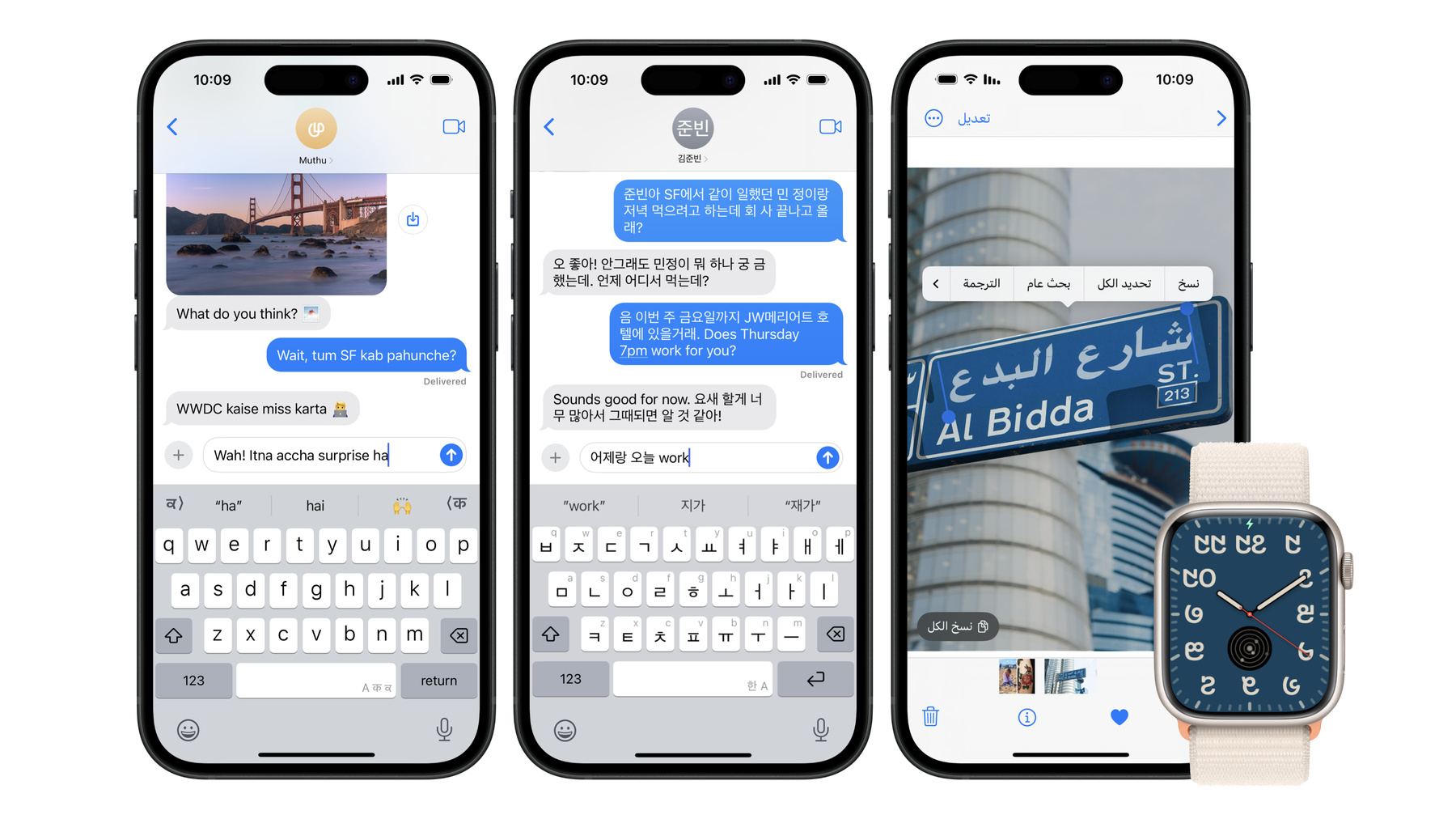
  • Build multilingual-ready apps

    Ensure your app works properly and effectively for multilingual users. Learn best practices for text input, display, search, and formatting. Get details on typing in multiple languages without switching between keyboards. And find out how the latest advances in the String Catalog can make localization even easier.

    Capítulos

    • 0:00 - Introduction
    • 2:24 - Input
    • 8:08 - Display
    • 11:01 - Localization
    • 16:07 - Wrap-up

    Recursos

    • Forum: UI Frameworks
    • Expanding Your App to New Markets
      • Vídeo HD
      • Vídeo SD

    Vídeos relacionados

    WWDC24

    • What’s new in SF Symbols 6

    WWDC23

    • Discover String Catalogs
    • Unlock the power of grammatical agreement

    WWDC21

    • Meet TextKit 2
    • Your guide to keyboard layout

    WWDC20

    • Formatters: Make data human-friendly
  • Buscar neste vídeo...
    • 3:18 - Specify textInputContextIdentifier

      override var textInputContextIdentifier: String? {
          uniqueID
      }
    • 3:41 - Place a view directly above the keyboard

      textView.inputAccessoryView = viewAboveKeyboard
    • 4:00 - Use keyboardLayoutGuide to adapt to keyboard

      view.keyboardLayoutGuide.topAnchor.constraint(equalToSystemSpacingBelow: textView.bottomAnchor, multiplier: 1.0).isActive = true
    • 4:42 - Check for marked text before modifying

      if textView.markedTextRange.empty {
          // Perform actions involving editing text
      }
    • 5:58 - Use localizedStandardRange when searching

      let range = text.localizedStandardRange(of: search)
    • 7:24 - Use color differences to highlight text

      attributedString[range].foregroundColor = highlightColor
    • 9:39 - Text Styles

      // Text Styles
      
      // SwiftUI
      Text("Hello, world!") // uses .body Text Style by default
      Text("Hello, world!").font(.title)
      
      // UIKit
      let label = UILabel()
      label.text = "Hello, world!"
      label.font = UIFont.preferredFont(forTextStyle: .body)
      
      // AppKit
      let textField = NSTextField(labelWithString: "Hello, world!")
      textField.font = NSFont.preferredFont(forTextStyle: .body)
      
      // Keep clipsToBounds off
      clipsToBounds = false
    • 10:03 - Typesetting language

      // Typesetting language
      
      // SwiftUI
      Text(verbatim: "Hello, world!").typesettingLanguage(.init(languageCode: .english))
      
      // UIKit
      let label = UILabel()
      label.text = "Hello, world!"
      label.traitOverrides.typesettingLanguage = Locale.Language(languageCode: .english)
    • 10:29 - Formatting names

      // Formatting names
      
      let nameComponents = PersonNameComponents
        (givenName: "瑗珺", familyName: "汪", nickname: "珺珺")
      
      // Short Name (respects settings like “Prefer Nicknames”)
      let shortName = 
 nameComponents.formatted(.name(style: .short)) // 珺珺
      
      // Abbreviated Name (can be used for monograms)
      let monogram = 
 nameComponents.formatted(.name(style: .abbreviated)) // 汪
    • 12:20 - Examples of personalizing text

      "^[Nuestro %@](inflect: true) está ^[hecho](agreeWithArgument: 1) de %@."
      "अगर आप पहुँच नहीं ^[पाते हैं](inflect: true)"
      "예: ‘^[%@을](inflect: true) 켤 때’"
    • 13:43 - Format numbers using Text

      Text("\(numberOfDays)-day forecast")
    • 14:21 - Format numbers using AttributedString

      AttributedString(localized: "10-day forecast")
      AttributedString(localized: "0.5× zoom")
    • 15:23 - Launch to your app’s settings

      // Launch to your app’s settings
      if let url =
      URL(string: UIApplication.openSettingsURLString) {
         await UIApplication.shared.open(url)
      }

Developer Footer

  • Vídeos
  • WWDC24
  • Build multilingual-ready apps
  • Open Menu Close Menu
    • iOS
    • iPadOS
    • macOS
    • tvOS
    • visionOS
    • watchOS
    • App Store
    Open Menu Close Menu
    • Swift
    • SwiftUI
    • Swift Playground
    • TestFlight
    • Xcode
    • Xcode Cloud
    • Icon Composer
    • SF Symbols
    Open Menu Close Menu
    • Accessibility
    • Accessories
    • Apple Intelligence
    • Audio & Video
    • Augmented Reality
    • Business
    • Design
    • Distribution
    • Education
    • Games
    • Health & Fitness
    • In-App Purchase
    • Localization
    • Maps & Location
    • Machine Learning & AI
    • Security
    • Safari & Web
    Open Menu Close Menu
    • Documentation
    • Downloads
    • Sample Code
    • Videos
    Open Menu Close Menu
    • Help Guides & Articles
    • Contact Us
    • Forums
    • Feedback & Bug Reporting
    • System Status
    Open Menu Close Menu
    • Apple Developer
    • App Store Connect
    • Certificates, IDs, & Profiles
    • Feedback Assistant
    Open Menu Close Menu
    • Apple Developer Program
    • Apple Developer Enterprise Program
    • App Store Small Business Program
    • MFi Program
    • Mini Apps Partner Program
    • News Partner Program
    • Video Partner Program
    • Security Bounty Program
    • Security Research Device Program
    Open Menu Close Menu
    • Meet with Apple
    • Apple Developer Centers
    • App Store Awards
    • Apple Design Awards
    • Apple Developer Academies
    • WWDC
    Read the latest news.
    Get the Apple Developer app.
    Copyright © 2026 Apple Inc. All rights reserved.
    Terms of Use Privacy Policy Agreements and Guidelines