

View in English

  • Apple Developer
    • Get Started

    Explore Get Started

    • Overview
    • Learn
    • Apple Developer Program

    Stay Updated

    • Latest News
    • Hello Developer
    • Platforms

    Explore Platforms

    • Apple Platforms
    • iOS
    • iPadOS
    • macOS
    • tvOS
    • visionOS
    • watchOS
    • App Store

    Featured

    • Design
    • Distribution
    • Games
    • Accessories
    • Web
    • Home
    • CarPlay
    • Technologies

    Explore Technologies

    • Overview
    • Xcode
    • Swift
    • SwiftUI

    Featured

    • Accessibility
    • App Intents
    • Apple Intelligence
    • Games
    • Machine Learning & AI
    • Security
    • Xcode Cloud
    • Community

    Explore Community

    • Overview
    • Meet with Apple events
    • Community-driven events
    • Developer Forums
    • Open Source

    Featured

    • WWDC
    • Swift Student Challenge
    • Developer Stories
    • App Store Awards
    • Apple Design Awards
    • Apple Developer Centers
    • Documentation

    Explore Documentation

    • Documentation Library
    • Technology Overviews
    • Sample Code
    • Human Interface Guidelines
    • Videos

    Release Notes

    • Featured Updates
    • iOS
    • iPadOS
    • macOS
    • watchOS
    • visionOS
    • tvOS
    • Xcode
    • Downloads

    Explore Downloads

    • All Downloads
    • Operating Systems
    • Applications
    • Design Resources

    Featured

    • Xcode
    • TestFlight
    • Fonts
    • SF Symbols
    • Icon Composer
    • Support

    Explore Support

    • Overview
    • Help Guides
    • Developer Forums
    • Feedback Assistant
    • Contact Us

    Featured

    • Account Help
    • App Review Guidelines
    • App Store Connect Help
    • Upcoming Requirements
    • Agreements and Guidelines
    • System Status
  • Quick Links

    • Events
    • News
    • Forums
    • Sample Code
    • Videos
 

Vídeos

Abrir menu Fechar menu
  • Coleções
  • Todos os vídeos
  • Sobre

Mais vídeos

  • Sobre
  • Código
  • Meet AccessorySetupKit

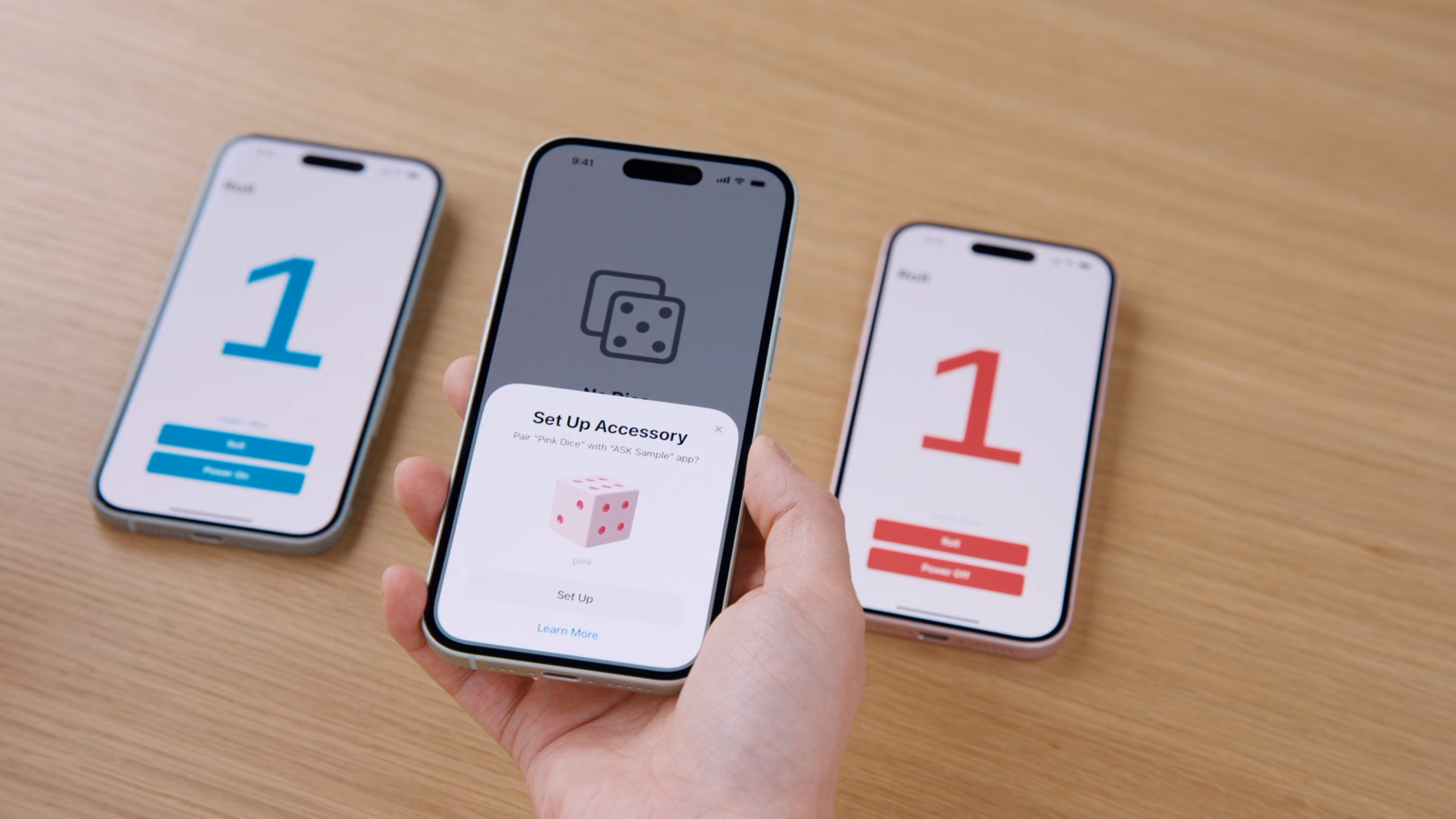
    Elevate your accessory setup experience with AccessorySetupKit. Display a beautiful pairing dialog with an image of your Bluetooth or Wi-Fi accessory — no trip to the Settings app required. Discover how to improve privacy by pairing only your app with an accessory. And learn how you can migrate existing accessories so they can be managed by AccessorySetupKit.

    Recursos

    • Setting up and authorizing a Bluetooth accessory
    • AccessorySetupKit
    • Forum: Privacy & Security
      • Vídeo HD
      • Vídeo SD
  • Buscar neste vídeo...
    • 6:02 - Register event handler

      import AccessorySetupKit
      
      // Create a session
      var session = ASAccessorySession()
      
      // Activate session with event handler
      session.activate(on: DispatchQueue.main, eventHandler: handleSessionEvent(event:))
      
      // Handle event
      func handleSessionEvent(event: ASAccessoryEvent) {  
          switch event.eventType {
          case .activated:
              print("Session is activated and ready to use")
              print(session.accessories)
          default:
              print("Received event type \(event.eventType)")
          }
      }
    • 7:23 - Create picker display items

      // Create descriptor for pink dice
      let pinkDescriptor = ASDiscoveryDescriptor()
      pinkDescriptor.bluetoothServiceUUID = pinkUUID
      // Create descriptor for blue dice
      let blueDescriptor = ASDiscoveryDescriptor()
      blueDescriptor.bluetoothServiceUUID = blueUUID
      
      // Create picker display items
      let pinkDisplayItem = ASPickerDisplayItem(
          name: "Pink Dice",
          productImage: UIImage(named: "pink")!,
          descriptor: pinkDescriptor
      )
      let blueDisplayItem = ASPickerDisplayItem(
          name: "Blue Dice",
          productImage: UIImage(named: "blue")!,
          descriptor: blueDescriptor
      )
    • 8:10 - Show picker

      // Invoke accessory picker
      Button {
          session.showPicker(for: [pinkDisplayItem, blueDisplayItem]) { error in
              if let error {
                  // Handle error
              }
          }
      } label: {
          Text("Add Dice")
      }
    • 9:26 - Handle events

      // Handle event
      func handleSessionEvent(event: ASAccessoryEvent) {  
          switch event.eventType {
      
          case .accessoryAdded:
              let newDice: ASAccessory = event.accessory!
      
          case .accessoryChanged:
              print("Accessory properties changed")
      
          case .accessoryRemoved:
              print("Accessory removed from system")
      
          default:
              print("Received event with type: \(event.eventType)")
          }
      }
    • 10:22 - Communicate with accessory

      // Connect to accessory using CoreBluetooth
      let central = CBCentralManager(delegate: self, queue: nil)
      
      func centralManagerDidUpdateState(_ central: CBCentralManager) {
          switch central.state {
          case .poweredOn:
             // state will only be updated to poweredOn when you have paired accessories
              let peripheral = central.retrievePeripherals(withIdentifiers: [newDice.bluetoothIdentifier]).first
              central.connect(peripheral)
          default:
              print("Received event type \(event.eventType)")
          }
      }
      
      func centralManager(_ central: CBCentralManager, didConnect peripheral: CBPeripheral) {
          peripheral.delegate = self
          peripheral.discoverServices(pinkUUID)
      }
    • 11:58 - Migrate existing accessories

      // Create migration items
      let pinkMigration = ASMigrationDisplayItem(name: "Pink Dice", productImage: UIImage(named: "pink")!, descriptor: pinkDescriptor)
      pinkMigration.peripheralIdentifier = pinkPeripheral.identifier
      
      // Present picker with migration items
      session.showPicker(for: [pinkMigration]) { error in
          if let error {
              // Handle error
          }
      }

Developer Footer

  • Vídeos
  • WWDC24
  • Meet AccessorySetupKit
  • Open Menu Close Menu
    • iOS
    • iPadOS
    • macOS
    • tvOS
    • visionOS
    • watchOS
    • App Store
    Open Menu Close Menu
    • Swift
    • SwiftUI
    • Swift Playground
    • TestFlight
    • Xcode
    • Xcode Cloud
    • Icon Composer
    • SF Symbols
    Open Menu Close Menu
    • Accessibility
    • Accessories
    • Apple Intelligence
    • Audio & Video
    • Augmented Reality
    • Business
    • Design
    • Distribution
    • Education
    • Games
    • Health & Fitness
    • In-App Purchase
    • Localization
    • Maps & Location
    • Machine Learning & AI
    • Security
    • Safari & Web
    Open Menu Close Menu
    • Documentation
    • Downloads
    • Sample Code
    • Videos
    Open Menu Close Menu
    • Help Guides & Articles
    • Contact Us
    • Forums
    • Feedback & Bug Reporting
    • System Status
    Open Menu Close Menu
    • Apple Developer
    • App Store Connect
    • Certificates, IDs, & Profiles
    • Feedback Assistant
    Open Menu Close Menu
    • Apple Developer Program
    • Apple Developer Enterprise Program
    • App Store Small Business Program
    • MFi Program
    • Mini Apps Partner Program
    • News Partner Program
    • Video Partner Program
    • Security Bounty Program
    • Security Research Device Program
    Open Menu Close Menu
    • Meet with Apple
    • Apple Developer Centers
    • App Store Awards
    • Apple Design Awards
    • Apple Developer Academies
    • WWDC
    Read the latest news.
    Get the Apple Developer app.
    Copyright © 2026 Apple Inc. All rights reserved.
    Terms of Use Privacy Policy Agreements and Guidelines