

-
Novidades do watchOS 26
Descubra os novos recursos do watchOS 26 e saiba como integrá-los aos seus apps para watchOS e iOS. Explore a arquitetura ARM64 e conheça o novo sistema de design. Também compartilharemos atualizações de widgets e informações sobre como implementar controles no Apple Watch.
Capítulos
- 0:00 - Introdução
- 0:56 - Atualizações do watchOS 26
- 3:48 - Levar apps a novos lugares
- 9:44 - Ser relevante e atual
Recursos
- Workouts and activity rings
- Creating controls to perform actions across the system
- Migrating ClockKit complications to WidgetKit
- Increasing the visibility of widgets in Smart Stacks
- Making a configurable widget
- MapKit
Vídeos relacionados
WWDC25
WWDC24
WWDC23
WWDC22
-
Buscar neste vídeo...
-
-
6:53 - Make a widget configurable
// In the AppIntentTimelineProvider func recommendations() -> [AppIntentRecommendation<BeachConfigurationIntent>] { return [] } -
7:06 - Support earlier versions of watchOS with a configurable widget
// In the AppIntentTimelineProvider func recommendations() -> [AppIntentRecommendation<BeachConfigurationIntent>] { if #available(watchOS 26, *) { // Return an empty array to allow configuration of the widget in watchOS 12+ return [] } else { // Return array of recommendations for preconfigured widgets before watchOS 12 return recommendedBeaches } } -
7:46 - Use AppIntentControlConfiguration to make a control configurable
struct ConfigurableMeditationControl: ControlWidget { var body: some ControlWidgetConfiguration { AppIntentControlConfiguration( kind: WidgetKinds.configurableMeditationControl, provider: Provider() ) { value in // Provide the control's content } .displayName("Ocean Meditation") .description("Meditation with optional ocean sounds.") .promptsForUserConfiguration() } } -
7:56 - Use AppIntentControlValueProvider for a configurable control
extension ConfigurableMeditationControl { struct Provider: AppIntentControlValueProvider { func previewValue(configuration: TimerConfiguration) -> Value { // Return the value to show in the add sheet } func currentValue(configuration: TimerConfiguration) async throws -> Value { // Return the control's value } } } -
10:53 - Relevance for a point-of-interest category
func relevance() async -> WidgetRelevance<Void> { guard let context = RelevantContext.location(category: .beach) else { return WidgetRelevance<Void>([]) } return WidgetRelevance([WidgetRelevanceAttribute(context: context)]) } -
14:37 - Implement the relevance method in the RelevanceEntriesProvider
struct BeachEventRelevanceProvider: RelevanceEntriesProvider { let store: BeachEventStore func relevance() async -> WidgetRelevance<BeachEventConfigurationIntent> { // Associate configuration intents with RelevantContexts let attributes = events.map { event in WidgetRelevanceAttribute( configuration: BeachEventConfigurationIntent(event: event), context: .date(interval: event.date, kind: .default) ) } return WidgetRelevance(attributes) } } -
15:09 - Create a RelevanceEntry when the widget is relevant
struct BeachEventRelevanceProvider: RelevanceEntriesProvider { func relevance() async -> WidgetRelevance<BeachEventConfigurationIntent> { // Return relevance information for the widget } func entry( configuration: BeachEventConfigurationIntent, context: Context ) async throws -> BeachEventRelevanceEntry { if context.isPreview { return .previewEntry } return BeachEventRelevanceEntry( event: configuration.event ) } } -
15:55 - Create a placeholder entry to display when the widget is loading
struct BeachEventRelevanceProvider: RelevanceEntriesProvider { func relevance() async -> WidgetRelevance<BeachEventConfigurationIntent> { // Return relevance information for the widget } func entry( configuration: BeachEventConfigurationIntent, context: Context ) async throws -> BeachEventRelevanceEntry { // Return the entry for the configuration } func placeholder(context: Context) -> BeachEventRelevanceEntry { BeachEventRelevanceEntry.placeholderEntry } } -
16:27 - Use a RelevanceConfiguration to create a relevant widget
struct BeachEventWidget: Widget { private let model = BeachEventStore.shared var body: some WidgetConfiguration { RelevanceConfiguration kind: "BeachWidget provider: BeachEventRelevanceProvider(store: model) ) { entry in BeachWidgetView(entry: entry) } .configurationDisplayName("Beach Events") .description("Events at the beach") } } -
17:31 - Use associatedKind to relate the relevant widget to the timeline widget
struct BeachEventWidget: Widget { private let model = BeachEventStore.shared var body: some WidgetConfiguration { RelevanceConfiguration kind: "BeachWidget provider: BeachEventRelevanceProvider(store: model) ) { entry in BeachWidgetView(entry: entry) } .configurationDisplayName("Beach Events") .description("Events at the beach") .associatedKind(WidgetKinds.beachEventsTimeline) } } -
18:06 - Create a Preview with relevanceEntries
#Preview("Entries") { BeachEventWidget() } relevanceEntries: { BeachEventRelevanceEntry.previewShorebirds BeachEventRelevanceEntry.previewMeditation } -
18:26 - Create a Preview with relevance
#Preview("Provider and Relevance") { BeachEventWidget() } relevanceProvider: { BeachEventRelevanceProvider(store: .preview) } relevance: { let configurations: [BeachEventConfigurationIntent] = [ .previewSurfing, .previewMeditation, .previewWalk ] let attributes = configurations.map { WidgetRelevanceAttribute( configuration: $0, context: .date($0.event.startDate, kind: .default) ) } return WidgetRelevance(attributes) } -
18:47 - Create a Preview with a relevanceProvider
#Preview("Provider") {
  BeachEventWidget()
} relevanceProvider: {
  BeachEventRelevanceProvider(store: .preview)
}
-
-
- 0:00 - Introdução
O watchOS 26 apresenta novos recursos e considerações de plataforma.
- 0:56 - Atualizações do watchOS 26
Explore o novo sistema de design do watchOS com atualizações nos controles, ícones de app e espaços do sistema. Veja as dicas para oferecer suporte à arquitetura arm64 no watchOS 26.
- 3:48 - Levar apps a novos lugares
Expanda a presença do seu app em todo o watchOS. Os controles ajudam as pessoas a realizar ações rápidas e podem ser adicionados à Central de Controle, ao Conjunto Inteligente e ao botão de Ação no Apple Watch Ultra. Os controles estão disponíveis automaticamente nos apps para iOS ou podem ser criados diretamente no watchOS. Os apps que registram exercícios com o HealthKit podem ser sugeridos automaticamente no Conjunto Inteligente com base na rotina das pessoas. As APIs do MapKit no iOS também estão disponíveis no watchOS 26, como encontrar itinerários entre dois locais ou exibir rotas como sobreposições.
- 9:44 - Ser relevante e atual
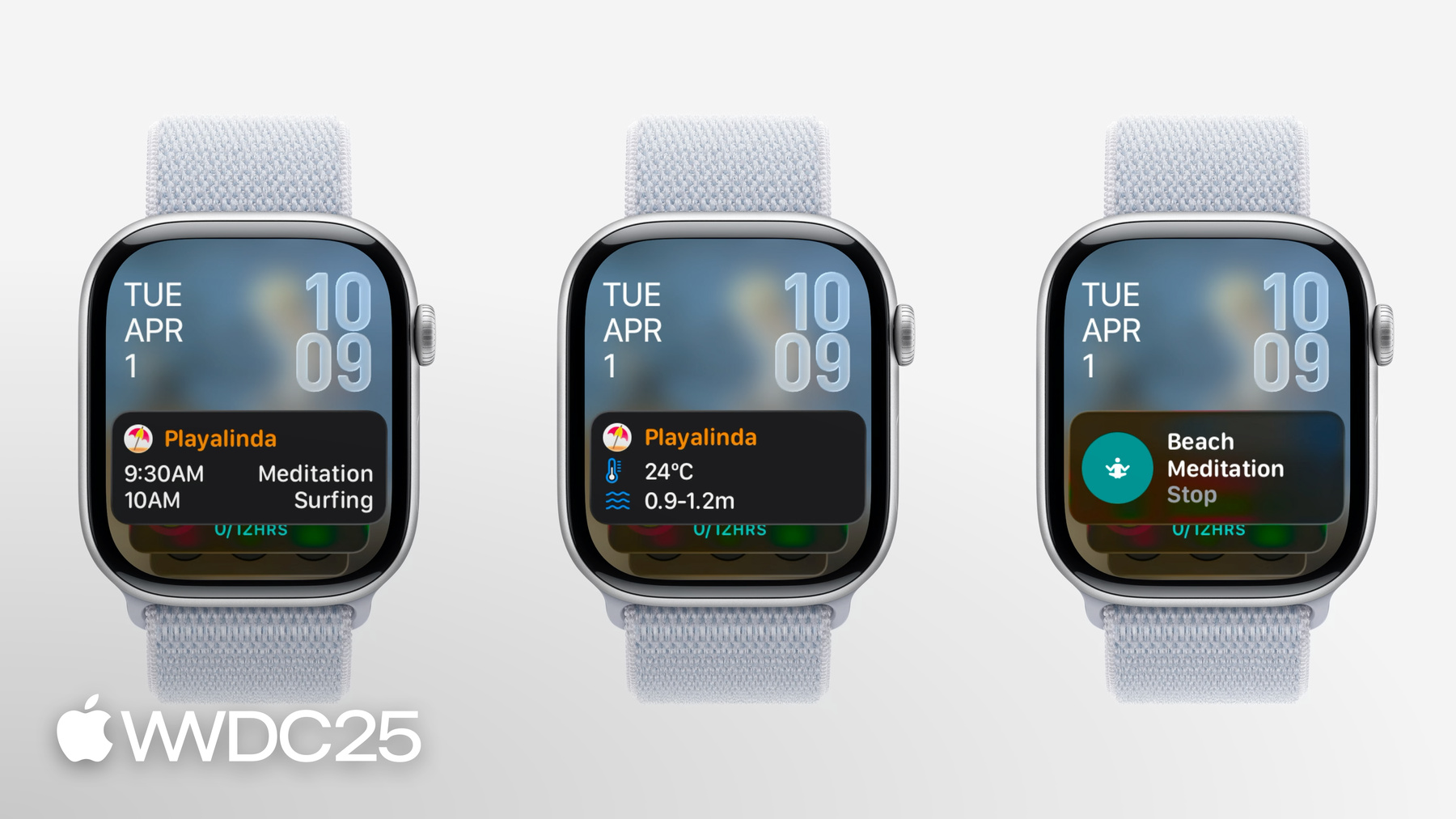
O RelevanceKit impulsiona uma nova forma de exibir widgets no Conjunto Inteligente quando eles são mais relevantes, com base em critérios como data, rotina de sono ou localização. A criação de um widget relevante tem etapas semelhantes às da criação de um widget baseado em linha do tempo. Veja as dicas para criar e testar seu widget relevante usando Pré-visualizações.