

View in English

  • Apple Developer
    • Get Started

    Explore Get Started

    • Overview
    • Learn
    • Apple Developer Program

    Stay Updated

    • Latest News
    • Hello Developer
    • Platforms

    Explore Platforms

    • Apple Platforms
    • iOS
    • iPadOS
    • macOS
    • tvOS
    • visionOS
    • watchOS
    • App Store

    Featured

    • Design
    • Distribution
    • Games
    • Accessories
    • Web
    • Home
    • CarPlay
    • Technologies

    Explore Technologies

    • Overview
    • Xcode
    • Swift
    • SwiftUI

    Featured

    • Accessibility
    • App Intents
    • Apple Intelligence
    • Games
    • Machine Learning & AI
    • Security
    • Xcode Cloud
    • Community

    Explore Community

    • Overview
    • Meet with Apple events
    • Community-driven events
    • Developer Forums
    • Open Source

    Featured

    • WWDC
    • Swift Student Challenge
    • Developer Stories
    • App Store Awards
    • Apple Design Awards
    • Apple Developer Centers
    • Documentation

    Explore Documentation

    • Documentation Library
    • Technology Overviews
    • Sample Code
    • Human Interface Guidelines
    • Videos

    Release Notes

    • Featured Updates
    • iOS
    • iPadOS
    • macOS
    • watchOS
    • visionOS
    • tvOS
    • Xcode
    • Downloads

    Explore Downloads

    • All Downloads
    • Operating Systems
    • Applications
    • Design Resources

    Featured

    • Xcode
    • TestFlight
    • Fonts
    • SF Symbols
    • Icon Composer
    • Support

    Explore Support

    • Overview
    • Help Guides
    • Developer Forums
    • Feedback Assistant
    • Contact Us

    Featured

    • Account Help
    • App Review Guidelines
    • App Store Connect Help
    • Upcoming Requirements
    • Agreements and Guidelines
    • System Status
  • Quick Links

    • Events
    • News
    • Forums
    • Sample Code
    • Videos
 

Vidéos

Ouvrir le menu Fermer le menu
  • Collections
  • Toutes les vidéos
  • À propos

Plus de vidéos

  • À propos
  • Code
  • App essentials in SwiftUI

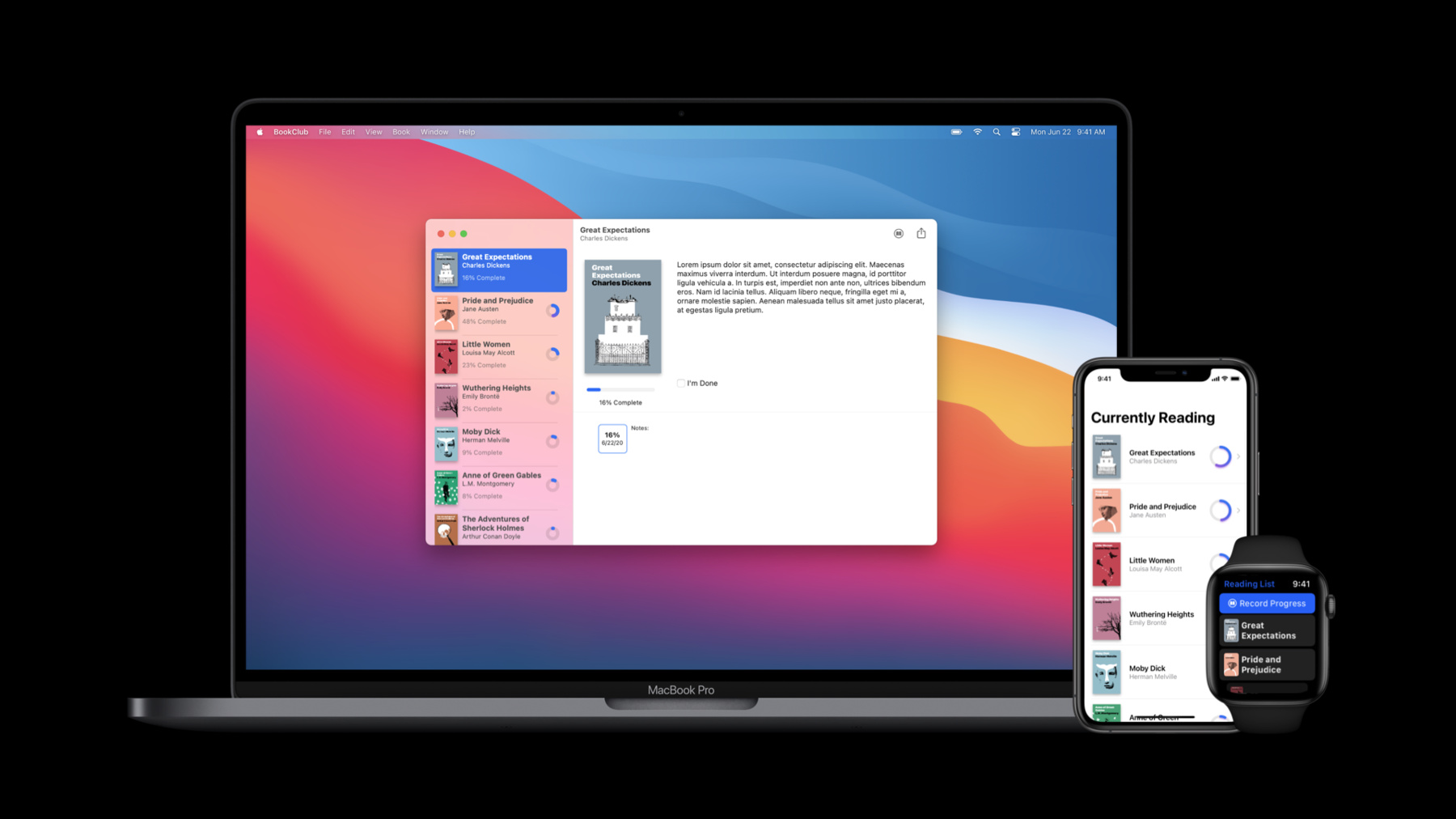
    Thanks to the new App protocol, SwiftUI now supports building entire apps! See how Apps, Scenes, and Views fit together. Learn how easy it is to implement the features people expect from a best-in-class product while saving time and reducing complexity. Easily add expected functionality to your interface using the new commands modifier, and explore the ins and outs of the new WindowGroup API.

    To get the most out of this session, you should have some experience with SwiftUI. Watch “Introduction to SwiftUI” for a primer.

    Want more SwiftUI? Take your pick: “What's new in SwiftUI”, “Data essentials in Swift UI ”, "Stacks, grids, and outlines in SwiftUI", and “Build document-based apps in SwiftUI”.

    Ressources

    • Scene
    • WindowGroup
    • App
      • Vidéo HD
      • Vidéo SD

    Vidéos connexes

    WWDC20

    • Build document-based apps in SwiftUI
    • Data Essentials in SwiftUI
    • Embrace Swift type inference
    • Introduction to SwiftUI
    • Stacks, Grids, and Outlines in SwiftUI
    • Structure your app for SwiftUI previews
    • What's new in SwiftUI
  • Rechercher dans cette vidéo…
    • 3:57 - Book club app

      @main
      struct BookClubApp: App {
          @StateObject private var store = ReadingListStore()
      
          var body: some Scene {
              WindowGroup {
                  ReadingListViewer(store: store)
              }
          }
      }
      
      struct ReadingListViewer: View {
          @ObservedObject var store: ReadingListStore
      
          var body: some View {
              NavigationView {
                  List(store.books) { book in
                      Text(book.title)
                  }
                  .navigationTitle("Currently Reading")
              }
          }
      }
      
      class ReadingListStore: ObservableObject {
          init() {}
      
          var books = [
              Book(title: "Book #1", author: "Author #1"),
              Book(title: "Book #2", author: "Author #2"),
              Book(title: "Book #3", author: "Author #3")
          ]
      }
      
      struct Book: Identifiable {
          let id = UUID()
          let title: String
          let author: String
      }
    • 10:21 - Window groups

      @main
      struct BookClubApp: App {
          @StateObject private var store = ReadingListStore()
      
          var body: some Scene {
              WindowGroup {
                  ReadingListViewer(store: store)
              }
          }
      }
      
      struct ReadingListViewer: View {
          @ObservedObject var store: ReadingListStore
      
          var body: some View {
              NavigationView {
                  List(store.books) { book in
                      Text(book.title)
                  }
                  .navigationTitle("Currently Reading")
              }
          }
      }
      
      class ReadingListStore: ObservableObject {
          init() {}
      
          var books = [
              Book(title: "Book #1", author: "Author #1"),
              Book(title: "Book #2", author: "Author #2"),
              Book(title: "Book #3", author: "Author #3")
          ]
      }
      
      struct Book: Identifiable {
          let id = UUID()
          let title: String
          let author: String
      }
    • 12:07 - Scene storage

      @main
      struct BookClubApp: App {
          @StateObject private var store = ReadingListStore()
      
          var body: some Scene {
              WindowGroup {
                  ReadingListViewer(store: store)
              }
          }
      }
      
      struct ReadingListViewer: View {
          @ObservedObject var store: ReadingListStore
          @SceneStorage("selectedItem") private var selectedItem: String?
          
          var selectedID: Binding<UUID?> {
              Binding<UUID?>(
                  get: { selectedItem.flatMap { UUID(uuidString: $0) } },
                  set: { selectedItem = $0?.uuidString }
              )
          }
      
          var body: some View {
              NavigationView {
                  List(store.books) { book in
                      NavigationLink(
                          destination: Text(book.title),
                          tag: book.id,
                          selection: selectedID
                      ) {
                          Text(book.title)
                      }
                  }
                  .navigationTitle("Currently Reading")
              }
          }
      }
      
      class ReadingListStore: ObservableObject {
          init() {}
      
          var books = [
              Book(title: "Book #1", author: "Author #1"),
              Book(title: "Book #2", author: "Author #2"),
              Book(title: "Book #3", author: "Author #3")
          ]
      }
      
      struct Book: Identifiable {
          let id = UUID()
          let title: String
          let author: String
      }
    • 12:59 - Document groups

      import SwiftUI
      import UniformTypeIdentifiers
      
      @main
      struct ShapeEditApp: App {
          var body: some Scene {
              DocumentGroup(newDocument: ShapeDocument()) { file in
                  DocumentView(document: file.$document)
              }
          }
      }
      
      struct DocumentView: View {
          @Binding var document: ShapeDocument
          
          var body: some View {
              Text(document.title)
                  .frame(width: 300, height: 200)
          }
      }
      
      struct ShapeDocument: Codable {
          var title: String = "Untitled"
      }
      
      extension UTType {
          static let shapeEditDocument =
              UTType(exportedAs: "com.example.ShapeEdit.shapes")
      }
      
      extension ShapeDocument: FileDocument {
          static var readableContentTypes: [UTType] { [.shapeEditDocument] }
          
          init(fileWrapper: FileWrapper, contentType: UTType) throws {
              let data = fileWrapper.regularFileContents!
              self = try JSONDecoder().decode(Self.self, from: data)
          }
      
          func write(to fileWrapper: inout FileWrapper, contentType: UTType) throws {
              let data = try JSONEncoder().encode(self)
              fileWrapper = FileWrapper(regularFileWithContents: data)
          }
      }
    • 13:27 - Settings scene

      @main
      struct BookClubApp: App {
          @StateObject private var store = ReadingListStore()
      
          @SceneBuilder var body: some Scene {
              WindowGroup {
                  ReadingListViewer(store: store)
              }
              
          #if os(macOS)
              Settings {
                  BookClubSettingsView()
              }
          #endif
          }
      }
      
      struct BookClubSettingsView: View {
          var body: some View {
              Text("Add your settings UI here.")
                  .padding()
          }
      }
      
      struct ReadingListViewer: View {
          @ObservedObject var store: ReadingListStore
      
          var body: some View {
              NavigationView {
                  List(store.books) { book in
                      Text(book.title)
                  }
                  .navigationTitle("Currently Reading")
              }
          }
      }
      
      class ReadingListStore: ObservableObject {
          init() {}
      
          var books = [
              Book2(title: "Book #1", author: "Author #1"),
              Book2(title: "Book #2", author: "Author #2"),
              Book2(title: "Book #3", author: "Author #3")
          ]
      }
      
      struct Book: Identifiable {
          let id = UUID()
          let title: String
          let author: String
      }
    • 14:07 - BookCommands

      struct BookCommands: Commands {
          @FocusedBinding(\.selectedBook) private var selectedBook: Book?
          
          var body: some Commands {
              CommandMenu("Book") {
                  Section {
                      Button("Update Progress...", action: updateProgress)
                          .keyboardShortcut("u")
                      Button("Mark Completed", action: markCompleted)
                          .keyboardShortcut("C")
                  }
                  .disabled(selectedBook == nil)
              }
          }
          
          private func updateProgress() {
              selectedBook?.updateProgress()
          }
          private func markCompleted() {
              selectedBook?.markCompleted()
          }
      }

Developer Footer

  • Vidéos
  • WWDC20
  • App essentials in SwiftUI
  • Open Menu Close Menu
    • iOS
    • iPadOS
    • macOS
    • tvOS
    • visionOS
    • watchOS
    • App Store
    Open Menu Close Menu
    • Swift
    • SwiftUI
    • Swift Playground
    • TestFlight
    • Xcode
    • Xcode Cloud
    • Icon Composer
    • SF Symbols
    Open Menu Close Menu
    • Accessibility
    • Accessories
    • Apple Intelligence
    • Audio & Video
    • Augmented Reality
    • Business
    • Design
    • Distribution
    • Education
    • Games
    • Health & Fitness
    • In-App Purchase
    • Localization
    • Maps & Location
    • Machine Learning & AI
    • Security
    • Safari & Web
    Open Menu Close Menu
    • Documentation
    • Downloads
    • Sample Code
    • Videos
    Open Menu Close Menu
    • Help Guides & Articles
    • Contact Us
    • Forums
    • Feedback & Bug Reporting
    • System Status
    Open Menu Close Menu
    • Apple Developer
    • App Store Connect
    • Certificates, IDs, & Profiles
    • Feedback Assistant
    Open Menu Close Menu
    • Apple Developer Program
    • Apple Developer Enterprise Program
    • App Store Small Business Program
    • MFi Program
    • Mini Apps Partner Program
    • News Partner Program
    • Video Partner Program
    • Security Bounty Program
    • Security Research Device Program
    Open Menu Close Menu
    • Meet with Apple
    • Apple Developer Centers
    • App Store Awards
    • Apple Design Awards
    • Apple Developer Academies
    • WWDC
    Read the latest news.
    Get the Apple Developer app.
    Copyright © 2026 Apple Inc. All rights reserved.
    Terms of Use Privacy Policy Agreements and Guidelines