

View in English

  • Apple Developer
    • Get Started

    Explore Get Started

    • Overview
    • Learn
    • Apple Developer Program

    Stay Updated

    • Latest News
    • Hello Developer
    • Platforms

    Explore Platforms

    • Apple Platforms
    • iOS
    • iPadOS
    • macOS
    • tvOS
    • visionOS
    • watchOS
    • App Store

    Featured

    • Design
    • Distribution
    • Games
    • Accessories
    • Web
    • Home
    • CarPlay
    • Technologies

    Explore Technologies

    • Overview
    • Xcode
    • Swift
    • SwiftUI

    Featured

    • Accessibility
    • App Intents
    • Apple Intelligence
    • Games
    • Machine Learning & AI
    • Security
    • Xcode Cloud
    • Community

    Explore Community

    • Overview
    • Meet with Apple events
    • Community-driven events
    • Developer Forums
    • Open Source

    Featured

    • WWDC
    • Swift Student Challenge
    • Developer Stories
    • App Store Awards
    • Apple Design Awards
    • Apple Developer Centers
    • Documentation

    Explore Documentation

    • Documentation Library
    • Technology Overviews
    • Sample Code
    • Human Interface Guidelines
    • Videos

    Release Notes

    • Featured Updates
    • iOS
    • iPadOS
    • macOS
    • watchOS
    • visionOS
    • tvOS
    • Xcode
    • Downloads

    Explore Downloads

    • All Downloads
    • Operating Systems
    • Applications
    • Design Resources

    Featured

    • Xcode
    • TestFlight
    • Fonts
    • SF Symbols
    • Icon Composer
    • Support

    Explore Support

    • Overview
    • Help Guides
    • Developer Forums
    • Feedback Assistant
    • Contact Us

    Featured

    • Account Help
    • App Review Guidelines
    • App Store Connect Help
    • Upcoming Requirements
    • Agreements and Guidelines
    • System Status
  • Quick Links

    • Events
    • News
    • Forums
    • Sample Code
    • Videos
 

Vidéos

Ouvrir le menu Fermer le menu
  • Collections
  • Toutes les vidéos
  • À propos

Plus de vidéos

  • À propos
  • Code
  • Write tests to fail

    Plan for failure: Design great tests to help you find and diagnose even the toughest bugs. Learn how to improve your automated tests with XCTest to find hidden issues in even the best code. We'll explain how to prepare your tests for failure to make triaging issues easier, letting you solve interface issues and deliver fixes quickly.

    To get the most out of this session, you should already be familiar with writing UI tests within the XCTest framework.

    For more on testing tools, head over to “The suite life of testing”.

    Ressources

      • Vidéo HD
      • Vidéo SD

    Vidéos connexes

    WWDC22

    • Author fast and reliable tests for Xcode Cloud

    WWDC20

    • Build scalable enterprise app suites
    • Get your test results faster
    • Handle interruptions and alerts in UI tests
    • Triage test failures with XCTIssue
    • XCTSkip your tests
  • Rechercher dans cette vidéo…
    • 1:58 - Use setUpWithError()

      class RecipesTests: XCTestCase {
          let app = FrutaApp()
      
          override func setUpWithError() throws {
              continueAfterFailure = false
              app.launchArguments.append("-recipes-tests")
              app.launch()
          }
      }
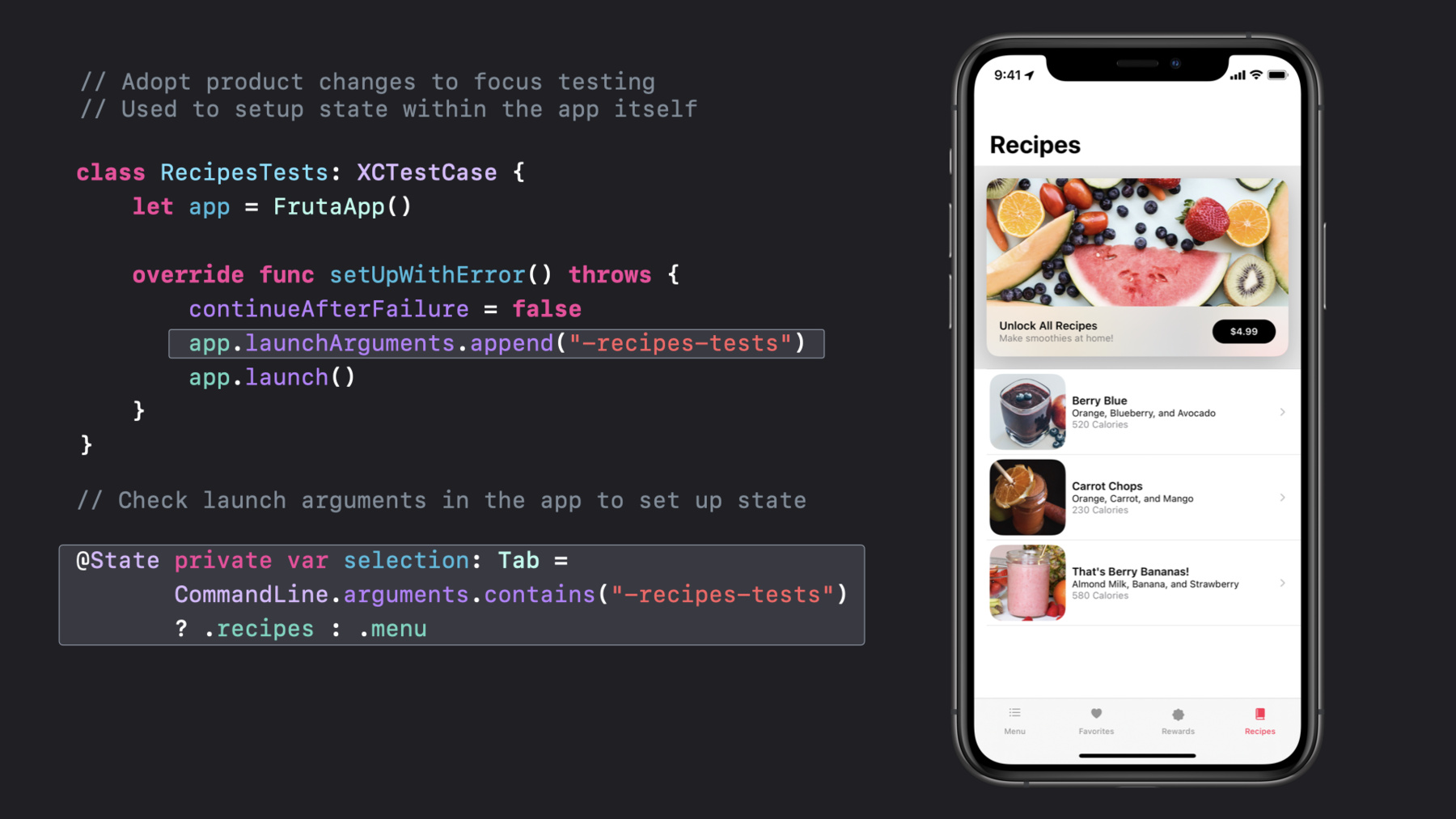
    • 3:09 - Use launch arguments

      class RecipesTests: XCTestCase {
          let app = FrutaApp()
      
          override func setUpWithError() throws {
              continueAfterFailure = false
              app.launchArguments.append("-recipes-tests")
              app.launch()
          }
      }
      
      @State private var selection: Tab = 
             CommandLine.arguments.contains("-recipes-tests") 
             ? .recipes : .menu
    • 4:12 - Design tests for a specific goal

      func testIngredientsListAccuracy() throws {
          // Select Berry Blue recipe
          let recipe = try   
              app.smoothieList().selectRecipe
                                 (smoothie: .berryBlue)
      
          // Verify ingredients list
          try recipe.verify(ingredients: 
              SmoothieType.berryBlue.ingredients)
      }
    • 4:56 - Use enums for string values

      public enum SmoothieType : String {
          case berryBlue = "Berry Blue"
          case carrotChops = "Carrot Chops"
          case berryBananas = "That's Berry Bananas!"
          
          var ingredients : [String] {
              switch self {
              case .berryBlue:
                  return ["Orange", "Blueberry", "Avocado"]
              case .carrotChops:
                  return ["Orange", "Carrot", "Mango"]
              case .berryBananas:
                  return ["Almond Milk", "Banana", "Strawberry"]
              }
          }
      }
    • 5:25 - Factor common code

      let recipe = try app.smoothieList().selectRecipe(smoothie: .berryBlue)
      
      public class FrutaApp : XCUIApplication {
         public func smoothieList() throws -> SmoothieList {
              let element = tables["Smoothie List"]
              if !element.waitForExistence(timeout: 5) {
                  throw FrutaError.elementDoesNotExist("Smoothie List table")
              }
              return SmoothieList(app: self, element: element)
          }
      }  
      
      public class SmoothieList : FrutaUIElement {
          public func selectRecipe(smoothie: SmoothieType) throws -> Recipe {
             element.buttons[smoothie.rawValue].tap()
             return try app.recipe()
         }
      }
    • 5:49 - Model UI hierarchy in testing code

      public class FrutaApp : XCUIApplication {
         public func smoothieList() throws -> SmoothieList {  }
      } 
      
      public class SmoothieList : FrutaUIElement {
          public func selectRecipe(smoothie: SmoothieType) throws -> Recipe {  }
      }
      
      open class FrutaUIElement {
          let app: FrutaApp
          let element: XCUIElement
          init(app: FrutaApp, element: XCUIElement) {
              self.app = app
              self.element = element
          }
      }
    • 8:17 - Use assertion messages

      XCTAssertEqual(count, expectedCount, "\(SmoothieType.berryBlue.rawValue) smoothie is expected to have \(expectedCount) ingredients: \(expectedIngredients), however, there were 
      \(count) found.")
    • 9:21 - Asynchronous events

      public func selectRecipe(smoothie: SmoothieType) throws -> Recipe {
          element.buttons[smoothie.rawValue].tap()
          return try app.recipe()
      }
      
      public func recipe() throws -> Recipe {
          let element = scrollViews["Ingredients View"]
          if !element.waitForExistence(timeout: 5) {
              throw FrutaError.elementDoesNotExist(
                              "Ingredients View scroll view")
          }
          return Recipe(app: self, element: element)
      }
    • 10:19 - Unwrapping optionals

      func countFavorites(favorites: [String]?) -> Int{
           let favs = favorites!
           return favs.count
      }
    • 10:56 - Unwrapping optionals continued

      if let favs = favorites {  }
      guard let favs = favorites else { /* throw an error */ }
      let favs = favorites ?? []
      let favs = try XCTUnwrap(favorites, "favorites is nil, so there is nothing to count”)
    • 12:19 - Throw errors from shared code

      public func verify(ingredients: [String]) throws {
          try XCTContext.runActivity(named: "Verifying \(ingredients) exists in the Recipe screen.")
          { verifyingRecipe in
              for ingredient in ingredients {
                  if !element.switches[ingredient].waitForExistence(timeout: 5) {
                      throw RecipeError.ingredientDoesNotExist(ingredient)
                  }
              }
          }
      }
      
      public enum RecipeError : Error, CustomStringConvertible {
          case ingredientDoesNotExist(String)
      
          public var description : String {
              switch self {
              case .ingredientDoesNotExist(let ingredient):
                  return "\(ingredient) does not exist in the Ingredients View.)"
              }
          }
      }
    • 13:41 - Use XCTContext.runActivity()

      public func verify(ingredients: [String]) throws {
          try XCTContext.runActivity(named: "Verifying \(ingredients) exists in the Recipe screen.")
          { verifyingRecipe in
              for ingredient in ingredients {
                  if !element.switches[ingredient].waitForExistence(timeout: 5) {
                      throw RecipeError.ingredientDoesNotExist(ingredient)
                  }
              }
          }
    • 14:02 - Add attachments to the result bundle

      public func verify(ingredients: [String]) throws {
          try XCTContext.runActivity(named: "Verifying \(ingredients) exists in the Recipe screen.")
          { verifyingRecipe in
              for ingredient in ingredients {
                  if !element.switches[ingredient].waitForExistence(timeout: 5) {
                      let attachment = XCTAttachment(string: element.debugDescription)
                      verifyingRecipe.add(attachment)
                       throw RecipeError.ingredientDoesNotExist(ingredient)
                  }
              }
          }
    • 14:50 - Use XCTSkip

      let debuggingTests = false
      
      func testSelectSmoothie() throws {
          try XCTSkipUnless(debuggingTests == true, "This test is not yet implemented.")
      }

Developer Footer

  • Vidéos
  • WWDC20
  • Write tests to fail
  • Open Menu Close Menu
    • iOS
    • iPadOS
    • macOS
    • tvOS
    • visionOS
    • watchOS
    • App Store
    Open Menu Close Menu
    • Swift
    • SwiftUI
    • Swift Playground
    • TestFlight
    • Xcode
    • Xcode Cloud
    • Icon Composer
    • SF Symbols
    Open Menu Close Menu
    • Accessibility
    • Accessories
    • Apple Intelligence
    • Audio & Video
    • Augmented Reality
    • Business
    • Design
    • Distribution
    • Education
    • Games
    • Health & Fitness
    • In-App Purchase
    • Localization
    • Maps & Location
    • Machine Learning & AI
    • Security
    • Safari & Web
    Open Menu Close Menu
    • Documentation
    • Downloads
    • Sample Code
    • Videos
    Open Menu Close Menu
    • Help Guides & Articles
    • Contact Us
    • Forums
    • Feedback & Bug Reporting
    • System Status
    Open Menu Close Menu
    • Apple Developer
    • App Store Connect
    • Certificates, IDs, & Profiles
    • Feedback Assistant
    Open Menu Close Menu
    • Apple Developer Program
    • Apple Developer Enterprise Program
    • App Store Small Business Program
    • MFi Program
    • Mini Apps Partner Program
    • News Partner Program
    • Video Partner Program
    • Security Bounty Program
    • Security Research Device Program
    Open Menu Close Menu
    • Meet with Apple
    • Apple Developer Centers
    • App Store Awards
    • Apple Design Awards
    • Apple Developer Academies
    • WWDC
    Read the latest news.
    Get the Apple Developer app.
    Copyright © 2026 Apple Inc. All rights reserved.
    Terms of Use Privacy Policy Agreements and Guidelines