

-
Target and optimize GPU binaries with Metal 3
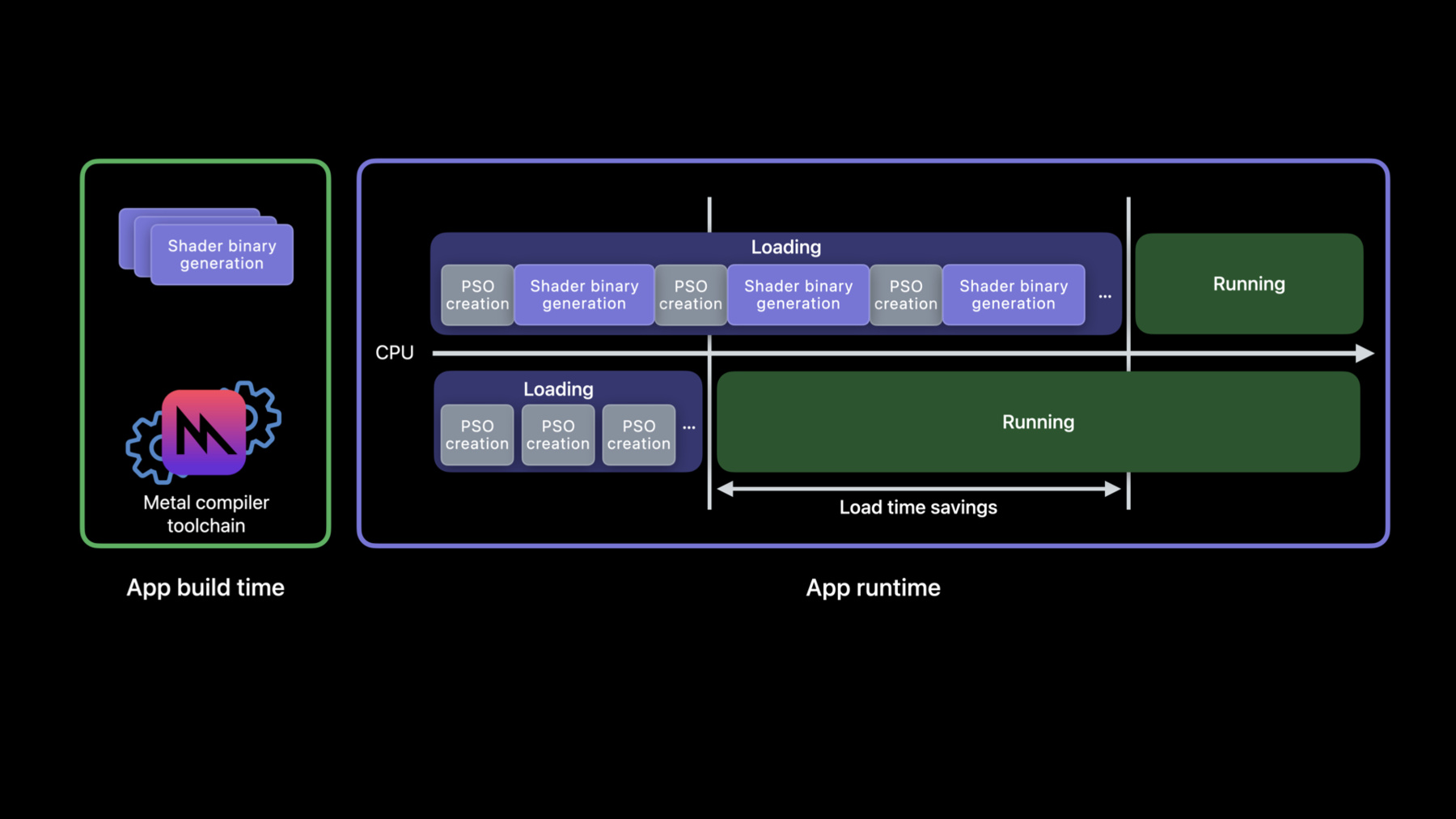
Discover how you can reduce in-app stutters, first launch times, and new level load times when you generate your GPU binaries entirely at project build time with offline compilation. We'll also show you how to improve total compile time and binary size for larger GPU programs using the "Optimize for size" compiler option.
Ressources
Vidéos connexes
WWDC23
WWDC22
WWDC21
WWDC20
-
Rechercher dans cette vidéo…
-
-
4:47 - Using a JSON editor: render pipeline descriptor
// An existing Obj-C render pipeline descriptor NSError *error = nil; id<MTLDevice> device = MTLCreateSystemDefaultDevice(); id<MTLLibrary> library = [device newLibraryWithFile:@"default.metallib" error:&error]; MTLRenderPipelineDescriptor *desc = [MTLRenderPipelineDescriptor new]; desc.vertexFunction = [library newFunctionWithName:@"vert_main"]; desc.fragmentFunction = [library newFunctionWithName:@"frag_main"]; desc.rasterSampleCount = 2; desc.colorAttachments[0].pixelFormat = MTLPixelFormatBGRA8Unorm; desc.depthAttachmentPixelFormat = MTLPixelFormatDepth32Float; -
4:47 - Using a JSON editor: pipelines script
{ "//comment": "Its equivalent new JSON script", "libraries": { "paths": [ { "path": "default.metallib" } ] }, "pipelines": { "render_pipelines": [ { "vertex_function": "vert_main", "fragment_function": "frag_main", "raster_sample_count": 2, "color_attachments": [ { "pixel_format": "BGRA8Unorm" }, ], "depth_attachment_pixel_format": "Depth32Float" } ] } } -
5:33 - Harvesting sample
// Create pipeline descriptor MTLRenderPipelineDescriptor *pipeline_desc = [MTLRenderPipelineDescriptor new]; pipeline_desc.vertexFunction = [library newFunctionWithName:@"vert_main"]; pipeline_desc.fragmentFunction = [library newFunctionWithName:@"frag_main"]; pipeline_desc.rasterSampleCount = 2; pipeline_desc.colorAttachments[0].pixelFormat = MTLPixelFormatBGRA8Unorm; pipeline_desc.depthAttachmentPixelFormat = MTLPixelFormatDepth32Float; // Add pipeline descriptor to new archive MTLBinaryArchiveDescriptor* archive_desc = [MTLBinaryArchiveDescriptor new]; id<MTLBinaryArchive> archive = [device newBinaryArchiveWithDescriptor:archive_desc error:&error]; bool success = [archive addRenderPipelineFunctionsWithDescriptor:pipeline_desc error:&error]; // Serialize archive to file system NSURL *url = [NSURL fileURLWithPath:@"harvested-binaryArchive.metallib"]; success = [archive serializeToURL:url error:&error]; -
6:01 - Extracting a JSON script
metal-source -flatbuffers=json harvested-binaryArchive.metallib -o /tmp/descriptors.mtlp-json -
6:24 - Generate a GPU binary from source
metal shaders.metal -N descriptors.mtlp-json -o archive.metallib -
6:48 - Generate a GPU binary from Metal library
metal-tt shaders.metallib descriptors.mtlp-json -o archive.metallib -
7:07 - Load GPU binaries via the runtime API
MTLBinaryArchiveDescriptor *desc = [MTLBinaryArchiveDescriptor new]; desc.url = [NSURL fileURLWithPath:@"archive.metallib"]; NSError *error = nil; id<MTLDevice> device = MTLCreateSystemDefaultDevice(); id<MTLBinaryArchive> binaryArchive = [device newBinaryArchiveWithDescriptor:desc error:&error]; -
12:11 - Enable optimize for size in command lines
xcrun metal -Os large_shader.metal # or xcrun metal -c -Os large_shader.metal xcrun metal -c more_shaders.metal xcrun metal large_shader.air more_shaders.air -
12:44 - Enable optimize for size with Metal framework
MTLCompileOptions* options = [MTLCompileOptions new];
options.optimizationLevel = MTLLibraryOptimizationLevelSize;

NSString* source = @"...";
NSError* error = nil;
id<MTLLibrary> lib = [device newLibraryWithSource:source
                                          options:options
                                            error:&error];
-