

-
Transform your geometry with Metal mesh shaders
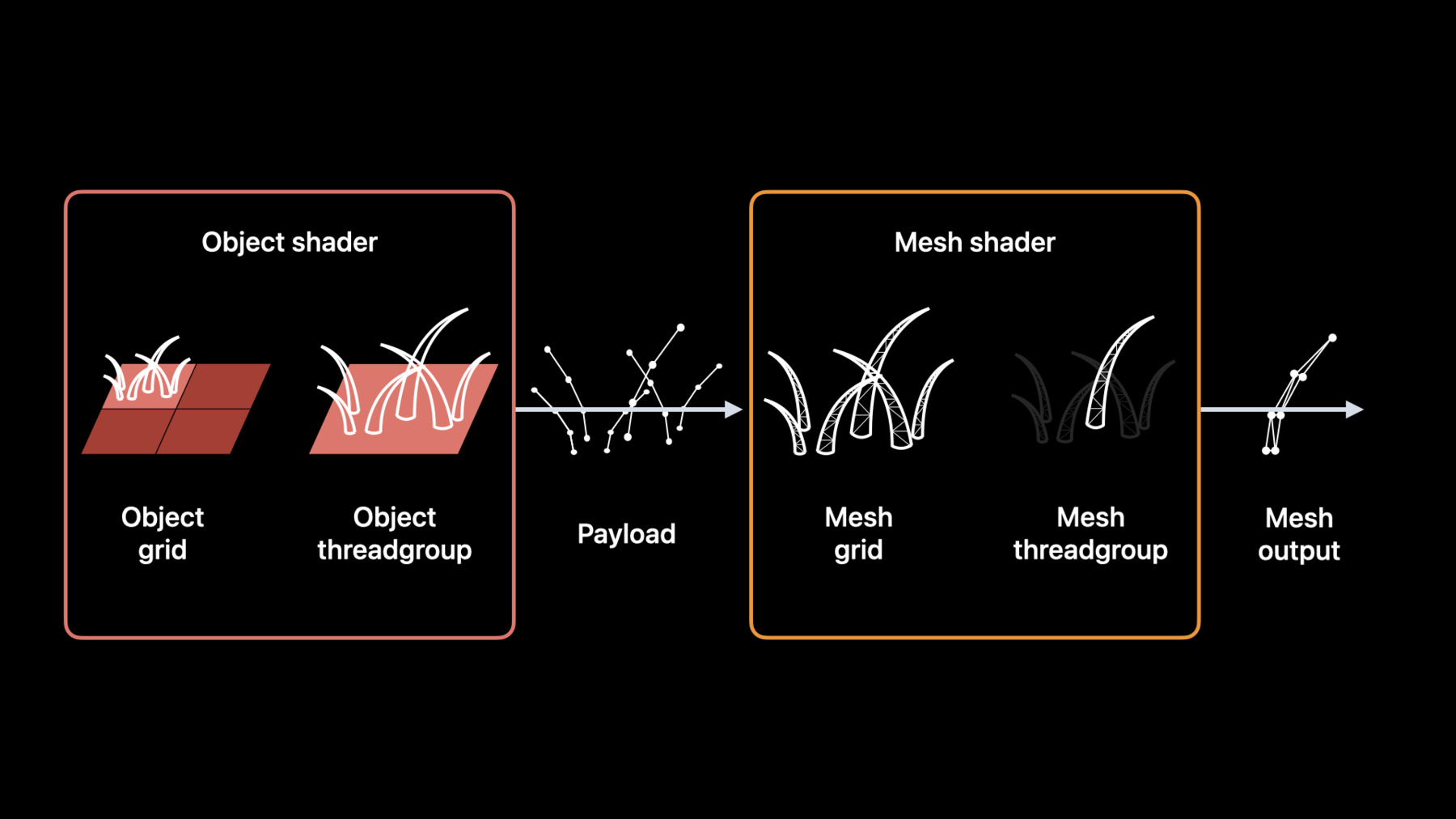
Meet Metal mesh shaders — a modern and flexible pipeline in Metal for GPU-driven geometry creation and processing. We'll explore how this API can improve and add flexibility to your render pipeline, and share some of the opportunities that GPU-driven work can create. Discover how you can create procedural geometry — like hair rendering — on the GPU using mesh shaders, and build single render passes without additional compute passes or intermediate buffers. We'll also show you how to improve scene processing and rendering through GPU-driven meshlet culling.
Ressources
Vidéos connexes
Tech Talks
WWDC22
-
Rechercher dans cette vidéo…
-
-
8:13 - Object shader (MSL)
[[object]] void objectShader(object_data CurvePayload *payloadOutput [[payload]], const device void *inputData [[buffer(0)]], uint hairID [[thread_index_in_threadgroup]], uint triangleID [[threadgroup_position_in_grid]], mesh_grid_properties mgp) { if (hairID < kHairsPerBlock) payloadOutput[hairID] = generateCurveData(inputData, hairID, triangleID); if (hairID == 0) mgp.set_threadgroups_per_grid(uint3(kHairPerBlockX, kHairPerBlockY, 1)); } -
8:35 - Initializing object stage
let meshPipelineDescriptor = MTLMeshRenderPipelineDescriptor() meshPipelineDescriptor.objectFunction = objectFunction meshPipelineDescriptor.payloadMemoryLength = payloadLength meshPipelineDescriptor.maxTotalThreadsPerObjectThreadgroup = hairsPerBlock -
9:26 - Defining a Metal Mesh
struct VertexData { float4 position [[position]]; }; struct PrimitiveData { float4 color; }; using triangle_mesh_t = metal::mesh< VertexData, // Vertex type PrimitiveData, // Primitive type 10, // Maximum vertices 6, // Maximum primitives metal::topology::triangle // Topology >; [[mesh]] void myMeshShader(triangle_mesh_t outputMesh, ...); -
11:16 - Mesh Shader (MSL)
[[mesh]] void myMeshShader(triangle_mesh_t outputMesh, uint tid [[thread_index_in_threadgroup]]) { if (tid < kVertexCount) outputMesh.set_vertex(tid, calculateVertex(tid)); if (tid < kIndexCount) outputMesh.set_index(tid, calculateIndex(tid)); if (tid < kPrimitiveCount) outputMesh.set_primitive(tid, calculatePrimitive(tid)); if (tid == 0) outputMesh.set_primitive_count(kPrimitiveCount); } -
11:35 - Initializing the mesh stage
meshPipelineDescriptor.meshFunction = meshFunction meshPipelineDescriptor.maxTotalThreadsPerMeshThreadgroup = vertexCountPerHair -
12:08 - Initializing the fragment stage
meshPipelineDescriptor.maxTotalThreadsPerMeshThreadgroup = vertexCountPerHair -
12:14 - Creating a mesh render pipeline
/// A mesh pipeline state the device creates from a mesh render pipeline descriptor. let meshPipeline: MTLRenderPipelineState do { /// A tuple of the mesh pipeline and its reflection information, if applicable. let (pipeline, reflection) = try device.makeRenderPipelineState(descriptor: meshRenderPipelineDescriptor, options: []) meshPipeline = pipeline } catch { print("The device can't create a mesh pipeline state: \(error)") return } -
12:25 - Encoding a mesh pipeline
// Create a encoder for a render pass from the command buffer.
let encoder: MTLRenderCommandEncoder!
encoder = commandBuffer.makeRenderCommandEncoder(descriptor: descriptor)

// Apply the mesh pipeline to the render pass.
encoder.setRenderPipelineState(meshPipeline)

// Bind the resources for the render pass.
encoder.setObjectBuffer(objectBuffer, offset: 0, index: 0)
encoder.setMeshTexture(meshTexture, index: 2)
encoder.setFragmentBuffer(fragmentBuffer, offset: 0, index: 0)

// Create the size instances for the mesh threadgroups.
let objectGridDimensions = MTLSize(width: trianglesPerModel, height: 1, depth: 1)
let threadsPerObject = MTLSize(width: hairsPerBlock, height: 1, depth: 1)
let threadsPerMesh = MTLSize(width: threadsPerHair, height: 1, depth: 1)

// Encode the draw command for the render pass.
encoder.drawMeshThreadgroups(objectGridDimensions,
                             threadsPerObjectThreadgroup: threadsPerObject,
                             threadsPerMeshThreadgroup: threadsPerMesh)

// Finish encoding the render pass.
encoder.endEncoding()
-