

-
Wind your way through advanced animations in SwiftUI
Discover how you can take animation to the next level with the latest updates to SwiftUI. Join us as we wind our way through animation and build out multiple steps, use keyframes to add coordinated multi-track animated effects, and combine APIs in unique ways to make your app spring to life.
Chapitres
- 0:00 - Introduction
- 2:23 - Animation phases
- 8:12 - Keyframes
- 15:07 - Tips and tricks
Ressources
Vidéos connexes
WWDC23
-
Rechercher dans cette vidéo…
-
-
0:42 - Scale Animation
struct Avatar: View { var petImage: Image @State private var selected: Bool = false var body: some View { petImage .scaleEffect(selected ? 1.5 : 1.0) .onTapGesture { withAnimation { selected.toggle() } } } } -
3:13 - Boolean Phases
OverdueReminderView() .phaseAnimator([false, true]) { content, value in content .foregroundStyle(value ? .red : .primary) } animation: { _ in .easeInOut(duration: 1.0) } -
6:20 - Custom Phases
ReactionView() .phaseAnimator( Phase.allCases, trigger: reactionCount ) { content, phase in content .scaleEffect(phase.scale) .offset(y: phase.verticalOffset) } animation: { phase in switch phase { case .initial: .smooth case .move: .easeInOut(duration: 0.3) case .scale: .spring( duration: 0.3, bounce: 0.7) } } enum Phase: CaseIterable { case initial case move case scale var verticalOffset: Double { switch self { case .initial: 0 case .move, .scale: -64 } } var scale: Double { switch self { case .initial: 1.0 case .move: 1.1 case .scale: 1.8 } } } -
9:48 - Keyframes
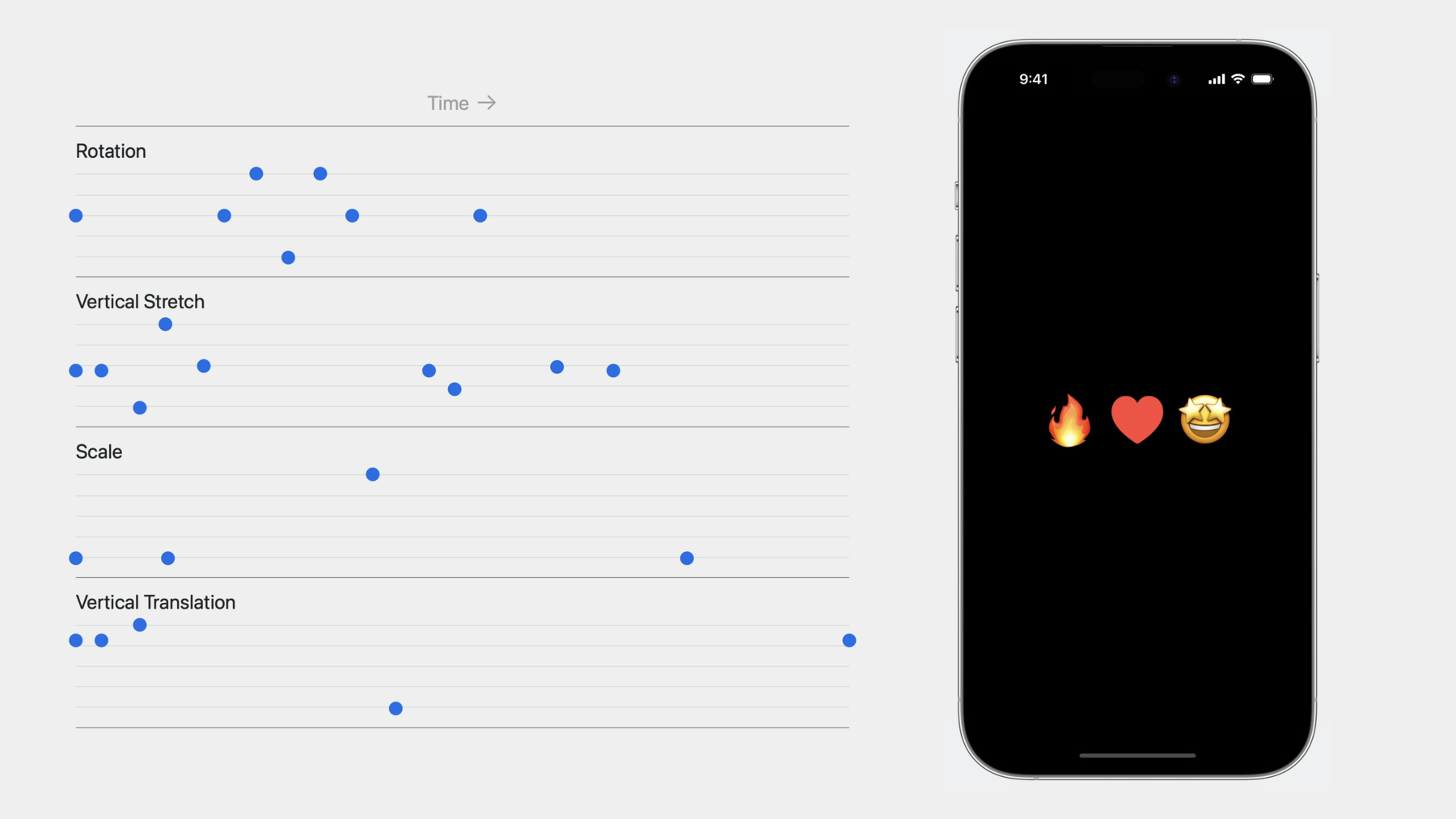
ReactionView() .keyframeAnimator(initialValue: AnimationValues()) { content, value in content .foregroundStyle(.red) .rotationEffect(value.angle) .scaleEffect(value.scale) .scaleEffect(y: value.verticalStretch) .offset(y: value.verticalTranslation) } keyframes: { _ in KeyframeTrack(\.angle) { CubicKeyframe(.zero, duration: 0.58) CubicKeyframe(.degrees(16), duration: 0.125) CubicKeyframe(.degrees(-16), duration: 0.125) CubicKeyframe(.degrees(16), duration: 0.125) CubicKeyframe(.zero, duration: 0.125) } KeyframeTrack(\.verticalStretch) { CubicKeyframe(1.0, duration: 0.1) CubicKeyframe(0.6, duration: 0.15) CubicKeyframe(1.5, duration: 0.1) CubicKeyframe(1.05, duration: 0.15) CubicKeyframe(1.0, duration: 0.88) CubicKeyframe(0.8, duration: 0.1) CubicKeyframe(1.04, duration: 0.4) CubicKeyframe(1.0, duration: 0.22) } KeyframeTrack(\.scale) { LinearKeyframe(1.0, duration: 0.36) SpringKeyframe(1.5, duration: 0.8, spring: .bouncy) SpringKeyframe(1.0, spring: .bouncy) } KeyframeTrack(\.verticalTranslation) { LinearKeyframe(0.0, duration: 0.1) SpringKeyframe(20.0, duration: 0.15, spring: .bouncy) SpringKeyframe(-60.0, duration: 1.0, spring: .bouncy) SpringKeyframe(0.0, spring: .bouncy) } } struct AnimationValues { var scale = 1.0 var verticalStretch = 1.0 var verticalTranslation = 0.0 var angle = Angle.zero } -
15:22 - Map Keyframes
struct RaceMap: View { let route: Route @State private var trigger = false var body: some View { Map(initialPosition: .rect(route.rect)) { MapPolyline(coordinates: route.coordinates) .stroke(.orange, lineWidth: 4.0) Marker("Start", coordinate: route.start) .tint(.green) Marker("End", coordinate: route.end) .tint(.red) } .toolbar { Button("Tour") { trigger.toggle() } } .mapCameraKeyframeAnimation(trigger: playTrigger) { initialCamera in KeyframeTrack(\MapCamera.centerCoordinate) { let points = route.points for point in points { CubicKeyframe(point.coordinate, duration: 16.0 / Double(points.count)) } CubicKeyframe(initialCamera.centerCoordinate, duration: 4.0) } KeyframeTrack(\.heading) { CubicKeyframe(heading(from: route.start.coordinate, to: route.end.coordinate), duration: 6.0) CubicKeyframe(heading(from: route.end.coordinate, to: route.end.coordinate), duration: 8.0) CubicKeyframe(initialCamera.heading, duration: 6.0) } KeyframeTrack(\.distance) { CubicKeyframe(24000, duration: 4) CubicKeyframe(18000, duration: 12) CubicKeyframe(initialCamera.distance, duration: 4) } } } } -
16:26 - KeyframeTimeline
// Keyframes
let myKeyframes = KeyframeTimeline(initialValue: CGPoint.zero) {
    KeyframeTrack(\.x) {...}
    KeyframeTrack(\.y) {...}
}

// Duration in seconds
let duration: TimeInterval = myKeyframes.duration

// Value for time
let value = myKeyframes.value(time: 1.2)
-