

View in English

  • Apple Developer
    • Get Started

    Explore Get Started

    • Overview
    • Learn
    • Apple Developer Program

    Stay Updated

    • Latest News
    • Hello Developer
    • Platforms

    Explore Platforms

    • Apple Platforms
    • iOS
    • iPadOS
    • macOS
    • tvOS
    • visionOS
    • watchOS
    • App Store

    Featured

    • Design
    • Distribution
    • Games
    • Accessories
    • Web
    • Home
    • CarPlay
    • Technologies

    Explore Technologies

    • Overview
    • Xcode
    • Swift
    • SwiftUI

    Featured

    • Accessibility
    • App Intents
    • Apple Intelligence
    • Games
    • Machine Learning & AI
    • Security
    • Xcode Cloud
    • Community

    Explore Community

    • Overview
    • Meet with Apple events
    • Community-driven events
    • Developer Forums
    • Open Source

    Featured

    • WWDC
    • Swift Student Challenge
    • Developer Stories
    • App Store Awards
    • Apple Design Awards
    • Apple Developer Centers
    • Documentation

    Explore Documentation

    • Documentation Library
    • Technology Overviews
    • Sample Code
    • Human Interface Guidelines
    • Videos

    Release Notes

    • Featured Updates
    • iOS
    • iPadOS
    • macOS
    • watchOS
    • visionOS
    • tvOS
    • Xcode
    • Downloads

    Explore Downloads

    • All Downloads
    • Operating Systems
    • Applications
    • Design Resources

    Featured

    • Xcode
    • TestFlight
    • Fonts
    • SF Symbols
    • Icon Composer
    • Support

    Explore Support

    • Overview
    • Help Guides
    • Developer Forums
    • Feedback Assistant
    • Contact Us

    Featured

    • Account Help
    • App Review Guidelines
    • App Store Connect Help
    • Upcoming Requirements
    • Agreements and Guidelines
    • System Status
  • Quick Links

    • Events
    • News
    • Forums
    • Sample Code
    • Videos
 

Vidéos

Ouvrir le menu Fermer le menu
  • Collections
  • Toutes les vidéos
  • À propos

Plus de vidéos

  • À propos
  • Code
  • Sync to iCloud with CKSyncEngine

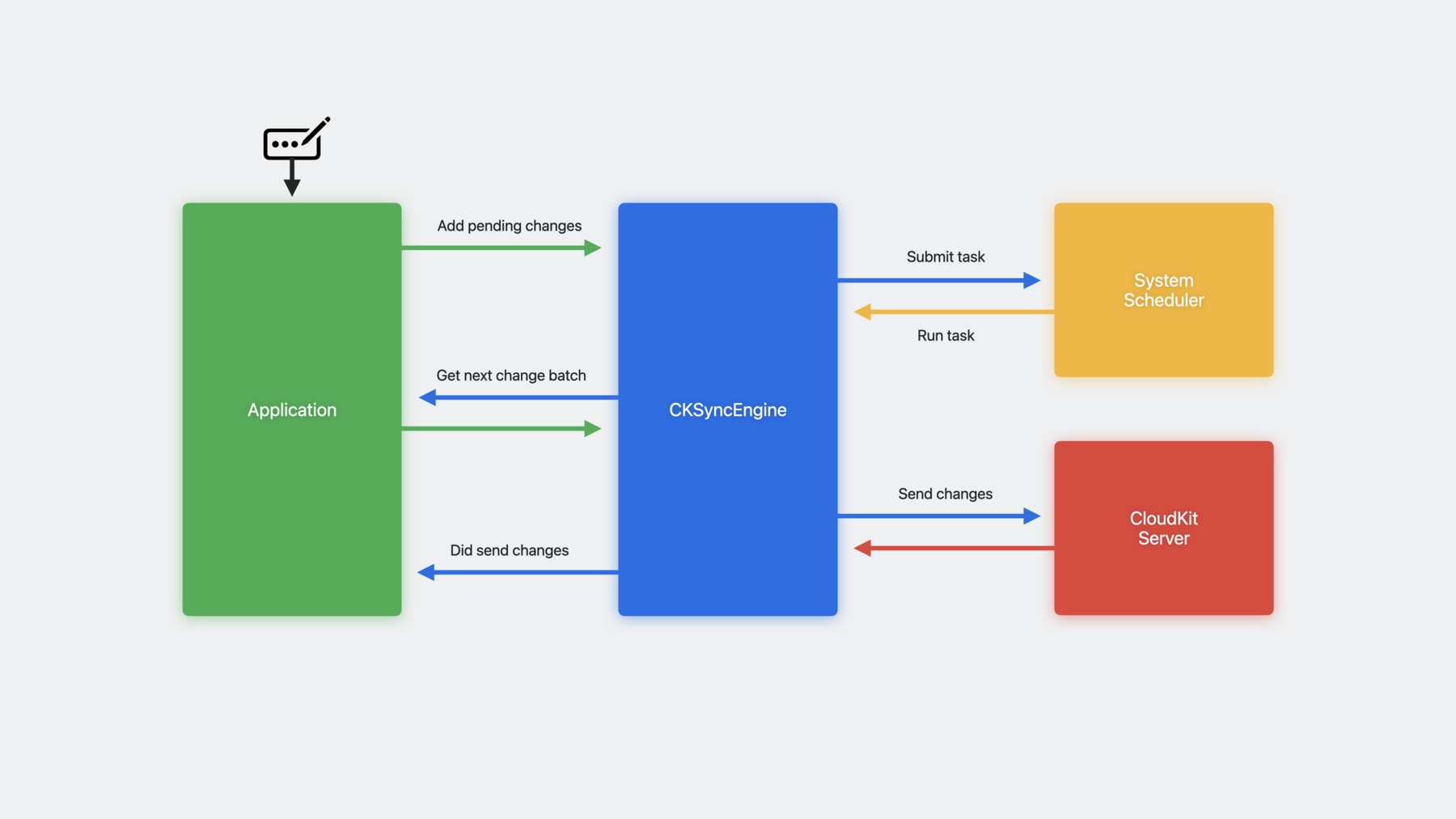
    Discover how CKSyncEngine can help you sync people's CloudKit data to iCloud. Learn how you can reduce the amount of code in your app when you let the system handle scheduling for your sync operations. We'll share how you can automatically benefit from enhanced performance as CloudKit evolves, explore testing for your sync implementation, and more.

    To get the most out of this session, you should be familiar with CloudKit and CKRecord types.

    Chapitres

    • 0:00 - Intro
    • 0:48 - The state of sync
    • 3:09 - Meet CKSyncEngine
    • 9:47 - Getting started
    • 13:18 - Using CKSyncEngine
    • 19:25 - Testing and debugging
    • 22:27 - Wrap-up

    Ressources

    • CloudKit Samples: CKSyncEngine
    • CKSyncEngine
      • Vidéo HD
      • Vidéo SD

    Vidéos connexes

    Tech Talks

    • Get the most out of CloudKit Sharing
  • Rechercher dans cette vidéo…
    • 12:14 - Initializing CKSyncEngine

      actor MySyncManager : CKSyncEngineDelegate {
          
          init(container: CKContainer, localPersistence: MyLocalPersistence) {
              let configuration = CKSyncEngine.Configuration(
                  database: container.privateCloudDatabase,
                  stateSerialization: localPersistence.lastKnownSyncEngineState,
                  delegate: self
              )
              self.syncEngine = CKSyncEngine(configuration)
          }
          
          func handleEvent(_ event: CKSyncEngine.Event, syncEngine: CKSyncEngine) async {
              switch event {
              case .stateUpdate(let stateUpdate):
                  self.localPersistence.lastKnownSyncEngineState = stateUpdate.stateSerialization
              }
          }
      }
    • 14:13 - Sending changes to the server

      func userDidEditData(recordID: CKRecord.ID) {
          // Tell the sync engine we need to send this data to the server.
          self.syncEngine.state.add(pendingRecordZoneChanges: [ .save(recordID) ])
      }
      
      func nextRecordZoneChangeBatch(
          _ context: CKSyncEngine.SendChangesContext, 
          syncEngine: CKSyncEngine
      ) async -> CKSyncEngine.RecordZoneChangeBatch? {
      
          let changes = syncEngine.state.pendingRecordZoneChanges.filter { 
              context.options.zoneIDs.contains($0.recordID.zoneID) 
          }
      
          return await CKSyncEngine.RecordZoneChangeBatch(pendingChanges: changes) { recordID in
              self.recordToSave(for: recordID)
          }
      }
    • 15:40 - Fetching changes from the server

      func handleEvent(_ event: CKSyncEngine.Event, syncEngine: CKSyncEngine) async {
          switch event {
              
          case .fetchedRecordZoneChanges(let recordZoneChanges):
              for modifications in recordZoneChanges.modifications {
                  // Persist the fetched modification locally
              }
      
              for deletions in recordZoneChanges.deletions {
                  // Remove the deleted data locally
              }
      
          case .fetchedDatabaseChanges(let databaseChanges):      
              for modifications in databaseChanges.modifications {
                  // Persist the fetched modification locally
              }
            
              for deletions in databaseChanges.deletions { 
                  // Remove the deleted data locally
              }
      
          // Perform any setup/cleanup necessary
          case .willFetchChanges, .didFetchChanges:
              break
            
          case .sentRecordZoneChanges(let sentChanges):
      
              for failedSave in sentChanges.failedRecordSaves {
                  let recordID = failedSave.record.recordID
      
                  switch failedSave.error.code {
      
                  case .serverRecordChanged:
                      if let serverRecord = failedSave.error.serverRecord {
                          // Merge server record into local data
                          syncEngine.state.add(pendingRecordZoneChanges: [ .save(recordID) ])
                      }
                  
                  case .zoneNotFound: 
                      // Tried to save a record, but the zone doesn't exist yet.
                      syncEngine.state.add(pendingDatabaseChanges: [ .save(recordID.zoneID) ])
                      syncEngine.state.add(pendingRecordZoneChanges: [ .save(recordID) ])
                   
                  // CKSyncEngine will automatically handle these errors
                  case .networkFailure, .networkUnavailable, .serviceUnavailable, .requestRateLimited:
                      break
                    
                  // An unknown error occurred
                  default:
                      break
                  }
              }
            
          case .accountChange(let event):
              switch event.changeType {
      
              // Prepare for new user
              case .signIn:
                  break
                
              // Delete local data
              case .signOut:
                  break
                
              // Delete local data and prepare for new user
              case .switchAccounts: 
                  break
              }
          }
      }
    • 18:49 - Using CKSyncEngine with private and shared databases

      let databases = [ container.privateCloudDatabase, container.sharedCloudDatabase ]
      
      let syncEngines = databases.map {
          var configuration = CKSyncEngine.Configuration(
              database: $0,
              stateSerialization: lastKnownSyncEngineState($0.databaseScope),
              delegate: self
          )
          return CKSyncEngine(configuration)
      }
    • 20:00 - Testing CKSyncEngine integration

      func testSyncConflict() async throws {
          
          // Create two local databases to simulate two devices.
          let deviceA = MySyncManager()
          let deviceB = MySyncManager()
          
          // Save a value from the first device to the server.
          deviceA.value = "A"
          try await deviceA.syncEngine.sendChanges()
          
          // Try to save the value from the second device before it fetches changes.
          // The record save should fail with a conflict that includes the current server record.
          // In this example, we expect the value from the server to win.
          deviceB.value = "B"
          XCTAssertThrows(try await deviceB.syncEngine.sendChanges())
          XCTAssertEqual(deviceB.value, "A")
      }

Developer Footer

  • Vidéos
  • WWDC23
  • Sync to iCloud with CKSyncEngine
  • Open Menu Close Menu
    • iOS
    • iPadOS
    • macOS
    • tvOS
    • visionOS
    • watchOS
    • App Store
    Open Menu Close Menu
    • Swift
    • SwiftUI
    • Swift Playground
    • TestFlight
    • Xcode
    • Xcode Cloud
    • Icon Composer
    • SF Symbols
    Open Menu Close Menu
    • Accessibility
    • Accessories
    • Apple Intelligence
    • Audio & Video
    • Augmented Reality
    • Business
    • Design
    • Distribution
    • Education
    • Games
    • Health & Fitness
    • In-App Purchase
    • Localization
    • Maps & Location
    • Machine Learning & AI
    • Security
    • Safari & Web
    Open Menu Close Menu
    • Documentation
    • Downloads
    • Sample Code
    • Videos
    Open Menu Close Menu
    • Help Guides & Articles
    • Contact Us
    • Forums
    • Feedback & Bug Reporting
    • System Status
    Open Menu Close Menu
    • Apple Developer
    • App Store Connect
    • Certificates, IDs, & Profiles
    • Feedback Assistant
    Open Menu Close Menu
    • Apple Developer Program
    • Apple Developer Enterprise Program
    • App Store Small Business Program
    • MFi Program
    • Mini Apps Partner Program
    • News Partner Program
    • Video Partner Program
    • Security Bounty Program
    • Security Research Device Program
    Open Menu Close Menu
    • Meet with Apple
    • Apple Developer Centers
    • App Store Awards
    • Apple Design Awards
    • Apple Developer Academies
    • WWDC
    Read the latest news.
    Get the Apple Developer app.
    Copyright © 2026 Apple Inc. All rights reserved.
    Terms of Use Privacy Policy Agreements and Guidelines