

-
Get models on device using Core ML Converters
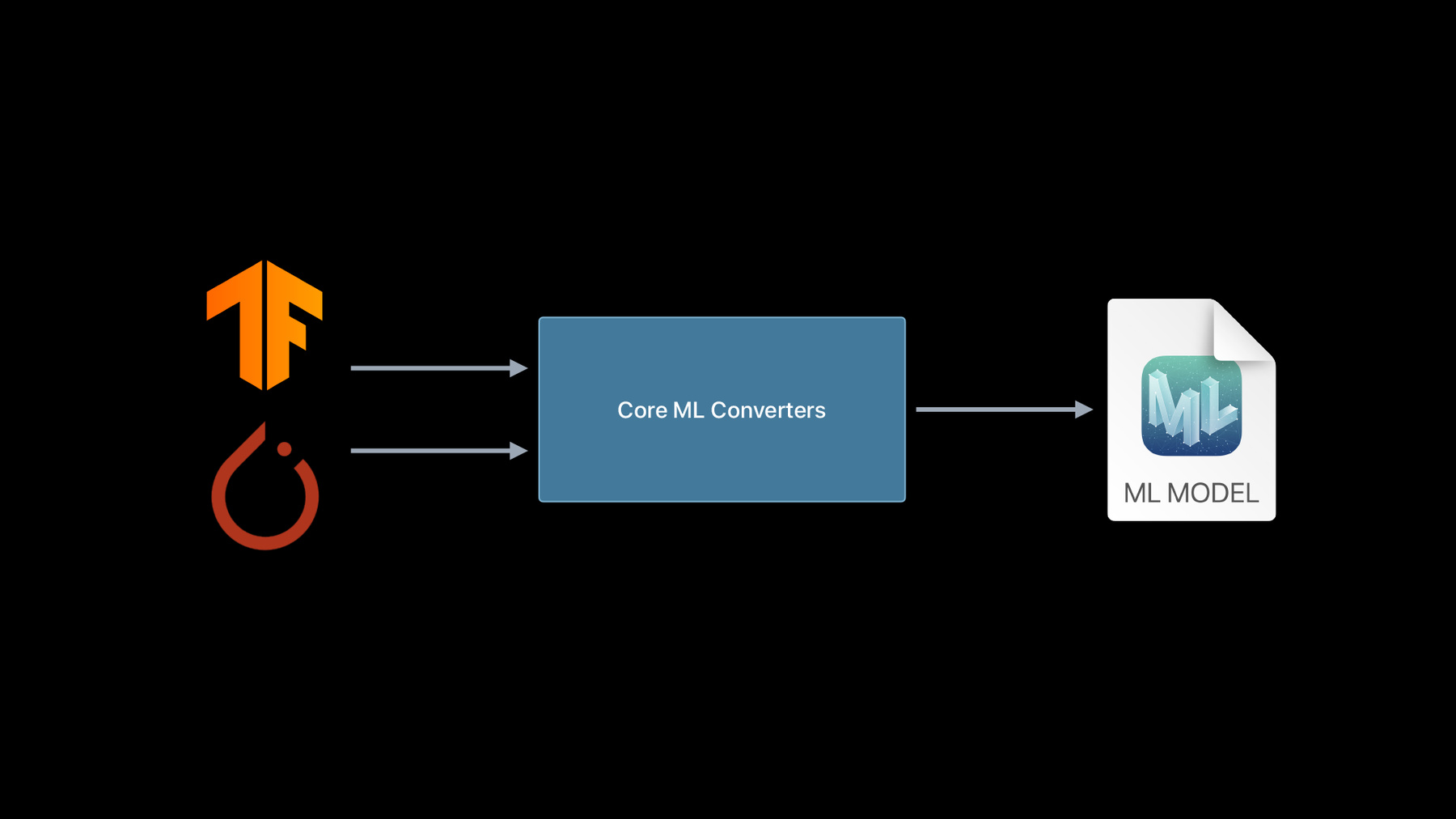
With Core ML you can bring incredible machine learning models to your app and run them entirely on-device. And when you use Core ML Converters, you can incorporate almost any trained model from TensorFlow or PyTorch and take full advantage of the GPU, CPU, and Neural Engine. Discover everything you need to begin converting existing models from other ML platforms and explore how to create custom operations that extend the capabilities of your models.
Once you've converted a model to Core ML, learn more about deployment strategy for those models by watching “Use model deployment and security with Core ML.”Recursos
Videos relacionados
WWDC23
WWDC22
WWDC21
WWDC20
-
Buscar este video…
-
-
2:58 - TensorFlow conversion using tfcoreml
# pip install tfcoreml # pip install coremltools import tfcoreml mlmodel = tfcoreml.convert(tf_model, mlmodel_path="/tmp/model.mlmodel") -
3:16 - New TensorFlow model conversion
# pip install coremltools import coremltools as ct mlmodel = ct.convert(tf_model) -
3:57 - ONNX conversion to Core ML
# pip install onnx-coreml # pip install coremltools import onnx_coreml onnx_model = torch.export(torch_model) mlmodel = onnx_coreml.convert(onnx_model) -
4:28 - New PyTorch model conversion
# pip install coremltools import coremltools as ct mlmodel = ct.convert(torch_script_model) -
4:52 - Unified conversion API
import coremltools as ct model = ct.convert( source_model # TF1, TF2, or PyTorch model ) -
6:42 - Demo 1: TF2 conversion
import coremltools as ct import tensorflow as tf tf_model = tf.keras.applications.MobileNet() mlmodel = ct.convert(tf_model) -
7:41 - Demo 1: Pytorch conversion
import coremltools as ct import torch import torchvision torch_model = torchvision.models.mobilenet_v2() torch_model.eval() example_input = torch.rand(1, 3, 256, 256) traced_model = torch.jit.trace(torch_model, example_input) mlmodel = ct.convert(traced_model, inputs=[ct.TensorType(shape=example_input.shape)]) print(mlmodel) spec = mlmodel.get_spec() ct.utils.rename_feature(spec, "input.1", "myInputName") ct.utils.rename_feature(spec, "1648", "myOutputName") mlmodel = ct.models.MLModel(spec) print(mlmodel) -
10:37 - Demo 1 : TF1 conversion
import coremltools as ct import tensorflow as tf mlmodel = ct.convert("mobilenet_frozen_graph.pb", inputs=[ct.ImageType(bias=[-1,-1,-1], scale=1/127.0)], classifier_config=ct.ClassifierConfig("labels.txt")) mlmodel.short_description = 'An image classifier' mlmodel.license = 'Apache 2.0' mlmodel.author = "Original Paper: A. Howard, M. Zhu, B. Chen, D. Kalenichenko, W. Wang, "\ "T. Weyand, M. Andreetto, H. Adam" mlmodel.save("mobilenet.mlmodel") -
13:33 - Demo 1 Recap: Using coremltools convert
import coremltools as ct mlmodel = ct.convert("./tf1_inception_model.pb") mlmodel = ct.convert("./tf2_inception_model.h5") mlmodel = ct.convert(torch_model, inputs=[ct.TensorType(shape=example_input.shape)]) -
15:45 - Converting a Deep Speech model
import numpy as np import IPython.display as ipd import coremltools as ct ### Pretrained models and chekpoints are available on the repository: https://github.com/mozilla/DeepSpeech !python DeepSpeech.py --export_dir /tmp --checkpoint_dir ./deepspeech-0.7.1-checkpoint --alphabet_config_path=alphabet.txt --scorer_path=kenlm.scorer >/dev/null 2>&1 ls /tmp/*.pb tf_model = "/tmp/output_graph.pb" from demo_utils import inspect_tf_outputs inspect_tf_outputs(tf_model) outputs = ["logits", "new_state_c", "new_state_h"] mlmodel = ct.convert(tf_model, outputs=outputs) audiofile = "./audio_sample_16bit_mono_16khz.wav" ipd.Audio(audiofile) from demo_utils import preprocessing, postprocessing mfccs = preprocessing(audiofile) mfccs.shape from demo_utils import inspect_inputs inspect_inputs(mlmodel, tf_model) start = 0 step = 16 max_time_steps = mfccs.shape[1] logits_sequence = [] input_dict = {} input_dict["input_lengths"] = np.array([step]).astype(np.float32) input_dict["previous_state_c"] = np.zeros([1, 2048]).astype(np.float32) # Initializing cell state input_dict["previous_state_h"] = np.zeros([1, 2048]).astype(np.float32) # Initializing hidden state print("Transcription: \n") while (start + step) < max_time_steps: input_dict["input_node"] = mfccs[:, start:(start + step), :, :] # Evaluation preds = mlmodel.predict(input_dict) start += step logits_sequence.append(preds["logits"]) # Updating states input_dict["previous_state_c"] = preds["new_state_c"] input_dict["previous_state_h"] = preds["new_state_h"] # Decoding probs = np.concatenate(logits_sequence) transcription = postprocessing(probs) print(transcription[0][1], end="\r", flush=True) !python DeepSpeech.py --n_steps -1 --export_dir /tmp --checkpoint_dir ./deepspeech-0.7.1-checkpoint --alphabet_config_path=alphabet.txt --scorer_path=kenlm.scorer >/dev/null 2>&1 mlmodel = ct.convert(tf_model, outputs=outputs) inspect_inputs(mlmodel,tf_model) input_dict = {} input_dict["input_node"] = mfccs input_dict["input_lengths"] = np.array([mfccs.shape[1]]).astype(np.float32) input_dict["previous_state_c"] = np.zeros([1, 2048]).astype(np.float32) # Initializing cell state input_dict["previous_state_h"] = np.zeros([1, 2048]).astype(np.float32) # Initializing hidden state probs = mlmodel.predict(input_dict)["logits"] transcription = postprocessing(probs) print(transcription[0][1]) -
21:52 - Deep Speech Demo Recap: Convert with input type
import coremltools as ct input = ct.TensorType(name="input_node", shape=(1, 16, 19, 26)) model = ct.convert(tf_model, outputs=outputs, inputs=[input]) -
26:26 - MIL Builder API sample
from coremltools.converters.mil import Builder as mb @mb.program(input_specs=[mb.TensorSpec(shape=(1, 100, 100, 3))]) def prog(x): x = mb.relu(x=x) x = mb.transpose(x=x, perm=[0, 3, 1, 2]) x = mb.reduce_mean(x=x, axes=[2, 3], keep_dims=False) x = mb.log(x=x) return x -
28:20 - Converting with composite ops
import coremltools as ct from transformers import TFT5Model model = TFT5Model.from_pretrained('t5-small') mlmodel = ct.convert(model) # Einsum Notation $$ \Large "bnqd,bnkd \rightarrow bnqk" $$ $$ \large C(b, n, q, k) = \sum_d A(b, n, q, d) \times B(b, n, k, d) $$ $$ \Large C = AB^{T}$$ from coremltools.converters.mil import Builder as mb from coremltools.converters.mil import register_tf_op @register_tf_op def Einsum(context, node): assert node.attr['equation'] == 'bnqd,bnkd->bnqk' a = context[node.inputs[0]] b = context[node.inputs[1]] x = mb.matmul(x=a, y=b, transpose_x=False, transpose_y=True, name=node.name) context.add(node.name, x) mlmodel = ct.convert(model) print(mlmodel) -
29:50 - Recap: Custom operation
@register_tf_op def Einsum(context, node): assert node.attr['equation'] == 'bnqd,bnkd->bnqk' a = context[node.inputs[0]] b = context[node.inputs[1]] x = mb.matmul(x=a, y=b, transpose_x=False, transpose_y=True, name=node.name) context.add(node.name, x) -
29:50 - Deep Speech demo utilities
import numpy as np
import pandas as pd
import tensorflow as tf
from tensorflow.python.ops import gen_audio_ops as contrib_audio


from deepspeech_training.util.text import Alphabet
from ds_ctcdecoder import ctc_beam_search_decoder, Scorer


## Preprocessing + Postprocessing functions are constructed using code in DeepSpeech repository: https://github.com/mozilla/DeepSpeech

audio_window_samples = 512
audio_step_samples = 320
n_input  = 26
audio_sample_rate = 16000
context = 9

lm_alpha = 0.931289039105002
lm_beta  = 1.1834137581510284
scorer_path = "./kenlm.scorer"

beam_width = 1024
cutoff_prob = 1.0
cutoff_top_n = 300

alphabet = Alphabet("./alphabet.txt")

scorer = Scorer(lm_alpha, lm_beta, scorer_path, alphabet)


def audiofile_to_features(wav_filename):

    samples = tf.io.read_file(wav_filename)

    decoded = contrib_audio.decode_wav(samples, desired_channels=1)

    spectrogram = contrib_audio.audio_spectrogram(decoded.audio,
                                                  window_size=audio_window_samples,
                                                  stride=audio_step_samples,
                                                  magnitude_squared=True)

    mfccs = contrib_audio.mfcc(spectrogram = spectrogram,
                               sample_rate = decoded.sample_rate,
                               dct_coefficient_count=n_input,
                               upper_frequency_limit=audio_sample_rate/2)

    mfccs = tf.reshape(mfccs, [-1, n_input])

    return mfccs, tf.shape(input=mfccs)[0]


def create_overlapping_windows(batch_x):

    batch_size = tf.shape(input=batch_x)[0]
    window_width = 2 * context + 1
    num_channels = n_input

    eye_filter = tf.constant(np.eye(window_width * num_channels)
                               .reshape(window_width, num_channels, window_width * num_channels), tf.float32)

    # Create overlapping windows
    batch_x = tf.nn.conv1d(input=batch_x, filters=eye_filter, stride=1, padding='SAME')

    batch_x = tf.reshape(batch_x, [batch_size, -1, window_width, num_channels])

    return batch_x


sess = tf.Session(graph=tf.Graph())

with sess.graph.as_default() as g:
    path = tf.placeholder(tf.string)
    _features, _ = audiofile_to_features(path)
    _features = tf.expand_dims(_features, 0)
    _features = create_overlapping_windows(_features)


def preprocessing(input_file_path):
    return _features.eval(session=sess, feed_dict={path: input_file_path})


def postprocessing(logits):
    logits = np.squeeze(logits)

    decoded = ctc_beam_search_decoder(logits, alphabet, beam_width,
                                      scorer=scorer, cutoff_prob=cutoff_prob,
                                      cutoff_top_n=cutoff_top_n)

    return decoded


def inspect_tf_outputs(path):

    with open(path, 'rb') as f:
        serialized = f.read()
    gdef = tf.GraphDef()
    gdef.ParseFromString(serialized)

    with tf.Graph().as_default() as g:
        tf.import_graph_def(gdef, name="")

    output_nodes = []
    for op in g.get_operations():

        if op.type == "Const":
            continue

        if all([len(g.get_tensor_by_name(tensor.name).consumers()) == 0 for tensor in op.outputs]):

            output_nodes.append(op.name)

    return output_nodes


def inspect_inputs(mlmodel, tfmodel):

    names = []
    ranks = []
    shapes = []

    spec = mlmodel.get_spec()

    with open(tfmodel, 'rb') as f:
        serialized = f.read()
    gdef = tf.GraphDef()
    gdef.ParseFromString(serialized)

    with tf.Graph().as_default() as g:
        tf.import_graph_def(gdef, name="")

    for tensor in spec.description.input:
        name = tensor.name
        shape = tensor.type.multiArrayType.shape

        if tensor.type.multiArrayType.shapeRange:
            for dim, size in enumerate(tensor.type.multiArrayType.shapeRange.sizeRanges):
                if size.upperBound == -1:
                    shape[dim] = -1
                elif size.lowerBound < size.upperBound:
                    shape[dim] = -1
                elif size.lowerBound == size.upperBound:
                    assert shape[dim] == size.lowerBound
                else:
                    raise TypeError("Invalid shape range")

        coreml_shape = tuple(None if i == -1 else i for i in shape)

        tf_shape = tuple(g.get_tensor_by_name(name + ":0").shape.as_list())

        shapes.append({"Core ML shape": coreml_shape, "TF shape": tf_shape})
        names.append(name)
        ranks.append(len(coreml_shape))


    columns = [shapes[i] for i in np.argsort(ranks)[::-1]]
    indices = [names[i] for i in np.argsort(ranks)[::-1]]

    return pd.DataFrame(columns, index= indices)
-