

View in English

  • Apple Developer
    • Get Started

    Explore Get Started

    • Overview
    • Learn
    • Apple Developer Program

    Stay Updated

    • Latest News
    • Hello Developer
    • Platforms

    Explore Platforms

    • Apple Platforms
    • iOS
    • iPadOS
    • macOS
    • tvOS
    • visionOS
    • watchOS
    • App Store

    Featured

    • Design
    • Distribution
    • Games
    • Accessories
    • Web
    • Home
    • CarPlay
    • Technologies

    Explore Technologies

    • Overview
    • Xcode
    • Swift
    • SwiftUI

    Featured

    • Accessibility
    • App Intents
    • Apple Intelligence
    • Games
    • Machine Learning & AI
    • Security
    • Xcode Cloud
    • Community

    Explore Community

    • Overview
    • Meet with Apple events
    • Community-driven events
    • Developer Forums
    • Open Source

    Featured

    • WWDC
    • Swift Student Challenge
    • Developer Stories
    • App Store Awards
    • Apple Design Awards
    • Apple Developer Centers
    • Documentation

    Explore Documentation

    • Documentation Library
    • Technology Overviews
    • Sample Code
    • Human Interface Guidelines
    • Videos

    Release Notes

    • Featured Updates
    • iOS
    • iPadOS
    • macOS
    • watchOS
    • visionOS
    • tvOS
    • Xcode
    • Downloads

    Explore Downloads

    • All Downloads
    • Operating Systems
    • Applications
    • Design Resources

    Featured

    • Xcode
    • TestFlight
    • Fonts
    • SF Symbols
    • Icon Composer
    • Support

    Explore Support

    • Overview
    • Help Guides
    • Developer Forums
    • Feedback Assistant
    • Contact Us

    Featured

    • Account Help
    • App Review Guidelines
    • App Store Connect Help
    • Upcoming Requirements
    • Agreements and Guidelines
    • System Status
  • Quick Links

    • Events
    • News
    • Forums
    • Sample Code
    • Videos
 

Videos

Abrir menú Cerrar menú
  • Colecciones
  • Todos los videos
  • Información

Más videos

  • Información
  • Código
  • Meet the new Photos picker

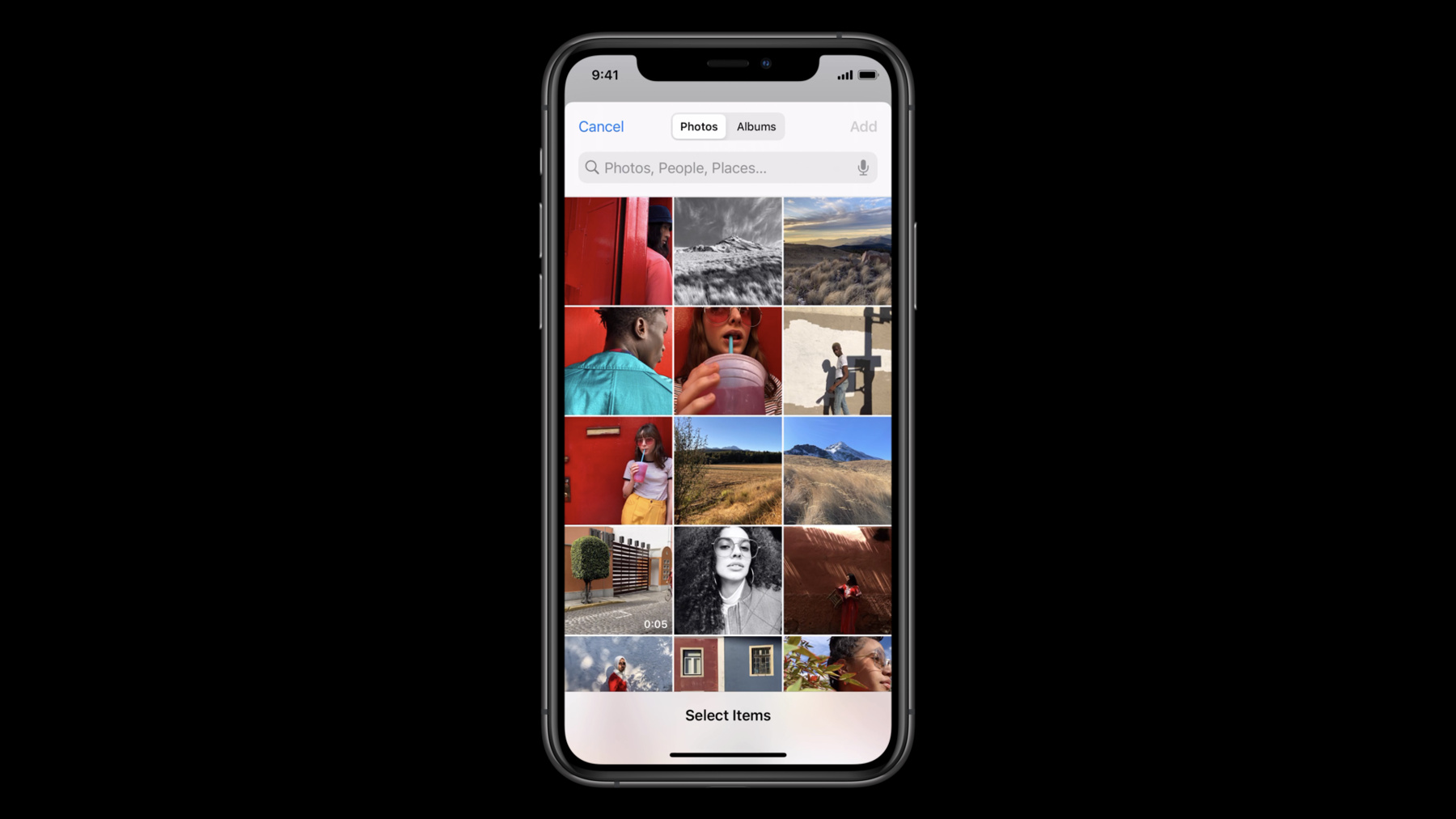
    Let people select photos and videos to use in your app without requiring full Photo Library access. Discover how the PHPicker API for iOS and Mac Catalyst ensures privacy while providing your app the features you need.

    PHPicker is the modern replacement for UIImagePickerController. In addition to its privacy-focused approach, the API also provides additional features for your app like search, multi-image selection, and the ability to zoom in or out on on the photo grid. We'll show you how PHPicker can help most apps avoid asking for direct library access and how you can implement it to improve the overall experience for people interacting with your app.

    Recursos

    • Selecting Photos and Videos in iOS
    • PhotoKit
      • Video HD
      • Video SD

    Videos relacionados

    WWDC23

    • Embed the Photos Picker in your app

    WWDC22

    • What's new in the Photos picker

    WWDC21

    • Capture and process ProRAW images
    • Improve access to Photos in your app

    WWDC20

    • Build trust through better privacy
    • Build with iOS pickers, menus and actions
    • Handle the Limited Photos Library in your app
  • Buscar este video…
    • 2:27 - PHPickerConfiguration

      import PhotosUI
      
      var configuration = PHPickerConfiguration()
      
      // “unlimited” selection by specifying 0, default is 1
      configuration.selectionLimit = 0
      
      // Only show images (including Live Photos)
      configuration.filter = .images
      // Uncomment next line for other example: Only show videos or Live Photos (for their video complement), but no images
      // configuration.filter = .any(of: [.videos, .livePhotos])
    • 3:07 - PHPickerViewController

      import UIKit
      import PhotosUI
      
      class SingleSelectionPickerViewController: UIViewController, PHPickerViewControllerDelegate {
          @IBAction func presentPicker(_ sender: Any) {
              var configuration = PHPickerConfiguration()
              // Only wants images
              configuration.filter = .images
              
              let picker = PHPickerViewController(configuration: configuration)
              picker.delegate = self
              
              // The client is responsible for presentation and dismissal
              present(picker, animated: true)
          }
          
          func picker(_ picker: PHPickerViewController, didFinishPicking results: [PHPickerResult]) {
              // The client is responsible for presentation and dismissal
              picker.dismiss(animated: true)
              
              // Get the first item provider from the results, the configuration only allowed one image to be selected
              let itemProvider = results.first?.itemProvider
              
              if let itemProvider = itemProvider, itemProvider.canLoadObject(ofClass: UIImage.self) {
                  itemProvider.loadObject(ofClass: UIImage.self) { (image, error) in
                      // TODO: Do something with the image or handle the error
                  }
              } else {
                  // TODO: Handle empty results or item provider not being able load UIImage
              }
          }
      }
    • 5:19 - Demo - Single Selection

      import UIKit
      import PhotosUI
      
      class ViewController: UIViewController {
          
          @IBOutlet weak var imageView: UIImageView!
          
          @IBAction func presentPicker(_ sender: Any) {
              var configuration = PHPickerConfiguration()
              configuration.filter = .images
              
              let picker = PHPickerViewController(configuration: configuration)
              picker.delegate = self
              present(picker, animated: true)
          }
          
      }
      
      extension ViewController: PHPickerViewControllerDelegate {
          
          func picker(_ picker: PHPickerViewController, didFinishPicking results: [PHPickerResult]) {
              dismiss(animated: true)
              
              if let itemProvider = results.first?.itemProvider, itemProvider.canLoadObject(ofClass: UIImage.self) {
                  let previousImage = imageView.image
                  itemProvider.loadObject(ofClass: UIImage.self) { [weak self] image, error in
                      DispatchQueue.main.async {
                          guard let self = self, let image = image as? UIImage, self.imageView.image == previousImage else { return }
                          self.imageView.image = image
                      }
                  }
              }
          }
          
      }
    • 7:34 - Demo - Multiple Selection

      import UIKit
      import PhotosUI
      
      class ViewController: UIViewController {
          
          @IBOutlet weak var imageView: UIImageView!
          
          var itemProviders: [NSItemProvider] = []
          var iterator: IndexingIterator<[NSItemProvider]>?
          
          @IBAction func presentPicker(_ sender: Any) {
              var configuration = PHPickerConfiguration()
              configuration.filter = .images
              configuration.selectionLimit = 0
              
              let picker = PHPickerViewController(configuration: configuration)
              picker.delegate = self
              present(picker, animated: true)
          }
          
          func displayNextImage() {
              if let itemProvider = iterator?.next(), itemProvider.canLoadObject(ofClass: UIImage.self) {
                  let previousImage = imageView.image
                  itemProvider.loadObject(ofClass: UIImage.self) { [weak self] image, error in
                      DispatchQueue.main.async {
                          guard let self = self, let image = image as? UIImage, self.imageView.image == previousImage else { return }
                          self.imageView.image = image
                      }
                  }
              }
          }
          
          override func touchesEnded(_ touches: Set<UITouch>, with event: UIEvent?) {
              displayNextImage()
          }
          
      }
      
      extension ViewController: PHPickerViewControllerDelegate {
          
          func picker(_ picker: PHPickerViewController, didFinishPicking results: [PHPickerResult]) {
              dismiss(animated: true)
              
              itemProviders = results.map(\.itemProvider)
              iterator = itemProviders.makeIterator()
              displayNextImage()
          }
          
      }
    • 11:13 - Using PHPicker with PhotoKit

      import UIKit
      import PhotosUI
      
      class PhotoKitPickerViewController: UIViewController, PHPickerViewControllerDelegate {
          @IBAction func presentPicker(_ sender: Any) {
              let photoLibrary = PHPhotoLibrary.shared()
              let configuration = PHPickerConfiguration(photoLibrary: photoLibrary)
              let picker = PHPickerViewController(configuration: configuration)
              picker.delegate = self
              present(picker, animated: true)
          }
          
          func picker(_ picker: PHPickerViewController, didFinishPicking results: [PHPickerResult]) {
              picker.dismiss(animated: true)
              
              let identifiers = results.compactMap(\.assetIdentifier)
              let fetchResult = PHAsset.fetchAssets(withLocalIdentifiers: identifiers, options: nil)
              
              // TODO: Do something with the fetch result if you have Photos Library access
          }
      }

Developer Footer

  • Videos
  • WWDC20
  • Meet the new Photos picker
  • Open Menu Close Menu
    • iOS
    • iPadOS
    • macOS
    • tvOS
    • visionOS
    • watchOS
    • App Store
    Open Menu Close Menu
    • Swift
    • SwiftUI
    • Swift Playground
    • TestFlight
    • Xcode
    • Xcode Cloud
    • Icon Composer
    • SF Symbols
    Open Menu Close Menu
    • Accessibility
    • Accessories
    • Apple Intelligence
    • Audio & Video
    • Augmented Reality
    • Business
    • Design
    • Distribution
    • Education
    • Games
    • Health & Fitness
    • In-App Purchase
    • Localization
    • Maps & Location
    • Machine Learning & AI
    • Security
    • Safari & Web
    Open Menu Close Menu
    • Documentation
    • Downloads
    • Sample Code
    • Videos
    Open Menu Close Menu
    • Help Guides & Articles
    • Contact Us
    • Forums
    • Feedback & Bug Reporting
    • System Status
    Open Menu Close Menu
    • Apple Developer
    • App Store Connect
    • Certificates, IDs, & Profiles
    • Feedback Assistant
    Open Menu Close Menu
    • Apple Developer Program
    • Apple Developer Enterprise Program
    • App Store Small Business Program
    • MFi Program
    • Mini Apps Partner Program
    • News Partner Program
    • Video Partner Program
    • Security Bounty Program
    • Security Research Device Program
    Open Menu Close Menu
    • Meet with Apple
    • Apple Developer Centers
    • App Store Awards
    • Apple Design Awards
    • Apple Developer Academies
    • WWDC
    Read the latest news.
    Get the Apple Developer app.
    Copyright © 2026 Apple Inc. All rights reserved.
    Terms of Use Privacy Policy Agreements and Guidelines