

-
Evolve your document launch experience
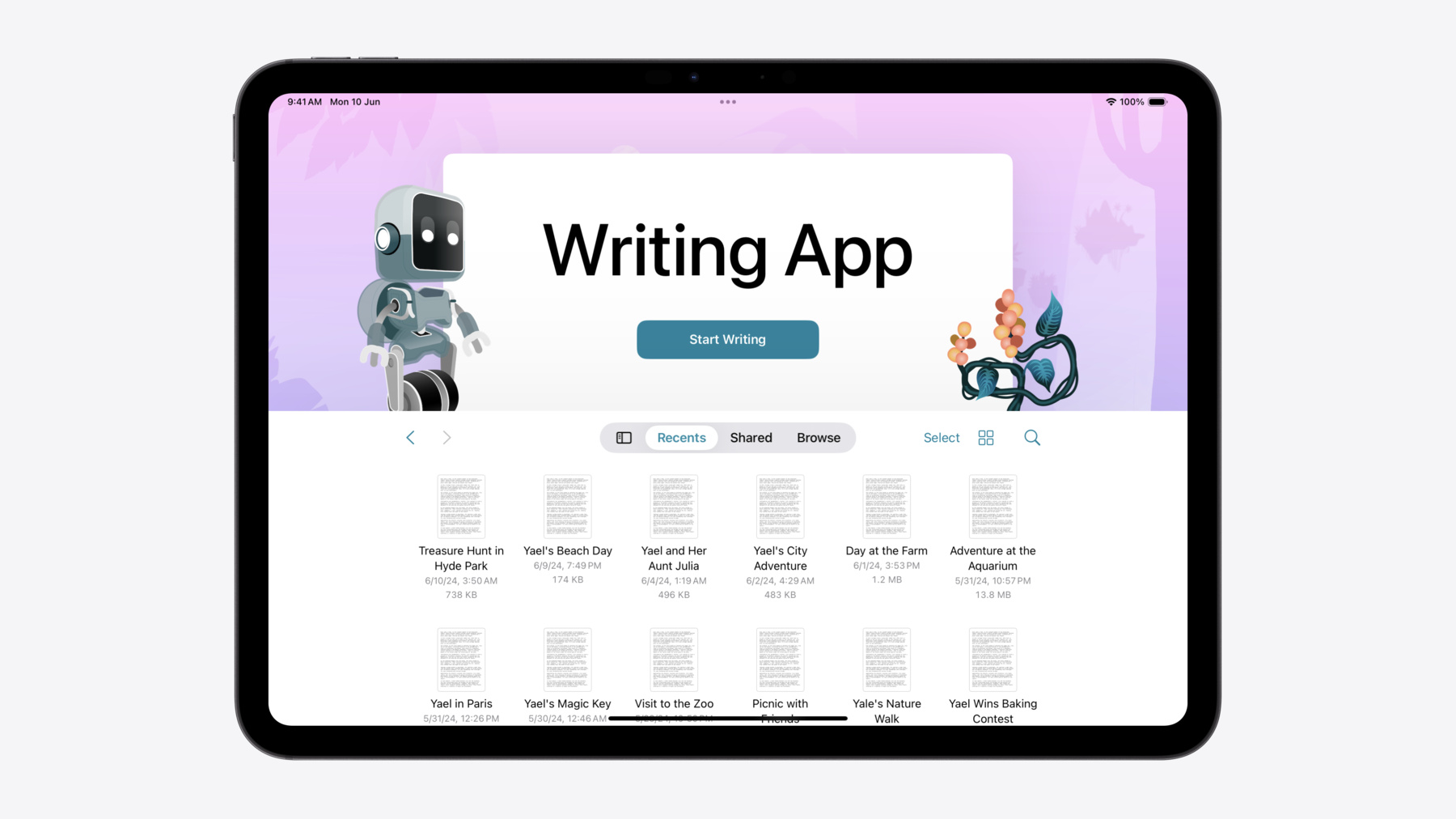
Make your document-based app stand out, and bring its unique identity into focus with the new document launch experience. Learn how to leverage the new API to customize the first screen people see when they launch your app. Utilize the new system-provided design, and amend it with custom actions, delightful decorative views, and impressive animations.
Capítulos
- 0:00 - Introduction
- 1:01 - Design overview
- 2:18 - Getting started with SwiftUI
- 3:13 - Getting started with UIKit
- 4:11 - Customization
- 6:42 - Adding template support to your app
Recursos
- Building a document-based app with SwiftUI
- Customizing a document-based app’s launch experience
- Forum: UI Frameworks
Videos relacionados
WWDC23
WWDC20
-
Buscar este video…
-
-
2:38 - Document-based application
@main struct WritingApp: App { var body: some Scene { DocumentGroup(newDocument: { StoryDocument() }) { file in StoryView(document: $file.document) } } } -
3:26 - Presenting a document from the browser in iOS 17
class DocumentViewController: UIDocumentViewController { ... } let documentViewController = DocumentViewController() let browserViewController = UIDocumentBrowserViewController( forOpening: [.plainText] ) window.rootViewController = browserViewController -
3:38 - Presenting a document from the browser in iOS 17
class DocumentViewController: UIDocumentViewController { ... } let documentViewController = DocumentViewController() let browserViewController = UIDocumentBrowserViewController( forOpening: [.plainText] ) window.rootViewController = browserViewController browserViewController.delegate = self -
3:43 - Presenting a document from the browser in iOS 17
class DocumentViewController: UIDocumentViewController { ... } let documentViewController = DocumentViewController() let browserViewController = UIDocumentBrowserViewController( forOpening: [.plainText] ) window.rootViewController = browserViewController browserViewController.delegate = self // MARK: UIDocumentBrowserViewControllerDelegate func documentBrowser( _ browser: UIDocumentBrowserViewController, didPickDocumentsAt documentURLs: [URL] ) { guard let url = documentURLs.first else { return } documentViewController.document = StoryDocument(fileURL: url) browser.present(documentViewController, animated: true) } -
3:56 - Presenting a document from the browser in iOS 18
class DocumentViewController: UIDocumentViewController { ... } let documentViewController = DocumentViewController() window.rootViewController = documentViewController -
4:38 - Customize the document launch experience: background
DocumentGroup( newDocument: { StoryDocument() } ) { file in StoryView(document: $file.document) } DocumentGroupLaunchScene { ... } background: { Image(.pinkJungle) .resizable() .aspectRatio(contentMode: .fill) } -
4:49 - Customize the document launch experience: new document button title
DocumentGroup( newDocument: { StoryDocument() } ) { file in StoryView(document: $file.document) } DocumentGroupLaunchScene { NewDocumentButton("Start Writing") } background: { Image(.pinkJungle) .resizable() .aspectRatio(contentMode: .fill) } -
5:29 - Customize the document launch experience: accessory views
DocumentGroupLaunchScene { NewDocumentButton("Start Writing") } background: { Image(.pinkJungle) .resizable() .aspectRatio(contentMode: .fill) } overlayAccessoryView: { } -
5:44 - Position accessory views
DocumentGroupLaunchScene { NewDocumentButton("Start Writing") } background: { Image(.pinkJungle) .resizable() .aspectRatio(contentMode: .fill) } overlayAccessoryView: { geometry in } -
5:53 - Position accessory views
DocumentGroupLaunchScene { NewDocumentButton("Start Writing") } background: { ... } overlayAccessoryView: { geometry in ZStack { Image(.robot) .position( x: geometry.titleViewFrame.minX, y: geometry.titleViewFrame.minY ) Image(.plant) .position( x: geometry.titleViewFrame.maxX, y: geometry.titleViewFrame.maxY ) } } -
6:11 - Customize the document launch experience in a UIKit app
class DocumentViewController: UIDocumentViewController { override func viewDidLoad() { super.viewDidLoad() // Update the background launchOptions.background.image = UIImage(resource: .pinkJungle) // Add foreground accessories launchOptions.foregroundAccessoryView = ForegroundAccessoryView() } } -
7:31 - Create a document from a template: add a button
DocumentGroupLaunchScene { NewDocumentButton("Start Writing") NewDocumentButton("Choose a Template", for: StoryDocument.self) { } } -
7:45 - Create a document from a template: return document later
@State private var creationContinuation: CheckedContinuation<StoryDocument?, any Error>? DocumentGroupLaunchScene { NewDocumentButton("Start Writing") NewDocumentButton("Choose a Template", for: StoryDocument.self) { try await withCheckedThrowingContinuation { continuation in self.creationContinuation = continuation } } } -
7:56 - Create a document from a template: present a template picker
@State private var creationContinuation: CheckedContinuation<StoryDocument?, any Error>? @State private var isTemplatePickerPresented = false DocumentGroupLaunchScene { NewDocumentButton("Start Writing") NewDocumentButton("Choose a Template", for: StoryDocument.self) { try await withCheckedThrowingContinuation { continuation in self.creationContinuation = continuation self.isTemplatePickerPresented = true } } .sheet(isPresented: $isTemplatePickerPresented) { TemplatePicker(continuation: $creationContinuation } } -
8:07 - Create a document from a template: template picker view
struct TemplatePicker: View { @Binding var creationContinuation: CheckedContinuation<StoryDocument?, any Error>? var body: some View { Button("Three Act Structure") { creationContinuation?.resume(returning: StoryDocument.threeActStructure()) creationContinuation = nil } } } extension StoryDocument { static func threeActStructure() -> Self { Self.init(...) } } -
8:20 - Create a document from a template in UIKit
extension UIDocument.CreationIntent { static let template = UIDocument.CreationIntent("template") } -
8:29 - Create a document from a template in UIKit
launchOptions.secondaryAction = LaunchOptions.createDocumentAction(with: .template)
launchOptions.browserViewController.delegate = self

// MARK: UIDocumentBrowserViewControllerDelegate

func documentBrowser(
    _ browser: UIDocumentBrowserViewController,
    didRequestDocumentCreationWithHandler importHandler: @escaping (URL?, ImportMode) -> Void)
{
    switch browser.activeDocumentCreationIntent {
    case .template:
        presentTemplatePicker(with: importHandler)
    default:
        let newDocumentURL = // ...
        importHandler(newDocumentURL, .copy)
    }
}
-