Create text layouts, optimize font handling, and access font metrics and glyph data.
-
-
Explains how to do text layout and font-related operations using the Core Text programming interfaces.
-
-
-
-
-
-
-
Explains how to use Quartz 2D. Includes illustrations and sample code.
-
Returns the version of the Core Text framework.
-
Attributes that specify text markup in legible media.
-
AttributeScopes.CoreTextAttributes
A namespace for attributes defined by CoreText.
-
Provides an overview of Core Audio and its programming interfaces.
-
Explains how the objects of the Cocoa text system interact.
-
Explains how to use the HTML5
-
Persist or cache data on a single device, or sync data to multiple devices with CloudKit.
-
Access low-level functions, primitive data types, and various collection types that are bridged seamlessly with the Foundation framework.
-
Harness the power of Quartz technology to perform lightweight 2D rendering with high-fidelity output. Handle path-based drawing, antialiased rendering, gradients, images, color management, PDF documents, and more.
-
Use built-in or custom filters to process still and video images.
-
Process accelerometer, gyroscope, pedometer, and environment-related events.
-
Detect NFC tags, read messages that contain NDEF data, and save data to writable tags.
-
Access and manage key operating system services, such as launch and identity services.
-
Introduces the development process for Mac apps.
-
Introduces OS X and its technologies.
-
Explains how to use the WebKit to embed web content in both Cocoa and Carbon applications.
-
Describes the keys for a bundle's Info.plist file.
-
Explains how to create document-based applications using the Cocoa document architecture on OS X.
-
Explains how the Cocoa text system lays out text on pages.
-
Explains how the objects of the Cocoa text system interact.
-
Attributes to which Core Text responds when placed in a CFAttributedString object.
-
Integrating vImage pixel buffers into a Core Image workflow
Share image data between Core Video pixel buffers and vImage buffers to integrate vImage operations into a Core Image workflow.
-
Integrating vImage pixel buffers into a Core Image workflow
Share image data between Core Video pixel buffers and vImage buffers to integrate vImage operations into a Core Image workflow.
-
Explains how to do text layout and font-related operations using the Core Text programming interfaces.
-
Explains how the objects of the Cocoa text system interact.
-
Describes the technologies and techniques for displaying and managing text and web content in iOS.
-
Core Audio Format Specification
Specifies the Apple Core Audio Format (CAF) for audio files.
-
Describes the built-in image processing filters available through Core Image.
-
Syncing Core Data Applications
Explains how to add syncing to your applications. Sync Services is deprecated in Mac OS X v10.7.
-
Pass image data between Core Video and vImage.
-
Lower Level Text-Handling Technologies
Describes the technologies and techniques for displaying and managing text and web content in iOS.
-
Text Handling Technologies in OS X
Explains how the objects of the Cocoa text system interact.
-
 10:55
10:55
Support semantic search with Core Spotlight
-
 15:45
15:45
What’s new with text and text interactions
Text is an absolutely critical component of every app. Discover the latest features and enhancements for creating rich text experiences on Apple...
-
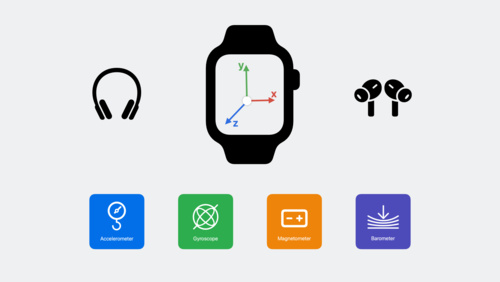 23:17
23:17
Learn how you can use the latest Core Motion updates to expand how your app uses motion data. Discover how to stream higher-frequency sensor data...
-
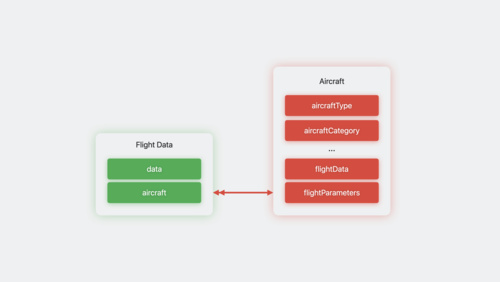 23:23
23:23
-
 24:04
24:04
What's new in TextKit and text views
-
 41:04
41:04
Meet TextKit 2: Apple's next-generation text engine, redesigned for improved correctness, safety, and performance. Discover how TextKit 2 can help...
-
 39:48
39:48
-
 30:43
30:43
Learn how easy it is to add support for NFC in your app and take advantage of the newest capabilities such as NDEF writing and support for widely...
-
 6:12
6:12
Background reading of NFC tags is a new feature for iPhone XS, iPhone XS Max, and iPhone XR. Learn how to associate your app with an NFC tag to make...
-
 35:45
35:45
Location technologies are core to delivering context-based services within your app. Discover how the latest features in the Core Location Framework...
-
Define your app’s object structure with a data model file.
-
Using Text Kit to Draw and Manage Text
Describes the technologies and techniques for displaying and managing text and web content in iOS.
-
Mirroring a Core Data store with CloudKit
Back user interfaces with a local replica of a CloudKit private database.
-
Larger Text evaluation criteria - App Store Connect - Help
Learn how to implement and test Larger Text accessibility to enhance user experience, and decide whether to highlight your app's support on the App Store.
-
Display Text with a Custom Layout
Lay out text in a custom-shaped container and apply glyph substitutions.
-
Describes the APIs and techniques for drawing and printing on iOS.
-
Introduces OS X and its technologies.