

-
Secure your apps with App Attest
Harness App Attest to protect your app from unauthorized modification and fraud. Uncover how attackers exploit modified apps to spoof data and bypass security checks, and how App Attest defends against these threats. Learn to generate and manage App Attest keys bound to the Secure Enclave, validate attestations and assertions, and use the fraud metric to detect abuse. Discover best practices across all Apple platforms, including new signals in iOS 27 to strengthen your validation.
Chapters
- 0:00 - Introduction
- 1:35 - Protections
- 4:04 - Availability
- 5:02 - Key generation
- 6:12 - Attestation
- 12:10 - Assertion
- 14:58 - Common pitfalls
- 16:27 - Fraud metric
- 19:07 - Next steps
Resources
-
Search this video…
Hello, my name is Manthan, and I am an engineer on the Trust and Safety team. Today, I will talk about how App Attest can help protect your apps and your users. You built and distributed your app to function in a secure environment on Apple's platforms. Fraudsters are always looking for ways to exploit your apps beyond their intended feature functionalities. These may include attack scenarios where compromised copies of your app, serve valid looking requests to your server, gaining access to sensitive data. Imagine, you've built a quiz proctoring app for students to take quizzes and submit answers. A fraudster may reverse engineer your app to create a modified copy that submits falsified quiz responses to your server. App Attest can help your server reject these types of requests from modified clients.
Or, modify your app to include content that you didn't ship.
By directly modifying compromised copies of your source code or related resource bundles, re-signing your app, and running a modified copy on the device.
Imagine, you have a dragon slayer game, and a fraudster has injected a cheat menu that boosts their abilities in your game. This allows them to submit fraudulent scores to your server and rise up the leaderboard with a compromised copy of your game app.
App Attest is designed to address these types of threat scenarios. I will start with what App Attest protects against, then walk through integration steps and best practices. I'll flag some common pitfalls, and I'll wrap up with the fraud metric, a powerful tool for detecting suspicious attestation activity. Starting with how App Attest can help protect your app.
App Attest can help ensure that your app is running on genuine Apple hardware. It does this by issuing an attestation, which provides cryptographic proof about the validity of your app running on the user's device. This can then be verified by your server and it gives you the assurance that your app is running on a secure Apple device.
Next, it helps make you aware of modifications to your App on the user's device. App Attest surfaces information about the relying party, launch category, and bundle version associated with your app, all of which can help you determine if your app has been modified.
Your app is uniquely identified through a relying party identifier. This is a concatenation of your Team Identifier from your Apple developer provisioning profile, and your app's bundle identifier. Imagine a fraudster modifies your app, and re-signs it with a provisioning profile that does not match your Team Identifier.
App Attest surfaces your app identity on the user's device, allowing you to discover unauthorized modifications.
New in iOS 27, it highlights the launch validation category of your app on the user's device. You may have distributed your app through the App Store, but observe App Attest indicating a TestFlight launch validation category.
It also identifies the bundle version for the version of the app that you ship. If a fraudster re-signs your app with an updated bundle version that you are not aware of, this will be transparent through App Attest.
Lastly, you can secure payloads from your app to your server using App Attest. App Attest can generate assertions using cryptographic properties from a previously issued attestation. Your server can then verify the assertions on payloads from your app, ensuring that the payload was not tampered in transit.
With this guidance in mind, here's how App Attest works and how to adopt it.
I will go over each of the core parts of App Attest.
Starting with determining where App Attest is available.
App Attest is supported on all Apple platforms, including macOS 27 and higher, which was previously not supported. While App Attest is available on all major Apple operating systems, it may not be available for use through all app types on these platforms. Gate your usage of App Attest through the isSupported API from the App Attest framework. For example, App Attest is available on Action and SSO app extensions, but not other types of app extensions.
You can also use the isSupported response as a fraud signal, incorporating it into your risk assessment. If you've distributed your app on a supported platform but observe a spike in unsupported responses from a particular user, that may indicate tampering. You should decide if the user should be allowed to proceed to use your app functions when App Attest is not supported.
Moving on to the first step in the App Attest workflow, which is generating a key ID.
Your app starts off by calling App Attest to generate a key ID. App Attest creates a Secure Enclave-bound key pair on behalf of the app, where the private key resides in the Secure Enclave.
App Attest returns a hash of the public key to your app.
Your app then stores the key ID in the Keychain.
You should keep some best practices in mind when dealing with App Attest keys. Generate 1 key per user for account-based apps or 1 key for your entire app on the user's device. Do not share keys across your user population.
Use Keychain to store the key IDs generated by your app.
Key IDs last as long as the app is installed. They survive app updates, but if the user reinstalls the app or restores their device, including from iCloud backup, the key is invalidated.
And keys are per-device, they don't sync across user devices.
That wraps up App Attest key generation. These form the basis for attestations and assertions.
Now that your App has generated a key ID, it can request App Attest to attest the key. Your app fetches the key ID from Keychain.
Your app requests your server to perform an attestation for the key ID. Your server responds by vending a challenge to your app, to include in the attestation. Your app calls the attestation API from the App Attest framework, providing the key ID and server challenge. App Attest fetches the key pair for the key ID along with some attestation data from the device. This attestation data is derived from the Secure Enclave, which contains a snapshot of the hardware properties of the device from boot. It cannot be modified.
It initiates a server request to an Apple service which validates the device data, and returns an attestation. App Attest returns the attestation object to your app.
Your app sends the attestation to your server. Your server should validate the attestation, which we will get to next, save it, and associate it with the user of your app.
There are a few best practices to keep in mind when collecting and handling attestations.
It's important that your server control the initiation of an attestation. This will help you ensure that your app stays within a safe requests-per-second upper bound.
Attestation failures can occur and your app should try again at some later time. Implement an exponential back-off scheme to avoid hitting global rate limits. You should not hard-code retry logic in your app to minimize uncontrollable spikes against the Apple attestation server.
Your app should collect the attestation outside of user flows. Try to perform the attestation operation on a background task. Finally, the attestation should always be validated by your server, and not the app. If your app becomes compromised, it cannot be trusted for validating an attestation.
I will now go over the attestation itself, which is the object that is returned from the App Attest attestation API.
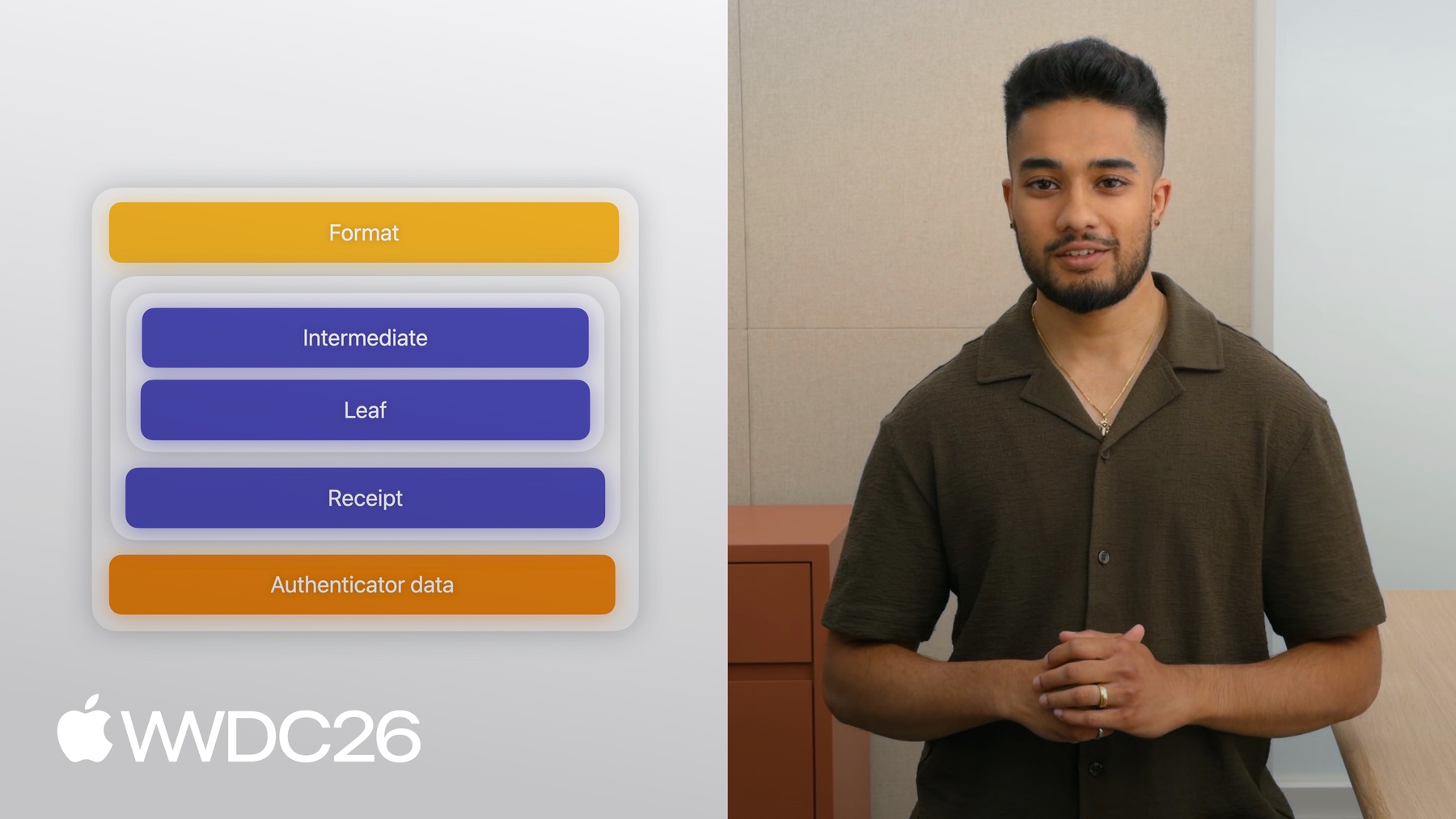
The attestation structure has three sections: format, attestation statement, and authenticator data. The format is a fixed string that identifies the Apple anonymized attestation.
Next, the attestation statement embeds a cryptographic certificate chain and receipt.
The certificate chain proves that the attested key was generated on genuine Apple hardware. Follow the Developer Documentation to validate the certificate chain, which contains the nonce, key ID, and your relying party identifier embedded in the leaf certificate.
On macOS 27 and later, a key access control property, known as the ACL Blob OID, is also included in the leaf certificate. This represents the security conditions associated with the App Attest key, that were enforced by the Secure Enclave when the attestation was collected on the device. The key access control property is available on all platforms, but is especially important on macOS. On macOS, App Attest configures each generated key with a policy that requires full security mode and System Integrity Protection.
Full security mode ensures the highest level of security and verifies the integrity of the operating system on the user's device. System Integrity Protection prevents the execution of unauthorized code and protects system paths. These are both enabled by default on Mac devices.
By validating the key access control property, you can be sure of the security conditions that were enforced on the user's device.
The attestation statement also contains a receipt. This is formatted similar to the App Store receipt, and you should follow the Developer Documentation for parsing this. You should validate the relying party ID, attested key, and your server challenge that is contained in the receipt. Your server should store this receipt for interfacing with the fraud metric.
Finally, the authenticator data identifies information about your app and the attestation.
Follow the Developer Documentation to unpack the authenticator data and validate its contents. On iOS 27 and later, a new structure is appended to the end of the authenticator data, known as extensions It is formatted as per the web authentication standard for the authenticator model. I will take a moment to talk about extensions and how your server should handle this section of the authenticator data.
Extensions describe additional security properties about your app that are collected on the device during the attestation process. Two extension identifiers have been added, the launch validation category and bundle version. The launch validation category helps you understand if your app is being executed in an unexpected environment. The bundle version helps you confirm that a version of your app that you distributed, is running on the user's device.
You should monitor these properties, check for unexpected values, and factor them into your overall risk assessment for a user. That's the attestation. It is especially useful for detecting signs of tampering.
For example, you have a macOS app that is integrated with App Attest. Consider a scenario where a fraudster disables System Integrity Protection. They then modify your app, re-sign it with a different provisioning profile, and modify the App Attest framework in the system path.
The attestation received at your server will highlight the disabled System Integrity Protection state via the key access control property. It may also include a modified Team Identifier, launch validation category, or bundle version.
Your server can reject communication with the modified copy of your app, and you can factor this into your risk assessment for the user.
Now that your server has validated the attestation and stored the public key, your app can use that attested key to secure ongoing communication via assertions.
Your app prepares itself to communicate some data with your server. Your server vends a challenge to include in the payload from your app.
Your app fetches the key ID and calls the assertion API from the App Attest framework, providing the key ID and server challenge. App Attest returns an encoded assertion object to your app.
Your app then embeds the assertion object into its payload and transmits the payload to your server.
Your server validates the assertion and accepts or rejects the payload contents. As your app generates assertions, you should keep some important considerations in mind.
Generate them on demand as required. Assertions are generated locally on the device and do not round-trip Apple servers. They can be generated at the point in your app's lifecycle where you need them, to embed into your server payload.
Assertions have CPU impact. Generating assertions involves performing cryptographic operations. Be mindful of rapidly generating assertions or generating too many within your app lifecycle.
Your server should validate the counter property embedded within the assertion and ensure it is strictly increasing.
Your server should track the counter from the assertions associated with a user.
This provides anti-replay attack protections. Each time your app embeds an assertion, the counter value in the assertion object should increase.
If you observe a steady or decreasing counter value, it may indicate a compromised copy of your app, that is unaware of the recorded counter value at your server.
Now, I will briefly talk about unpacking the assertion object. The assertion is a structure that contains two sections: signature and authenticator data.
Follow the Developer Documentation to validate the signature using the authenticator data, server challenge, and public key from the attestation object.
Similar to the attestation, the authenticator data in the assertion object identifies information about your app at the time of assertion.
On iOS 27 and later, a new structure is appended to the end of the authenticator data, known as extensions.
It should be handled in the same way as the extensions in the attestation object's authenticator data. That's the assertion and that wraps up the core parts of App Attest. The assertion is especially useful for ensuring server requests from valid copies of your app.
Next up, some common pitfalls worth calling out.
Your server should cautiously handle suspicious activity scenarios from your app.
Consider the case of handling new attestations for an existing user. Don't reject new keys outright as legitimate scenarios such as app reinstall or device restore can cause key rotation. This also means do not invalidate keys from previous attestations for a user immediately.
Coupled with the fraud metric, your server's map of attestations for a user can be used as a fraud or abuse signal.
If your server rejects an attestation or assertion, your app should gracefully handle this.
Degrade functionality tied to App Attest for the user. Allow limited access for the user with heightened monitoring. Avoid blocking the user directly without a comprehensive risk assessment.
I will take a minute to highlight what I mean by a risk assessment for your users. This will vary based on your business, the type of app you distribute, and the implications of potential fraud in your app.
If you suspect fraudulent activity for a user based on App Attest, follow your business' guidelines for user deactivation or suspension. Remember, blocking users without proper evaluation can erode trust, and may impact legitimate users. Always follow a well-defined risk assessment process.
You now have a broad and deep understanding of the core flows of App Attest, and how to best interact with them.
The last part of App Attest to cover is the fraud metric, a tool for detecting suspicious attestation activity.
A compromised device could still pass attestations and act as a broker, by generating valid attestations on behalf of modified app instances running on other devices.
These modified apps can send compromised requests to your server. The fraud metric provides an approximate count of unique attested keys associated with your app, on a particular device over the past 30 days. You can use this as part of your risk assessment profile for a user, by determining if they are associated with attestations from a potentially-compromised device.
The fraud metric is accessed between your server and the App Attest data server. Your server retrieves the receipt from an attestation associated with a user. It then sends a POST request to the App Attest data server, using the retrieved receipt.
The data server then returns a receipt to your server, containing the fraud metric, which you should use for subsequent receipt fetches.
The receipt is structured similar to an App Store receipt. It has three sections: a signature, certificate chain, and receipt payload.
The signature signs the receipt payload. The certificate chain roots to the Apple certifying authority. The receipt payload contains information about the attested key associated with the metric and the fraud metric itself.
Follow the Developer Documentation to verify the different parts of this receipt payload.
The risk metric field defines the fraud metric count. The receipt must also be refreshed. The not before field outlines the earliest point at which you can refresh it. The expiration time field describes when the receipt expires and it can no longer be refreshed.
Consider the following when working with the fraud metric. Any user steps that involve App Attest key rotation will contribute to the fraud metric. For example, reinstalling the app or restoring the device may force key generation and reattestation within your app. These can contribute to the fraud metric.
Avoid using the fraud metric to block users from your app outright. Treat the fraud metric as a fraudulent activity investigation signal. You should monitor its value, analyze it for a baseline, and identify spikes as indicators of suspicious activity.
Now you have everything you need to protect your app's workflows with App Attest keeping your users safe and your app secure.
To continue your journey, start off by re-building your app against the latest SDKs, so you're accessing the latest features from the App Attest API.
Identify areas of your app that may benefit from the security of an attestation, such as authentication flows, or sensitive payloads for premium content that can be strengthened with assertions.
Set up your server to validate attestations, store receipts, and track assertion counters.
Incorporate the fraud metric into your risk assessment pipeline App Attest gives you the tools to verify your app's integrity, secure the communication between your app and your server, and detect signs of fraud all backed by the security of Apple hardware. Now go put these protections to work for your users. Thanks for watching!
-
-
5:07 - Generate a Secure Enclave–bound key
import DeviceCheck let keyID = try await DCAppAttestService.shared.generateKey() -
6:32 - Attestation API
import DeviceCheck let keyId: String = ... let clientDataHash: Data = ... let attestation = try await DCAppAttestService.shared.attestKey(keyId: keyId, clientDataHash: clientDataHash) -
12:33 - Assertion API
import DeviceCheck

let keyId: String = ...
let clientDataHash: Data = ...
let assertion = try await DCAppAttestService.shared.generateAssertion(keyId: String, clientDataHash: Data)
-
-
- 0:00 - Introduction
The threats App Attest is designed to address — modified copies of your app sending valid-looking requests to your server, such as falsified quiz submissions or injected game cheats.
- 1:35 - Protections
Verify genuine Apple hardware, detect app modifications, and secure payloads with assertions.
- 4:04 - Availability
Where App Attest is available, now including macOS 27 and all major platforms though not every app extension type, and how to gate usage with the isSupported API and treat unexpected unsupported responses as a fraud signal.
- 5:02 - Key generation
Create a Secure Enclave–bound key ID and store it in the keychain.
- 6:12 - Attestation
Request and validate attestations, including the macOS key access control property and new authenticator-data extensions.
- 12:10 - Assertion
Sign payloads with attested keys and validate the assertion counter on your server.
- 14:58 - Common pitfalls
Handle new keys for existing users, degrade gracefully on rejection, and assess risk before blocking.
- 16:27 - Fraud metric
The receipt-based fraud metric — an approximate 30-day count of unique attested keys on a device — and how it fits a risk profile to spot a compromised device acting as a broker.
- 19:07 - Next steps
Steps to adopt App Attest: rebuild against the latest SDKs, identify flows that benefit from attestations and assertions, set up your server to validate and track them, and fold the fraud metric into your risk pipeline.