

-
Create live communication experiences
LiveCommunicationKit transforms your real-time communication apps into integrated experiences. We'll show you how to deliver a rich, native conversation UI that puts your app right where people need it: from a full-screen presentation on the Lock Screen to seamless multitasking with the Dynamic Island. Join us as we step through integrating the framework for incoming, outgoing, and group conversations.
Chapters
- 0:01 - Introduction
- 7:56 - Incoming conversations
- 11:29 - Outgoing conversations
- 13:18 - Groups
Resources
- Initiating VoIP conversations with LiveCommunicationKit
- Responding to VoIP Notifications from PushKit
- LiveCommunicationKit
Related Videos
WWDC25
WWDC22
-
Search this video…
Hi, I'm Yaseen, a Software Engineer at Apple.
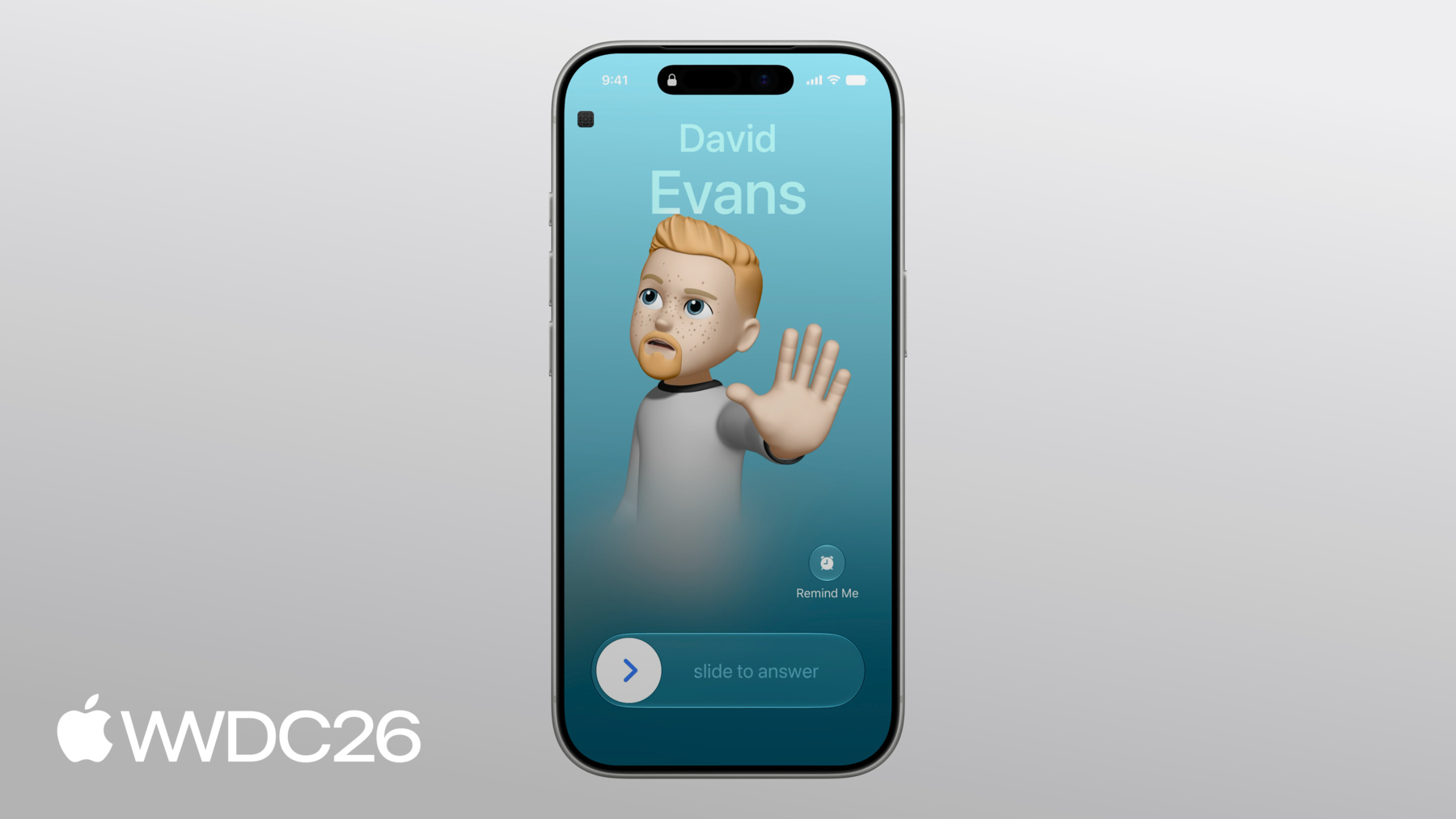
In this session, I'll show you how to deliver a rich, native conversation UI that puts your app right where people need it, from a full-screen presentation on the Lock Screen to seamless multitasking with the Dynamic Island. It starts the moment a conversation comes in. When your app adopts this API, its conversations get a full-screen presentation on the Lock Screen, complete with the contact's name, photo, and a standard set of controls. This is exactly what appears when the phone rings.
Apps that adopt this API get the same presentation.
Conversations can also show up in Phone app Recents and in contact details. Recents shows who the person spoke with and when, and they can tap to start a new conversation.
LiveCommunicationKit is the modern way to create communication apps that integrate with these system experiences. If you have an app that uses traditional approaches, like the CXProvider API, now is a great time to move over to LiveCommunicationKit. It provides a more flexible and feature-rich API to integrate all of the different types of real-time conversations that your app supports.
I'll start with the core concepts: what a conversation is; how it moves through its lifecycle; and how your app communicates with the system. Then I'll walk through receiving conversations, from waking your app with a push notification to presenting the conversation on the Lock Screen. Then, starting outgoing conversations from inside your app and making them available through Siri and Recents.
And finally, group conversations, managing participants and merging conversations together.
To explore how all of this works, I'll follow a group of college friends, David, Ryan, Andre, and Adam, as they use my audio conversation app to plan their annual reunion trip. But first, a quick introduction to how LiveCommunicationKit works. Every experience I just walked through is driven by a single object - a conversation. A conversation represents a single real-time interaction between people. It lives only as long as someone is in it. When everyone leaves, it's gone. A conversation has two parts: handles, which represent the people in the conversation, and capabilities, which describe what the conversation can do. I'll start with handles.
A handle identifies a person. It has three properties: kind, value, and display name. I'll go through each one.
The kind tells the system what type of identifier the handle is: a phone number, an email address or a generic string. If your app already identifies people by phone number or email, setting the right kind allows the system to match the person's handle to a saved contact and show their name and photo in the system conversation UI.
The value is the identifier itself - the phone number, email address, or generic string. This is what the system uses to look up the contact and what your app gets back when someone redials from Recents.
And the display name is what the system shows when it can't match the handle to a contact. Set this to the name your app already knows for the person so the conversation UI always has something to display.
Capabilities tell the system what a conversation can do. The system uses them to decide which controls to show and which gestures to enable so that the conversation UI only offers what your app actually supports.
The system shows a standard set of in-conversation controls: Mute, Speaker, Keypad and More. Some of them only appear when my app opts in. Here, the pausing capability is declared so a long press on the Mute button puts the conversation on hold. Without that capability, the long press does nothing. The video capability tells the system this is a video conversation. The video button itself is enabled by my app's provider configuration, which I'll cover later.
Capabilities can change over the lifetime of a conversation; when this one upgrades from audio to video, my app updates the capabilities and the system reflects the change immediately.
Now that you know what makes a conversation, I'll walk through how it moves through its lifecycle with the system.
When your app first reports a conversation to the system, the conversation starts in the idle state, and the device starts ringing. While it's ringing, your app can begin its local setup. When the person answers, your app sets the state to joining. The system updates the UI to show the conversation as connecting while your app finishes setting up and gets ready to join. No audio or video capture happens yet. When your app finishes preparing, it sets the state to joined and starts capturing and sending audio and video, and the conversation is now live. If the person switches to AirPods or connects to car Bluetooth, your app gets a route change notification and updates its capture pipeline to match.
If your app declares the pausing capability, the system enables its hold control. When someone holds the conversation, the system asks your app to pause. Your app pauses its media streams and reports the new state. When the person resumes the conversation, the system asks your app to resume the conversation's media streams and report the change. When the conversation ends, your app sets the state to leaving. This is where your app tears down the conversation and cleans up its connections.
After teardown, your app sets the state to left, and the conversation is over.
How does your app actually drive all of this? I'll start with the architecture.
Your app drives the conversation lifecycle through the ConversationManager and its delegate. Your app reports conversations and events through the manager. Every time you tell the system about a new conversation or about a change to an existing one, you go through the manager. That's how your conversations show up on the Lock Screen, in the Dynamic Island, and everywhere else.
The delegate is where your app responds to the system. Whenever something needs to happen on a conversation, the action arrives at a delegate method, and your app does the work to fulfill it.
They communicate through actions. When someone interacts with the system UI - for example, accepting a conversation from the Lock Screen or ending one from the Dynamic Island - the system creates an action and sends it to your delegate. And when someone taps a button in your app's own UI, your app creates the action instead. Every interaction, whether it starts from the system UI or from within the app, flows through the same delegate callback, so there's exactly one place to put the logic for each action. That single code path means there's no duplicated state management and no risk of the app and the system getting out of sync. Before my app can report any conversations, it needs a ConversationManager. Here's how my app creates one.
The ConversationManager's configuration tells the system everything it needs to present and manage conversations for your app. You can update this configuration at any time during the app's lifetime.
Here, my app provides a ringtone from its bundle and a PNG of its icon. The system presents both alongside my app's conversations across the system UI.
Next are the conversation group limits. When conversations get merged together, they form a group. These values cap how many groups can exist at once, and how many conversations each group can hold. Then, there's whether my app's conversations show up in the Phone app's Recents list (for something like a one-time room that doesn't support redialing, pass 'false' to keep it out); and whether the app supports video, which enables the video button in the system UI; and, which handle types my app supports.
With that, my app creates its ConversationManager. Because the manager is needed for the entire lifetime of the app, my app creates it right at launch.
Finally, my app sets the manager's delegate.
To continue conversations when the app is backgrounded or the device is locked, my app registers for the Audio and Voice over IP background modes in the app target's capabilities in Xcode.
With the ConversationManager configured, I'll walk through an incoming conversation from start to finish.
David wants to start planning this year's reunion trip so he starts a conversation with Adam to talk about potential destinations.
Adam's device is locked, but when David's conversation comes in, it appears right on the lock screen. Here's how my app makes this happen.
When David starts the conversation with Adam, the app on his device builds a payload with two fields: a handle representing David's phone number and a unique identifier for the conversation.
David's app then sends that payload to my app's server, and the server forwards it to Adam's device.
When Adam's device receives the push, my app wakes up and decodes the payload.
It then uses the decoded handle to build a Conversation.Update. This update also includes the conversation's capabilities, in this case, video, pausing, and merging.
My app then uses the update to report the conversation to the ConversationManager, and the system updates its UI to match.
PushKit is what wakes your app when a conversation arrives, and the app isn't already running.
When your app's server sends a Voice over IP push, PushKit launches your app and delivers the payload to the delegate method immediately.
Your app must report the conversation before the method returns or the system will terminate the app.
For more on Voice over IP push handling, check out the PushKit documentation.
Here's that PushKit delegate method in my app.
This is the entry point every incoming conversation goes through. My app first extracts the handle and conversation UUID from the payload.
Then it builds a Conversation.Update with the decoded handle and the conversation's capabilities and reports it.
Adam sees the incoming conversation and slides to answer.
The system updates the UI to show the conversation is connecting then sends my app a JoinConversationAction through the delegate.
Every time someone answers, pauses or merges a conversation, the system delivers it to my app as an action. My app handles them in one place, the perform action delegate callback. The ConversationManager calls this every time an action comes in. Inside, my app uses a switch statement to route each action type to its appropriate handler. I'll trace the join action.
To handle the join action, my app first verifies that the ConversationManager is tracking a conversation matching the action's unique identifier. If no matching conversation is found, my app fails the action.
Then it reports the conversation has started connecting, which will set the state to joining.
Once my app reports the connecting event, the system updates the conversation UI on Adam's device.
Now my app does its own setup, connecting to its server and configuring the media stream. That work is async, so my app wraps it in a Task to keep the delegate responsive.
After setup finishes, my app reports the connection and fulfills the action. If setup fails for any reason, my app marks the action accordingly so the system can clean up the conversation on its side. The conversation is now in the joined state, and the UI updates accordingly .
After weighing a few options, they settle on Iceland for this year's destination, and Adam taps the End button.
As soon as he does, the conversation transitions into the leaving state, and the UI updates to match.
The system then sends my app an EndConversationAction through the delegate, and my app tears down the media stream and fulfills the action. And on Adam's device, the conversation disappears from the system UI .
Next, I'll talk about how to place outgoing conversations. Now that David and Adam have settled on Iceland, Adam starts a conversation with Ryan to figure out where the friends will stay. This time, Adam starts the conversation from inside my app.
When someone starts a conversation from inside your app, you should report it to the system so people can keep the conversation going while they're using other apps. To do this, your app creates a start action to ring the recipient's device. Then it calls perform on the ConversationManager and handles the action in its delegate the same way as the join action from earlier.
Once the action is handled, the recipient either answers or your app reports that the conversation went unanswered or failed.
Here's how my app represents Adam's conversation with Ryan.
It builds a StartConversationAction with a fresh unique identifier and Ryan's handle. Then it sends the action to the ConversationManager.
The manager first updates the system UI, then it forwards the action to the delegate.
From here, my app handles it the same way as the join action from earlier.
Once the conversation connects, Adam and Ryan look through a few options before finally settling on a cabin near Reykjavík. With lodging decided, they catch up for a few more minutes, then they say their goodbyes and hang up. After a conversation ends, people can redial them from Spotlight or Recents.
Your app handles this by having support for the start call intent.
This intent will be delivered to your app's scene to continue as an NSUserActivity.
When your app's conversations are saved to recents, Apple Intelligence already knows about them but, to surface your app's own representation of the conversation, donate your own intent at the end of each conversation as well.
To learn more about integrating intents in your app, check out the session "Get to know App Intents".
Everything so far has been one-to-one. Group conversations bring in multiple participants. Having settled on a destination and lodging, Adam starts a group conversation with David and Ryan to plan their itinerary.
Group conversations track two types of members. Members include everyone who's been invited to the conversation whereas activeRemoteMembers includes only those with media actively flowing.
The system needs both; members tells it how many participants the conversation has, and activeRemoteMembers tells it which ones are actively sending media.
When reporting a group conversation, my app creates a handle for each participant then creates a startAction with all invited members and reports it.
After the conversation starts, David and Ryan both join. To report this change, my app builds a conversation update. It names Adam as the localMember, declares the new activeRemoteMembership, and lists the capabilities the conversation supports, including merging and unmerging, which I'll come back to in a moment.
My app then reports the conversation update through the manager, and the system updates the conversation to reflect the new membership.
While Adam, David, and Ryan are working through the itinerary, Ryan realizes Andre still needs to confirm that the trip dates work for him...
so, Ryan starts a separate conversation with Andre to loop him in.
Now two conversations are running in parallel, the original group with Adam, David, and Ryan, and Ryan's side conversation with Andre. Ryan is in both conversations but only active on the one with Andre. Once Andre and Ryan have agreed on the trip dates, they want to bring everyone back together to review the full plan. Rather than the group having to hang up and start a new conversation, my app can merge the two together.
My app declares the merging capability, and the system enables its merge control UI.
When Ryan taps it, my app merges the two conversations, and the whole group, now with Andre, can finish planning their itinerary. I'll walk through the conversation merging code next. Unmerging follows the same delegation pattern, so once you've seen the merge handler, the unmerge one will seem familiar.
When two conversations merge, the ConversationManager delivers a MergeConversationAction to my app's delegate.
The merge action carries two unique identifiers, one for each conversation being merged. The handler uses these to look up my app's local representation of both conversations. If either one is missing (maybe it already ended), the handler fails the action immediately.
Once my app has both conversations, it combines the media streams on its server with combineStreams, then it reports the updated membership and fulfills the action. If anything throws, the catch block fails the action instead.
Once my app has merged the two conversations, the system updates the conversation UI to reflect the new merged conversation. With everyone in the same conversation, the group finalizes their itinerary: a soak in the Blue Lagoon, a day on the Golden Circle, and a few glacier hikes. With the itinerary set, Andre and Ryan want to split off and book their flights together so they can sit next to each other on the plane.
Since the conversation supports the unmerging capability, they can go back to their own conversation while Adam and David wrap up the last few details. That's LiveCommunicationKit. From a single incoming conversation on the Lock Screen all the way to merging group conversations, the framework gives your app system-level conversation UI everywhere people expect it: on the Lock Screen, in Recents, and Siri.
Here's what to do next. Adopt ConversationManager and report your first incoming conversation on the Lock Screen. Donate intents so Siri knows how to start conversations. Replace any transient tokens with stable handles to support redialing from Recents, and make sure to keep conversation membership updated. Thanks for watching.
-
-
6:41 - Set up a conversation manager
// Set up a conversation manager import LiveCommunicationKit let configuration = ConversationManager.Configuration( ringtoneName: "SampleRingtone.caf", iconTemplateImageData: UIImage(named: "SampleIcon")?.pngData(), maximumConversationGroups: 1, maximumConversationsPerConversationGroup: 2, includesConversationInRecents: true, supportsVideo: true, supportedHandleTypes: [.phoneNumber, .emailAddress] ) let manager = ConversationManager(configuration: configuration) manager.delegate = self -
9:22 - Report the incoming conversation to the system
// Report the incoming conversation to the system import LiveCommunicationKit import PushKit final class SamplePushHandler: NSObject, PKPushRegistryDelegate { func pushRegistry( _ registry: PKPushRegistry, didReceiveIncomingVoIPPushWith payload: PKPushPayload, metadata: PKVoIPPushMetadata) async { guard let (handle, uuid) = parseConversationPayload(from: payload) else { return } let capabilities = [.video, .pausing, .merging] let update = Conversation.Update(members: [handle], capabilities: capabilities) try? await manager.reportNewIncomingConversation(uuid: uuid, update: update) } } -
9:57 - Implement the delegate
// Implement the delegate import LiveCommunicationKit final class SampleDelegate: ConversationManagerDelegate { func conversationManager( _ manager: ConversationManager, perform action: ConversationAction ) { switch action { case let action as JoinConversationAction: handleJoinAction(action) default: action.fail() } } } -
10:13 - Fulfill the join action
// Handle a failed connection extension SampleDelegate { func handleJoinAction(_ action: JoinConversationAction) { guard let conversation = manager.conversations.first(where: {$0.uuid == uuid })else { return action.fail() } manager.reportConversationEvent(.conversationStartedConnecting(.now), for: conversation) Task { do { try await setupMediaStream(with: action.conversationUUID) manager.reportConversationEvent(.conversationConnected(.now), for: conversation) action.fulfill(dateConnected: .now) } catch { action.fail() } } } } -
11:17 - Route end actions
// Route end actions final class SampleDelegate: ConversationManagerDelegate { // … func conversationManager( _ manager: ConversationManager, perform action: ConversationAction ) { switch action { case let action as JoinConversationAction: handleJoinAction(action) case let action as EndConversationAction: handleEndAction(action) default: action.fail() } } } -
12:14 - Create a start action
let startAction = StartConversationAction( conversationUUID: UUID(), handles: [Handle(type: .phoneNumber, value: "+1-650-555-0199", displayName: "Ryan Notch")], isVideo: false ) -
12:23 - Perform the action
try await manager.perform([startAction]) -
12:29 - Route start actions
// Route start actions final class SampleDelegate: ConversationManagerDelegate { // … func conversationManager( _ manager: ConversationManager, perform action: ConversationAction ) { switch action { case let action as JoinConversationAction: handleJoinAction(action) case let action as EndConversationAction: handleEndAction(action) case let action as StartConversationAction: handleStartAction(action) default: action.fail() } } } -
13:51 - Start group conversations
// Start group conversations let adam = Handle(type: .emailAddress, value: "adam.halwani@icloud.com", displayName: "Adam Halwani") let david = Handle(type: .emailAddress, value: "david@example.com", displayName: "David Evans") let ryan = Handle(type: .phoneNumber, value: "+16505550199", displayName: "Ryan Notch") let startAction = StartConversationAction( conversationUUID: UUID(), handles: [david, ryan], isVideo: false ) try await manager.perform([startAction]) -
14:01 - Report group membership updates
// Report group membership updates let update = Conversation.Update( localMember: adam, members: [david, ryan], activeRemoteMembers: [david, ryan], capabilities: [.merging, .pausing, .unmerging] ) manager.reportConversationEvent( .conversationUpdated(update), for: conversation ) -
15:26 - Route merge actions
// Route merge actions final class SampleDelegate: ConversationManagerDelegate { func conversationManager( _ manager: ConversationManager, perform action: ConversationAction ) { switch action { case let action as JoinConversationAction: handleJoinAction(action) case let action as EndConversationAction: handleEndAction(action) case let action as StartConversationAction: handleStartAction(action) case let action as MergeConversationAction: handleMergeAction(action) default: action.fail() } } } -
15:33 - Handle the merge action
// Handle the merge action

extension SampleDelegate {
  func handleMergeAction(_ action: MergeConversationAction) {
    let sourceUUID = action.conversationUUID
    let targetUUID = action.conversationUUIDToMergeWith
    guard manager.conversations.contains(where: { $0.uuid == sourceUUID }),
          manager.conversations.contains(where: { $0.uuid == targetUUID }) else {
      return action.fail()
    }

    Task {
      do {
        let update = try await combineStreams(from: sourceUUID, into: targetUUID)
        manager.reportConversationEvent(.conversationUpdated(update), for: target)
        action.fulfill()
      } catch {
        action.fail()
      }
    }
  }
}
-
-
- 0:01 - Introduction
LiveCommunicationKit is the modern way to build live conversation experiences that integrate with the system. Conversations in LiveCommunicationKit are built upon fundamental elements, such as handles, display names, and capabilities, that configure the interface, as well as a single ConversationManager object to manage the full lifecycle.
- 7:56 - Incoming conversations
Incoming conversations rely on the ConversationManager class where you configure properties like ringtones, group limits, and supported handles. Use PushKit to deliver an incoming conversation to a device, then report it to the ConversationManager.
- 11:29 - Outgoing conversations
Start outgoing conversations initiated within the app by performing a StartConversationAction. This allows your app's ConversationManager delegate to handle the entire process, using the same unified action-handling logic for actions started by in-app or system UI.
- 13:18 - Groups
Track the full list of invited members in addition to the currently active remote members so the interface stays perfectly in sync as people join or drop off. Advanced call management is handled through delegate actions and supports merging and unmerging calls as needed.