

-
Explore the machine learning development experience
Learn how to bring great machine learning (ML) based experiences to your app. We'll take you through model discovery, conversion, and training and provide tips and best practices for ML. We'll share considerations to take into account as you begin your ML journey, demonstrate techniques for evaluating model performance, and explore how you can tune models to achieve real-time performance on device.
To learn more about the techniques covered in this session, watch "Optimize your Core ML usage" and "Accelerate machine learning with Metal" from WWDC22.Recursos
- Core ML Converters
- Core ML Tools PyTorch Conversion Documentation
- Integrating a Core ML Model into Your App
- Core ML
Vídeos relacionados
WWDC23
WWDC22
- Accelerate machine learning with Metal
- Display EDR content with Core Image, Metal, and SwiftUI
- Meet the Presenter: Explore the machine learning developer experience
- Optimize your Core ML usage
- Q&A: Core ML
WWDC20
-
Buscar neste vídeo...
-
-
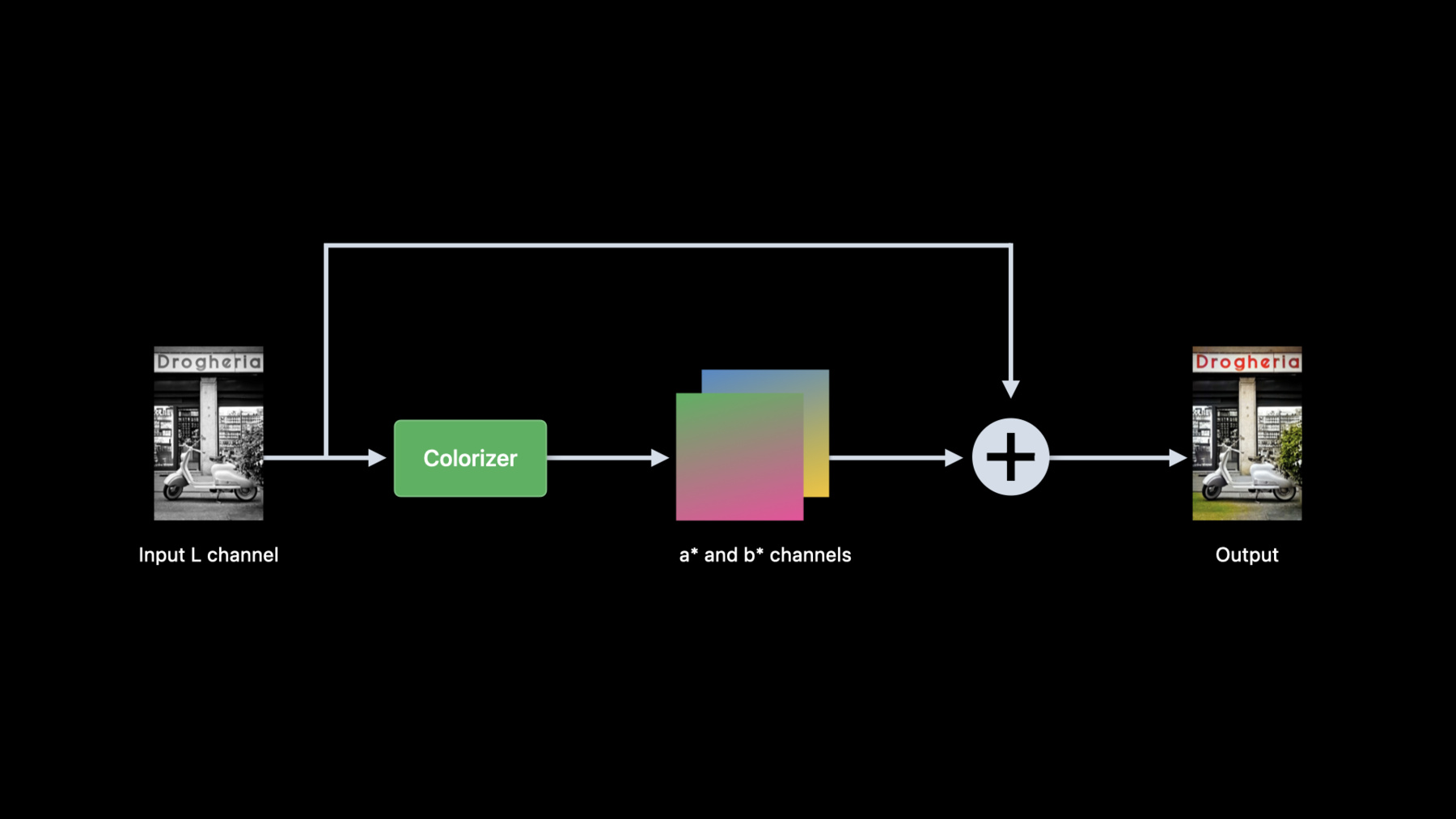
3:06 - Colorization pre-processing
from skimage import color in_lab = color.rgb2lab(in_rgb) in_l = in_lab[:,:,0] -
3:39 - Colorization post-processing
from skimage import color import numpy as np import torch out_lab = torch.cat((in_l, out_ab), dim=1) out_rgb = color.lab2rgb(out_lab.data.numpy()[0,…].transpose((1,2,0))) -
3:56 - Convert colorizer model to Core ML
import coremltools as ct import torch import Colorizer torch_model = Colorizer().eval() example_input = torch.rand([1, 1, 256, 256]) traced_model = torch.jit.trace(torch_model, example_input) coreml_model = ct.convert(traced_model, inputs=[ct.TensorType(name="input", shape=example_input.shape)]) coreml_model.save("Colorizer.mlpackage") -
4:26 - Core ML model verification using Core ML Tools
import coremltools as ct from PIL import Image from skimage import color in_img = Image.open(“image.png").convert("RGB") in_rgb = np.array(in_img) in_lab = color.rgb2lab(in_rgb, channel_axis=2) lab_components = np.split(in_lab, indices_or_sections=3, axis=-1) (in_l, _, _) = [ np.expand_dims(array.transpose((2, 0, 1)).astype(np.float32), 0) for array in lab_components ] out_ab = coreml_model.predict({"input": in_l})[0] out_lab = np.squeeze(np.concatenate([in_l, out_ab], axis=1), axis=0).transpose((1, 2, 0)) out_rgb = color.lab2rgb(out_lab, channel_axis=2).astype(np.uint8) out_img = Image.fromarray(out_rgb) -
7:11 - Colorization in Swift
import CoreImage import CoreML func colorize(image inputImage: CIImage) throws -> CIImage { let lightness: CIImage = extractLightness(from: inputImage) let modelInput = try ColorizerInput(inputWith: lightness.cgImage!) let modelOutput: ColorizerOutput = try colorizer.prediction(input: modelInput) let (aChannel, bChannel): (CIImage, CIImage) = extractColorChannels(from: modelOutput) let colorizedImage = reconstructRGBImage(l: lightness, a: aChannel, b: bChannel) return colorizedImage } -
7:41 - Extract lightness from RGB image using Core Image
import CoreImage.CIFilterBuiltins func extractLightness(from inputImage: CIImage) -> CIImage { let rgbToLabFilter = CIFilter.convertRGBtoLab() rgbToLabFilter.inputImage = inputImage rgbToLabFilter.normalize = true let labImage = rgbToLabFilter.outputImage let matrixFilter = CIFilter.colorMatrix() matrixFilter.inputImage = labImage matrixFilter.rVector = CIVector(x: 1, y: 0, z: 0) matrixFilter.gVector = CIVector(x: 1, y: 0, z: 0) matrixFilter.bVector = CIVector(x: 1, y: 0, z: 0) let lightness = matrixFilter.outputImage! return lightness } -
8:31 - Create two color channel CIImages from model output
func extractColorChannels(from output: ColorizerOutput) -> (CIImage, CIImage) { let outA: [Float] = output.output_aShapedArray.scalars let outB: [Float] = output.output_bShapedArray.scalars let dataA = Data(bytes: outA, count: outA.count * MemoryLayout<Float>.stride) let dataB = Data(bytes: outB, count: outB.count * MemoryLayout<Float>.stride) let outImageA = CIImage(bitmapData: dataA, bytesPerRow: 4 * 256, size: CGSize(width: 256, height: 256), format: CIFormat.Lh, colorSpace: CGColorSpaceCreateDeviceGray()) let outImageB = CIImage(bitmapData: dataB, bytesPerRow: 4 * 256, size: CGSize(width: 256, height: 256), format: CIFormat.Lh, colorSpace: CGColorSpaceCreateDeviceGray()) return (outImageA, outImageB) } -
8:51 - Reconstruct RGB image from Lab images
func reconstructRGBImage(l lightness: CIImage, a aChannel: CIImage, b bChannel: CIImage) -> CIImage { guard let kernel = try? CIKernel.kernels(withMetalString: source)[0] as? CIColorKernel, let kernelOutputImage = kernel.apply(extent: lightness.extent, arguments: [lightness, aChannel, bChannel]) else { fatalError() } let labToRGBFilter = CIFilter.convertLabToRGBFilter() labToRGBFilter.inputImage = kernelOutputImage labToRGBFilter.normalize = true let rgbImage = labToRGBFilter.outputImage! return rgbImage } -
9:08 - Custom CIKernel to combine L, a* and b* channels.
let source = """
#include <CoreImage/CoreImage.h>
[[stichable]] float4 labCombine(coreimage::sample_t imL, coreimage::sample_t imA, coreimage::sample_t imB)
{
   return float4(imL.r, imA.r, imB.r, imL.a);
}
"""
-