

-
Dive deep into volumes and immersive spaces
Discover powerful new ways to customize volumes and immersive spaces in visionOS. Learn to fine-tune how volumes resize and respond to people moving around them. Make volumes and immersive spaces interact through the power of coordinate conversions. Find out how to make your app react when people adjust immersion with the Digital Crown, and use a surrounding effect to dynamically customize the passthrough tint in your immersive space experience.
Capítulos
- 0:00 - Introduction
- 2:04 - Volumes
- 2:06 - Volumes: Baseplate
- 4:08 - Volumes: Size
- 6:59 - Volumes: Toolbars
- 8:48 - Volumes: Ornaments
- 11:36 - Volumes: Viewpoints
- 15:34 - Volumes: World alignment
- 16:52 - Volumes: Dynamic scale
- 18:26 - Intermezzo
- 18:42 - Immersive spaces
- 19:38 - Immersive spaces: Coordinate conversions
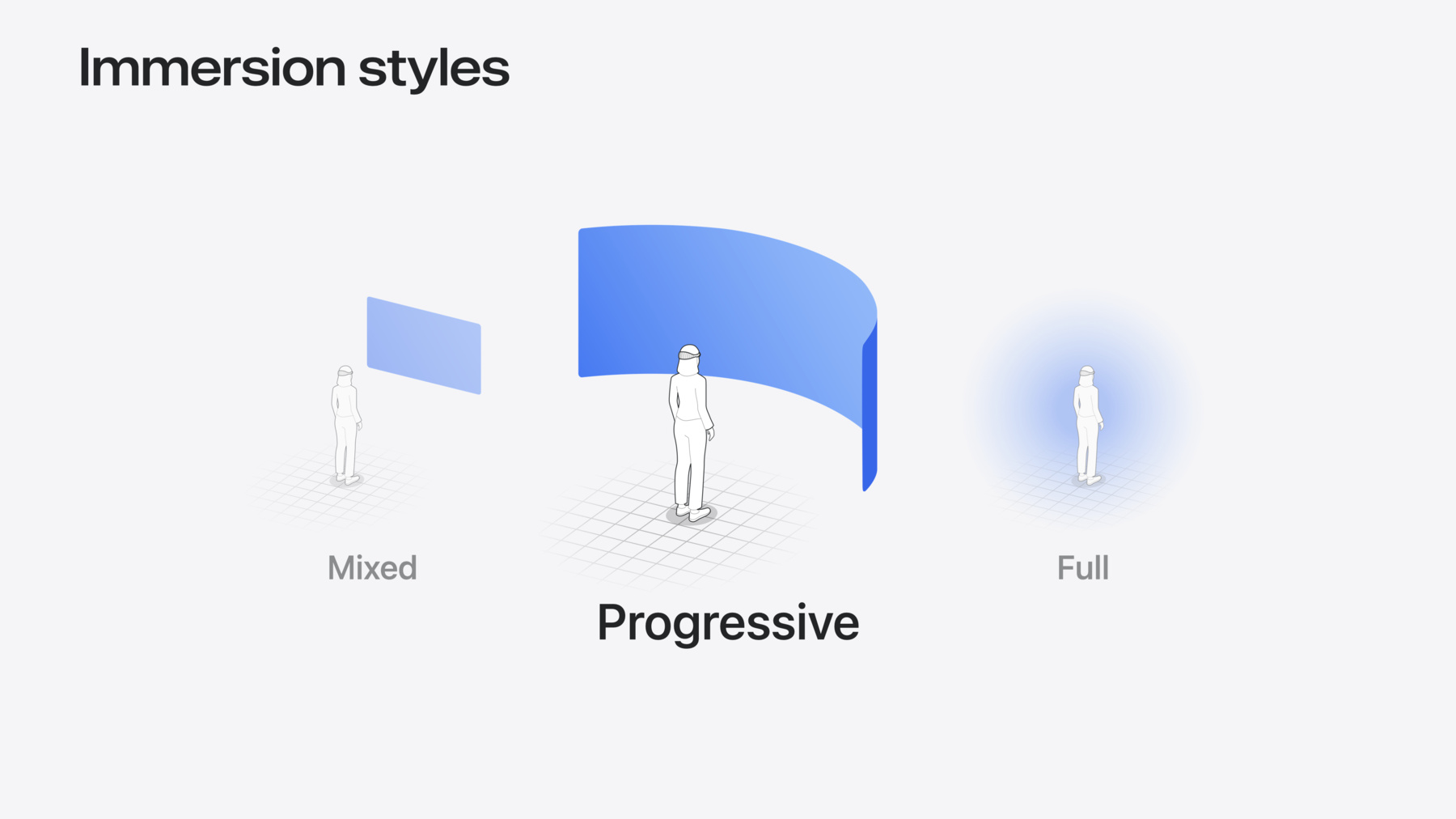
- 22:40 - Immersive spaces: Immersion styles
- 26:08 - Immersive spaces: Anchored UI interactions
- 29:03 - Immersive spaces: Surroundings effects
- 31:21 - Next steps
Recursos
Vídeos relacionados
WWDC24
WWDC23
-
Buscar neste vídeo...
-
-
3:09 - Baseplate
// Baseplate WindowGroup(id: "RobotExploration") { ExplorationView() .volumeBaseplateVisibility(.visible) // Default! } .windowStyle(.volumetric) -
4:29 - Enabling resizability
// Enabling resizability WindowGroup(id: "RobotExploration") { let initialSize = Size3D(width: 900, height: 500, depth: 900) ExplorationView() .frame(minWidth: initialSize.width, maxWidth: initialSize.width * 2, minHeight: initialSize.height, maxHeight: initialSize.height * 2) .frame(minDepth: initialSize.depth, maxDepth: initialSize.depth * 2) } .windowStyle(.volumetric) .windowResizability(.contentSize) // Default! -
6:10 - Programmatic resize
// Programmatic resize struct ExplorationView: View { @State private var levelScale: Double = 1.0 var body: some View { RealityView { content in // Level code here } update: { content in appState.explorationLevel?.setScale( [levelScale, levelScale, levelScale], relativeTo: nil) } .frame(width: levelSize.value.width * levelScale, height: levelSize.value.height * levelScale) .frame(depth: levelSize.value.depth * levelScale) .overlay { Button("Change Size") { levelScale = levelScale == 1.0 ? 2.0 : 1.0 } } } } -
7:39 - Toolbar ornament
// Toolbar ornament ExplorationView() .toolbar { ToolbarItem { Button("Next Size") { levelScale = levelScale == 1.0 ? 2.0 : 1.0 } } ToolbarItemGroup { Button("Replay") { resetExploration() } Button("Exit Game") { exitExploration() openWindow(id: "RobotCreation") } } } -
10:41 - Ornaments
// Ornaments WindowGroup(id: "RobotExploration") { ExplorationView() .ornament(attachmentAnchor: .scene(.topBack)) { ProgressView() } } .windowStyle(.volumetric) -
12:08 - Volume viewpoint
// Volume viewpoint struct ExplorationView: View { var body: some View { RealityView { content in // Some RealityKit code } .onVolumeViewpointChange { oldValue, newValue in appState.robot?.currentViewpoint = newValue.squareAzimuth } } } -
13:06 - Using volume viewpoint
// Volume viewpoint class RobotCharacter { func handleMovement(deltaTime: Float) { if self.robotState == .idle { characterModel.performRotation(toFace: self.currentViewpoint, duration: 0.5) self.animationState.transition(to: .wave) } else { // Handle normal movement } } } -
13:43 - Supported viewpoints
// Supported viewpoints struct ExplorationView: View { let supportedViewpoints: Viewpoint3D.SquareAzimuth.Set = [.front, .left, .right] var body: some View { RealityView { content in // Some RealityKit code } .supportedVolumeViewpoints(supportedViewpoints) .onVolumeViewpointChange { _, newValue in appState.robot?.currentViewpoint = newValue.squareAzimuth } } } -
14:30 - Viewpoint update strategy
// Viewpoint update strategy struct ExplorationView: View { let supportedViewpoints: Viewpoint3D.SquareAzimuth.Set = [.front, .left, .right] var body: some View { RealityView { content in // Some RealityKit code } .supportedVolumeViewpoints(supportedViewpoints) .onVolumeViewpointChange(updateStrategy: .all) { _, newValue in appState.robot?.currentViewpoint = newValue.squareAzimuth if !supportedViewpoints.contains(newValue) { appState.robot?.animationState.transition(to: .annoyed) } } } } -
16:42 - World alignment
// World alignment WindowGroup { ExplorationView() .volumeWorldAlignment(.gravityAligned) } .windowStyle(.volumetric) -
18:05 - Dynamic scale
// Dynamic scale WindowGroup { ContentView() } .windowStyle(.volumetric) .defaultWorldScalingBehavior(.dynamic) -
19:16 - Starting with an empty immersive space
struct BotanistApp: App { var body: some Scene { // Volume WindowGroup(id: "Exploration") { VolumeExplorationView() } .windowStyle(.volumetric) // Immersive Space ImmersiveSpace(id: "Immersive") { EmptyView() } } } -
20:52 - Callout to convert function from volume view
// Coordinate conversions // Convert from RealityKit entity in volume to SwiftUI space struct VolumeExplorationView: View { @Environment(ImmersiveSpaceAppModel.self) var appModel var body: some View { RealityView { content in content.add(appModel.volumeRoot) // ... } update: { content in guard appModel.convertingRobotFromVolume else { return } // Convert the robot transform from RealityKit scene space for // the volume to SwiftUI immersive space convertRobotFromRealityKitToImmersiveSpace(content: content) } } } -
21:08 - Convert robot's transform to SwiftUI immersive space
// Coordinate conversions // Convert from RealityKit entity in volume to SwiftUI space func convertRobotFromRealityKitToImmersiveSpace(content: RealityViewContent) { // Convert the robot transform from RealityKit scene space for // the volume to SwiftUI immersive space appModel.immersiveSpaceFromRobot = content.transform(from: appModel.robot, to: .immersiveSpace) // Reparent robot from volume to immersive space appModel.robot.setParent(appModel.immersiveSpaceRoot) // Handoff to immersive space view to continue conversions. appModel.convertingRobotFromVolume = false appModel.convertingRobotToImmersiveSpace = true } -
21:42 - Callout to convert function from immersive space view
// Coordinate conversions // Convert from SwiftUI immersive space back to RealityKit local space struct ImmersiveExplorationView: View { @Environment(ImmersiveSpaceAppModel.self) var appModel var body: some View { RealityView { content in content.add(appModel.immersiveSpaceRoot) } update: { content in guard appModel.convertingRobotToImmersiveSpace else { return } // Convert the robot transform from SwiftUI space for the immersive // space to RealityKit scene space convertRobotFromSwiftUIToRealityKitSpace(content: content) } } } -
21:48 - Compute transform to place robot in matching position in immersive space
// Coordinate conversions // Calculate transform from SwiftUI to RealityKit scene space func convertRobotFromSwiftUIToRealityKitSpace(content: RealityViewContent) { // Calculate transform from SwiftUI immersive space to RealityKit // scene space let realityKitSceneFromImmersiveSpace = content.transform(from: .immersiveSpace, to: .scene) // Multiply with the robot's transform in SwiftUI immersive space to build a // transformation which converts from the robot's local // coordinate space in the volume and ends with the robot's local // coordinate space in an immersive space. let realityKitSceneFromRobot = realityKitSceneFromImmersiveSpace * appModel.immersiveSpaceFromRobot // Place the robot in the immersive space to match where it // appeared in the volume appModel.robot.transform = Transform(realityKitSceneFromRobot) // Start the jump! appModel.startJump() } -
23:54 - Customizing immersion
// Customizing immersion struct BotanistApp: App { // Custom immersion amounts @State private var immersionStyle: ImmersionStyle = .progressive(0.2...1.0, initialAmount: 0.8) var body: some Scene { // Immersive Space ImmersiveSpace(id: "ImmersiveSpace") { ImmersiveSpaceExplorationView() } .immersionStyle(selection: $immersionStyle, in: .mixed, .progressive, .full) } } -
25:17 - Callout to function to handle immersion amount changed
// Reacting to immersion struct ImmersiveView: View { @State var immersionAmount: Double? var body: some View { ImmersiveSpaceExplorationView() .onImmersionChange { context in immersionAmount = context.amount } .onChange(of: immersionAmount) { oldValue, newValue in handleImmersionAmountChanged(newValue: newValue, oldValue: oldValue) } } } -
25:39 - Handle function to make robot react to changed immersion amount
// Reacting to immersion func handleImmersionAmountChanged(newValue: Double?, oldValue: Double?) { guard let newValue, let oldValue else { return } if newValue > oldValue { // Move the robot outward to react to increasing immersion moveRobotOutward() } else if newValue < oldValue { // Move the robot inward to react to decreasing immersion moveRobotInward() } } -
26:57 - Create spatial tracking session
// Create and run spatial tracking session struct ImmersiveExplorationView { @State var spatialTrackingSession: SpatialTrackingSession = SpatialTrackingSession() var body: some View { RealityView { content in // ... } .task { await runSpatialTrackingSession() } } } -
27:11 - Run spatial tracking session
// Create and run the spatial tracking session func runSpatialTrackingSession() async { // Configure the session for plane anchor tracking let configuration = SpatialTrackingSession.Configuration(tracking: [.plane]) // Run the session to request plane anchor transforms let _ = await spatialTrackingSession.run(configuration) } -
27:32 - Create a floor anchor to track
// Create a floor anchor to track struct ImmersiveExplorationView { @State var spatialTrackingSession: SpatialTrackingSession = SpatialTrackingSession() let floorAnchor = AnchorEntity( .plane(.horizontal, classification: .floor, minimumBounds: .init(x: 0.01, y: 0.01)) ) var body: some View { RealityView { content in content.add(floorAnchor) } .task { await runSpatialTrackingSession() } } } -
27:54 - Detect taps on entities in immersive space
// Detect taps on entities in immersive space RealityView { content in // ... } .gesture( SpatialTapGesture( coordinateSpace: .immersiveSpace ) .targetedToAnyEntity() .onEnded { value in handleTapOnFloor(value: value) } ) -
28:09 - Handle tap event to place plant
// Handle tap event func handleTapOnFloor(value: EntityTargetValue<SpatialTapGesture.Value>) { let location = value.convert(value.location3D, from: .immersiveSpace, to: floorAnchor) plantEntity.position = location floorAnchor.addChild(plantEntity) } -
29:47 - Add tint color to custom plant component
// Add tint color to custom plant component struct PlantComponent: Component { var tintColor: Color { switch plantType { case .coffeeBerry: // Light blue return Color(red: 0.3, green: 0.3, blue: 1.0) case .poppy: // Magenta return Color(red: 1.0, green: 0.0, blue: 1.0) case .yucca: // Light green return Color(red: 0.2, green: 1.0, blue: 0.2) } } } -
30:09 - Handle collisions with robot
// Handle collisions with robot // // Handle movement of the robot between frames func handleMovement(deltaTime: Float) { // Move character in the collision world appModel.robot.moveCharacter(by: SIMD3<Float>(...), deltaTime: deltaTime, relativeTo: nil) { collision in handleCollision(collision) } } -
30:29 - Set active tint color when colliding with plant
// Set active tint color when colliding with plant // // Handle collision between robot and hit entity func handleCollision(_ collision: CharacterControllerComponent.Collision) { guard let plantComponent = collision.hitEntity.components[PlantComponent.self] else { return } // Play the plant growth celebration animation playPlantGrowthAnimation(plantComponent: plantComponent) if inImmersiveSpace { appModel.tintColor = plantComponent.tintColor } } -
30:48 - Apply effect to tint passthrough
// Apply effect to tint passthrough
struct ImmersiveExplorationView: View {
    var body: some View {
        RealityView { content in
            // ...
        }
        .preferredSurroundingsEffect(surroundingsEffect)
    }

    // The resolved surroundings effect based on tint color
    var surroundingsEffect: SurroundingsEffect? {
        if let color = appModel.tintColor {
            return SurroundingsEffect.colorMultiply(color)
        } else {
            return nil
        }
    }
}
-