

View in English

  • Apple Developer
    • Get Started

    Explore Get Started

    • Overview
    • Learn
    • Apple Developer Program

    Stay Updated

    • Latest News
    • Hello Developer
    • Platforms

    Explore Platforms

    • Apple Platforms
    • iOS
    • iPadOS
    • macOS
    • tvOS
    • visionOS
    • watchOS
    • App Store

    Featured

    • Design
    • Distribution
    • Games
    • Accessories
    • Web
    • Home
    • CarPlay
    • Technologies

    Explore Technologies

    • Overview
    • Xcode
    • Swift
    • SwiftUI

    Featured

    • Accessibility
    • App Intents
    • Apple Intelligence
    • Games
    • Machine Learning & AI
    • Security
    • Xcode Cloud
    • Community

    Explore Community

    • Overview
    • Meet with Apple events
    • Community-driven events
    • Developer Forums
    • Open Source

    Featured

    • WWDC
    • Swift Student Challenge
    • Developer Stories
    • App Store Awards
    • Apple Design Awards
    • Apple Developer Centers
    • Documentation

    Explore Documentation

    • Documentation Library
    • Technology Overviews
    • Sample Code
    • Human Interface Guidelines
    • Videos

    Release Notes

    • Featured Updates
    • iOS
    • iPadOS
    • macOS
    • watchOS
    • visionOS
    • tvOS
    • Xcode
    • Downloads

    Explore Downloads

    • All Downloads
    • Operating Systems
    • Applications
    • Design Resources

    Featured

    • Xcode
    • TestFlight
    • Fonts
    • SF Symbols
    • Icon Composer
    • Support

    Explore Support

    • Overview
    • Help Guides
    • Developer Forums
    • Feedback Assistant
    • Contact Us

    Featured

    • Account Help
    • App Review Guidelines
    • App Store Connect Help
    • Upcoming Requirements
    • Agreements and Guidelines
    • System Status
  • Quick Links

    • Events
    • News
    • Forums
    • Sample Code
    • Videos
 

Vídeos

Abrir menu Fechar menu
  • Coleções
  • Todos os vídeos
  • Sobre

Mais vídeos

  • Sobre
  • Código
  • Support real-time ML inference on the CPU

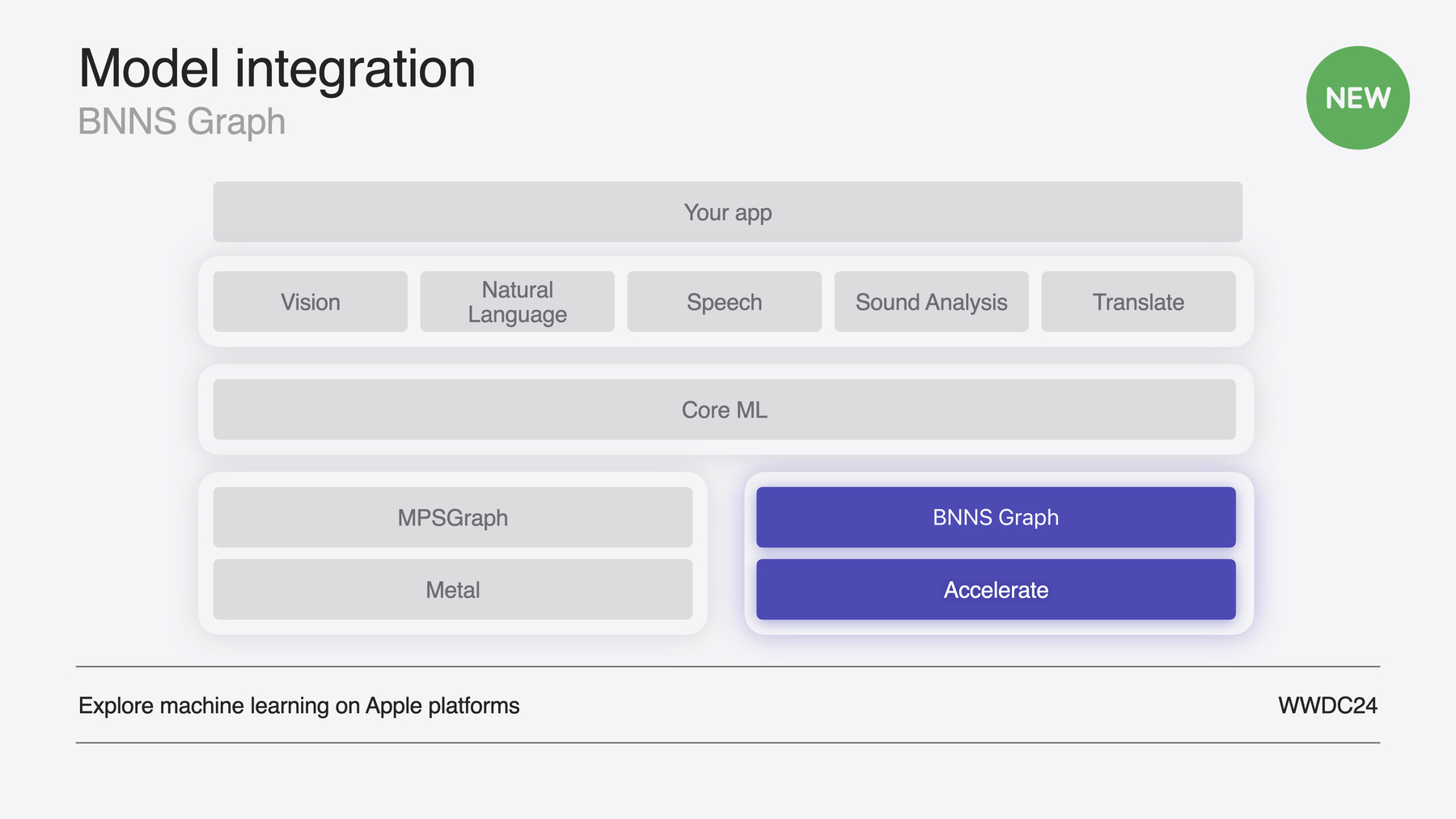
    Discover how you can use BNNSGraph to accelerate the execution of your machine learning model on the CPU. We will show you how to use BNNSGraph to compile and execute a machine learning model on the CPU and share how it provides real-time guarantees such as no runtime memory allocation and single-threaded running for audio or signal processing models.

    Capítulos

    • 0:00 - Introduction
    • 1:18 - Introducing BNNS Graph
    • 6:47 - Real-time processing
    • 8:00 - Adopting BNNS Graph
    • 14:52 - BNNS Graph in Swift

    Recursos

    • Forum: Machine Learning and AI
      • Vídeo HD
      • Vídeo SD

    Vídeos relacionados

    WWDC24

    • Explore machine learning on Apple platforms
  • Buscar neste vídeo...
    • 0:01 - Create the graph

      // Get the path to the mlmodelc.
              NSBundle *main = [NSBundle mainBundle];
              NSString *mlmodelc_path = [main pathForResource:@"bitcrusher"
                                                       ofType:@"mlmodelc"];
              
              // Specify single-threaded execution.
              bnns_graph_compile_options_t options = BNNSGraphCompileOptionsMakeDefault();
              BNNSGraphCompileOptionsSetTargetSingleThread(options, true);
              
              // Compile the BNNSGraph.
              bnns_graph_t graph = BNNSGraphCompileFromFile(mlmodelc_path.UTF8String,
                                                            NULL, options);
              assert(graph.data);
              BNNSGraphCompileOptionsDestroy(options);
    • 0:02 - Create context and workspace

      // Create the context.
              context = BNNSGraphContextMake(graph);
              assert(context.data);
              
              // Set the argument type.
              BNNSGraphContextSetArgumentType(context, BNNSGraphArgumentTypePointer);
              
              // Specify the dynamic shape.
              uint64_t shape[] = {mMaxFramesToRender, 1, 1};
              bnns_graph_shape_t shapes[] = {
                  (bnns_graph_shape_t) {.rank = 3, .shape = shape},
                  (bnns_graph_shape_t) {.rank = 3, .shape = shape}
              };
              BNNSGraphContextSetDynamicShapes(context, NULL, 2, shapes);
              
              // Create the workspace.
              workspace_size = BNNSGraphContextGetWorkspaceSize(context, NULL) + NSPageSize();
              workspace = (char *)aligned_alloc(NSPageSize(), workspace_size);
    • 0:03 - Calculate indices

      // Calculate indices into the arguments array.
              dst_index = BNNSGraphGetArgumentPosition(graph, NULL, "dst");
              src_index = BNNSGraphGetArgumentPosition(graph, NULL, "src");
              resolution_index = BNNSGraphGetArgumentPosition(graph, NULL, "resolution");
              saturationGain_index = BNNSGraphGetArgumentPosition(graph, NULL, "saturationGain");
              dryWet_index = BNNSGraphGetArgumentPosition(graph, NULL, "dryWet");
    • 0:04 - Execute graph

      // Set the size of the first dimension.
                  BNNSGraphContextSetBatchSize(context, NULL, frameCount);
                  
                  // Specify the direct pointer to the output buffer.
                  arguments[dst_index] = {
                      .data_ptr = outputBuffers[channel],
                      .data_ptr_size = frameCount * sizeof(outputBuffers[channel][0])
                  };
                  
                  // Specify the direct pointer to the input buffer.
                  arguments[src_index] = {
                      .data_ptr = (float *)inputBuffers[channel],
                      .data_ptr_size = frameCount * sizeof(inputBuffers[channel][0])
                  };
                  
                  // Specify the direct pointer to the resolution scalar parameter.
                  arguments[resolution_index] = {
                      .data_ptr = &mResolution,
                      .data_ptr_size = sizeof(float)
                  };
                  
                  // Specify the direct pointer to the saturation gain scalar parameter.
                  arguments[saturationGain_index] = {
                      .data_ptr = &mSaturationGain,
                      .data_ptr_size = sizeof(float)
                  };
                  
                  // Specify the direct pointer to the mix scalar parameter.
                  arguments[dryWet_index] = {
                      .data_ptr = &mMix,
                      .data_ptr_size = sizeof(float)
                  };
                  
                  // Execute the function.
                  BNNSGraphContextExecute(context, NULL,
                                          5, arguments,
                                          workspace_size, workspace);
    • 0:05 - Declare buffers

      // Create source buffer that represents a pure sine wave.
          let srcChartData: UnsafeMutableBufferPointer<Float> = {
              let buffer = UnsafeMutableBufferPointer<Float>.allocate(capacity: sampleCount)
              
              for i in 0 ..< sampleCount {
                  buffer[i] = sin(Float(i) / ( Float(sampleCount) / .pi) * 4)
              }
              
              return buffer
          }()
          
          // Create destination buffer.
          let dstChartData = UnsafeMutableBufferPointer<Float>.allocate(capacity: sampleCount)
          
          // Create scalar parameter buffer for resolution.
          let resolutionValue = UnsafeMutableBufferPointer<Float>.allocate(capacity: 1)
          
          // Create scalar parameter buffer for resolution.
          let saturationGainValue = UnsafeMutableBufferPointer<Float>.allocate(capacity: 1)
          
          // Create scalar parameter buffer for resolution.
          let mixValue = UnsafeMutableBufferPointer<Float>.allocate(capacity: 1)
    • 0:06 - Declare indices

      // Declare BNNSGraph objects.
          let graph: bnns_graph_t
          let context: bnns_graph_context_t
          
          // Declare workspace.
          let workspace: UnsafeMutableRawBufferPointer
          
          // Create the indices into the arguments array.
          let dstIndex: Int
          let srcIndex: Int
          let resolutionIndex: Int
          let saturationGainIndex: Int
          let dryWetIndex: Int
    • 0:07 - Create graph and context

      // Get the path to the mlmodelc.
              guard let fileName = Bundle.main.url(
                  forResource: "bitcrusher",
                  withExtension: "mlmodelc")?.path() else {
                  fatalError("Unable to load model.")
              }
              
              // Compile the BNNSGraph.
              graph = BNNSGraphCompileFromFile(fileName, nil,
                                               BNNSGraphCompileOptionsMakeDefault())
              
              // Create the context.
              context = BNNSGraphContextMake(graph)
              
              // Verify graph and context.
              guard graph.data != nil && context.data != nil else { fatalError()}
    • 0:08 - Finish initialization

      // Set the argument type.
              BNNSGraphContextSetArgumentType(context, BNNSGraphArgumentTypePointer)
              
              // Set the size of the first dimension.
              BNNSGraphContextSetBatchSize(context, nil, UInt64(sampleCount))
              
              // Create the workspace.
              workspace = .allocate(byteCount: BNNSGraphContextGetWorkspaceSize(context, nil),
                                    alignment: NSPageSize())
              
              // Calculate indices into the arguments array.
              dstIndex = BNNSGraphGetArgumentPosition(graph, nil, "dst")
              srcIndex = BNNSGraphGetArgumentPosition(graph, nil, "src")
              resolutionIndex = BNNSGraphGetArgumentPosition(graph, nil, "resolution")
              saturationGainIndex = BNNSGraphGetArgumentPosition(graph, nil, "saturationGain")
              dryWetIndex = BNNSGraphGetArgumentPosition(graph, nil, "dryWet")
    • 0:09 - Create arguments array

      // Copy slider values to scalar parameter buffers.
              resolutionValue.initialize(repeating: resolution.value)
              saturationGainValue.initialize(repeating: saturationGain.value)
              mixValue.initialize(repeating: mix.value)
              
              // Specify output and input arguments.
              var arguments = [(dstChartData, dstIndex),
                               (srcChartData, srcIndex),
                               (resolutionValue, resolutionIndex),
                               (saturationGainValue, saturationGainIndex),
                               (mixValue, dryWetIndex)]
                  .sorted { a, b in
                      a.1 < b.1
                  }
                  .map {
                      var argument = bnns_graph_argument_t()
                      
                      argument.data_ptr = UnsafeMutableRawPointer(mutating: $0.0.baseAddress!)
                      argument.data_ptr_size = $0.0.count * MemoryLayout<Float>.stride
                      
                      return argument
                  }
    • 0:10 - Execute graph

      // Execute the function.
              BNNSGraphContextExecute(context,
                                      nil,
                                      arguments.count, &arguments,

Developer Footer

  • Vídeos
  • WWDC24
  • Support real-time ML inference on the CPU
  • Open Menu Close Menu
    • iOS
    • iPadOS
    • macOS
    • tvOS
    • visionOS
    • watchOS
    • App Store
    Open Menu Close Menu
    • Swift
    • SwiftUI
    • Swift Playground
    • TestFlight
    • Xcode
    • Xcode Cloud
    • Icon Composer
    • SF Symbols
    Open Menu Close Menu
    • Accessibility
    • Accessories
    • Apple Intelligence
    • Audio & Video
    • Augmented Reality
    • Business
    • Design
    • Distribution
    • Education
    • Games
    • Health & Fitness
    • In-App Purchase
    • Localization
    • Maps & Location
    • Machine Learning & AI
    • Security
    • Safari & Web
    Open Menu Close Menu
    • Documentation
    • Downloads
    • Sample Code
    • Videos
    Open Menu Close Menu
    • Help Guides & Articles
    • Contact Us
    • Forums
    • Feedback & Bug Reporting
    • System Status
    Open Menu Close Menu
    • Apple Developer
    • App Store Connect
    • Certificates, IDs, & Profiles
    • Feedback Assistant
    Open Menu Close Menu
    • Apple Developer Program
    • Apple Developer Enterprise Program
    • App Store Small Business Program
    • MFi Program
    • Mini Apps Partner Program
    • News Partner Program
    • Video Partner Program
    • Security Bounty Program
    • Security Research Device Program
    Open Menu Close Menu
    • Meet with Apple
    • Apple Developer Centers
    • App Store Awards
    • Apple Design Awards
    • Apple Developer Academies
    • WWDC
    Read the latest news.
    Get the Apple Developer app.
    Copyright © 2026 Apple Inc. All rights reserved.
    Terms of Use Privacy Policy Agreements and Guidelines