

View in English

  • Apple Developer
    • Get Started

    Explore Get Started

    • Overview
    • Learn
    • Apple Developer Program

    Stay Updated

    • Latest News
    • Hello Developer
    • Platforms

    Explore Platforms

    • Apple Platforms
    • iOS
    • iPadOS
    • macOS
    • tvOS
    • visionOS
    • watchOS
    • App Store

    Featured

    • Design
    • Distribution
    • Games
    • Accessories
    • Web
    • Home
    • CarPlay
    • Technologies

    Explore Technologies

    • Overview
    • Xcode
    • Swift
    • SwiftUI

    Featured

    • Accessibility
    • App Intents
    • Apple Intelligence
    • Games
    • Machine Learning & AI
    • Security
    • Xcode Cloud
    • Community

    Explore Community

    • Overview
    • Meet with Apple events
    • Community-driven events
    • Developer Forums
    • Open Source

    Featured

    • WWDC
    • Swift Student Challenge
    • Developer Stories
    • App Store Awards
    • Apple Design Awards
    • Apple Developer Centers
    • Documentation

    Explore Documentation

    • Documentation Library
    • Technology Overviews
    • Sample Code
    • Human Interface Guidelines
    • Videos

    Release Notes

    • Featured Updates
    • iOS
    • iPadOS
    • macOS
    • watchOS
    • visionOS
    • tvOS
    • Xcode
    • Downloads

    Explore Downloads

    • All Downloads
    • Operating Systems
    • Applications
    • Design Resources

    Featured

    • Xcode
    • TestFlight
    • Fonts
    • SF Symbols
    • Icon Composer
    • Support

    Explore Support

    • Overview
    • Help Guides
    • Developer Forums
    • Feedback Assistant
    • Contact Us

    Featured

    • Account Help
    • App Review Guidelines
    • App Store Connect Help
    • Upcoming Requirements
    • Agreements and Guidelines
    • System Status
  • Quick Links

    • Events
    • News
    • Forums
    • Sample Code
    • Videos
 

Vidéos

Ouvrir le menu Fermer le menu
  • Collections
  • Toutes les vidéos
  • À propos

Plus de vidéos

  • À propos
  • Code
  • Create accessible experiences for watchOS

    Discover how you can build a top-notch accessibility experience for watchOS when you support features like larger text sizes, VoiceOver, and AssistiveTouch. We'll take you through adding visual and motor accessibility support to a SwiftUI app built for watchOS, including best practices around API integration, experience, and more.

    Ressources

    • Create accessible experiences for watchOS
    • Accessibility for Developers
      • Vidéo HD
      • Vidéo SD

    Vidéos connexes

    WWDC21

    • SwiftUI Accessibility: Beyond the basics
    • Tuesday@WWDC21

    WWDC20

    • Make your app visually accessible

    WWDC19

    • Accessibility in SwiftUI
  • Rechercher dans cette vidéo…
    • 4:48 - Dynamic Type for PlantView

      struct PlantView: View {
          @Binding var plant: Plant
          
          var body: some View {
              VStack(alignment: .leading) {
                  Text(plant.name)
                      .font(.title3)
                  HStack() {
                      PlantImage(plant: plant)
                      PlantTaskList(plant: $plant)
                  }
                  PlantTaskButtons(plant: $plant)
              }
          }
      }
    • 5:00 - Line limits for PlantTaskLabel

      struct PlantTaskLabel: View {
          let task: PlantTask
          @Binding var plant: Plant
      
          var body: some View {
              HStack {
                  Image(systemName: task.systemImageName)
                      .imageScale(.small)
                  Text(plant.stringForTask(task: task))
              }
              .lineLimit(3)
              .font(.caption2)
          }
      }
    • 5:48 - Alternate layouts for PlantContainerView

      struct PlantContainerView: View {
          @Environment(\.sizeCategory) var sizeCategory
          @Binding var plant: Plant
          
          var body: some View {
              if sizeCategory < .extraExtraLarge {
                  PlantViewHorizontal(plant: $plant)
              } else {
                  PlantViewVertical(plant: $plant)
              }
          }
      }
    • 8:56 - Element grouping for PlantCellView

      struct PlantCellView: View {
          @EnvironmentObject var plantData: PlantData
          var plant: Plant
          
          var plantIndex: Int {
              plantData.plants.firstIndex(where: { $0.id == plant.id })!
          }
          
          var body: some View {
              NavigationLink(destination: PlantEditView(plant: plant).environmentObject(plantData)) {
                  PlantContainerView(plant: $plantData.plants[plantIndex])
                      .padding()
              }
          }
      }
    • 9:38 - Accessibility labels for PlantTaskLabel

      struct PlantTaskLabel: View {
          let task: PlantTask
          @Binding var plant: Plant
      
          var body: some View {
              HStack {
                  Image(systemName: task.systemImageName)
                      .imageScale(.small)
                  Text(plant.stringForTask(task: task))
                      .accessibilityLabel(plant.accessibilityStringForTask(task: task))
              }
              .lineLimit(3)
              .font(.caption2)
          }
      }
    • 10:03 - Accessibility labels for PlantButton

      struct PlantButton: View {
          let task: PlantTask
          let action: () -> Void
          @State private var isTapped: Bool = false
          
          var body: some View {
              Button(action: {
                  self.isTapped.toggle()
                  DispatchQueue.main.asyncAfter(deadline: .now() + 0.5) {
                      self.isTapped.toggle()
                  }
                  action()
              }) {
                  Image(systemName: task.systemImageFillName)
                      .foregroundColor(task.color)
                      .scaleEffect(isTapped ? 1.5 : 1)
                      .animation(nil, value: 0)
                      .rotationEffect(.degrees(isTapped ? 360 : 0))
                      .animation(.spring(), value: 0)
                      .imageScale(.large)
              }
              .buttonStyle(BorderedButtonStyle())
              .accessibilityLabel("Log \(task.name)")
          }
      }
    • 11:07 - Custom control accessibility for PlantTaskFrequency

      struct PlantTaskFrequency: View {
          let task: PlantTask
          @Binding var plant: Plant
          let increment: () -> Void
          let decrement: () -> Void
          
          var value: Int {
              switch task {
              case .water:
                  return plant.wateringFrequency
              case .fertilize:
                  return plant.fertilizingFrequency
              default:
                  return 0
              }
          }
          
          var body: some View {
              Section(header: Text("\(task.name) frequency in days"), content: {
                  CustomCounter(value: value, increment: increment, decrement: decrement)
                      .accessibilityElement()
                      .accessibilityAdjustableAction { direction in
                          switch direction {
                          case .increment:
                              increment()
                          case .decrement:
                              decrement()
                          default:
                              break
                          }
                      }
                      .accessibilityLabel("\(task.name) frequency")
                      .accessibilityValue("\(value) days")
              })
          }
      }
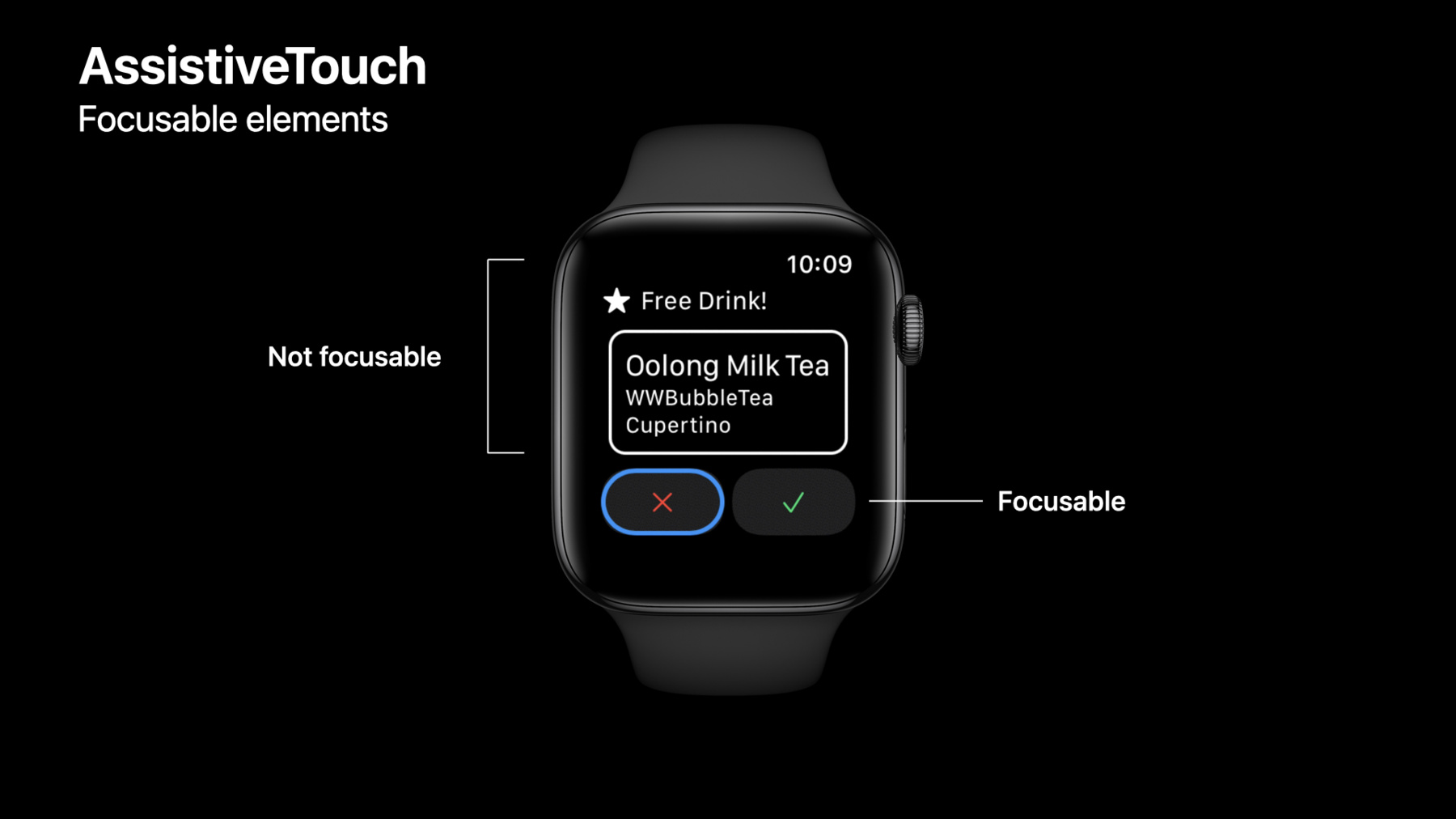
    • 19:50 - Make static element focusable

      struct FreeDrinkView: View {
          @State var didCancel = false
          @State var didAccept = false
          @State var showDetail = false
          
          var body: some View {
              VStack(spacing:10) {
                  FreeDrinkTitleView()
                  
                  FreeDrinkInfoView()
                      .accessibilityRespondsToUserInteraction(true)
                  
                  HStack {
                      CancelButton(buttonTapped: $didCancel)
                      AcceptButton(buttonTapped: $didAccept)
                  }
              }
              .onTapGesture {
                  showDetail.toggle()
              }
              .sheet(isPresented: $showDetail, onDismiss: dismiss) {
                  DrinkDetailModalView()
              }
          }
      }
    • 21:12 - AssistiveTouch cursor frame

      struct DrinkView: View {
          var currentDrink:DrinkInfo
          
          var body: some View {
              HStack(alignment: .firstTextBaseline) {
                  DrinkInfoView(drink:currentDrink)
                  
                  Spacer()
                  
                  NavigationLink(destination: EditView()) {
                      Image(systemName: "ellipsis")
                          .symbolVariant(.circle)
                  }
                  .contentShape(Circle().scale(1.5))
              }
          }
      }
    • 22:48 - AssistiveTouch Action Menu

      PlantContainerView(plant: plant)
          .padding()
          .accessibilityElement(children: .combine)
          .accessibilityAction {
              // Edit action
          } label: {
              Label("Edit", systemImage: "ellipsis.circle")
          }

Developer Footer

  • Vidéos
  • WWDC21
  • Create accessible experiences for watchOS
  • Open Menu Close Menu
    • iOS
    • iPadOS
    • macOS
    • tvOS
    • visionOS
    • watchOS
    • App Store
    Open Menu Close Menu
    • Swift
    • SwiftUI
    • Swift Playground
    • TestFlight
    • Xcode
    • Xcode Cloud
    • Icon Composer
    • SF Symbols
    Open Menu Close Menu
    • Accessibility
    • Accessories
    • Apple Intelligence
    • Audio & Video
    • Augmented Reality
    • Business
    • Design
    • Distribution
    • Education
    • Games
    • Health & Fitness
    • In-App Purchase
    • Localization
    • Maps & Location
    • Machine Learning & AI
    • Security
    • Safari & Web
    Open Menu Close Menu
    • Documentation
    • Downloads
    • Sample Code
    • Videos
    Open Menu Close Menu
    • Help Guides & Articles
    • Contact Us
    • Forums
    • Feedback & Bug Reporting
    • System Status
    Open Menu Close Menu
    • Apple Developer
    • App Store Connect
    • Certificates, IDs, & Profiles
    • Feedback Assistant
    Open Menu Close Menu
    • Apple Developer Program
    • Apple Developer Enterprise Program
    • App Store Small Business Program
    • MFi Program
    • Mini Apps Partner Program
    • News Partner Program
    • Video Partner Program
    • Security Bounty Program
    • Security Research Device Program
    Open Menu Close Menu
    • Meet with Apple
    • Apple Developer Centers
    • App Store Awards
    • Apple Design Awards
    • Apple Developer Academies
    • WWDC
    Read the latest news.
    Get the Apple Developer app.
    Copyright © 2026 Apple Inc. All rights reserved.
    Terms of Use Privacy Policy Agreements and Guidelines