

View in English

  • Apple Developer
    • Get Started

    Explore Get Started

    • Overview
    • Learn
    • Apple Developer Program

    Stay Updated

    • Latest News
    • Hello Developer
    • Platforms

    Explore Platforms

    • Apple Platforms
    • iOS
    • iPadOS
    • macOS
    • tvOS
    • visionOS
    • watchOS
    • App Store

    Featured

    • Design
    • Distribution
    • Games
    • Accessories
    • Web
    • Home
    • CarPlay
    • Technologies

    Explore Technologies

    • Overview
    • Xcode
    • Swift
    • SwiftUI

    Featured

    • Accessibility
    • App Intents
    • Apple Intelligence
    • Games
    • Machine Learning & AI
    • Security
    • Xcode Cloud
    • Community

    Explore Community

    • Overview
    • Meet with Apple events
    • Community-driven events
    • Developer Forums
    • Open Source

    Featured

    • WWDC
    • Swift Student Challenge
    • Developer Stories
    • App Store Awards
    • Apple Design Awards
    • Apple Developer Centers
    • Documentation

    Explore Documentation

    • Documentation Library
    • Technology Overviews
    • Sample Code
    • Human Interface Guidelines
    • Videos

    Release Notes

    • Featured Updates
    • iOS
    • iPadOS
    • macOS
    • watchOS
    • visionOS
    • tvOS
    • Xcode
    • Downloads

    Explore Downloads

    • All Downloads
    • Operating Systems
    • Applications
    • Design Resources

    Featured

    • Xcode
    • TestFlight
    • Fonts
    • SF Symbols
    • Icon Composer
    • Support

    Explore Support

    • Overview
    • Help Guides
    • Developer Forums
    • Feedback Assistant
    • Contact Us

    Featured

    • Account Help
    • App Review Guidelines
    • App Store Connect Help
    • Upcoming Requirements
    • Agreements and Guidelines
    • System Status
  • Quick Links

    • Events
    • News
    • Forums
    • Sample Code
    • Videos
 

Vidéos

Ouvrir le menu Fermer le menu
  • Collections
  • Toutes les vidéos
  • À propos

Plus de vidéos

  • À propos
  • Code
  • Elevate your tab and sidebar experience in iPadOS

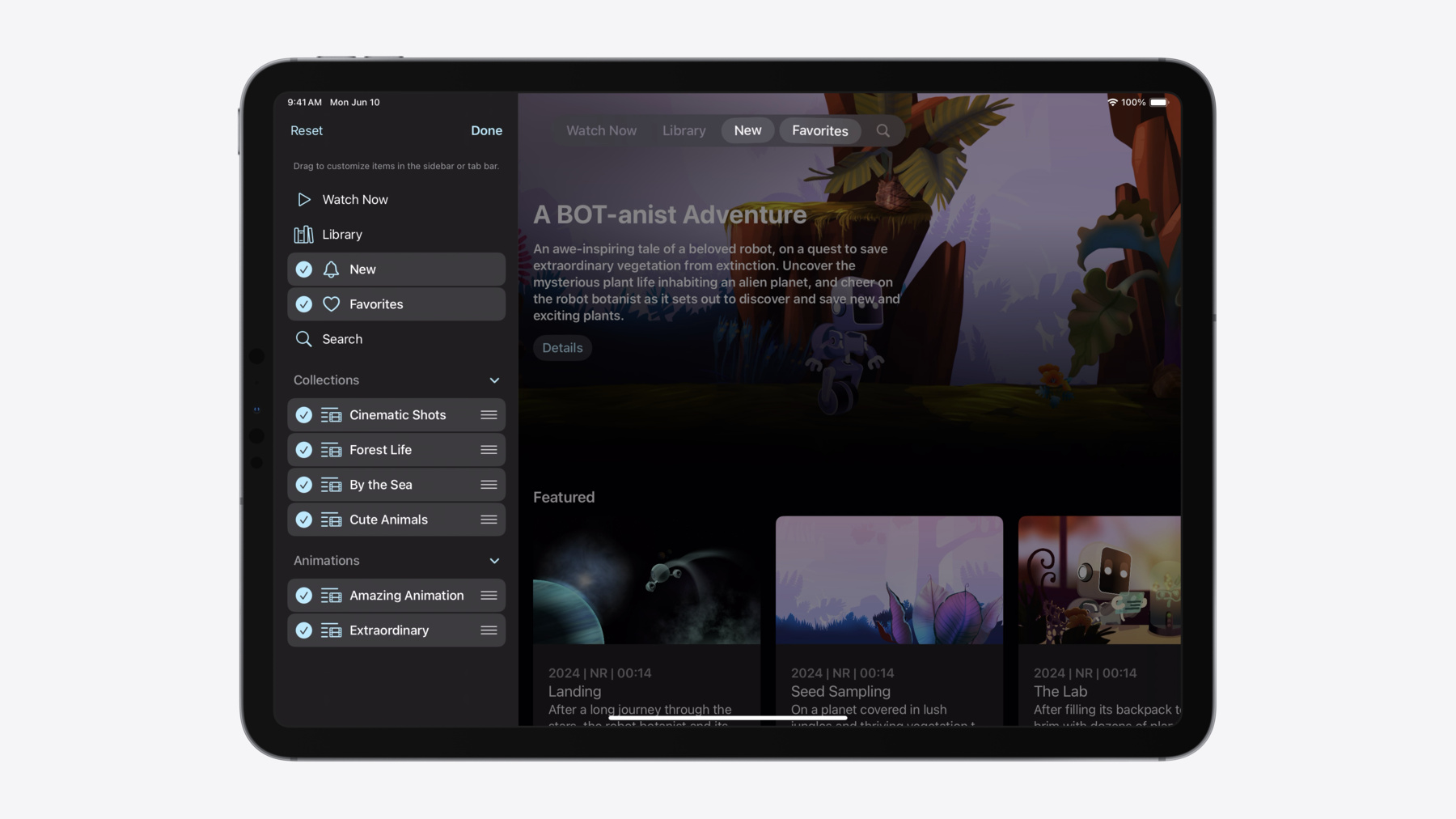
    iPadOS 18 introduces a new navigation system that gives people the flexibility to choose between using a tab bar or sidebar. The newly redesigned tab bar provides more space for content and other functionality. Learn how to use SwiftUI and UIKit to enable customization features – like adding, removing and reordering tabs – to enable a more personal touch in your app.

    Chapitres

    • 0:00 - Introduction
    • 0:52 - Tab bar and sidebar refresh
    • 3:56 - Tab bar and sidebar features
    • 4:28 - Tab bar SwiftUI updates
    • 5:00 - Tab bar UIKit updates
    • 5:58 - Search tab
    • 6:41 - Enable sidebar with TabView in SwiftUI
    • 7:16 - Enable sidebar with UITabBarController in UIKit
    • 7:46 - Sidebar actions
    • 8:13 - Drop destinations on Tabs in SwiftUI
    • 8:25 - Drop destinations on UITabs in UIKit
    • 9:15 - User customization
    • 10:45 - Enable customization in SwiftUI
    • 12:38 - Enable customization in UIKit
    • 13:52 - Platform considerations

    Ressources

    • Enhancing your app’s content with tab navigation
    • Elevating your iPad app with a tab bar and sidebar
    • Forum: UI Frameworks
    • Destination Video
      • Vidéo HD
      • Vidéo SD

    Vidéos connexes

    WWDC22

    • Explore navigation design for iOS

    WWDC20

    • Designed for iPad
  • Rechercher dans cette vidéo…
    • 4:27 - TabView updates in SwiftUI

      TabView {
          Tab("Watch Now", systemImage: "play") {
              WatchNowView()
          }
          Tab("Library", systemImage: "books.vertical") {
              LibraryView()
          }
          // ...
      }
    • 4:58 - UITabBarController updates in UIKIt

      tabBarController.tabs = [
          UITab(title: "Watch Now", image: UIImage(systemName: "play"), identifier: "Tabs.watchNow") { _ in
             WatchNowViewController()
          },
          UITab(title: "Library", image: UIImage(systemName: "books.vertical"), identifier: "Tabs.library") { _ in
             LibraryViewController()
          },
          // ...
      ]
    • 5:58 - Search tab

      // SwiftUI
      Tab(role: .search) {
          SearchView()
      }
      
      // UIKit
      let searchTab = UISearchTab {
          SearchViewController()
      }
    • 6:41 - Adding a sidebar in SwiftUI

      TabView {
          Tab("Watch Now", systemImage: "play") {
              // ...
          }
          Tab("Library", systemImage: "books.vertical") {
              // ...
          }
          // ...
          TabSection("Collections") {
              Tab("Cinematic Shots", systemImage: "list.and.film") {
                  // ...
              }
              Tab("Forest Life", systemImage: "list.and.film") {
                  // ...
              }
              // ...
          }
          TabSection("Animations") {
              // ...
          }
          Tab(role: .search) {
              // ...
          }
      }
      .tabViewStyle(.sidebarAdaptable)
    • 7:16 - Adding a sidebar in UIKit

      let collectionsGroup = UITabGroup(
          title: "Collections",
          image: UIImage(systemName: "folder"),
          identifier: "Tabs.CollectionsGroup"
          children: self.collectionsTabs()) { _ in
              // ...
      }
      
      tabBarController.mode = .tabSidebar
      tabBarController.tabs = [
          UITab(title: "Watch Now", ...) { _ in
              // ...
          },
          UITab(title: "Library", ...) { _ in
              // ...
          },
          // ...
          collectionsGroup,
          UITabGroup(title: "Animations", ...) { _ in
              // ...
          },
          UISearchTab { _ in
              // ...
          },
      ]
    • 7:35 - Updating a tab group in UIKit

      let collectionsGroup = UITabGroup(
          title: "Collections",
          image: UIImage(systemName: "folder"),
          identifier: "Tabs.CollectionsGroup"
          children: self.collectionsTabs()) { _ in
              // ...
      }
      
      
      let newCollection = UITab(...)
      collectionsGroup.children.append(newCollection)
    • 7:45 - Sidebar actions

      TabSection(...) {
          // ...
      }
      .sectionActions {
          Button("New Station", ...) {
              // action
          }
      }
      
      // UIKit
      
      let tabGroup = UITabGroup(...)
      tabGroup.sidebarActions = [
          UIAction(title: "New Station", ...) { _ in
              // action
          },
      ]
    • 8:12 - Drop destinations in SwiftUI

      Tab(collection.name, image: collection.image) {
          CollectionDetailView(collection)
      }
      .dropDestination(for: Photo.self) { photos in
          // Add 'photos' to the specified collection
      }
    • 8:24 - Drop destinations in UIKit

      func tabBarController(
          _ tabBarController: UITabBarController,
          tab: UITab, operationForAcceptingItemsFrom dropSession: any UIDropSession
      ) -> UIDropOperation {
          session.canLoadObjects(ofClass: Photo.self) ? .copy : .cancel
      }
      
      func tabBarController(
          _ tabBarController: UITabBarController,
          tab: UITab, acceptItemsFrom dropSession: any UIDropSession) {
          session.loadObjects(ofClass: Photo.self) { photos in
              // Add 'photos' to the specified collection
          }
      }
    • 10:45 - TabView customization in SwiftUI

      @AppStorage("MyTabViewCustomization")
      private var customization: TabViewCustomization
      
      TabView {
          Tab("Watch Now", systemImage: "play", value: .watchNow) {
              // ...
          }
          .customizationID("Tab.watchNow")
          // ...
          TabSection("Collections") {
              ForEach(MyCollectionsTab.allCases) { tab in
                  Tab(...) {
                      // ...
                  }
                  .customizationID(tab.customizationID)
              }
          }
          .customizationID("Tab.collections")
          // ...
      }
      .tabViewCustomization($customization)
    • 11:40 - Customization behavior and visibility in SwiftUI

      Tab("Watch Now", systemImage: "play", value: .watchNow) {
          // ...
      }
      .customizationBehavior(.disabled, for: .sidebar, .tabBar)
      
      
      Tab("Optional Tab", ...) {
          // ...
      }
      .customizationID("Tab.example.optional")
      .defaultVisibility(.hidden, for: .tabBar)
    • 12:38 - Tab customization in UIKit

      let myTab = UITab(...)
      myTab.allowsHiding = true
      print(myTab.isHidden)
      
      
      // .default, .optional, .movable, .pinned, .fixed, .sidebarOnly
      myTab.preferredPlacement = .fixed
      
      
      let myTabGroup = UITabGroup(...)
      myTabGroup.allowsReordering = true
      myTabGroup.displayOrderIdentifiers = [...]
    • 12:39 - Observing customization changes in UIKit

      func tabBarController(_ tabBarController: UITabBarController, visibilityDidChangeFor tabs: [UITab]) {
          // Read 'tab.isHidden' for the updated visibility.
      }
      
      func tabBarController(_ tabBarController: UITabBarController, displayOrderDidChangeFor group: UITabGroup) {
          // Read 'group.displayOrderIdentifiers' for the updated order.
      }

Developer Footer

  • Vidéos
  • WWDC24
  • Elevate your tab and sidebar experience in iPadOS
  • Open Menu Close Menu
    • iOS
    • iPadOS
    • macOS
    • tvOS
    • visionOS
    • watchOS
    • App Store
    Open Menu Close Menu
    • Swift
    • SwiftUI
    • Swift Playground
    • TestFlight
    • Xcode
    • Xcode Cloud
    • Icon Composer
    • SF Symbols
    Open Menu Close Menu
    • Accessibility
    • Accessories
    • Apple Intelligence
    • Audio & Video
    • Augmented Reality
    • Business
    • Design
    • Distribution
    • Education
    • Games
    • Health & Fitness
    • In-App Purchase
    • Localization
    • Maps & Location
    • Machine Learning & AI
    • Security
    • Safari & Web
    Open Menu Close Menu
    • Documentation
    • Downloads
    • Sample Code
    • Videos
    Open Menu Close Menu
    • Help Guides & Articles
    • Contact Us
    • Forums
    • Feedback & Bug Reporting
    • System Status
    Open Menu Close Menu
    • Apple Developer
    • App Store Connect
    • Certificates, IDs, & Profiles
    • Feedback Assistant
    Open Menu Close Menu
    • Apple Developer Program
    • Apple Developer Enterprise Program
    • App Store Small Business Program
    • MFi Program
    • Mini Apps Partner Program
    • News Partner Program
    • Video Partner Program
    • Security Bounty Program
    • Security Research Device Program
    Open Menu Close Menu
    • Meet with Apple
    • Apple Developer Centers
    • App Store Awards
    • Apple Design Awards
    • Apple Developer Academies
    • WWDC
    Read the latest news.
    Get the Apple Developer app.
    Copyright © 2026 Apple Inc. All rights reserved.
    Terms of Use Privacy Policy Agreements and Guidelines