HealthKit
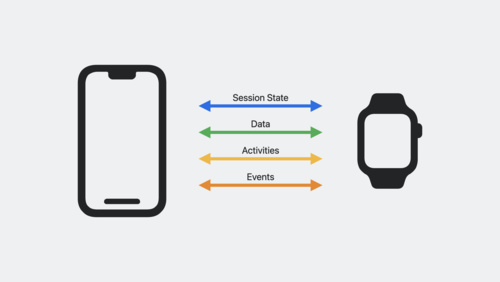
HealthKit provides a central repository for health and fitness data for iPhone, iPad, Apple Watch, and Apple Vision Pro. When people give your app permission to read and write relevant data to HealthKit, your app can provide deeper, more personalized and informative workout and health and fitness experiences.
Motion
You can use the Core Motion framework to deliver rich, personalized experiences within your apps. Core Motion reports motion- and environment-related data on iPhone, iPad, Apple Watch, and Apple Vision Pro, allowing you to provide people with deeper insights related to their activity. To make the most of this framework, you’ll need to receive permission to access certain motion data. When requesting access, be sure to give people context on how this data will be used — for example, using their steps, distance, and elevation gain to provide a more detailed post-workout analysis, or auto-detect a workout. Use this framework alongside HealthKit to offer enhanced Apple Watch fitness experiences with precise insights based on activity.
Location
Use the Core Location framework to let people record their outdoor activities like running, cycling, or hiking using location data. Use this framework to map routes, measure distance, and even provide location-based coaching or challenges. If your app needs to access a person’s location, the system will first display a prompt that allows people to grant or deny that request, allowing them to stay in control of their data and how they choose to share it.
App Intents and Shortcuts
With the App Intents framework, you can make actions and content from your app available in system locations like Siri, the Shortcuts app, and Spotlight. App Intents can also be expressed as shortcuts, allowing them to be mapped to the Action button on iPhone and Apple Watch Ultra. You can map actions like starting a workout, logging nutrition, or viewing progress to a shortcut.
WorkoutKit
With the WorkoutKit framework, you can create and preview interval workouts in your app, including single goal, pace-based, triathlete, or custom interval workouts. You can also use WorkoutKit to create and maintain a workout schedule and, with permission, sync scheduled compositions to Apple Watch. These compositions appear in a dedicated space in the Workout app on Apple Watch, as well as the Fitness app on iPhone, and include your app’s icon and name.
Foundation models
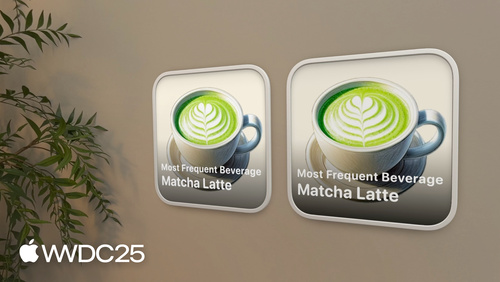
The Foundation Models framework provides access to Apple’s on-device large language model that powers Apple Intelligence, allowing your app to privately perform tasks like tailoring in-app messaging, or personalizing in-app content.
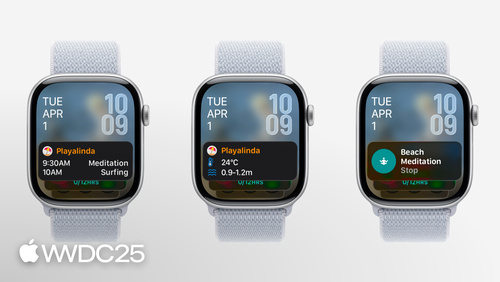
You can use WidgetKit and Live Activities to make your health or fitness app more engaging and informative in glanceable locations across devices. WidgetKit lets you display relevant data — like daily steps, calories, or workout streaks. Live Activities, built using ActivityKit, extend this by showing real-time progress for active workouts — such as elapsed time, distance, pace, or heart rate. If people might consider the information in your Live Activity to be sensitive or private, display an innocuous summary and let people tap the Live Activity to access the sensitive information in your app. Together, these frameworks help people stay connected to their goals, providing timely updates and live motivation during workouts.
 Connect to accessories
Use Core Bluetooth to connect directly with a wide range of Bluetooth Low Energy (BLE)-enabled smart health accessories — such as heart rate straps, cycling sensors, treadmills, or smart scales — to capture live biometric and performance data.
Health research and care
With ResearchKit, CareKit, and other tools, medical professionals can develop an app that can drive health science through research at scale, or change the way you deliver care to patients beyond the confines of a lab or doctor’s office. Discover how an app could take your work further and join a global community that is transforming health through technology.
Respect user privacy
People expect health and fitness apps to preserve their privacy and protect their sensitive data. That’s why we offer developers tools and technologies that help protect privacy in addition to controls that let people choose what information they share. To provide people with transparency and control related to what data you have permission to access and how it may be used, review the following guidelines and requirements:
- Design with privacy in mind. Minimize data collection and request permission to collect data such as location, health, and motion data in order to ensure user data stays protected and private.
- Comply with the App Review Guidelines. You must ensure your app complies with applicable requirements in the App Review Guidelines, including the specific requirements listed in Guideline 5.1.3 related to health and health research. For example, information collected in the health, fitness, and medical research context may not be used for advertising, marketing, or other use-based data mining purposes, or sold to data brokers.
If your app provides a service in a highly regulated field, such as healthcare that requires the collection of sensitive user information, it should be submitted by a legal entity that provides the services, and not by an individual developer. See Guideline 5.1.1 (ix) for more information.
- Provide information about your app’s privacy practices. When submitting a new app or app update in App Store Connect, you’ll need to declare your app’s privacy practices, including what data is collected — such as any health, fitness, or location data — and whether it’s linked to them or their device. Based on this information, a Privacy Nutrition Label will appear on your App Store product page, which helps people understand what data is collected and your app’s privacy practices.
- Only request access to data that’s core to the functionality of your app. Avoid requesting access to data and frameworks that are not essential to the experience of your app. Be sure to supply clear purpose strings to explain why your app is requesting access to this data and how it will be used.
- Process on device and use end-to-end encryption when possible. On-device processing offers a faster and more secure experience. You can use technologies like Apple Neural Engine, custom Create ML models, and foundation models to process information and data right on device. End-to-end encryption adds another layer of protection and should be used where possible. For example, if someone shares health data with other people, end-to-end encryption ensures that only those authorized can access the data.
- Declare your app as a regulated medical device. In certain regions, your app may be considered a regulated medical device and require certain registrations and authorizations. Starting in spring 2026, if your app is in the Medical or Health & Fitness category on the App Store, you can indicate the app’s regulatory status in certain regions and provide additional information associated with its use.
 Communicate your app’s compatibility
Use the Works with Apple Health badge to promote your HealthKit-enabled apps. Download the badge and review the guidelines for using the badge on marketing communications.
View marketing guidelines
Get updates
Discuss health and fitness technologies on the Apple Developer Forums. To receive emails about health and fitness technologies, select the Health & Fitness topic in your Developer profile.