

-
What's new in SwiftUI
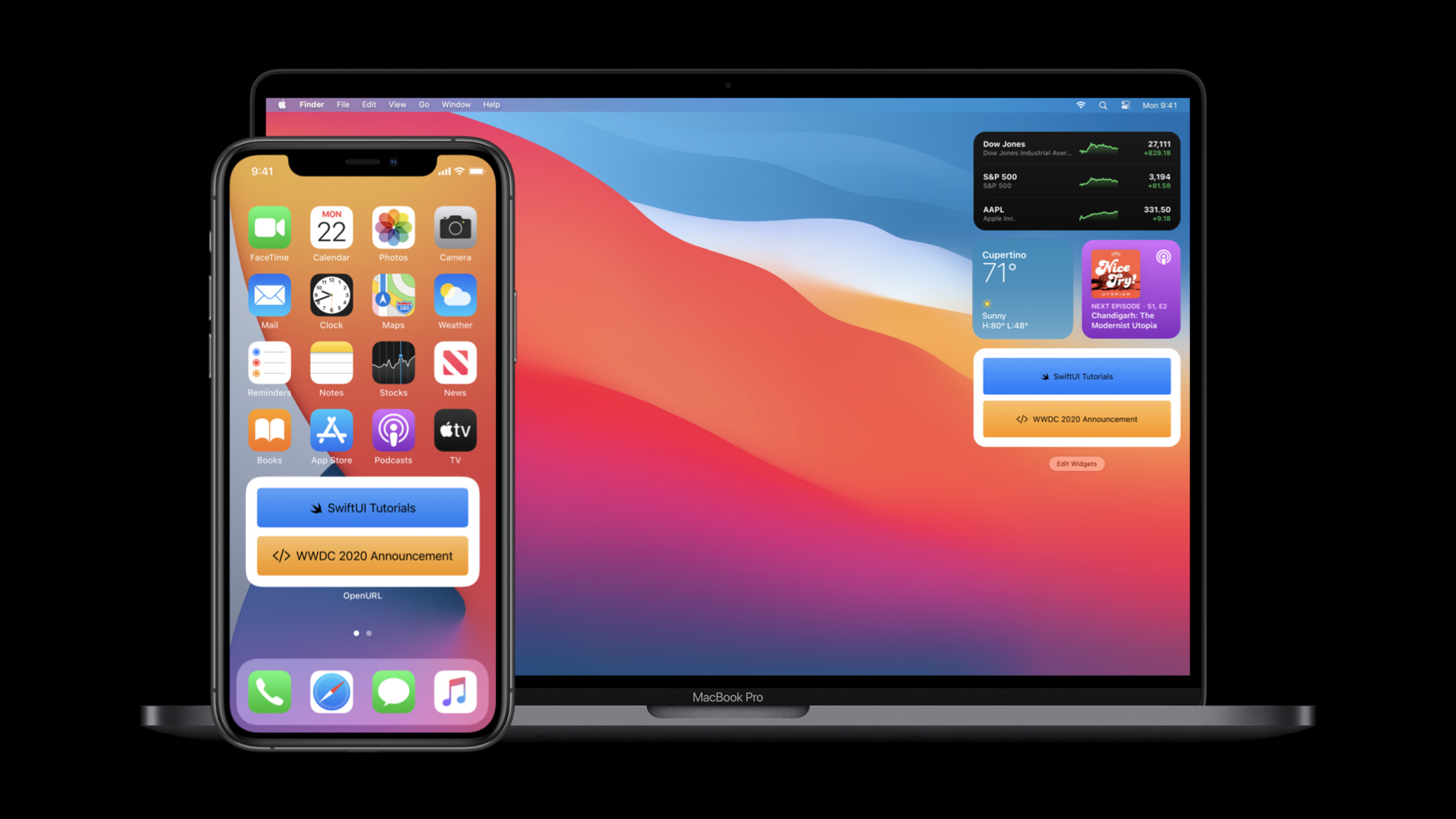
SwiftUI can help you build better and more powerful apps for iPhone, iPad, Mac, Apple Watch, and Apple TV. Learn more about the latest refinements to SwiftUI, including interface improvements like outlines, grids, and toolbars. Take advantage of SwiftUI's enhanced support across Apple frameworks to enable features like Sign In with Apple. Discover new visual effects, as well as new controls and styles. And find out how the new app and scene APIs enable you to create apps entirely in SwiftUI, as well as custom complications and all new widgets.
To get the most out of this session, you should be familiar with SwiftUI. Watch "Introduction to SwiftUI" for a primer.Recursos
Videos relacionados
WWDC20
- App essentials in SwiftUI
- Build complications in SwiftUI
- Build document-based apps in SwiftUI
- Build SwiftUI apps for tvOS
- Build SwiftUI views for widgets
- Data Essentials in SwiftUI
- Introduction to SwiftUI
- Meet WidgetKit
- Optimize the interface of your Mac Catalyst app
- SF Symbols 2
- Stacks, Grids, and Outlines in SwiftUI
- The details of UI typography
- What's new in Mac Catalyst
- What's new in Swift
- Widgets Code-along, part 1: The adventure begins
- Widgets Code-along, part 2: Alternate timelines
- Widgets Code-along, part 3: Advancing timelines
-
Buscar este video…
-
-
1:26 - Hello World
@main struct HelloWorld: App { var body: some Scene { WindowGroup { Text("Hello, world!").padding() } } } -
1:56 - Book Club app
@main struct BookClubApp: App { @StateObject private var store = ReadingListStore() var body: some Scene { WindowGroup { ReadingListViewer(store: store) } } } struct ReadingListViewer: View { @ObservedObject var store: ReadingListStore var body: some View { NavigationView { List(store.books) { book in Text(book.title) } .navigationTitle("Currently Reading") } } } class ReadingListStore: ObservableObject { init() {} var books = [ Book(title: "Book #1", author: "Author #1"), Book(title: "Book #2", author: "Author #2"), Book(title: "Book #3", author: "Author #3") ] } struct Book: Identifiable { let id = UUID() let title: String let author: String } -
4:46 - Settings
@main struct BookClubApp: App { @StateObject private var store = ReadingListStore() @SceneBuilder var body: some Scene { WindowGroup { ReadingListViewer(store: store) } #if os(macOS) Settings { BookClubSettingsView() } #endif } } struct BookClubSettingsView: View { var body: some View { Text("Add your settings UI here.") .padding() } } struct ReadingListViewer: View { @ObservedObject var store: ReadingListStore var body: some View { NavigationView { List(store.books) { book in Text(book.title) } .navigationTitle("Currently Reading") } } } class ReadingListStore: ObservableObject { init() {} var books = [ Book(title: "Book #1", author: "Author #1"), Book(title: "Book #2", author: "Author #2"), Book(title: "Book #3", author: "Author #3") ] } struct Book: Identifiable { let id = UUID() let title: String let author: String } -
5:10 - Document groups
import SwiftUI import UniformTypeIdentifiers @main struct ShapeEditApp: App { var body: some Scene { DocumentGroup(newDocument: ShapeDocument()) { file in DocumentView(document: file.$document) } } } struct DocumentView: View { @Binding var document: ShapeDocument var body: some View { Text(document.title) .frame(width: 300, height: 200) } } struct ShapeDocument: Codable { var title: String = "Untitled" } extension UTType { static let shapeEditDocument = UTType(exportedAs: "com.example.ShapeEdit.shapes") } extension ShapeDocument: FileDocument { static var readableContentTypes: [UTType] { [.shapeEditDocument] } init(fileWrapper: FileWrapper, contentType: UTType) throws { let data = fileWrapper.regularFileContents! self = try JSONDecoder().decode(Self.self, from: data) } func write(to fileWrapper: inout FileWrapper, contentType: UTType) throws { let data = try JSONEncoder().encode(self) fileWrapper = FileWrapper(regularFileWithContents: data) } } -
5:49 - Custom Commands
import SwiftUI import UniformTypeIdentifiers @main struct ShapeEditApp: App { var body: some Scene { DocumentGroup(newDocument: ShapeDocument()) { file in DocumentView(document: file.$document) } .commands { CommandMenu("Shapes") { Button("Add Shape...", action: addShape) .keyboardShortcut("N") Button("Add Text", action: addText) .keyboardShortcut("T") } } } func addShape() {} func addText() {} } struct DocumentView: View { @Binding var document: ShapeDocument var body: some View { Text(document.title) .frame(width: 300, height: 200) } } struct ShapeDocument: Codable { var title: String = "Untitled" } extension UTType { static let shapeEditDocument = UTType(exportedAs: "com.example.ShapeEdit.shapes") } extension ShapeDocument: FileDocument { static var readableContentTypes: [UTType] { [.shapeEditDocument] } init(fileWrapper: FileWrapper, contentType: UTType) throws { let data = fileWrapper.regularFileContents! self = try JSONDecoder().decode(Self.self, from: data) } func write(to fileWrapper: inout FileWrapper, contentType: UTType) throws { let data = try JSONEncoder().encode(self) fileWrapper = FileWrapper(regularFileWithContents: data) } } -
7:55 - Widgets
import SwiftUI import WidgetKit @main struct RecommendedAlbum: Widget { var body: some WidgetConfiguration { StaticConfiguration( kind: "RecommendedAlbum", provider: Provider(), placeholder: PlaceholderView() ) { entry in AlbumWidgetView(album: entry.album) } .configurationDisplayName("Recommended Album") .description("Your recommendation for the day.") } } struct AlbumWidgetView: View { var album: Album var body: some View { Text(album.title) } } struct PlaceholderView: View { var body: some View { Text("Placeholder View") } } struct Album { var title: String } struct Provider: TimelineProvider { struct Entry: TimelineEntry { var album: Album var date: Date } public func snapshot(with context: Context, completion: @escaping (Entry) -> ()) { let entry = Entry(album: Album(title: "Untitled"), date: Date()) completion(entry) } public func timeline(with context: Context, completion: @escaping (Timeline<Entry>) -> ()) { var entries: [Entry] = [] // Generate a timeline consisting of five entries an hour apart, starting from the current date. let currentDate = Date() for hourOffset in 0 ..< 5 { let entryDate = Calendar.current.date(byAdding: .hour, value: hourOffset, to: currentDate)! let entry = Entry(album: Album(title: "Untitled #\(hourOffset)"), date: entryDate) entries.append(entry) } let timeline = Timeline(entries: entries, policy: .atEnd) completion(timeline) } } -
8:31 - Complications using SwiftUI
struct CoffeeHistoryChart: View { var body: some View { VStack { ComplicationHistoryLabel { Text("Weekly Coffee") .complicationForeground() } HistoryChart() } .complicationChartFont() } } struct ComplicationHistoryLabel: View { ... } struct HistoryChart: View { ... } extension View { func complicationChartFont() -> some View { ... } } -
9:22 - Outlines
struct OutlineContentView: View { var graphics: [Graphic] var body: some View { List(graphics, children: \.children) { graphic in GraphicRow(graphic) } .listStyle(SidebarListStyle()) } } struct Graphic: Identifiable { var id: String var name: String var icon: Image var children: [Graphic]? } struct GraphicRow: View { var graphic: Graphic init(_ graphic: Graphic) { self.graphic = graphic } var body: some View { Label { Text(graphic.name) } icon: { graphic.icon } } } -
10:09 - Adaptive grids
struct ContentView: View { var items: [Item] var body: some View { ScrollView { LazyVGrid(columns: [GridItem(.adaptive(minimum: 176))]) { ForEach(items) { item in ItemView(item: item) } } .padding() } } } struct Item: Identifiable { var name: String var id = UUID() var icon: Image { Image(systemName: name) } var color: Color { colors[colorIndex % (colors.count - 1)] } private static var nextColorIndex: Int = 0 private var colorIndex: Int init(name: String) { self.name = name colorIndex = Self.nextColorIndex Self.nextColorIndex += 1 } } struct ItemView: View { var item: Item var body: some View { ZStack { RoundedRectangle(cornerRadius: 8, style: .continuous) .fill() .layoutPriority(1) .foregroundColor(item.color) item.icon .resizable() .aspectRatio(contentMode: .fit) .padding(.all, 16) .foregroundColor(.white) } .frame(width: 176, height: 110) } } -
10:28 - Fixed-column grids
struct ContentView: View { var items: [Item] var body: some View { ScrollView { LazyVGrid(columns: Array(repeating: GridItem(), count: 4)]) { ForEach(items) { item in ItemView(item: item) } } .padding() } } } struct Item: Identifiable { var name: String var id = UUID() var icon: Image { Image(systemName: name) } var color: Color { colors[colorIndex % (colors.count - 1)] } private static var nextColorIndex: Int = 0 private var colorIndex: Int init(name: String) { self.name = name colorIndex = Self.nextColorIndex Self.nextColorIndex += 1 } } struct ItemView: View { var item: Item var body: some View { ZStack { RoundedRectangle(cornerRadius: 8, style: .continuous) .fill() .layoutPriority(1) .foregroundColor(item.color) item.icon .resizable() .aspectRatio(contentMode: .fit) .padding(.all, 16) .foregroundColor(.white) } .frame(width: 176, height: 110) } } -
10:38 - Horizontal grids
struct ContentView: View { var items: [Item] var body: some View { ScrollView(.horizontal) { LazyHGrid(rows: [GridItem(.adaptive(minimum: 110))]) { ForEach(items) { item in ItemView(item: item) } } .padding() } } } struct Item: Identifiable { var name: String var id = UUID() var icon: Image { Image(systemName: name) } var color: Color { colors[colorIndex % (colors.count - 1)] } private static var nextColorIndex: Int = 0 private var colorIndex: Int init(name: String) { self.name = name colorIndex = Self.nextColorIndex Self.nextColorIndex += 1 } } struct ItemView: View { var item: Item var body: some View { ZStack { RoundedRectangle(cornerRadius: 8, style: .continuous) .fill() .layoutPriority(1) .foregroundColor(item.color) item.icon .resizable() .aspectRatio(contentMode: .fit) .padding(.all, 16) .foregroundColor(.white) } .frame(width: 176, height: 110) } } -
10:58 - Lazy stacks
struct WildlifeList: View { var rows: [ImageRow] var body: some View { ScrollView { LazyVStack(spacing: 2) { ForEach(rows) { row in switch row.content { case let .singleImage(image): SingleImageLayout(image: image) case let .imageGroup(images): ImageGroupLayout(images: images) case let .imageRow(images): ImageRowLayout(images: images) } } } } } } -
12:24 - Toolbar modifier
struct ContentView: View { var body: some View { List { Text("Book List") } .toolbar { Button(action: recordProgress) { Label("Record Progress", systemImage: "book.circle") } } } private func recordProgress() {} } -
12:40 - ToolbarItem
struct ContentView: View { var body: some View { List { Text("Book List") } .toolbar { ToolbarItem(placement: .primaryAction) { Button(action: recordProgress) { Label("Record Progress", systemImage: "book.circle") } } } } private func recordProgress() {} } -
12:47 - Confirmation and cancellation toolbar placements
struct ContentView: View { var body: some View { Form { Slider(value: .constant(0.39)) } .toolbar { ToolbarItem(placement: .confirmationAction) { Button("Save", action: saveProgress) } ToolbarItem(placement: .cancellationAction) { Button("Cancel", action: dismissSheet) } } } private func saveProgress() {} private func dismissSheet() {} } -
13:00 - Principal toolbar placement
struct ContentView: View { enum ViewMode { case details case notes } @State private var viewMode: ViewMode = .details var body: some View { List { Text("Book Detail") } .toolbar { ToolbarItem(placement: .principal) { Picker("View", selection: $viewMode) { Text("Details").tag(ViewMode.details) Text("Notes").tag(ViewMode.notes) } } } } } -
13:17 - Bottom bar toolbar placement
struct ContentView: View { var body: some View { List { Text("Book Detail") } .toolbar { ToolbarItem { Button(action: recordProgress) { Label("Progress", systemImage: "book.circle") } } ToolbarItem(placement: .bottomBar) { Button(action: shareBook) { Label("Share", systemImage: "square.and.arrow.up") } } } } private func recordProgress() {} private func shareBook() {} } -
13:38 - Label
Label("Progress", systemImage: "book.circle") -
14:06 - Label expanded form
Label { Text("Progress") } icon: { Image(systemName: "book.circle") } -
14:24 - Bottom bar toolbar placement
struct ContentView: View { var body: some View { List { Text("Book Detail") } .toolbar { ToolbarItem { Button(action: recordProgress) { Label("Progress", systemImage: "book.circle") } } ToolbarItem(placement: .bottomBar) { Button(action: shareBook) { Label("Share", systemImage: "square.and.arrow.up") } } } } private func recordProgress() {} private func shareBook() {} } -
14:36 - Context menu Labels
struct ContentView: View { var body: some View { List { Text("Book List Row") .contextMenu { Button(action: recordProgress) { Label("Progress", systemImage: "book.circle") } Button(action: addToFavorites) { Label("Add to Favorites", systemImage: "heart") } Button(action: shareBook) { Label("Share", systemImage: "square.and.arrow.up") } } } } private func recordProgress() {} private func addToFavorites() {} private func shareBook() {} } -
14:39 - List Labels
struct ContentView: View { var body: some View { List { Group { Label("Introducing SwiftUI", systemImage: "hand.wave") Label("SwiftUI Essentials", systemImage: "studentdesk") Label("Data Essentials in SwiftUI", systemImage: "flowchart") Label("App Essentials in SwiftUI", systemImage: "macwindow.on.rectangle") } Group { Label("Build Document-based apps in SwiftUI", systemImage: "doc") Label("Stacks, Grids, and Outlines", systemImage: "list.bullet.rectangle") Label("Building Custom Views in SwiftUI", systemImage: "sparkles") Label("Build SwiftUI Apps for tvOS", systemImage: "tv") Label("Build SwiftUI Views for Widgets", systemImage: "square.grid.2x2.fill") Label("Create Complications for Apple Watch", systemImage: "gauge") Label("SwiftUI on All Devices", systemImage: "laptopcomputer.and.iphone") Label("Integrating SwiftUI", systemImage: "rectangle.connected.to.line.below") } } } } -
15:28 - Help modifier
struct ContentView: View { var body: some View { Button(action: recordProgress) { Label("Progress", systemImage: "book.circle") } .help("Record new progress entry") } private func recordProgress() {} } -
16:12 - Keyboard shortcut modifier
@main struct BookClubApp: App { var body: some Scene { WindowGroup { List { Text("Reading List Viewer") } } .commands { Button("Previous Book", action: selectPrevious) .keyboardShortcut("[") Button("Next Book", action: selectNext) .keyboardShortcut("]") } } private func selectPreviousBook() {} private func selectNextBook() {} } -
16:28 - Cancel and default action keyboard shortcuts
struct ContentView: View { var body: some View { HStack { Button("Cancel", action: dismissSheet) .keyboardShortcut(.cancelAction) Button("Save", action: saveProgress) .keyboardShortcut(.defaultAction) } } private func dismissSheet() {} private func saveProgress() {} } -
17:08 - ProgressView
struct ContentView: View { var percentComplete: Double var body: some View { ProgressView("Downloading Photo", value: percentComplete) } } -
17:19 - Circular ProgressView
struct ContentView: View { var percentComplete: Double var body: some View { ProgressView("Downloading Photo", value: percentComplete) .progressViewStyle(CircularProgressViewStyle()) } } -
17:25 - Activity indicator ProgressView
struct ContentView: View { var body: some View { ProgressView() } } -
17:32 - Gauge
struct ContentView: View { var acidity: Double var body: some View { Gauge(value: acidity, in: 3...10) { Label("Soil Acidity", systemImage: "drop.fill") .foregroundColor(.green) } } } -
17:52 - Gauge with current value label
struct ContentView: View { var acidity: Double var body: some View { Gauge(value: acidity, in: 3...10) { Label("Soil Acidity", systemImage: "drop.fill") .foregroundColor(.green) } currentValueLabel: { Text("\(acidity, specifier: "%.1f")") } } } -
18:00 - Gauge with minimum and maximum value labels
struct ContentView: View { var acidity: Double var body: some View { Gauge(value: acidity, in: 3...10) { Label("Soil Acidity", systemImage: "drop.fill") .foregroundColor(.green) } currentValueLabel: { Text("\(acidity, specifier: "%.1f")") } minimumValueLabel: { Text("3") } maximumValueLabel: { Text("10") } } } -
18:57 - Initial Album Picker
struct ContentView: View { @State private var selectedAlbumIDs: Set<Album.ID> = [] var body: some View { VStack(spacing: 0) { ScrollView { albumGrid.padding(.horizontal) } Divider().zIndex(-1) selectedAlbumRow .frame(height: AlbumCell.albumSize) .padding(.top, 8) } .buttonStyle(PlainButtonStyle()) } private var albumGrid: some View { LazyVGrid(columns: [GridItem(.adaptive(minimum: AlbumCell.albumSize))], spacing: 8) { ForEach(unselectedAlbums) { album in Button(action: { select(album) }) { AlbumCell(album) } } } } private var selectedAlbumRow: some View { HStack { ForEach(selectedAlbums) { album in AlbumCell(album) } } } private var unselectedAlbums: [Album] { Album.allAlbums.filter { !selectedAlbumIDs.contains($0.id) } } private var selectedAlbums: [Album] { Album.allAlbums.filter { selectedAlbumIDs.contains($0.id) } } private func select(_ album: Album) { withAnimation(.spring(response: 0.5)) { _ = selectedAlbumIDs.insert(album.id) } } } struct AlbumCell: View { static let albumSize: CGFloat = 100 var album: Album init(_ album: Album) { self.album = album } var body: some View { album.image .frame(width: AlbumCell.albumSize, height: AlbumCell.albumSize) .background(Color.pink) .cornerRadius(6.0) } } struct Album: Identifiable { static let allAlbums: [Album] = [ .init(name: "Sample", image: Image(systemName: "music.note")), .init(name: "Sample 2", image: Image(systemName: "music.note.list")), .init(name: "Sample 3", image: Image(systemName: "music.quarternote.3")), .init(name: "Sample 4", image: Image(systemName: "music.mic")), .init(name: "Sample 5", image: Image(systemName: "music.note.house")), .init(name: "Sample 6", image: Image(systemName: "tv.music.note")) ] var name: String var image: Image var id: String { name } } -
19:17 - Matched geometry effect Album Picker
struct ContentView: View { @Namespace private var namespace @State private var selectedAlbumIDs: Set<Album.ID> = [] var body: some View { VStack(spacing: 0) { ScrollView { albumGrid.padding(.horizontal) } Divider().zIndex(-1) selectedAlbumRow .frame(height: AlbumCell.albumSize) .padding(.top, 8) } .buttonStyle(PlainButtonStyle()) } private var albumGrid: some View { LazyVGrid(columns: [GridItem(.adaptive(minimum: AlbumCell.albumSize))], spacing: 8) { ForEach(unselectedAlbums) { album in Button(action: { select(album) }) { AlbumCell(album) } .matchedGeometryEffect(id: album.id, in: namespace) } } } private var selectedAlbumRow: some View { HStack { ForEach(selectedAlbums) { album in AlbumCell(album) .matchedGeometryEffect(id: album.id, in: namespace) } } } private var unselectedAlbums: [Album] { Album.allAlbums.filter { !selectedAlbumIDs.contains($0.id) } } private var selectedAlbums: [Album] { Album.allAlbums.filter { selectedAlbumIDs.contains($0.id) } } private func select(_ album: Album) { withAnimation(.spring(response: 0.5)) { _ = selectedAlbumIDs.insert(album.id) } } } struct AlbumCell: View { static let albumSize: CGFloat = 100 var album: Album init(_ album: Album) { self.album = album } var body: some View { album.image .frame(width: AlbumCell.albumSize, height: AlbumCell.albumSize) .background(Color.pink) .cornerRadius(6.0) } } struct Album: Identifiable { static let allAlbums: [Album] = [ .init(name: "Sample", image: Image(systemName: "music.note")), .init(name: "Sample 2", image: Image(systemName: "music.note.list")), .init(name: "Sample 3", image: Image(systemName: "music.quarternote.3")), .init(name: "Sample 4", image: Image(systemName: "music.mic")), .init(name: "Sample 5", image: Image(systemName: "music.note.house")), .init(name: "Sample 6", image: Image(systemName: "tv.music.note")) ] var name: String var image: Image var id: String { name } } -
19:53 - Container Relative Shape
struct AlbumWidgetView: View { var album: Album var body: some View { album.image .clipShape(ContainerRelativeShape()) .padding() } } struct Album { var name: String var artist: String var image: Image } -
20:34 - Dynamic Type scaling
struct ContentView: View { var album: Album @ScaledMetric private var padding: CGFloat = 10 var body: some View { VStack { Text(album.name) .font(.custom("AvenirNext-Bold", size: 30)) Text("\(Image(systemName: "music.mic")) \(album.artist)") .font(.custom("AvenirNext-Bold", size: 17)) } .padding(padding) .background(RoundedRectangle(cornerRadius: 16, style: .continuous).fill(Color.purple)) } } struct Album { var name: String var artist: String var image: Image } -
22:08 - Initial Sidebar List
struct ContentView: View { var body: some View { NavigationView { List { Label("Menu", systemImage: "list.bullet") Label("Favorites", systemImage: "heart") Label("Rewards", systemImage: "seal") Section(header: Text("Recipes")) { ForEach(1..<4) { Label("Recipes \($0)", systemImage: "book.closed") } } } .listStyle(SidebarListStyle()) } } } -
22:17 - List Item Tint in Sidebars
struct ContentView: View { var body: some View { NavigationView { List { Label("Menu", systemImage: "list.bullet") Label("Favorites", systemImage: "heart") .listItemTint(.red) Label("Rewards", systemImage: "seal") .listItemTint(.purple) Section(header: Text("Recipes")) { ForEach(1..<4) { Label("Recipes \($0)", systemImage: "book.closed") } } .listItemTint(.monochrome) } .listStyle(SidebarListStyle()) } } } -
22:33 - List Item Tint on watchOS
struct ContentView: View { var body: some View { NavigationView { List { Label("Menu", systemImage: "list.bullet") Label("Favorites", systemImage: "heart") .listItemTint(.red) Label("Rewards", systemImage: "seal") .listItemTint(.purple) Section(header: Text("Recipes")) { ForEach(1..<4) { Label("Recipes \($0)", systemImage: "book.closed") } } .listItemTint(.monochrome) } } } } -
22:46 - SwitchToggleStyle tint
struct ContentView: View { @State var order = Order() var body: some View { Toggle("Send notification when ready", isOn: $order.notifyWhenReady) .toggleStyle(SwitchToggleStyle(tint: .accentColor)) } } struct Order { var notifyWhenReady = true } -
23:15 - Link
let appleURL = URL(string: "https://developer.apple.com/tutorials/swiftui/")! let wwdcAnnouncementURL = URL(string: "https://apple.news/AjriX1CWUT-OfjXu_R4QsnA")! struct ContentView: View { var body: some View { Form { Section { Link(destination: apple) { Label("SwiftUI Tutorials", systemImage: "swift") } Link(destination: wwdcAnnouncementURL) { Label("WWDC 2020 Announcement", systemImage: "chevron.left.slash.chevron.right") } } } } } -
23:56 - OpenURL Environment Action
let customPublisher = NotificationCenter.default.publisher(for: .init("CustomURLRequestNotification")) let apple = URL(string: "https://developer.apple.com/tutorials/swiftui/")! struct ContentView: View { @Environment(\.openURL) private var openURL var body: some View { Text("OpenURL Environment Action") .onReceive(customPublisher) { output in if output.userInfo!["shouldOpenURL"] as! Bool { openURL(apple) } } } } -
24:44 - Uniform Type Identifiers
import UniformTypeIdentifiers extension UTType { static let myFileFormat = UTType(exportedAs: "com.example.myfileformat") } func introspecContentType(_ fileURL: URL) throws { // Get this file's content type. let resourceValues = try fileURL.resourceValues(forKeys: [.contentTypeKey]) if let type = resourceValues.contentType { // Get the human presentable description of the type. let description = type.localizedDescription if type.conforms(to: .myFileFormat) { // The file is our app’s format. } else if type.conforms(to: .image) { // The file is an image. } } } -
25:16 - Sign in with Apple Button
import AuthenticationServices
import SwiftUI

struct ContentView: View {
    var body: some View {
        SignInWithAppleButton(
            .signUp,
            onRequest: handleRequest,
            onCompletion: handleCompletion
        )
        .signInWithAppleButtonStyle(.black)
    }

    private func handleRequest(request: ASAuthorizationAppleIDRequest) {}
    private func handleCompletion(result: Result<ASAuthorization, Error>) {}
}
-