

View in English

  • Apple Developer
    • Get Started

    Explore Get Started

    • Overview
    • Learn
    • Apple Developer Program

    Stay Updated

    • Latest News
    • Hello Developer
    • Platforms

    Explore Platforms

    • Apple Platforms
    • iOS
    • iPadOS
    • macOS
    • tvOS
    • visionOS
    • watchOS
    • App Store

    Featured

    • Design
    • Distribution
    • Games
    • Accessories
    • Web
    • Home
    • CarPlay
    • Technologies

    Explore Technologies

    • Overview
    • Xcode
    • Swift
    • SwiftUI

    Featured

    • Accessibility
    • App Intents
    • Apple Intelligence
    • Games
    • Machine Learning & AI
    • Security
    • Xcode Cloud
    • Community

    Explore Community

    • Overview
    • Meet with Apple events
    • Community-driven events
    • Developer Forums
    • Open Source

    Featured

    • WWDC
    • Swift Student Challenge
    • Developer Stories
    • App Store Awards
    • Apple Design Awards
    • Apple Developer Centers
    • Documentation

    Explore Documentation

    • Documentation Library
    • Technology Overviews
    • Sample Code
    • Human Interface Guidelines
    • Videos

    Release Notes

    • Featured Updates
    • iOS
    • iPadOS
    • macOS
    • watchOS
    • visionOS
    • tvOS
    • Xcode
    • Downloads

    Explore Downloads

    • All Downloads
    • Operating Systems
    • Applications
    • Design Resources

    Featured

    • Xcode
    • TestFlight
    • Fonts
    • SF Symbols
    • Icon Composer
    • Support

    Explore Support

    • Overview
    • Help Guides
    • Developer Forums
    • Feedback Assistant
    • Contact Us

    Featured

    • Account Help
    • App Review Guidelines
    • App Store Connect Help
    • Upcoming Requirements
    • Agreements and Guidelines
    • System Status
  • Quick Links

    • Events
    • News
    • Forums
    • Sample Code
    • Videos
 

Videos

Abrir menú Cerrar menú
  • Colecciones
  • Todos los videos
  • Información

Más videos

  • Información
  • Código
  • Discover compilation workflows in Metal

    The Metal shading language is a powerful C++ based language that allows apps to render stunning effects while maintaining a flexible shader development pipeline. Discover how to more easily build and extend your render pipelines using Dynamic Libraries and Function Pointers. We'll also show you how to accelerate your shader compilation at runtime with Binary Function Archives, Function Linking, and Function Stitching.

    Recursos

    • Shader libraries
    • Creating a Metal dynamic library
    • Metal Feature Set Tables
    • Metal
    • Metal Shading Language Specification
      • Video HD
      • Video SD

    Videos relacionados

    WWDC23

    • Bring your game to Mac, Part 2: Compile your shaders
    • Optimize GPU renderers with Metal

    WWDC22

    • Target and optimize GPU binaries with Metal 3

    WWDC21

    • Discover Metal debugging, profiling, and asset creation tools

    WWDC20

    • Build GPU binaries with Metal
    • Get to know Metal function pointers
  • Buscar este video…
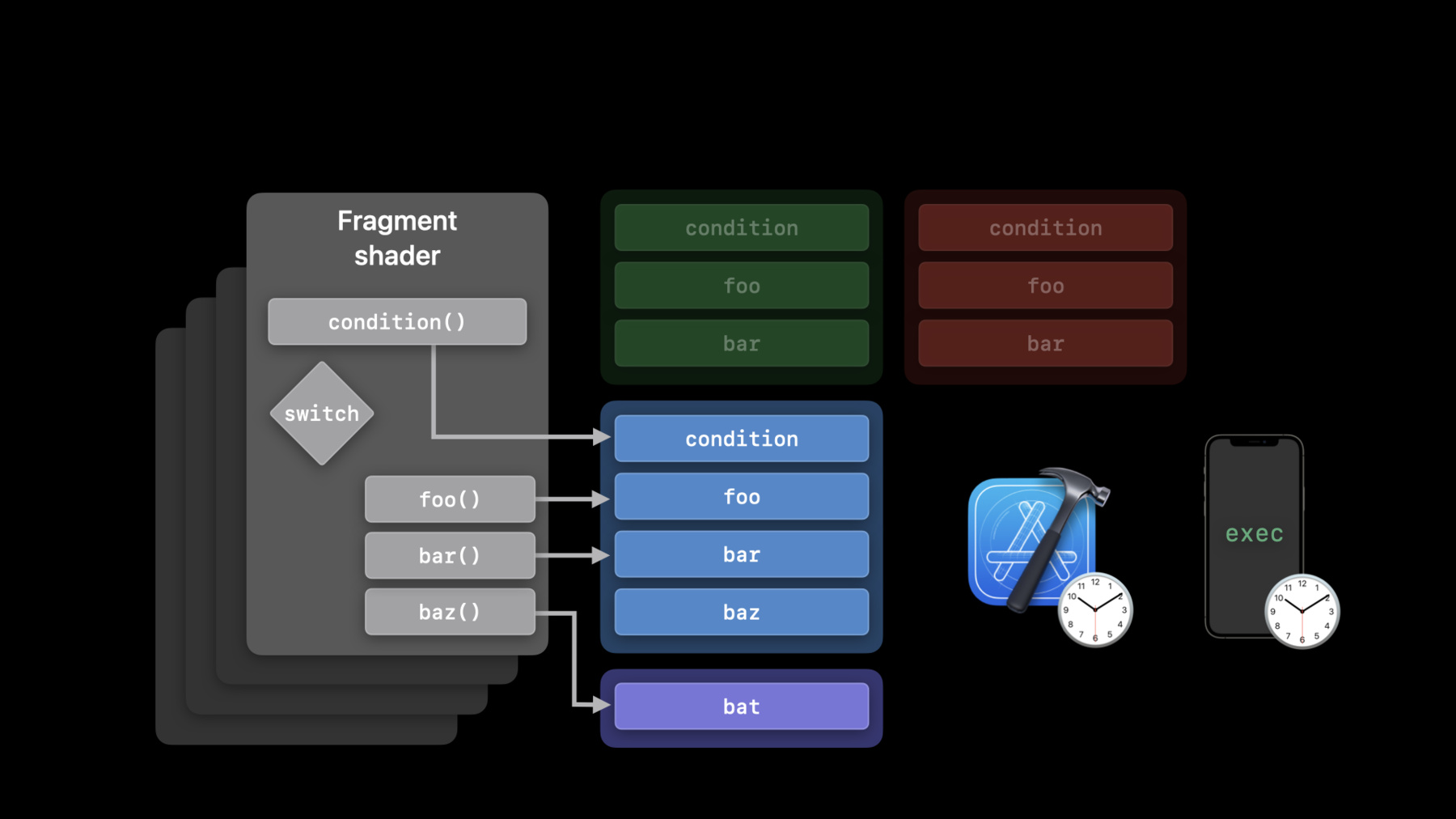
    • 5:38 - Shading language

      // Declare external functions
      
      extern float4 foo(FragmentInput input);
      extern float4 bar(FragmentInput input);
      
      // Use functions in shader
      
      fragment float4 main(FragmentInput input [[stage_in]])
      {
          switch(condition(input)) 
          {
              case 0: 
                  return foo(input);
              case 1:
                  return bar(input);
          }
      }
    • 9:01 - Declare and instantiate visible functions

      // Declare a descriptor and set CompileToBinary options
      
      MTLFunctionDescriptor* functionDescriptor = [MTLFunctionDescriptor new];
      functionDescriptor.options = MTLFunctionOptionCompileToBinary;
      
      // Backend compile the function
      
      functionDescriptor.name = @"foo";
      id<MTLFunction> foo = [library newFunctionWithDescriptor:functionDescriptor
    • 9:30 - Configure pipeline descriptor

      // Provide a list of functions that the pipeline stage may call
      
      // AIR functions
      
      renderPipeDesc.fragmentLinkedFunctions.functions = @[foo, bar, baz];
      
      // Binary functions
      
      renderPipeDesc.fragmentLinkedFunctions.binaryFunctions = @[foo, bar, baz];
    • 10:47 - Create and populate visible function table

      // Create visible function table
      
          [renderPipeline newVisibleFunctionTableWithDescriptor:stage:];
      
      // Create function handles
      
          [renderPipeline functionHandleWithFunction:stage:];
      
      // Insert handles into table
      
          [visibleFunctionTable setFunction:atIndex:];
    • 11:21 - Encoding and calling function pointers

      // Bind visible function table objects to each stage
      
          [renderCommandEncoder setFragmentVisibleFunctionTable:atBufferIndex:];
      
      // Usage in shader
      
         fragment float4 shaderFunc(FragmentData vo[[stage_in]],
                                    visible_function_table<float4(float3)>materials[[buffer(0)]])
         {
         		 //...
           
             return materials[materialSelector](coord);
         }
    • 12:20 - Incremental pipeline creation

      // Enable incrementally adding binary functions per stage
      
      renderPipeDesc.supportAddingFragmentBinaryFunctions = YES;
      
      // Create render pipeline functions descriptor
      
      MTLRenderPipelineFunctionsDescriptor extraDesc;
      extraDesc.fragmentAdditionalBinaryFunctions = @[bat];
      
      // Instantiate render pipeline state
      
      id<MTLRenderPipelineState> renderPipeline2 =
        [renderPipeline1 newRenderPipelineStateWithAdditionalBinaryFunctions:extraDesc
    • 20:30 - Stitching process

      [[stitchable]] int FunctionA(device int*, int) {…}
      [[stitchable]] int FunctionC(int, int) {…}
      
      [[stitchable]]
      int ResultFunction(device int* Input0,
                         int Input1, 
                         int Input2)
      {
        int N0 = FunctionA(Input0, Input1);
        int N1 = FunctionA(Input0, Input2);
        int N2 = FunctionC(N0, N1);    
        return N2;
      }
    • 21:32 - Creating the graph

      // Create input nodes
      
        inputs[0] = [[MTLFunctionStitchingInputNode alloc] initWithArgumentIndex:0];
      
      // Create function nodes
      
        n0 = [[MTLFunctionStitchingFunctionNode alloc] initWithName:@"FunctionA"
                                                          arguments:@[inputs[0], inputs[1]]
                                                controlDependencies:@[]];
        n1 = [[MTLFunctionStitchingFunctionNode alloc] initWithName:@"FunctionA"
                                                          arguments:@[inputs[0], inputs[2]]
                                                controlDependencies:@[]];
        n2 = [[MTLFunctionStitchingFunctionNode alloc] initWithName:@"FunctionC"
                                                          arguments:@[n0, n1]
                                                controlDependencies:@[]];
      
      // Create graph
      
        graph = [[MTLFunctionStitchingGraph alloc] initWithFunctionName:@"ResultFunction"
                                                                  nodes:@[n0, n1]
                                                             outputNode:n2
                                                             attributes:@[]];
    • 22:18 - Configure stitched library descriptor

      // Configure stitched library descriptor
        
        MTLStitchedLibraryDescriptor* descriptor = [MTLStitchedLibraryDescriptor new];
      
        descriptor.functions      = @[stitchableFunctions];
        descriptor.functionGraphs = @[graph];
      
      // Create stitched function
      
        id<MTLLibrary> lib = [device newLibraryWithDescriptor:descriptor 
                                                        error:&error];
      
        id<MTLFunction> stitchedFunction = [lib newFunctionWithName:@"ResultFunction"];

Developer Footer

  • Videos
  • WWDC21
  • Discover compilation workflows in Metal
  • Open Menu Close Menu
    • iOS
    • iPadOS
    • macOS
    • tvOS
    • visionOS
    • watchOS
    • App Store
    Open Menu Close Menu
    • Swift
    • SwiftUI
    • Swift Playground
    • TestFlight
    • Xcode
    • Xcode Cloud
    • Icon Composer
    • SF Symbols
    Open Menu Close Menu
    • Accessibility
    • Accessories
    • Apple Intelligence
    • Audio & Video
    • Augmented Reality
    • Business
    • Design
    • Distribution
    • Education
    • Games
    • Health & Fitness
    • In-App Purchase
    • Localization
    • Maps & Location
    • Machine Learning & AI
    • Security
    • Safari & Web
    Open Menu Close Menu
    • Documentation
    • Downloads
    • Sample Code
    • Videos
    Open Menu Close Menu
    • Help Guides & Articles
    • Contact Us
    • Forums
    • Feedback & Bug Reporting
    • System Status
    Open Menu Close Menu
    • Apple Developer
    • App Store Connect
    • Certificates, IDs, & Profiles
    • Feedback Assistant
    Open Menu Close Menu
    • Apple Developer Program
    • Apple Developer Enterprise Program
    • App Store Small Business Program
    • MFi Program
    • Mini Apps Partner Program
    • News Partner Program
    • Video Partner Program
    • Security Bounty Program
    • Security Research Device Program
    Open Menu Close Menu
    • Meet with Apple
    • Apple Developer Centers
    • App Store Awards
    • Apple Design Awards
    • Apple Developer Academies
    • WWDC
    Read the latest news.
    Get the Apple Developer app.
    Copyright © 2026 Apple Inc. All rights reserved.
    Terms of Use Privacy Policy Agreements and Guidelines