

View in English

  • Apple Developer
    • Get Started

    Explore Get Started

    • Overview
    • Learn
    • Apple Developer Program

    Stay Updated

    • Latest News
    • Hello Developer
    • Platforms

    Explore Platforms

    • Apple Platforms
    • iOS
    • iPadOS
    • macOS
    • tvOS
    • visionOS
    • watchOS
    • App Store

    Featured

    • Design
    • Distribution
    • Games
    • Accessories
    • Web
    • Home
    • CarPlay
    • Technologies

    Explore Technologies

    • Overview
    • Xcode
    • Swift
    • SwiftUI

    Featured

    • Accessibility
    • App Intents
    • Apple Intelligence
    • Games
    • Machine Learning & AI
    • Security
    • Xcode Cloud
    • Community

    Explore Community

    • Overview
    • Meet with Apple events
    • Community-driven events
    • Developer Forums
    • Open Source

    Featured

    • WWDC
    • Swift Student Challenge
    • Developer Stories
    • App Store Awards
    • Apple Design Awards
    • Apple Developer Centers
    • Documentation

    Explore Documentation

    • Documentation Library
    • Technology Overviews
    • Sample Code
    • Human Interface Guidelines
    • Videos

    Release Notes

    • Featured Updates
    • iOS
    • iPadOS
    • macOS
    • watchOS
    • visionOS
    • tvOS
    • Xcode
    • Downloads

    Explore Downloads

    • All Downloads
    • Operating Systems
    • Applications
    • Design Resources

    Featured

    • Xcode
    • TestFlight
    • Fonts
    • SF Symbols
    • Icon Composer
    • Support

    Explore Support

    • Overview
    • Help Guides
    • Developer Forums
    • Feedback Assistant
    • Contact Us

    Featured

    • Account Help
    • App Review Guidelines
    • App Store Connect Help
    • Upcoming Requirements
    • Agreements and Guidelines
    • System Status
  • Quick Links

    • Events
    • News
    • Forums
    • Sample Code
    • Videos
 

Videos

Abrir menú Cerrar menú
  • Colecciones
  • Todos los videos
  • Información

Más videos

  • Información
  • Código
  • Optimize your use of Core Data and CloudKit

    Join us as we explore the three parts of the development cycle that can help you optimize your Core Data and CloudKit implementation. We'll show you how you can analyze your app's architecture and feature set to verify assumptions, explore changes in behavior after ingesting large data sets, and get actionable feedback to make improvements to your workflow.

    To get the most out of this session, we recommend familiarity with syncing your data model to CloudKit.

    Recursos

    • Synchronizing a local store to the cloud
    • Mirroring a Core Data store with CloudKit
    • Core Data
      • Video HD
      • Video SD

    Videos relacionados

    WWDC22

    • Evolve your Core Data schema

    WWDC21

    • Build apps that share data through CloudKit and Core Data

    WWDC20

    • Diagnose performance issues with the Xcode Organizer

    WWDC19

    • Getting Started with Instruments
    • Using Core Data With CloudKit
  • Buscar este video…
    • 4:35 - Define a large data generator

      class LargeDataGenerator {
          func generateData(context: NSManagedObjectContext) throws {
              try context.performAndWait {
                  for postCount in 1...60 {
                      //add a post               
                      for attachmentCount in 1...11 {
                          //add an attachment with an image
                          let imageFileData = NSData(contentsOf: url!)!
                     }
                  }
              }
          }
      }
    • 5:07 - Testing a large data generator

      class TestLargeDataGenerator: CoreDataCloudKitDemoUnitTestCase {
          func testGenerateData() throws {
              let context = self.coreDataStack.persistentContainer.newBackgroundContext()
              try self.generator.generateData(context: context)
              try context.performAndWait {                     
                  let posts = try context.fetch(Post.fetchRequest())
                  for post in posts {
                      self.verify(post: post, has: 11, matching: imageDatas)
                  }
              }
          }
      }
    • 5:33 - Sync generated data in test

      func testExportThenImport() throws {
          let exportContainer = newContainer(role: "export", postLoadEventType: .setup)
          try self.generator.generateData(context: exportContainer.newBackgroundContext())
          self.expectation(for: .export, from: exportContainer)
          self.waitForExpectations(timeout: 1200)
      }
    • 6:35 - Expectation helper method

      func expectation(for eventType: NSPersistentCloudKitContainer.EventType,
                       from container: NSPersistentCloudKitContainer) -> [XCTestExpectation] {
          var expectations = [XCTestExpectation]()
          for store in container.persistentStoreCoordinator.persistentStores {
              let expectation = self.expectation(
                  forNotification: NSPersistentCloudKitContainer.eventChangedNotification,
                  object: container
              ) { notification in
                  let userInfoKey = NSPersistentCloudKitContainer.eventNotificationUserInfoKey
                  let event = notification.userInfo![userInfoKey]               
                  return (event.type == eventType) &&
                      (event.storeIdentifier == store.identifier) &&
                      (event.endDate != nil)
              }
              expectations.append(expectation)
          }
          return expectations
      }
    • 7:18 - Import data model in test

      func testExportThenImport() throws {
          let exportContainer = newContainer(role: "export", postLoadEventType: .setup)
          try self.generator.generateData(context: exportContainer.newBackgroundContext())
          self.expectation(for: .export, from: exportContainer)
          self.waitForExpectations(timeout: 1200)
          
          let importContainer = newContainer(role: "import", postLoadEventType: .import)
          self.waitForExpectations(timeout: 1200)
      }
    • 8:23 - Data generator alert action

      UIAlertAction(title: "Generator: Large Data", 
                    style: .default) {_ in
          let generator = LargeDataGenerator()
          try generator.generateData(context: context)
          self.dismiss(animated: true)
      }
    • 10:50 - Eagerly generating thumbnail in data generator

      func generateData(context: NSManagedObjectContext) throws {
          try context.performAndWait {
              for postCount in 1...60 {
                  for attachmentCount in 1...11 {
                      let attachment = Attachment(context: context)
                      let imageData = ImageData(context: context)
                      imageData.attachment = attachment
                      imageData.data = autoreleasepool {
                          let imageFileData = NSData(contentsOf: url!)!
                          attachment.thumbnail = Attachment.thumbnail(from: imageFileData,        
                                                                      thumbnailPixelSize: 80)
                          return imageFileData
                      }
                  }
              }
          }
      }
    • 11:13 - Lazily generating thumbnail in data generator

      func generateData(context: NSManagedObjectContext) throws {
          try context.performAndWait {
              for postCount in 1...60 {
                  for attachmentCount in 1...11 {
                      let attachment = Attachment(context: context)
                      let imageData = ImageData(context: context)
                      imageData.attachment = attachment
                      imageData.data = autoreleasepool {
                          return NSData(contentsOf: url!)!
                      }
                  }
              }
          }
      }
    • 14:14 - Problematic verifyPosts implementation

      func verifyPosts(in context: NSManagedObjectContext) throws {
          try context.performAndWait {
              let fetchRequest = Post.fetchRequest()
              let posts = try context.fetch(fetchRequest)
      
              for post in posts {
                  // verify post
      
                  let attachments = post.attachments as! Set<Attachment>
                  for attachment in attachments {
      
                      XCTAssertNotNil(attachment.imageData)
                      //verify image
                  }
              }
          }
      }
    • 14:49 - Efficient verifyPosts implementation

      func verifyPosts(in context: NSManagedObjectContext) throws {
          try context.performAndWait {
              let fetchRequest = Attachment.fetchRequest()
              fetchRequest.resultType = .managedObjectIDResultType
              let attachments = try context.fetch(fetchRequest) as! [NSManagedObjectID]
      
              for index in 0...attachments.count - 1 {
                  let attachment = context.object(with: attachments[index]) as! Attachment
      
                  //verify attachment
                  let post = attachment.post!
                  //verify post
      
                  if 0 == (index % 10) {
                      context.reset()
                  }
              }
          }
      }
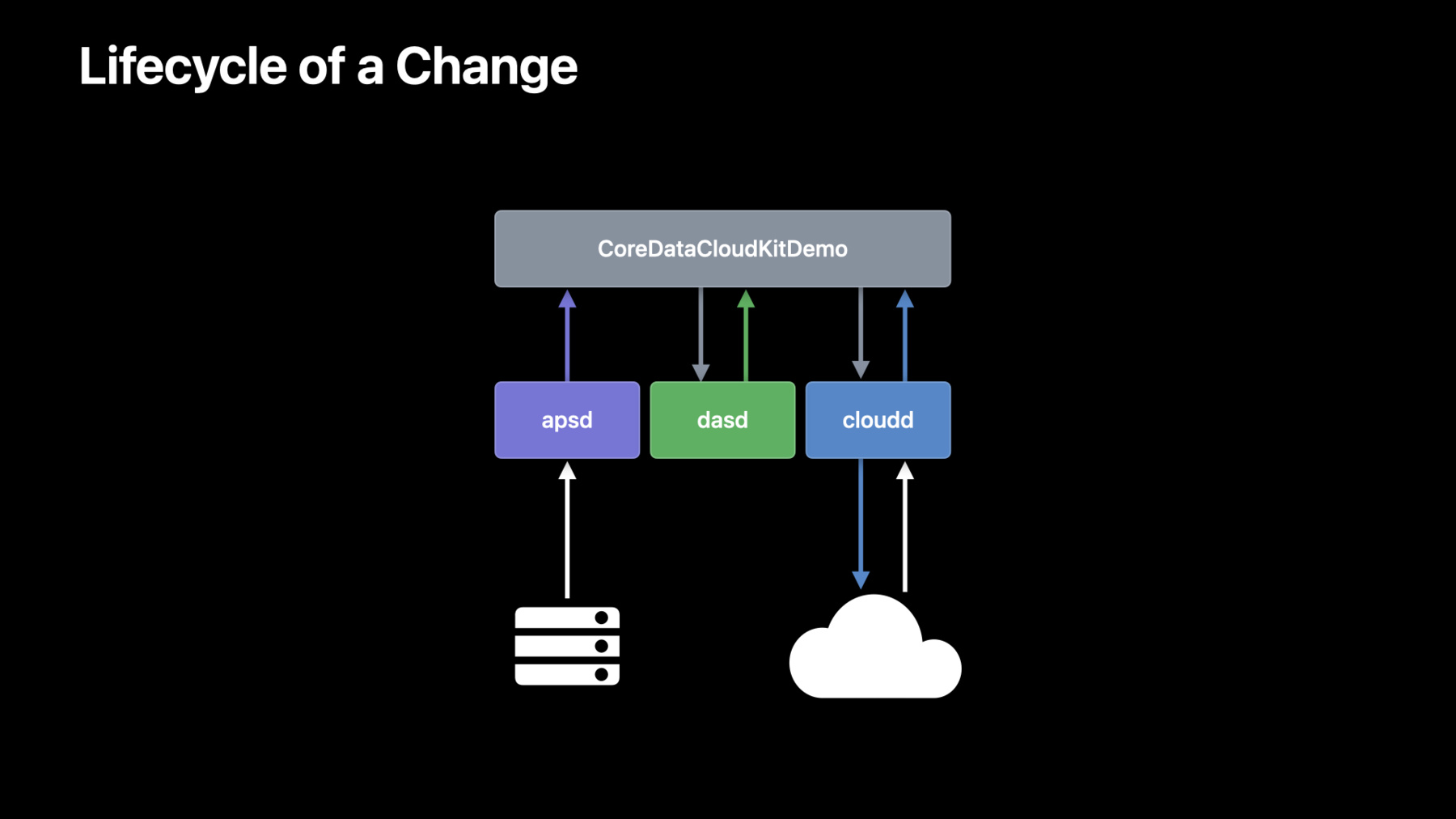
    • 20:41 - Display logs using `log stream`

      # Application
      log stream --predicate 'process = "CoreDataCloudKitDemo" AND 
                              (sender = "CoreData" OR sender = "CloudKit")'
      
      # CloudKit 
      log stream --predicate 'process = "cloudd" AND
                              message contains[cd] "iCloud.com.example.CloudKitCoreDataDemo"'
      
      # Push
      log stream --predicate 'process = "apsd" AND message contains[cd] "CoreDataCloudKitDemo"'
      
      # Scheduling
      log stream --predicate 'process = "dasd" AND 
                              message contains[cd] "com.apple.coredata.cloudkit.activity" AND
                              message contains[cd] "CEF8F02F-81DC-48E6-B293-6FCD357EF80F"'
    • 24:36 - Display logs with `log show`

      log show --info --debug
          --predicate 'process = "apsd" AND
                       message contains[cd] "iCloud.com.example.CloudKitCoreDataDemo"'
          system_logs.logarchive
      
      log show --info --debug
          --start "2022-06-04 09:40:00"
          --end "2022-06-04 09:42:00"
          --predicate 'process = "apsd" AND 
                       message contains[cd] "iCloud.com.example.CloudKitCoreDataDemo"'
          system_logs.logarchive
    • 25:17 - Provide a predicate to `log show`

      log show --info --debug
          --start "2022-06-04 09:40:00" --end "2022-06-04 09:42:00"
          --predicate '(process = "CoreDataCloudKitDemo" AND
                            (sender = "CoreData" or sender = "CloudKit")) OR
                       (process = "cloudd" AND
                            message contains[cd] "iCloud.com.example.CloudKitCoreDataDemo") OR
                       (process = "apsd" AND message contains[cd] "CoreDataCloudKitDemo") OR 
                       (process = "dasd" AND
                           message contains[cd] "com.apple.coredata.cloudkit.activity" AND
                           message contains[cd] "CEF8F02F-81DC-48E6-B293-6FCD357EF80F")'
          system_logs.logarchive

Developer Footer

  • Videos
  • WWDC22
  • Optimize your use of Core Data and CloudKit
  • Open Menu Close Menu
    • iOS
    • iPadOS
    • macOS
    • tvOS
    • visionOS
    • watchOS
    • App Store
    Open Menu Close Menu
    • Swift
    • SwiftUI
    • Swift Playground
    • TestFlight
    • Xcode
    • Xcode Cloud
    • Icon Composer
    • SF Symbols
    Open Menu Close Menu
    • Accessibility
    • Accessories
    • Apple Intelligence
    • Audio & Video
    • Augmented Reality
    • Business
    • Design
    • Distribution
    • Education
    • Games
    • Health & Fitness
    • In-App Purchase
    • Localization
    • Maps & Location
    • Machine Learning & AI
    • Security
    • Safari & Web
    Open Menu Close Menu
    • Documentation
    • Downloads
    • Sample Code
    • Videos
    Open Menu Close Menu
    • Help Guides & Articles
    • Contact Us
    • Forums
    • Feedback & Bug Reporting
    • System Status
    Open Menu Close Menu
    • Apple Developer
    • App Store Connect
    • Certificates, IDs, & Profiles
    • Feedback Assistant
    Open Menu Close Menu
    • Apple Developer Program
    • Apple Developer Enterprise Program
    • App Store Small Business Program
    • MFi Program
    • Mini Apps Partner Program
    • News Partner Program
    • Video Partner Program
    • Security Bounty Program
    • Security Research Device Program
    Open Menu Close Menu
    • Meet with Apple
    • Apple Developer Centers
    • App Store Awards
    • Apple Design Awards
    • Apple Developer Academies
    • WWDC
    Read the latest news.
    Get the Apple Developer app.
    Copyright © 2026 Apple Inc. All rights reserved.
    Terms of Use Privacy Policy Agreements and Guidelines